
On this page
Start here
Quick answer
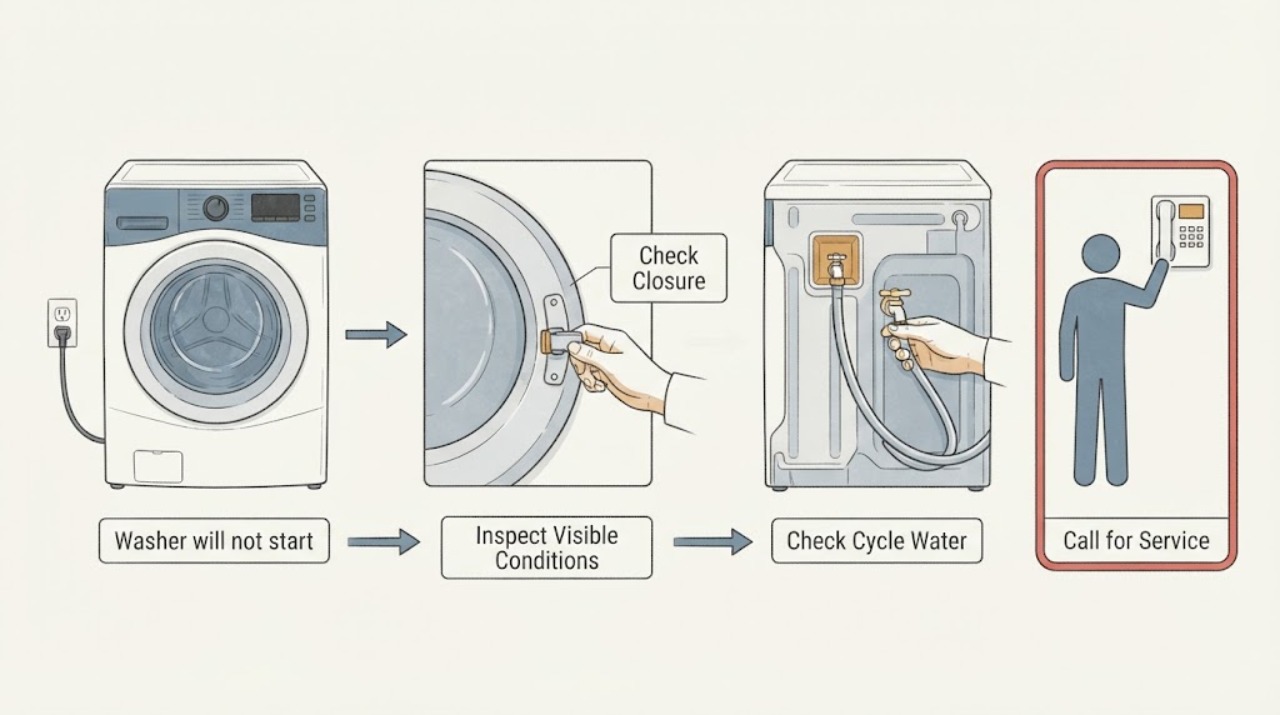
Confirm the washer has a stable display or indicator, the door or lid is fully closed, the selected cycle is valid, and no water or safety fault is visible. Do only external, owner-level observations: do not open panels, bypass a lock, or work on live wiring. If the control remains unresponsive, a lock will not engage, or water is present, stop and arrange appliance service.
Before you begin
Safety first
- The technician tests supply, interlock, controls, and related components safely.
Work through in order
Diagnostic checks
Use only checks that match the exact appliance or system and its official guide.
-
Check 1
Observe the display, indicator lights, and nearby outlet/switch without removing covers or changing wiring.
Expected result: Note a blank display, partial lights, error message, tripped household protection, or normal display with no response.
Next step: Record the exact indicator or code and follow only the model manual's external reset guidance.
Stop if: Stop for heat, burning odor, damaged cord, water near electricity, or repeat tripping.
Why this matters
Why: A blank display points toward supply or control power; a normal display shifts attention to door/lid state, cycle selection, or control input.
-
Check 2
Close the door or lid normally and observe whether the washer visibly recognizes the closed state; do not defeat or bypass the latch.
Expected result: Answer yes if the lock/closed indicator appears; answer no if it remains open, clicks repeatedly, or will not engage.
Next step: Keep the washer unused and provide the model and closure behavior to a technician.
Stop if: Stop if the door/lid, hinge, or lock is cracked or loose.
Why this matters
Why: A no result makes the lock, strike, hinge, or alignment a service path; bypassing it creates a safety hazard.
-
Check 3
Observe the selected cycle, control response, and visible water condition from outside the washer.
Expected result: Note whether buttons respond, a cycle is paused, water remains in the tub, or the unit hums then stops.
Next step: Do not repeatedly start it; record the sequence and request appliance repair.
Stop if: Stop if water leaks, the cabinet is wet, or the machine moves abnormally.
Why this matters
Why: A paused/invalid selection may be user-state; standing water or a hum/stop pattern suggests a fault needing service rather than repeated starts.
Use your observations
Decision map
Find the observation that best matches what you see, then follow the next safe action.
-
PATH 01Safety boundary
What you see
The display is blank or household protection trips.
Do this next
Stop and request appliance service after recording the external symptoms.
Why this path and its safety boundary
Why it matters: Supply or internal power fault is possible.
Safety stop: Do not open panels or test live wiring.
-
PATH 02Safety boundary
What you see
The door/lid does not register closed.
Do this next
Leave the washer unused and call a technician.
Why this path and its safety boundary
Why it matters: Lock, strike, hinge, or alignment may prevent starting.
Safety stop: Never bypass the safety lock.
-
PATH 03Safety boundary
What you see
Controls respond but the washer does not begin or stops with water present.
Do this next
Provide the cycle and water observations to service.
Why this path and its safety boundary
Why it matters: A control, drain, or motor-related fault is possible.
Safety stop: Stop repeated start attempts.
Helpful context
Understand the symptom
A washer that will not start may have a supply or control-state issue, an unrecognized door/lid state, or a component fault. The exact model manual governs any reset or indicator meaning; record the display and behavior before service.
Safety boundary
Stop conditions
- Stop for burning odor, damaged cord, water near electricity, repeat tripping, leaks, or abnormal movement.
- Do not open panels, bypass the lock, or test live wiring.
Only after diagnosis
Potential parts
- washer door lock
Consider only if a technician confirms the lock fails to register closure.
Confirm the exact washer model and fitment before ordering. - washer lid switch
Consider only for a technician-confirmed lid-state fault.
Match model and switch configuration; never bypass it. - washer control board
Consider only after supply, closure, and user-state checks do not explain the failure.
Confirm model and diagnosis before ordering.
When checks do not resolve it
Need a professional?
Use prompt service for water/electrical hazards or a persistent no-start.
Safety scope: The technician tests supply, interlock, controls, and related components safely.
Have this ready
- Model and serial information
- Exact display or indicator behavior
- Door/lid and water observations
Common questions
FAQ
Why does a washer have power but still not start?
The door/lid state, cycle state, control input, or a component fault can prevent starting. Record the indicators and request service if external checks do not resolve it.
Can I bypass a washer lid or door lock?
No. It is a safety interlock; bypassing it can expose moving or wet operation.
Read the exact guide
Official sources
- Selection and Use of Work PracticesOccupational Safety and Health Administration · Supports stopping before panel or live-electrical work.
Community feedback
Share a repair observation
Share a plain-text repair observation. Accepted observations are published automatically; this page may take a moment to update.