
On this page
Start here
Quick answer
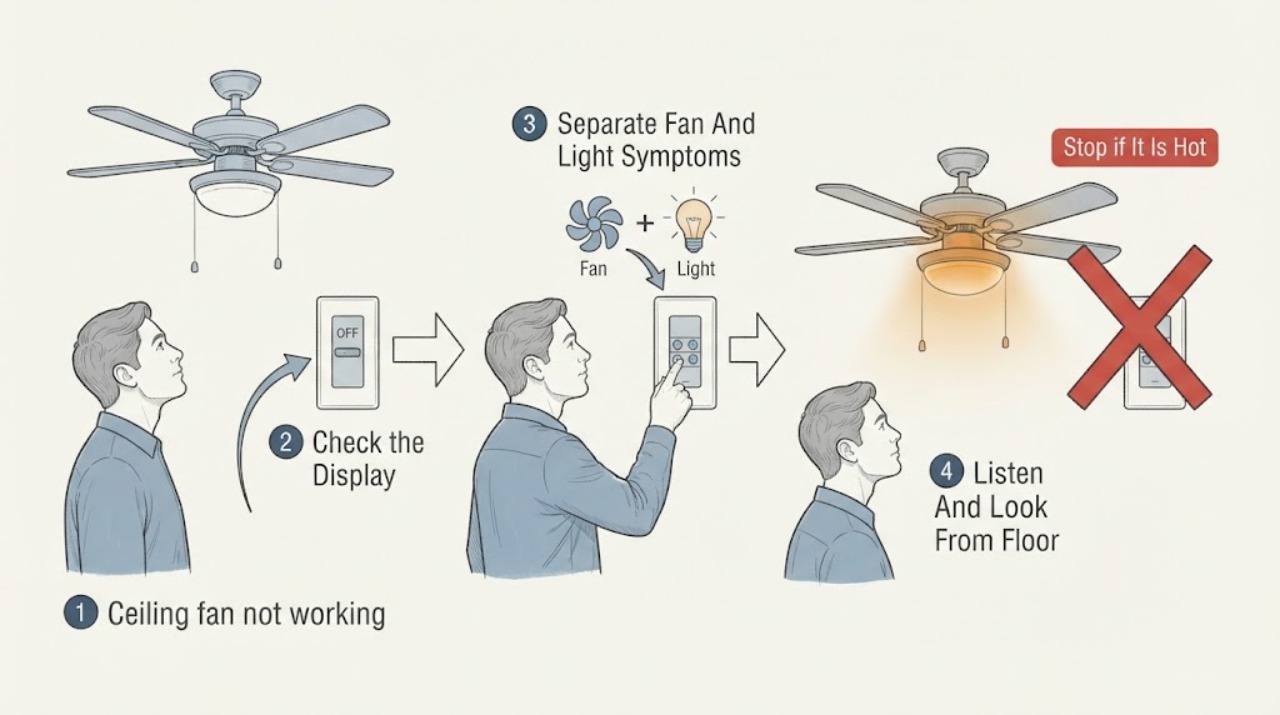
Start by separating a total no-response problem from a fan-only or light-only problem. From the floor, note the wall-switch and remote state, the last known fan and light response, and any click, hum, heat, odor, flicker, or prior breaker trip. Do not climb, push the blades, remove the canopy, open the motor or receiver, perform a live test, bypass a control, or keep energizing a fan that is hot, smells burnt, or trips power. A dead remote may only need its model-appropriate batteries or pairing procedure, while a light-only fault may involve the bulb, LED module, socket, or light kit. If there is burning odor, visible scorching, heat, water exposure, a loose-looking fixture, or a repeated trip, leave the fan off and arrange a qualified electrician or manufacturer service.
Work through in order
Diagnostic checks
Use only checks that match the exact appliance or system and its official guide.
-
Check 1
From the floor, identify whether the fan is controlled by a wall switch, pull chain, remote, or more than one control, and record whether a nearby wall control is visibly on. Record any prior outage or breaker trip without opening the electrical panel or repeatedly resetting power.
Expected result: The control is visibly off, the remote display or indicator is blank, the room has other working lights, or someone reports a recent trip; alternatively, controls look normal but the fan and light remain unresponsive.
Next step: Continue only with the symptom-separation and visible-condition observations below; arrange service immediately for a repeated trip, heat, odor, moisture, or uncertainty about the power source.
Stop if: Stop if the panel, switch wiring, or ceiling connection would need to be opened, or if power behavior is abnormal.
Why this matters
Why: This separates a control or supply-history lead from a fan-specific failure, but it does not prove that hidden wiring is safe. Give the exact history and control type to the electrician or manufacturer rather than opening the panel.
-
Check 2
Write down the last known state of each function: whether the blades previously ran, whether the light previously illuminated, and whether the failure is total, fan-only, or light-only. Use the normal controls only as part of ordinary use; do not repeat a test when there is heat, odor, a harsh noise, visible damage, or a prior trip.
Expected result: The fan worked while the light did not, the light worked while the fan did not, both failed together, or the result changed intermittently.
Next step: Use the matching branch below and provide the last known states, model label if visible from the floor, and whether the failure began after an outage, installation, moisture event, or control change.
Stop if: Stop all operation if the symptom includes burning smell, smoke, scorching, unusual heat, sparking, water, or a fixture that appears loose.
Why this matters
Why: A one-function failure points toward that function's control, receiver, light kit, or lamp path; both functions failing together points toward a shared supply or control path. The symptom alone cannot identify a replacement part.
-
Check 3
From a safe floor-level position, note whether the fixture is silent, clicks, hums, buzzes, or makes a scraping sound, and look for visible wobble, a hanging shade, scorch marks, discoloration, or moisture. Do not approach a moving fan, touch it, or run it again just to reproduce the noise.
Expected result: There is a burning odor, heat, smoke, visible damage, moisture, a loose-looking fixture, repeated electrical noise, or no abnormal visible condition.
Next step: Leave the fan off and request qualified service for any hazard sign. If none is present, continue by documenting the wall/remote response and the model information without reaching the fixture.
Stop if: Stop immediately for smoke, burning odor, unusual heat, sparking, water exposure, a falling part, or any sound that worsens.
Why this matters
Why: Heat, odor, smoke, moisture, visible damage, or a loose fixture is a stop signal and can indicate an electrical, mechanical, or mounting hazard. A quiet fixture with no visible damage is not proof that the motor, receiver, or wiring is sound.
-
Check 4
If a remote is normally used, inspect it from the floor for a blank indicator, obvious battery leakage, damaged buttons, or a changed setting; if the manual is available, record the model-specific pairing status. Note whether a wall control has an indicator or whether another control in the same room still responds. Do not open the receiver, reach the fan, bypass the control, or use an unapproved substitute.
Expected result: The remote is blank or damaged, the remote responds but the fan does not, the wall control responds but the remote does not, or neither control responds.
Next step: Follow only the ordinary battery or pairing steps explicitly allowed by the fan's manual when there is no hazard sign; otherwise give the control observations and model number to service.
Stop if: Stop if battery leakage, heat, scorching, a trip, or any need to access the receiver or ceiling wiring is present.
Why this matters
Why: A remote-only symptom can be a battery, pairing, or receiver-path issue; a failure of every control points back toward shared power, wiring, or internal fan control. Manufacturer guidance is model-specific, so a replacement receiver or light module should not be selected from the symptom alone.
-
Check 5
Record the installation age if known, any recent bulb or LED change, control replacement, room remodeling, outage, moisture event, or prior repair. From the floor, photograph or transcribe only a model label that is already visible; do not climb or remove a cover to find it.
Expected result: The problem began after a control or light change, after an outage or moisture event, gradually, or with no identifiable trigger.
Next step: Call the electrical service when any stop condition is present or when the safe observations do not restore normal operation; request manufacturer documentation for model-specific parts questions.
Stop if: Stop the homeowner diagnosis once hidden access, electrical measurement, component replacement, or fixture support would be required.
Why this matters
Why: Timing helps the professional distinguish a control/light-kit lead from a supply, installation, or internal-control lead, but it is not a diagnosis. A model number and the exact fan/light symptom make safe parts identification more reliable.
Use your observations
Decision map
Find the observation that best matches what you see, then follow the next safe action.
-
PATH 01Next step
What you see
Both fan and light stopped together, other room power is also abnormal, or there was a recent trip
Do this next
Leave the fan off and report the power history to a qualified electrician. Do not open the panel, perform a live test, bypass a control, or repeatedly reset power.
-
PATH 02Next step
What you see
The fan previously ran but the light did not
Do this next
Treat this as a light-path lead such as the lamp, LED module, socket, or light kit, subject to the model manual. Do not reach the light kit or inspect hidden connections; arrange service if a visible socket mark, heat, odor, or repeated failure is present.
-
PATH 03Next step
What you see
The light previously worked but the fan did not
Do this next
Treat this as a fan-control, receiver, motor, or internal-control lead. Do not push the blades, access the motor or capacitor, remove the canopy, or substitute a part without model confirmation; provide the symptom and remote/wall-control response to service.
-
PATH 04Next step
What you see
The remote is the only control that fails and there is no heat, odor, moisture, or damage
Do this next
Check the remote's ordinary battery or pairing guidance in the model manual from the floor. If it remains unresponsive, have the remote and receiver path evaluated rather than opening the receiver.
-
PATH 05Next step
What you see
There is smoke, burning odor, unusual heat, sparking, water exposure, a repeated trip, or a loose-looking fixture
Do this next
Stop using the fan immediately, keep people clear, and seek qualified electrical service. If there is active smoke or fire, use emergency services; do not touch the fixture or attempt a repair.
Helpful context
Understand the symptom
What the symptom can tell you
A ceiling fan has separate control paths for airflow and illumination, so the first useful fact is whether one function still worked the last time it was used. A wall switch or remote that appears normal does not prove that the ceiling wiring is safe or energized. Treat the observations below as a handoff for a professional, not as permission to access hidden electrical parts.
Stay at a safe observation point
Do every check from the floor and with the fan left undisturbed. Do not use a ladder, reach toward the fixture, manually push the blades, open the canopy, remove a light-kit cover, touch wiring or a capacitor, or operate the fan repeatedly to reproduce a suspicious sound. If the fixture is hot, smells burnt, shows scorch marks, or has been exposed to water, stop using it and call for service.
Only after diagnosis
Potential parts
- ceiling fan LED module
Only consider this category when the fan function is known to work but the light remains out after the model-approved basic lamp and control checks, with no heat, scorching, or wiring hazard.
Confirm the exact fan model, light-kit design, voltage, connector, and manufacturer fit information before ordering; a symptom does not establish compatibility. - ceiling fan light kit
This is relevant only when the light path is confirmed as the isolated problem and a professional or model manual identifies the light kit as the failed or unsupported component.
Match the fan model and the approved light-kit interface and rating; do not assume a universal kit will fit or be safe. - fan remote receiver
Consider this category only after the remote's ordinary battery/pairing path and the fan's shared power history have been evaluated, and a service professional or model documentation points to the receiver.
Confirm the exact fan and remote system, receiver frequency or protocol when applicable, wiring connector, and manufacturer-approved fit before any replacement.
When checks do not resolve it
Need a professional?
Call a qualified electrician or the fan manufacturer's service team when the fan remains dead after safe observations, when one function fails repeatedly, or whenever there is heat, burning odor, smoke, sparking, moisture, visible scorching, a repeated breaker trip, a loose-looking fixture, or a need to access hidden wiring or the receiver.
Have this ready
- Provide the fan brand and model if visible without climbing, whether the fan, light, or both failed, wall-switch and remote type, remote indicator/battery condition, sounds or heat, visible damage, prior trips or outages, recent light/control work, and any moisture history.
Common questions
FAQ
Why would the ceiling fan and light stop working at the same time?
A shared control or supply path is one possibility, especially after an outage or trip, but the symptom does not prove a safe diagnosis. Record the history from the floor and have a qualified electrician evaluate hidden electrical work rather than opening a panel or ceiling connection.
What if the fan works but the ceiling-fan light does not?
Treat it as an isolated light-path lead involving the lamp, LED module, socket, or light kit, subject to the model manual. Do not reach the fixture; report any scorch mark, heat, odor, flicker, or repeated failure to service.
Can a bad remote make a ceiling fan seem dead?
Yes, a blank or unpaired remote can prevent normal control, but a remote symptom does not rule out the receiver or shared power. Use only the ordinary battery or pairing guidance in the model manual from the floor, and do not open the receiver or bypass the control.
Read the exact guide
Official sources
- How to Fix a Ceiling Fan That Won't Turn On, Wobbles, or Makes NoiseHunter Fan · Supplemental general guidance; the product's own manual and a qualified professional govern model-specific work.
- My fan stopped working. What do I do?Hunter Fan Support · General ceiling-fan troubleshooting; model-specific instructions take precedence.
- Home Electrical Safety ChecklistU.S. Consumer Product Safety Commission · General home electrical safety context; it does not provide a model-specific ceiling-fan repair procedure.
- Air Conditioner and Fan SafetyElectrical Safety Foundation International · General fan electrical-safety context, not a substitute for the product manual or a licensed electrician.
Community feedback
Share a repair observation
Share a plain-text repair observation. Accepted observations are published automatically; this page may take a moment to update.