
On this page
Start here
Quick answer
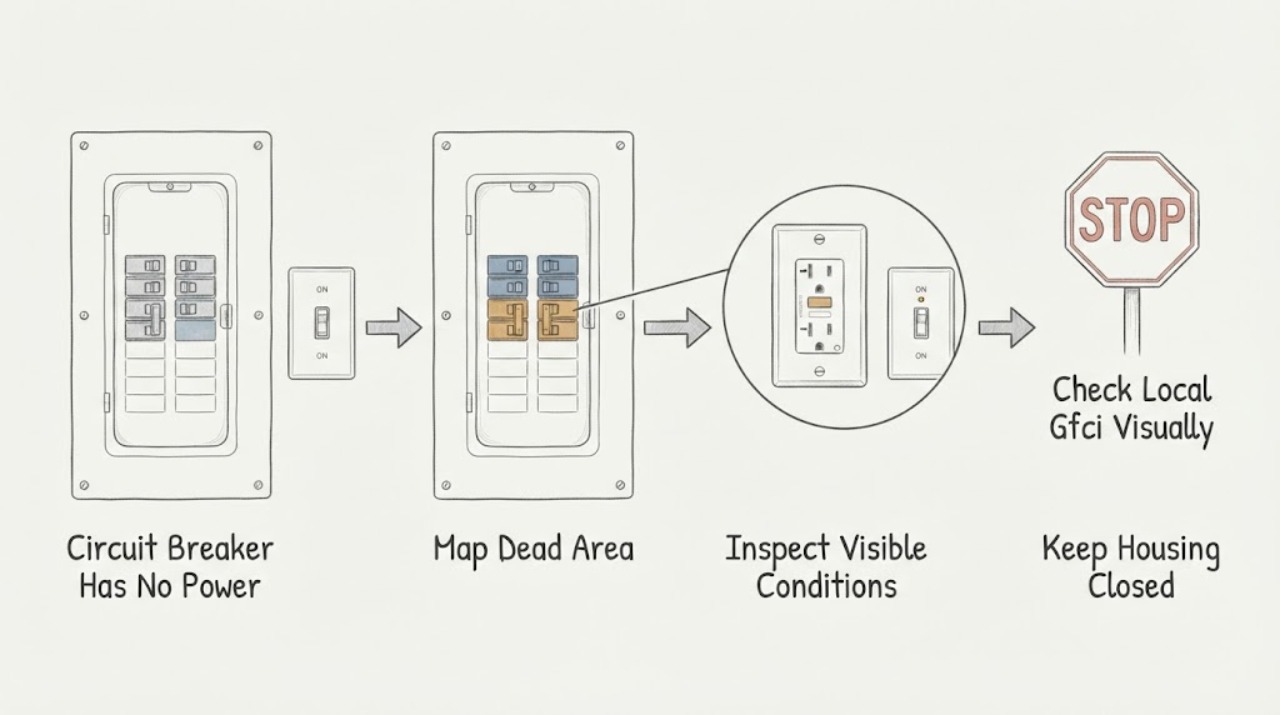
First determine whether power is missing from one outlet, one room, one breaker circuit, or the whole property. From a dry, safe position, record which lights and outlets are dead and whether the breaker handle or a nearby GFCI indicator appears tripped; do not remove a panel cover, touch wiring, measure voltage, bypass protection, or repeatedly reset the breaker. A single affected circuit may reflect an overload, short, ground fault, failed switch, or loose connection. If a breaker will not stay on, trips again, the switch or panel is hot, buzzing, discolored, smells burned, sparks, or power is flickering across multiple circuits, leave it alone and contact a licensed electrician or the utility/emergency service as appropriate.
Before you begin
Safety first
- This article supports safe scope mapping and exterior observation only. Panel, switch, receptacle, GFCI replacement, wiring, breaker, and live electrical diagnosis belong to a licensed electrician.
Work through in order
Diagnostic checks
Use only checks that match the exact appliance or system and its official guide.
-
Check 1
From dry, ordinary access, check only known-safe lights and receptacles and record the smallest area without power; do not plug in an appliance to a wet outlet or remove a cover.
Expected result: Record whether the loss affects one device, one room, several rooms, the whole home, or neighboring properties; note whether lights flicker or other circuits remain normal.
Next step: Use the matching branch and give the electrician or utility the affected locations and onset; leave the circuit unused if the scope is expanding or unstable.
Stop if: Stop immediately for sparks, smoke, burning odor, buzzing, hot or discolored plates, water near electrical equipment, shock, or flickering across multiple circuits.
Why this matters
Why: One device suggests a local device or switch issue. One branch or room suggests a protective-device or branch-circuit issue. Multiple circuits or neighbors suggest a main, building, or utility event rather than a single switch.
-
Check 2
Without opening the electrical panel cover or touching any wiring, observe the breaker handle and label only from a dry, safe exterior position if it is already visible.
Expected result: Record whether the suspected handle appears on, off, or in a middle/trip position, whether a GFCI/AFCI indication is visible, and whether more than one protective device appears affected.
Next step: Do not reach into the panel or reset as a repeated experiment; provide the label, position, and affected-area map to a licensed electrician, building manager, or utility as appropriate.
Stop if: Do not remove the panel cover, touch the breaker body or bus, insert tools, test voltage, replace a fuse, or fit a larger protective device.
Why this matters
Why: A middle or off position can explain a branch outage, but the trip is a warning about an underlying overload, short, ground fault, device, or wiring condition. A handle that appears on while the branch is dead may indicate an upstream device, loose connection, failed breaker, or misidentified circuit.
-
Check 3
In a bathroom, kitchen, garage, outdoor, or other wet-prone area, identify nearby receptacles with TEST/RESET markings from a dry position and record whether the indicator or button appears abnormal; do not handle a wet or damaged device.
Expected result: Record whether the dead outlet is downstream of a visible GFCI, whether the GFCI appears tripped, whether the area is wet, and whether the outage extends to other protected outlets.
Next step: Keep the area dry and arrange a licensed electrician when the device will not operate normally, the outage persists, or water or appliance damage may have caused the trip.
Stop if: Do not press TEST or RESET with wet hands, standing water, a damaged faceplate, exposed conductors, or a hot, buzzing, discolored, or sparking device; do not install a replacement yourself.
Why this matters
Why: A GFCI can interrupt downstream power after detecting leakage current, but a failed or wet device is a shock hazard and a reset result cannot diagnose the branch wiring. An outlet that remains dead with the protective device apparently normal needs qualified diagnosis.
-
Check 4
If the outage is associated with one wall switch, light, or plugged-in load, leave that control or load off and record the exact trigger without turning it on again to reproduce the fault.
Expected result: Record whether the loss occurred immediately or after operation, what other devices went dead, and whether there was a flash, pop, buzz, odor, warmth, or visible discoloration.
Next step: Leave the triggering control or load unused and tell a licensed electrician the sequence, connected equipment, and any warning signs; do not remove the switch plate or device.
Stop if: Stop and move away for arcing, smoke, burning smell, a hot switch, crackling, shock, or a damaged cord or fixture; do not touch the device or use water on an electrical fire.
Why this matters
Why: A trip linked to a particular switch, light, receptacle, or appliance is a warning about that load, its connection, or the circuit. A delayed trip can still indicate overload or heating; the observation does not identify which internal part failed.
-
Check 5
From a safe location, compare the home's outage with nearby building or utility status and note recent heavy loads, storms, water intrusion, remodeling, or a new appliance; do not use an extension cord or improvised feed to restore power.
Expected result: Record whether neighbors or common areas are also without power, whether the outage began after a particular load or event, and whether power is flickering or returning intermittently.
Next step: Contact the utility or building manager for a wider outage, or a licensed electrician for a local, event-linked, or intermittent fault; keep sensitive loads off until power is stable.
Stop if: Do not make temporary wiring, use an extension cord as a repair, bypass protection, operate wet equipment, or continue when power is flickering, arcing, or accompanied by smoke or odor.
Why this matters
Why: A wider outage points toward the utility or building supply. A local outage after a heavy load or water event points toward a branch overload, ground fault, or damaged equipment. Intermittent power can damage equipment and is not safe to chase with repeated resets.
-
Check 6
Do not reset a breaker as a diagnostic experiment; if a licensed electrician or the exact local instructions explicitly authorizes one safe reset and there is no hazard, record whether the protective device stays engaged without touching the panel interior.
Expected result: Record whether power returns, the device trips immediately, it trips after a load starts, or it will not remain engaged; record the load and timing without repeating the test.
Next step: Leave the circuit off or unused after any trip and arrange licensed electrical diagnosis, especially when the switch, load, or wiring is implicated.
Stop if: Never repeat resets, hold a breaker on, bypass a protective device, open the panel, test live voltage, or continue after heat, noise, odor, smoke, sparks, or water exposure.
Why this matters
Why: A repeat trip or failure to stay engaged is evidence of an unresolved fault, not a defective switch proven by the handle alone. A one-time return of power does not clear the circuit or authorize continued operation of a suspect load.
Use your observations
Decision map
Find the observation that best matches what you see, then follow the next safe action.
-
PATH 01Safety boundary
What you see
Only one light, outlet, appliance, or switch-controlled load is without power while nearby circuits are normal.
Do this next
Leave the suspect device unused and ask a licensed electrician to inspect the device and its circuit without removing the plate or testing it yourself.
Why this path and its safety boundary
Why it matters: The local device, lamp, appliance, switch, cord, or receptacle may be at fault; a circuit-breaker failure is not established.
Safety stop: Stop for heat, discoloration, buzzing, odor, smoke, sparks, shock, a damaged cord, or moisture.
-
PATH 02Safety boundary
What you see
Several lights or receptacles on one labeled branch are dead and the breaker appears off or in a trip position.
Do this next
Keep loads off and provide the circuit label, affected locations, and event timing to a licensed electrician; follow only an explicitly authorized single-reset procedure.
Why this path and its safety boundary
Why it matters: An overload, short, ground fault, failed load, switch, or branch wiring problem may have opened the protective device; the handle position alone does not identify the cause.
Safety stop: Do not repeatedly reset, fit a higher-rated breaker, open the panel, or touch wiring.
-
PATH 03Safety boundary
What you see
Power is lost when one switch, light, receptacle, or load is operated, or the breaker trips whenever that control is used.
Do this next
Leave the triggering control off and arrange licensed electrical diagnosis, recording whether the trip was immediate or delayed and any heat, sound, odor, or flash.
Why this path and its safety boundary
Why it matters: The load, switch, connection, or branch may have a fault. This repeatable trigger is evidence for an electrician, not a reason to open the switch box.
Safety stop: Stop for arcing, smoke, burning odor, a hot switch, shock, or visible damage; keep away from the equipment.
-
PATH 04Safety boundary
What you see
The dead outlet is in a bathroom, kitchen, garage, outdoor, or other wet-prone area, and a GFCI or water exposure may be involved.
Do this next
Keep the area dry and unused and request a licensed electrician; report any plumbing leak or water source as part of the service call.
Why this path and its safety boundary
Why it matters: Ground-fault protection may have interrupted the circuit, but wet or damaged electrical equipment creates a shock hazard and cannot be safely diagnosed by repeated button presses.
Safety stop: Do not handle a wet device, press a button with wet hands, remove a receptacle, or touch standing water near electrical equipment.
-
PATH 05Safety boundary
What you see
Multiple circuits are dead, power flickers, the main supply appears affected, or neighboring properties are also without power.
Do this next
Contact the utility or building manager from a safe location and use a licensed electrician for property-side faults; leave sensitive equipment off until supply is stable.
Why this path and its safety boundary
Why it matters: The event may involve the building service or utility rather than the assigned switch; intermittent supply can also damage equipment.
Safety stop: Do not approach damaged service equipment, touch fallen or exposed conductors, repeatedly operate breakers, or investigate smoke, sparks, or hot equipment.
Helpful context
Understand the symptom
Define what has lost power before touching anything
A dark room does not necessarily mean the circuit breaker itself has failed. Compare a few lights and receptacles that were previously known to work, and note whether the outage is limited to one device, a room, several rooms, or the entire property. If only one device is dead, its plug, switch, lamp, appliance, or local GFCI may be involved. If several devices on one branch are dead, a tripped breaker or upstream protective device is possible. If multiple circuits or neighbors are also out, treat it as a service or utility problem rather than a switch repair.
Observe the protective device without opening the panel
If the panel is already visible from a dry, safe position, record the labeled circuit and whether the handle appears fully on, fully off, or in a middle or trip position. Do not remove the cover or reach inside. A tripped handle is a symptom, not proof of a bad breaker: overload, short circuit, ground fault, a faulty device, or wiring damage can all be involved. Never substitute a larger breaker or fuse to restore power.
Bathroom and wet-area power needs extra caution
A bathroom can have a GFCI receptacle or breaker protecting outlets downstream, sometimes in another nearby location. A visible TEST or RESET device can be documented from a dry position, but do not handle a wet device or treat a failed reset as a DIY wiring problem. Water and electricity can create a ground-fault shock path, so keep hands, floors, plugs, and tools dry and arrange qualified electrical service when the protection device will not operate normally.
The switch may be the trigger, not the whole diagnosis
If power disappears whenever one wall switch, light, or appliance is used, that repeatable association is valuable evidence but not permission to remove the switch plate. The fault may be the load, a damaged cord, a connection, or branch wiring. Record what was switched on, what else lost power, and whether the breaker tripped immediately or after running. Give that record to a licensed electrician so the circuit can be isolated and tested with proper procedures.
Safety boundary
Stop conditions
- Do not remove an electrical-panel cover, switch plate, receptacle, or fixture; do not touch wiring, terminals, bus bars, or any exposed conductor.
- Do not measure voltage, use a test probe, hold a breaker on, bypass protection, install a larger breaker or fuse, or use an extension cord as a repair.
- Do not repeatedly reset a breaker or GFCI, repeatedly operate the triggering switch, or continue using a load that caused a trip.
- Stop for sparks, arcing, smoke, burning odor, buzzing or crackling, hot or discolored switches and outlets, shock, flickering across circuits, or exposed conductors.
- Stop for water, standing moisture, a leak, or wet electrical equipment; keep away and arrange licensed service.
Only after diagnosis
Potential parts
- compatible circuit breaker
Consider this category only when a licensed electrician confirms the breaker itself is defective and identifies the exact panel and protective-device requirements.
Match the panel listing, pole configuration, rating, AFCI/GFCI function, and local requirements; never install a higher-rated device to stop trips. - compatible wall switch
Consider this category only after an electrician confirms the switch is the failed component rather than the load or branch wiring.
Confirm load type, rating, box and wiring condition, and local code; do not open or replace the switch as a no-power experiment. - GFCI receptacle or protective device
Consider this category only when a licensed electrician confirms a failed or damaged GFCI and identifies the required protection and downstream arrangement.
Confirm location, protection requirements, wiring, rating, and test behavior; wet or damaged electrical equipment requires professional handling.
When checks do not resolve it
Need a professional?
Arrange licensed electrician service for any breaker that will not stay engaged, any outage linked to a switch or load, an outlet or GFCI that remains dead or will not operate normally, a breaker that appears on while its branch is dead, or any suspected wiring, panel, or service fault. Contact the utility or building manager for a wider outage. Treat smoke, arcing, burning odor, hot or discolored equipment, shock, water near electrical equipment, or exposed conductors as an urgent safety event and move away without touching the equipment.
Safety scope: This article supports safe scope mapping and exterior observation only. Panel, switch, receptacle, GFCI replacement, wiring, breaker, and live electrical diagnosis belong to a licensed electrician.
Common questions
FAQ
Why is one room without power when the rest of the home works?
A branch protective device, upstream GFCI, switch, load, receptacle, or wiring fault may affect one room or circuit. Map the dead devices and observe the breaker or GFCI from a dry exterior position, then use a licensed electrician if the circuit remains dead or trips.
Can I open the breaker-panel cover to see what is wrong?
No. Do not remove the panel cover, touch wiring, or measure live voltage. A safe exterior observation of a clearly visible handle and label is enough to report; internal diagnosis belongs to a licensed electrician.
What if the breaker keeps tripping when I use one switch?
Leave that switch or load off and record the sequence. A switch-linked trip can involve the load, switch, connection, or branch wiring. Do not repeatedly reset or remove the switch plate; arrange licensed electrical diagnosis.
Could a GFCI cause the outlet to lose power?
Yes. A GFCI can interrupt downstream power after detecting leakage current, especially in wet-prone areas. Keep the area dry and do not handle a wet or damaged device; a GFCI that will not operate normally needs a qualified electrician.
When is a no-power problem an emergency?
Move away and seek urgent help for sparks, smoke, burning odor, arcing, hot or discolored equipment, shock, exposed conductors, water near electrical equipment, or widespread flickering. Do not touch the equipment or repeatedly operate the breaker.
Read the exact guide
Official sources
- Ground Fault Circuit Interrupters (GFCI)Electrical Safety Foundation International · General GFCI safety education; the installed device and local electrical code control exact operation and service.
- CPSC Guide to Home Wiring HazardsU.S. Consumer Product Safety Commission · General residential electrical-safety guidance; local code and a licensed electrician control an individual panel and circuit.
Community feedback
Share a repair observation
Share a plain-text repair observation. Accepted observations are published automatically; this page may take a moment to update.