
On this page
Start here
Quick answer
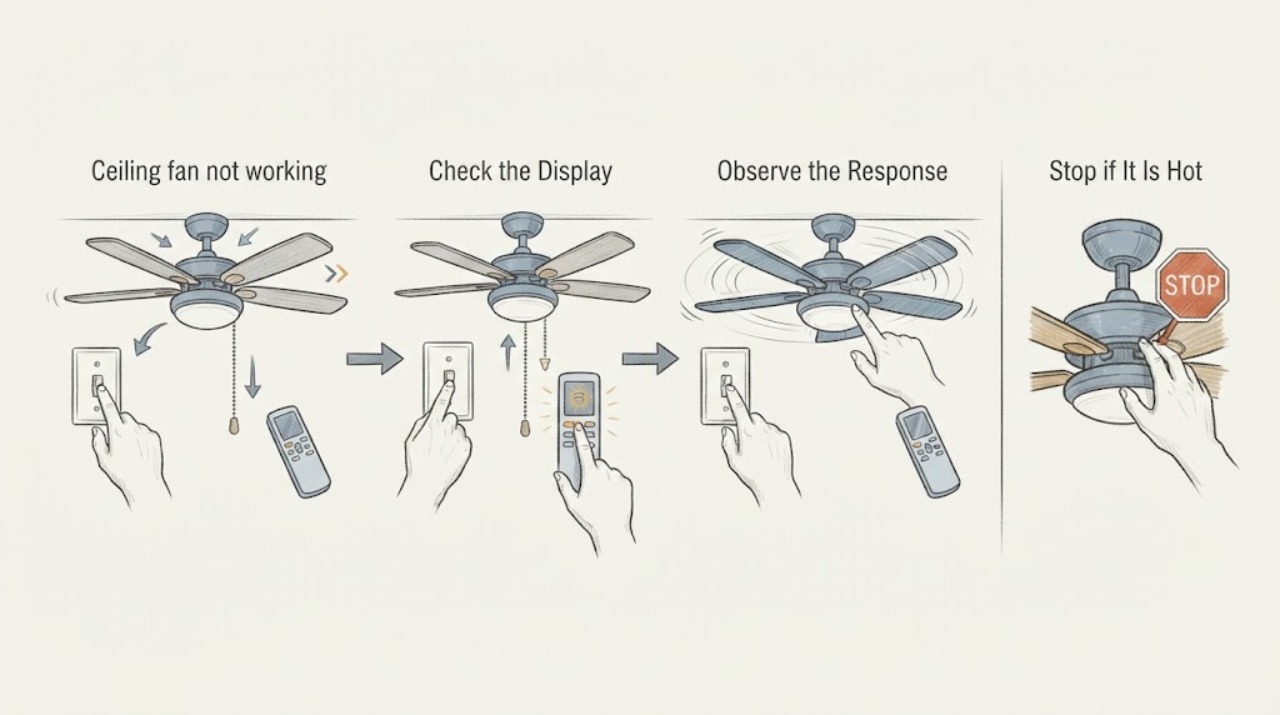
When a Hunter ceiling fan is not working, first confirm the wall switch supplies power and use the control intended for that fan: a pull chain for a pull-chain model or the remote's on command for a remote model. Then check the labeled breaker, make sure a reverse switch is fully engaged rather than centered, and with power off confirm the blades are not physically stuck. If the light works but the blades do not, the receiver, capacitor, wiring harness, or internal controls become more likely; if neither light nor fan responds, power, the switch, remote batteries or pairing, or the receiver supply remain in question. Use the exact Hunter model manual for pairing and compatibility. Do not open the canopy, handle wiring, bypass a receiver, or test an energized circuit as a routine user check. Stop and arrange qualified electrical service for a repeated breaker trip, burn marks, loose or exposed wiring, a hot control, a loose ceiling mount, severe wobble, or any fault that remains after safe external checks.
Work through in order
Diagnostic checks
Use only checks that match the exact appliance or system and its official guide.
-
Check 1
Turn on the normal wall switch and use the control intended for the fan: press the remote on command, or use the pull chain if it is a pull-chain model; keep hands away from moving blades.
Expected result: The light responds, the fan responds, only a pull chain responds, or neither function responds.
Next step: Record the response pattern and continue with the breaker and control-specific checks. Do not remove a cover to look for the receiver.
Why this matters
Why: A working light shows that at least part of the fan's power and control path is active. A pull-chain response can indicate a control-state issue, while no light or fan response keeps wall power, the breaker, batteries, pairing, or receiver supply in question.
-
Check 2
From a dry, safe position, look for the clearly labeled fan circuit at the electrical panel and confirm the wall switch is in its normal on position; do not remove switch covers or touch wiring.
Expected result: The breaker is tripped, the breaker trips again after one normal reset, the switch appears off, or power controls appear normal but the fan remains dead.
Next step: If there is no visible hazard and you can identify the labeled breaker, restore it once. If it trips again, leave it off and call a qualified electrician; do not keep resetting it.
Why this matters
Why: A tripped breaker or off switch can remove power from the fan. A repeat trip points to an electrical or equipment fault, while normal external controls shift attention toward the remote, receiver, wiring, or motor controls.
-
Check 3
With the fan off and blades stopped, look for a manual reverse switch and confirm it is fully to one side rather than centered; do not reach over a running fan or climb unsafely.
Expected result: The reverse switch is centered or loose, or it is already fully engaged and the fan still does not work.
Next step: Move the switch only when the fan is stopped and it can be reached safely, then test once. If the fan remains dead, stop at external checks and use the model manual or service.
Why this matters
Why: Hunter identifies a reverse switch that is not engaged as a possible reason a fan will not operate. A fully engaged switch makes this explanation less likely and leaves the power, control, receiver, or motor path in question.
-
Check 4
After switching the fan off, observe from the floor whether the blades are obstructed or visibly contacting anything; if the model and access make it safe, confirm they move freely without forcing them, and do not remove guards or covers.
Expected result: A blade is obstructed, movement feels abnormal, the fan wobbles or sags, or blades appear free with no visible mounting problem.
Next step: Keep the fan off if blades bind, the mount moves, or wobble is severe. Arrange qualified service for mounting or internal diagnosis rather than forcing the blades.
Why this matters
Why: An obstruction or structural movement can prevent safe operation and may indicate an installation or mounting issue. Free blades do not rule out the receiver, capacitor, wiring harness, or motor controls.
-
Check 5
If the fan uses a handheld remote, install fresh batteries and follow the exact model manual's pairing instructions; do not guess at a pairing sequence or substitute a remote or receiver by appearance.
Expected result: The remote begins working, the light responds but the fan does not, pairing fails, or the fan has no remote system.
Next step: Record the result and fan model. If pairing does not restore control, arrange model-specific support or qualified electrical service; do not open the canopy.
Why this matters
Why: A response after fresh batteries supports a battery issue; a selective response points toward a function-specific control path. Failed pairing leaves the remote, receiver, fan power, or internal control unresolved.
-
Check 6
Look from a safe position for burn marks, smoke, a hot switch or control, exposed wiring, a loose ceiling box, severe wobble, or a breaker that trips again; do not touch the fan or wiring when any hazard is present.
Expected result: Any electrical or structural warning sign is present, or the fan remains unresponsive after the safe checks.
Next step: Keep people clear, switch off the circuit only from a safe location, and arrange qualified electrical service. Use emergency services for active smoke or fire.
Why this matters
Why: The fault may involve energized wiring, the receiver or motor controls, or loss of structural support, none of which can be identified safely by repeated button presses.
Use your observations
Decision map
Find the observation that best matches what you see, then follow the next safe action.
-
PATH 01Next step
What you see
Do this next
Check only the labeled breaker and wall switch from a safe position. If the breaker trips or the fan stays dead, leave the circuit off and arrange qualified electrical service.
-
PATH 02Next step
What you see
Do this next
Stop repeated restart attempts, record the model and response pattern, and arrange model-specific or qualified service. Do not open the canopy or handle internal components.
-
PATH 03Next step
What you see
Do this next
Keep the remote paired according to the model manual. If pairing fails or operation is intermittent, arrange qualified diagnosis of the remote and receiver rather than substituting parts blindly.
-
PATH 04Next step
What you see
Do this next
Keep the fan off and keep people clear of a loose or falling fixture. Arrange a qualified fan installer or electrician to inspect support and internal parts.
-
PATH 05Next step
What you see
Do this next
Do not touch or operate the fan. Isolate power only from a safe location, keep people away, and contact a qualified electrician; use emergency services for active smoke or fire.
Helpful context
Understand the symptom
Start with the control and power path
A ceiling fan can appear dead because its wall switch is off even when the remote has fresh batteries. Pull-chain fans also need the chain in an on state, while remote-only fans depend on the wall control supplying power to the receiver. Compare the light and fan response so a total power loss is not confused with a motor or speed-control problem.
A stopped fan is not always a failed motor
Hunter lists a centered reverse switch, a tripped breaker, stuck blades, loose connections, a receiver, capacitor, wiring harness, and internal controls as possible paths. The observed pattern matters: a working light with still blades narrows the issue differently from a fan and light that are both silent.
Keep wiring and overhead work professional
The fan's receiver and wiring are above or within the canopy. User-level checks are limited to controls, batteries, labeled power status, and safe visual observations with the fan off. Hunter recommends breaker-off precautions and professional electrical help for wiring, burn marks, no power at the switch, or discomfort with electrical components.
Only after diagnosis
Potential parts
- Hunter remote control
Consider a replacement remote only when fan power is confirmed, fresh batteries and the model pairing procedure fail, and diagnosis points to the handheld control.
Confirm the exact fan and remote model; a similar-looking remote is not proof of compatibility. - Hunter remote receiver
Consider a receiver only when the fan has power but does not respond to a known-compatible, correctly paired remote and a qualified diagnosis identifies the receiver.
Receiver access is electrical work above or within the canopy; isolate power first and use exact model documentation. - fan wiring harness or control assembly
Consider an internal harness or control assembly only after power, controls, and receiver behavior are checked and a professional identifies a fan-side fault.
Use the exact model manual and qualified electrical service; do not bypass controls or substitute an unverified assembly. - fan capacitor or motor assembly
Consider this category only when the fan has power but the blades will not start or spin and professional diagnosis confirms an internal motor-control failure.
Internal component fit and repair depend on the exact model; do not open the motor housing as a routine user check.
When checks do not resolve it
Need a professional?
Arrange qualified service when the fan remains dead after safe control and power checks, when only the light or one function works, when pairing fails, or when the next step requires opening the canopy or inspecting wiring. Stop immediately for a repeated breaker trip, burn marks, smoke, hot controls, exposed wiring, a loose mount, severe wobble, or water intrusion; isolate power only from a safe location.
Common questions
FAQ
Why is my Hunter ceiling fan not working at all?
Start with the wall switch and labeled breaker, then check the pull-chain or reverse-switch state if applicable and the remote batteries or pairing if it is remote-controlled. If both light and fan remain dead, a power or receiver-supply issue is more likely than a motor-only fault.
What if the Hunter fan light works but the blades do not?
That pattern keeps the receiver, capacitor, wiring harness, and internal fan controls in question. Record the model and avoid opening the canopy; arrange qualified diagnosis if the control and reverse-switch checks do not restore operation.
Can a centered reverse switch stop a Hunter fan?
Hunter lists an unengaged reverse switch as one possible cause. With the fan off and blades stopped, confirm it is fully to one side if it can be reached safely; if the fan remains dead, continue with power and service checks.
What should I do if the remote does not work?
Confirm the wall switch is on, install fresh batteries, and follow the exact model manual's pairing procedure. If the remote still fails, the receiver or fan-side control may need diagnosis; do not substitute or bypass parts by appearance.
When should I call an electrician for a Hunter ceiling fan?
Call for repeated breaker trips, burn marks, exposed or loose wiring, a loose mount, severe wobble, or any receiver, canopy, motor, or control inspection. Turn power off at the breaker before wiring work and use emergency services for active smoke or fire.
Read the exact guide
Official sources
- How to Fix a Ceiling Fan That Won't Turn On, Wobbles, or Makes NoiseHunter Fan · Hunter supplemental troubleshooting guidance; the exact model manual and qualified electrical service govern internal work.
- My fan stopped working. What do I do?Hunter Fan Support Site and Help Center · Hunter general installed-fan guidance; the exact product manual governs model-specific procedures.
Community feedback
Share a repair observation
Share a plain-text repair observation. Accepted observations are published automatically; this page may take a moment to update.