
On this page
Start here
Quick answer
A faint buzz that changes with dimming can come from LED–dimmer incompatibility or lamp/driver noise, but a buzz from the switch box or fixture is an electrical warning. Turn the light off and observe whether the sound follows the dimmer range, one bulb, or the switch itself. If the switch/plate is hot, discolored, sparking, crackling, smells burnt, or the buzz continues at full/off, turn off the circuit if safely identified and call an electrician. Do not remove the switch, change wiring, or use a non-dimmable bulb on a dimmer.
Before you begin
Safety first
- Request compatibility and electrical safety diagnosis. This self-check does not include switch/fixture disassembly, wiring changes, ballast/driver work, or live testing.
Work through in order
Diagnostic checks
Use only checks that match the exact appliance or system and its official guide.
-
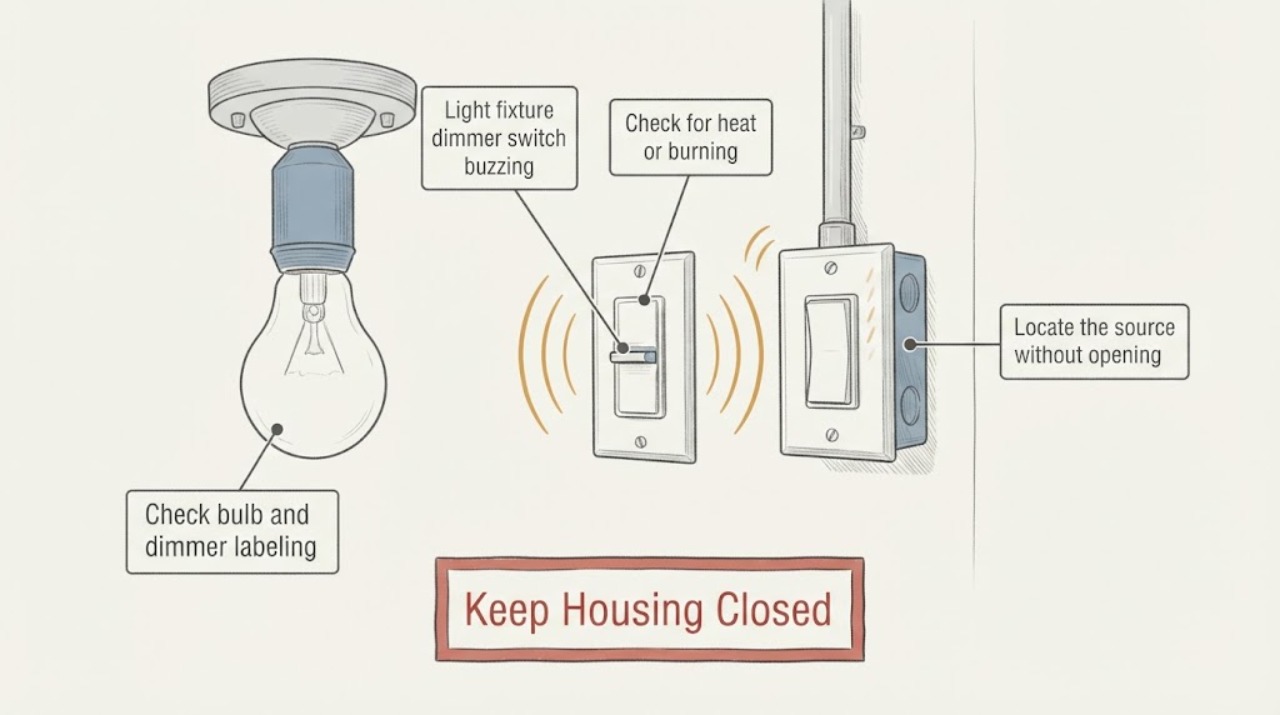
Check for heat or burning signs
Turn the light off and observe the switch plate and fixture from outside. Note heat, discoloration, melted plastic, crackling, sparks, smoke, burning odor, or a breaker trip; do not touch a hot plate or open anything.
Expected result: Yes: a heat/burning/electrical warning is present. No: there is a buzz without those visible warnings.
Next step: For yes, stop using the circuit, turn off the breaker only if it is safely identified, and request prompt electrician service. For no, continue external compatibility observations.
Stop if: Stop immediately if smoke, sparks, a hot/discolored plate, burning odor, or repeated breaker operation occurs.
Why this matters
Why: Heat, arcing, or odor can indicate a loose/failing connection, overloaded control, damaged fixture, or other hazard. No warning does not prove the dimmer is correctly matched.
-
Locate the source without opening it
From a safe distance, listen with the light at off, full, and a few normal brightness settings. Note whether the buzz is loudest at the lamp/fixture, at the wall dimmer, or is heard throughout the room; do not hold a hand to the switch or fixture.
Expected result: The sound changes with dimming at the lamp, stays at the switch, occurs at all settings, or cannot be localized.
Next step: Record setting, source, and a safe audio clip. Leave the light off if the sound is new, loud, or worsening and arrange service.
Stop if: Stop if the light flickers violently, smells hot, the plate heats, or localization requires touching/opening the fixture or switch.
Why this matters
Why: A dimming-dependent lamp buzz can be compatibility/driver related; a switch-localized or all-setting buzz needs electrician assessment. An uncertain source is not permission to disassemble the circuit.
-
Check bulb and dimmer labeling
With power off and the lamp cool, read only the visible bulb/fixture and dimmer labels. Note whether the bulb is marked dimmable, whether bulbs are mixed, whether the dimmer is intended for the load type, and whether the fixture has a driver or ballast label.
Expected result: The bulb is non-dimmable/unknown, labeled dimmable and compatible information is available, or the load/fixture type is uncertain.
Next step: If the bulb is clearly non-dimmable and replacement is safely user-accessible, choose a dimmable bulb specified for the dimmer; otherwise request service. Do not mix random bulbs to force a result.
Stop if: Stop if the bulb is stuck/hot, the fixture is damaged, the label is inaccessible without opening the circuit, or a replacement requires rewiring.
Why this matters
Why: A non-dimmable or mismatched load can buzz, flicker, or dim poorly. Labels can guide a compatible replacement but cannot establish that the switch wiring or control is safe.
-
Compare one bulb with the whole circuit
If the fixture has multiple identical, user-replaceable bulbs and no hazard sign, note whether the buzz follows one bulb after a cool, like-for-like dimmable replacement. Do not bypass the dimmer, install a non-dimmable lamp, or alter wiring.
Expected result: The buzz follows one lamp, changes with the replacement, or remains across the fixture/dimmer.
Next step: Record the original and replacement labels and brightness setting. If noise remains or the result is unclear, stop experimenting and call an electrician.
Stop if: Stop if any replacement causes heat, flicker, odor, sparking, or requires access beyond a cool user-replaceable lamp.
Why this matters
Why: A change tied to one lamp supports a lamp/driver compatibility lead; a buzz that remains points to the dimmer, fixture, load, or wiring and needs professional diagnosis.
-
Prepare the electrician handoff
Provide fixture and dimmer location, visible labels, bulb type/count, settings where buzzing occurs, source location, flicker/heat/odor, breaker events, recent bulb or dimmer changes, and whether the circuit was left off. State that no wiring or covers were opened.
Expected result: The report separates the audible pattern and labels from electrical conditions that were not tested.
Next step: Request service for a persistent or switch-localized buzz; use prompt service for heat, burning odor, crackling, sparks, flicker, or breaker trips.
Stop if: Stop self-checking when diagnosis requires wiring access, a live test, fixture disassembly, or bypassing the dimmer.
Why this matters
Why: This helps an electrician check load compatibility, dimmer condition, connections, fixture/driver/ballast, and circuit safety without a risky homeowner disassembly.
Use your observations
Decision map
Find the observation that best matches what you see, then follow the next safe action.
-
PATH 01Safety boundary
What you see
The switch/fixture is hot, discolored, sparking, crackling, smoking, burning, or tripping power.
Do this next
Stop using the circuit, turn off the breaker only if safely identified, and request prompt electrician service; follow emergency guidance for active smoke/fire.
Why this path and its safety boundary
Safety stop: Do not touch, open, reset repeatedly, or continue testing.
-
PATH 02Safety boundary
What you see
The buzz is at the lamp/fixture and changes with dimmer position; labels suggest an LED/dimmer compatibility issue.
Do this next
Use a clearly dimmable, application-compatible bulb only if replacement is safely user-accessible; call if buzzing or flicker remains.
Why this path and its safety boundary
Safety stop: Do not use a non-dimmable bulb, mix unknown lamps, or rewire the dimmer.
-
PATH 03Safety boundary
What you see
The buzz comes from the wall dimmer or occurs at all settings.
Do this next
Leave the light off and request electrician inspection of the dimmer, load, connections, and fixture.
Why this path and its safety boundary
Safety stop: Do not remove the wall plate or tighten terminals.
-
PATH 04Safety boundary
What you see
Bulb/fixture/dimmer labeling or load type is unknown.
Do this next
Record visible markings and request compatibility and safety assessment.
Why this path and its safety boundary
Safety stop: Do not guess a replacement or open the fixture to identify wiring.
-
PATH 05Safety boundary
What you see
The buzz disappears after one clearly compatible, cool, user-replaceable bulb is changed and no hazard sign exists.
Do this next
Monitor normally and keep the bulb/dimmer labels for reference; call if noise returns or heat/flicker appears.
Why this path and its safety boundary
Safety stop: Do not treat temporary quiet as proof the dimmer circuit is safe if warning signs develop.
Helpful context
Understand the symptom
Separate compatibility noise from an electrical warning
LED lamps and dimmers need to be compatible, and some lamp or driver noise appears only at part of the dimming range. A buzz from the wall control, a hot/discolored plate, crackling, flicker, burning odor, or heat is not a normal compatibility experiment: stop using the circuit and request electrical service.
The safe checks below use the control, bulb labeling, and listening from outside. Do not remove the wall plate, expose terminals, open the fixture, touch a hot lamp, or test live wiring. If the bulb is clearly user-replaceable and cool, it may be replaced only with a dimmable type specified for the application; a persistent buzz still needs diagnosis.
Record when the buzz occurs
Note whether the sound comes from the lamp/fixture or switch, whether it changes with brightness, whether it affects one bulb or all bulbs, and whether there is flicker, heat, smell, or a tripped breaker. This pattern helps an electrician distinguish compatibility, lamp/driver, dimmer, fixture, and circuit causes.
Safety boundary
Stop conditions
- Stop using the circuit and request prompt electrician service for heat, discoloration, burning odor, crackling, sparks, smoke, flicker with heat, or breaker trips.
- Do not remove a switch/fixture cover, touch wiring, open a driver/ballast, bypass the dimmer, or perform live electrical tests.
- Do not use non-dimmable lamps on a dimmer, mix unknown load types, or guess at compatibility from appearance.
- Do not repeatedly cycle or reset a buzzing circuit to test it.
Only after diagnosis
Potential parts
- LED bulb
Relevant only when the existing lamp is non-dimmable or a compatibility issue is confirmed and the bulb is safely user-replaceable.
Match the dimmer/fixture application and use a clearly dimmable lamp; do not infer compatibility from base shape alone. - LED dimmer
A dimmer replacement is an electrical installation decision after load and wiring assessment by a qualified person.
Match circuit configuration and load requirements; do not replace or wire the switch as a homeowner experiment. - fluorescent ballast
Relevant only for a fluorescent fixture after a professional confirms ballast failure and exact fixture requirements.
Ballast work requires power isolation and fixture-specific identification; do not open the fixture from a buzz symptom alone.
When checks do not resolve it
Need a professional?
Request electrician service for a buzz that remains after a clearly compatible bulb check, comes from the switch, occurs at all settings, or is accompanied by flicker. Use prompt service for heat, burning odor, crackling, sparks, smoke, or breaker trips.
Safety scope: Request compatibility and electrical safety diagnosis. This self-check does not include switch/fixture disassembly, wiring changes, ballast/driver work, or live testing.
Common questions
FAQ
Is a buzzing LED bulb always dangerous?
No, but a buzz can reflect LED–dimmer incompatibility. A buzz from the switch, heat, discoloration, burning odor, crackling, sparks, flicker, or breaker trips is a stop-use warning requiring an electrician.
Can I use any LED bulb with a dimmer?
No. The bulb must be marked dimmable and compatible with the dimmer/fixture application. If labels are unknown or the buzz remains, request professional compatibility and safety diagnosis.
Should I tighten the dimmer wires?
No. Do not open the switch or touch wiring. Turn the circuit off if safely identified for a hazard and have an electrician inspect connections and load.
Why does the buzz happen only at low brightness?
Some lamp/driver combinations buzz or hum at part of the dimming range, often because of compatibility or control-range behavior. Record the setting and labels; do not rewire or bypass the dimmer.
Read the exact guide
Official sources
- NEMA DimmingLeviton · Supports treating bulb/dimmer matching as a compatibility issue and using manufacturer compatibility information rather than selecting by appearance.
Community feedback
Share a repair observation
Share a plain-text repair observation. Accepted observations are published automatically; this page may take a moment to update.