
On this page
Start here
Quick answer
Start by identifying whether both the fan and light are dead, whether the light still works, or whether the remote or wall control is the only part that fails. Check the accessible wall switch, remote batteries and buttons, and the relevant breaker without opening the ceiling canopy. Minka Aire advises using the exact model manual for control and frequency-interference procedures; find the model number in the canopy, on the back of the back plate, in the manual, or on the box. If the breaker trips again, there is a burning smell, sparking, exposed wiring, a loose overhead fan, or any need to open wiring, leave the circuit off and arrange qualified electrical or fan service. A fan that remains silent after safe control and power checks may have a receiver, controller, motor, or capacitor fault that cannot be identified safely from the symptom alone.
Before you begin
Safety first
- This article supports observing the symptom, using the ordinary wall control, checking an accessible breaker without opening the panel, replacing accessible remote batteries, locating the model information without disturbing wiring, and following exact-model user instructions. It does not authorize live electrical testing, canopy or junction-box work, receiver or capacitor replacement, control rewiring, fan removal, support repair, or operation of a hazardous fan.
Work through in order
Diagnostic checks
Use only checks that match the exact appliance or system and its official guide.
-
Check 1
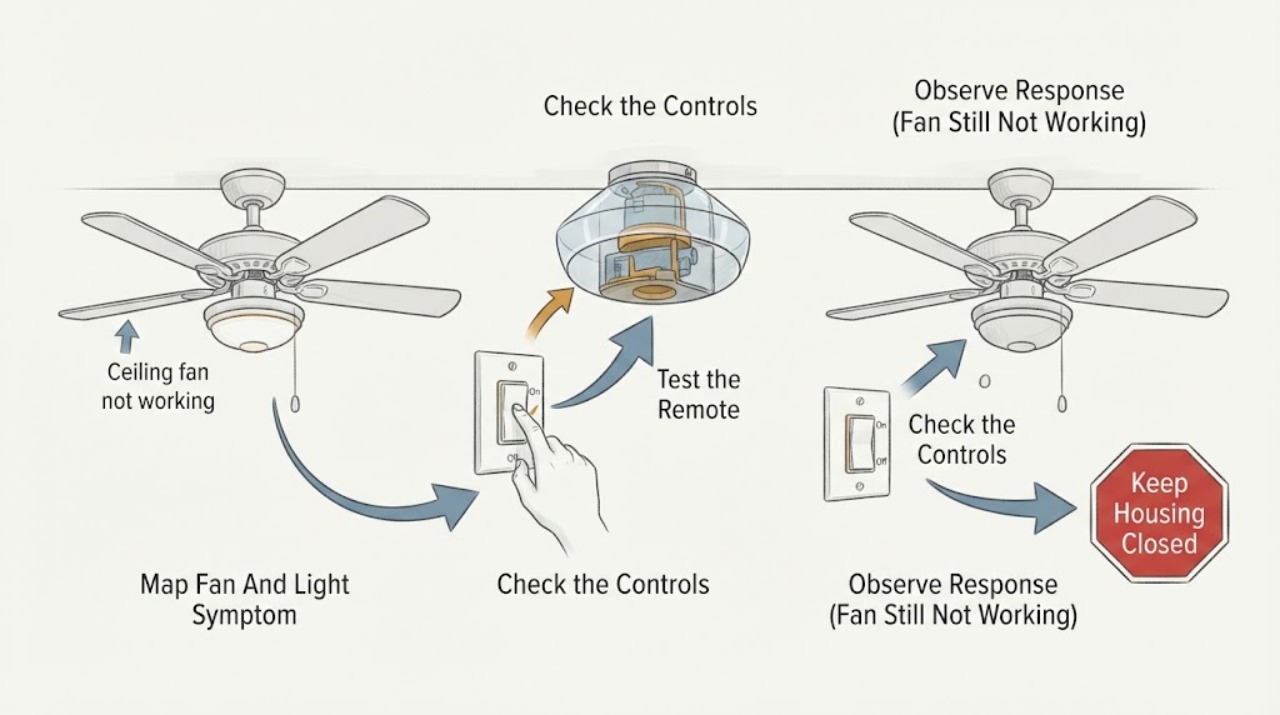
Stand clear of the blades and identify exactly what does not work. Try the normal wall switch and the normal control once, without opening the canopy or reaching toward the fan. Record whether the light works, the fan motor is silent, the fan hums or clicks, the remote indicator responds, and whether the symptom appeared after an installation, power event, or control change.
Expected result: Classify the result as both fan and light dead, light works but fan does not, fan works but light does not, neither control responds, or a hum/click occurs without rotation. Note any ceiling movement, scraping, odor, heat, sparks, or breaker trip.
Next step: Use the matching symptom branch below. If there is an electrical hazard, a loose overhead assembly, or a repeated breaker trip, stop and arrange service instead of continuing checks.
Stop if: Do not run the fan to reproduce a scraping or unstable condition, touch the blades while moving, or continue near sparks, burning odor, exposed wiring, or a fan that shifts at the ceiling.
Why this matters
Why: When both loads are dead, an upstream switch, breaker, supply, receiver, or shared control path is more likely. When the light works but the fan does not, the fan control path, receiver output, motor, or capacitor is more likely than a completely dead supply. A hum, click, movement at the ceiling, or electrical odor raises the safety risk and is not a battery or pairing diagnosis.
-
Check 2
Check only the ordinary wall switch or control that serves the fan and the accessible electrical panel. Look for a switch left off or a breaker visibly tripped; do not remove a panel cover, test live wiring, or reset a device that is hot, wet, damaged, or repeatedly trips. If there was one ordinary trip and no hazard is present, follow the home's electrical safety practice for a single reset, then observe whether the fan and light return.
Expected result: Record whether the switch was off, the breaker was tripped, the breaker resets and holds, the breaker trips again, or nothing changes. Note any buzzing, heat, discoloration, odor, or a switch that feels loose.
Next step: If power returns and the fan operates normally, monitor it and keep the model information for future control questions. If the breaker will not hold or trips again, leave it off and call a qualified electrician. If it holds but the fan remains dead, continue with the non-wiring control check.
Stop if: Do not repeatedly reset a breaker, bypass protection, remove a deadfront or switch plate, or investigate a hot, wet, sparking, or damaged panel yourself.
Why this matters
Why: A single tripped breaker can explain a dead fan and light, but a repeat trip, heat, odor, buzzing, or discoloration indicates a fault that a reset cannot diagnose. If the breaker is on and the light and fan remain dead, the fault may be at the switch, receiver, connection, or fan rather than the panel.
-
Check 3
Use the exact Minka Aire control supplied with the fan. Replace its batteries with the correct type if they are weak or expired, confirm the control is aimed or positioned as the model requires, and try the normal speed or light buttons once. If a wall control is present, note whether it can operate either function independently. Do not open the receiver or change dip switches, wiring, or pairing combinations without the exact model instructions.
Expected result: Look for a remote indicator that does or does not light, a response from the light but not the fan, response from the wall control but not the remote, or no response from either control after fresh batteries.
Next step: Find the exact model manual before attempting any model-specific pairing or frequency procedure. If the control still fails, preserve the control and model information for service rather than substituting an unverified remote.
Stop if: Do not assume a visually similar remote is compatible, repeatedly reprogram an unknown receiver, or open electrical compartments to test a control.
Why this matters
Why: A dead remote indicator or a response restored by fresh batteries points to the hand control or battery path. A control that operates the light but not the fan, or a wall control that works while the remote does not, isolates the symptom to a control path or receiver channel. No response from all controls with confirmed house power makes a receiver, connection, or fan-side fault more likely.
-
Check 4
Identify the complete Minka Aire model number before pursuing a pairing, receiver, or replacement-part decision. Look for it in the places Minka lists—inside the canopy, on the back of the back plate, in the manual, or on the original box—without removing the canopy or disturbing wiring. Use Minka's literature search to locate the manual for that exact model and compare only the control and troubleshooting steps it specifies.
Expected result: Record the full model number, control type, whether the fan was recently installed or repaired, and which functions respond. If the number is missing or unreadable, record that rather than guessing from the appearance of the fan.
Next step: Follow only the exact manual's non-wiring user steps. Give the model and the symptom map to a qualified electrician or fan technician if the manual points to wiring, a receiver, a motor, or a component replacement.
Stop if: Do not remove the canopy to find a label, substitute a receiver or remote based only on appearance, or perform live voltage tests without qualified electrical training and equipment.
Why this matters
Why: The model number determines which manual, remote, receiver, and control procedure can be evaluated. A missing model identity makes a replacement or pairing recommendation uncertain; similar-looking Minka Aire fans can have different controls or installation details.
-
Check 5
Arrange qualified electrical or ceiling-fan service when house power and safe control checks do not restore operation, when the fan hums or clicks without starting, or when the light works but the motor remains inoperative. Tell the technician whether the light works, which controls respond, whether a breaker tripped, the exact model number, and any recent installation or repair history.
Expected result: The remaining symptom is a confirmed control or motor-side failure, a repeat protective-device trip, a loose or damaged overhead assembly, or a hazard such as odor, heat, sparks, or exposed wiring.
Next step: Keep the fan off until the professional verifies the support, wiring, controls, receiver, motor, and safe operation. Ask the professional to confirm the exact model-specific replacement or repair before any part is ordered.
Stop if: Do not open the canopy, touch conductors, bypass a receiver, replace a capacitor, remove the fan, or keep operating a fan that hums, overheats, sparks, or moves at the ceiling.
Why this matters
Why: The likely fault area may include a receiver or controller, a motor-side component, a capacitor, a switch connection, or the support and wiring. These possibilities overlap in their visible symptoms; the article cannot identify a safe replacement part without model and electrical testing.
Use your observations
Decision map
Find the observation that best matches what you see, then follow the next safe action.
-
PATH 01Safety boundary
What you see
The fan and light are both unresponsive, the normal controls do not change the symptom, and the accessible breaker or switch is off or has tripped.
Do this next
If a safe single reset restores normal operation and the breaker holds, monitor the fan. If the breaker will not hold, trips again, or the switch or panel is hot, buzzing, discolored, wet, or sparking, leave it off and arrange qualified electrician service. If power is present but neither load responds, use the exact model manual and arrange fan service if the control check fails.
Why this path and its safety boundary
Why it matters: An upstream supply, switch, breaker, or shared fan control path is more likely than a fan motor-only failure. A breaker that trips again or shows heat, odor, or damage is an electrical fault, not a normal reset condition.
Safety stop: Do not repeatedly reset protection, remove switch or panel covers, or open the fan canopy.
-
PATH 02Safety boundary
What you see
The light operates normally, but the fan does not start from the usual wall control or remote, with no odor, sparking, ceiling movement, or repeated breaker trip.
Do this next
Check fresh remote batteries and the normal control buttons, identify the exact model, and follow only its user-level control instructions. If the fan remains silent or only hums, keep it off and arrange qualified fan or electrical service for receiver, control, motor, and capacitor diagnosis.
Why this path and its safety boundary
Why it matters: The supply is at least partly available, so a fan-specific control channel, receiver output, motor-side component, or motor fault is more likely than a completely dead circuit. The light working does not prove that the fan wiring or receiver channel is healthy.
Safety stop: Do not infer a compatible receiver or capacitor from the light symptom, and do not open the canopy to test it.
-
PATH 03Safety boundary
What you see
The wall control operates the fan or light, but the remote does not, or the remote indicator is absent until its batteries are replaced.
Do this next
Use the exact Minka Aire model manual for any permitted pairing or frequency-interference procedure. If the model cannot be identified or the control still fails, have service verify the remote and receiver before replacing either.
Why this path and its safety boundary
Why it matters: The remote, batteries, range, or model-specific pairing path is more likely than a failed fan motor. If fresh batteries do not help, the control may be incompatible, unpaired, or faulty, but appearance alone cannot establish compatibility.
Safety stop: Do not change unknown receiver settings, mix controls from another model, or open electrical covers.
-
PATH 04Safety boundary
What you see
The fan hums or clicks without rotating, a breaker trips again, there is heat, odor, sparking, exposed wiring, or the fan body, canopy, or ceiling support moves.
Do this next
Turn the fan off and leave the circuit off if safe to do so; keep people clear and arrange qualified electrician or fan service. Provide the symptom pattern and model number from a safe location.
Why this path and its safety boundary
Why it matters: A motor, control, wiring, or support fault is possible, and the symptom carries shock, fire, or falling-equipment risk. A control reset or battery change is not an adequate diagnosis for this pattern.
Safety stop: Do not operate the fan to reproduce the noise, reset a repeatedly tripping breaker, touch the housing or wiring, or climb to the canopy.
Helpful context
Understand the symptom
The symptom pattern matters more than the brand name
A silent Minka Aire fan can have a control or power problem, a receiver or controller problem, or a motor-side fault. First note whether the light works, whether a wall switch changes anything, whether the remote indicator responds, and whether the breaker has tripped. Those observations narrow the path without requiring access to ceiling wiring. Model-specific remote pairing and control behavior should come from the exact Minka Aire manual, because a procedure for one model is not proof of compatibility with another.
Keep canopy and wiring work professional
The Minka Aire installation instructions say to turn power off at the breaker before maintenance and recommend a qualified electrician when the installer is unfamiliar with electrical work. Checking a switch, remote batteries, an accessible breaker, and the model information is a reasonable first screen. Removing the canopy, testing live conductors, changing a receiver, or repairing a junction box is an electrical and overhead-equipment job.
Do not keep resetting a protective device
A breaker that trips again, a fuse that opens, a hot or discolored switch, sparking, a burning odor, or a fan that moves at the ceiling is a stop condition. Leave the affected circuit off if it can be done safely, keep people clear of the fan, and provide the professional with the observed pattern and model number. Repeated resets can turn an unresolved fault into a shock, fire, or equipment hazard.
Safety boundary
Stop conditions
- Turn the fan and its control off before any inspection, and keep hands, tools, clothing, and ladders away from rotating blades.
- Leave the circuit off and arrange qualified service for a repeated breaker trip, sparks, burning odor, heat, buzzing, exposed wiring, a wet or damaged control, or a fan that moves at the ceiling.
- Do not remove the canopy, open a receiver or junction box, test live conductors, change unknown control settings, replace a capacitor, or remove the fan without qualified electrical and overhead-equipment expertise.
- Do not substitute a remote, receiver, motor component, or other part based only on appearance; identify the exact model and confirm fitment through the model manual or a qualified professional.
- If safe switch, breaker, battery, and model-specific user-control checks do not restore operation, keep the fan off and arrange qualified electrical or ceiling-fan service.
Only after diagnosis
Potential parts
- Minka Aire remote transmitter or battery
Consider this category only when the exact model and control type are confirmed and the remote remains unresponsive after an accessible battery check or the model manual identifies the control as the failed path.
Match the complete fan model and control system; do not substitute a visually similar remote or assume a generic pairing procedure. - Minka Aire receiver or fan control module
Consider this category only after a qualified diagnosis shows that house power and the user controls are available but the receiver or control output is not operating.
Confirm the exact fan model, control protocol, electrical ratings, and installation instructions with Minka Aire or a qualified professional before replacement. - ceiling-fan motor-side component
Consider this category only when a qualified professional confirms a motor-side component fault after distinguishing it from the switch, receiver, control, supply, and mounting system.
Do not order by appearance or symptom; verify the exact model, electrical specification, and approved repair method before fitting any component.
When checks do not resolve it
Need a professional?
Arrange qualified electrician or ceiling-fan service when the fan remains inoperative after safe switch, breaker, battery, and exact-model control checks; when the light works but the fan is silent or hums; or when the model points to a receiver, motor, capacitor, wiring, or support issue. Stop immediately for repeat breaker trips, sparks, burning odor, hot or discolored controls, exposed wiring, moisture, a loose overhead assembly, or any component that may fall.
Safety scope: This article supports observing the symptom, using the ordinary wall control, checking an accessible breaker without opening the panel, replacing accessible remote batteries, locating the model information without disturbing wiring, and following exact-model user instructions. It does not authorize live electrical testing, canopy or junction-box work, receiver or capacitor replacement, control rewiring, fan removal, support repair, or operation of a hazardous fan.
Common questions
FAQ
Why is my Minka Aire ceiling fan not working but the light still works?
The supply is at least partly available, so the fan control channel, receiver output, motor-side component, or motor is more likely than a completely dead circuit. Check the normal control and fresh remote batteries without opening the canopy, identify the exact model, and arrange qualified service if the fan remains silent or hums. Do not choose a receiver or capacitor from the light symptom alone.
What should I check first when both the Minka Aire fan and light are dead?
Check the ordinary wall switch and look at the accessible breaker for a visible trip, without removing covers. A single safe reset may restore operation if there is no heat, moisture, damage, or other hazard, but a breaker that trips again must remain off and be evaluated by a qualified electrician. If power is available but both functions remain dead, use the exact model manual and arrange service for the control or connection path.
Can I re-pair a Minka Aire ceiling-fan remote?
Only follow the pairing or frequency procedure in the manual for the exact fan model. Minka's official guidance points owners to the model manual for frequency-interference issues, and a similar-looking remote does not establish compatibility. If the model is unknown or the control remains unresponsive after an accessible battery check, have the remote and receiver verified before replacing either.
Is a humming Minka Aire fan safe to keep running?
No. Turn it off and stop troubleshooting if the fan hums or clicks without starting, a breaker trips again, the housing becomes hot, there is burning odor or sparking, exposed wiring, or movement at the ceiling. These symptoms can involve control, motor, wiring, or support faults and need qualified electrical or fan service.
Where can I find the Minka Aire model number?
Minka's literature page lists the inside of the canopy, the back of the back plate, the manual, and the original box as possible locations. Use only a location you can inspect without disturbing wiring; if finding the label would require removing the canopy, let a qualified professional do it. The complete model number is important for the correct manual, remote, receiver, and parts decision.
Read the exact guide
Official sources
- FAQMinka Lighting LLC · Minka's official FAQ; exact remote and control procedures remain model-specific.
- LiteratureMinka Lighting LLC · Minka's official literature search; the exact manual and instructions vary by fan model.
- Instruction Manual Warranty Certificate — Great Room TraditionalMinka-Aire · Official F539 English installation manual used for general safety and troubleshooting patterns; hardware and control procedures vary by model, so the assigned fan's exact manual controls.
Community feedback
Share a repair observation
Share a plain-text repair observation. Accepted observations are published automatically; this page may take a moment to update.