
On this page
Start here
Quick answer
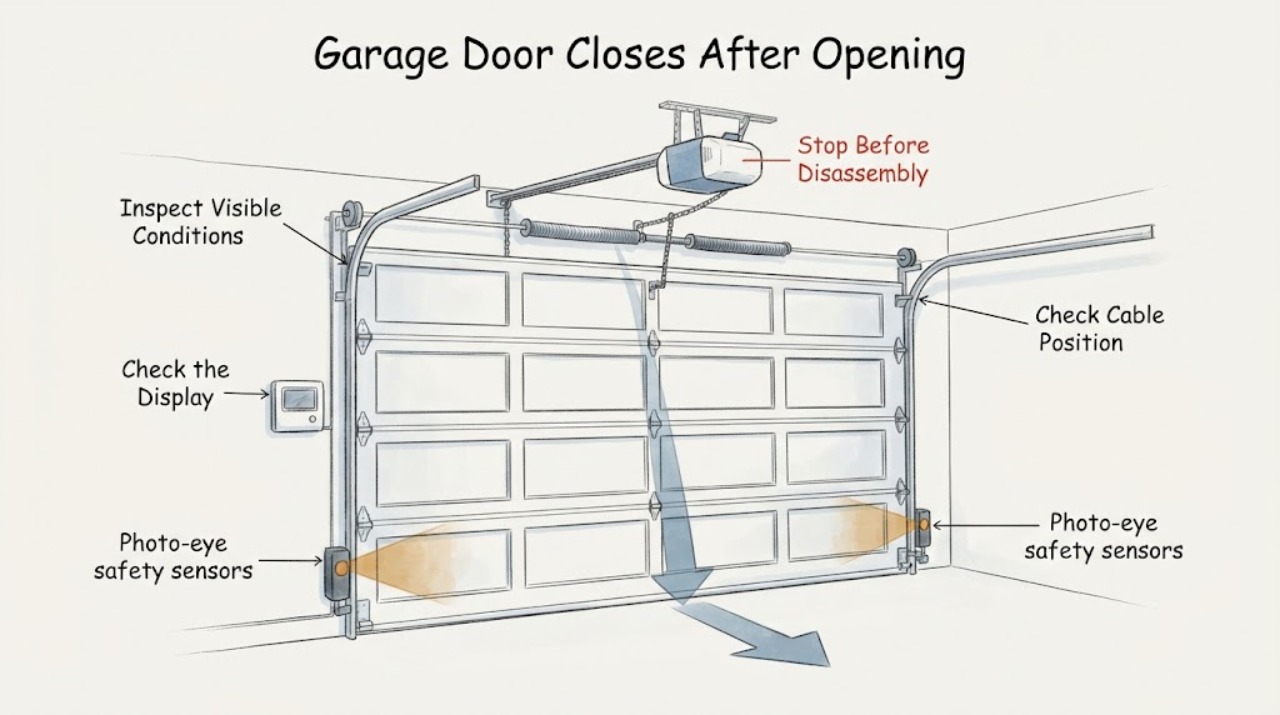
First determine whether the door starts closing by itself, or starts down and then reverses back open. If it reverses during a commanded close, clear the door path and check the photo-eye lenses, alignment and visible wiring without bypassing the safety system; Genie identifies an obstruction or Safe-T-Beam fault as a likely branch. If the door moves without a button or app command, inspect for a stuck wall-console or remote button and stop using the opener if unexpected motion continues; Genie identifies stuck controls, shorted wiring or a control-board problem as possibilities. Keep people, pets and vehicles clear, do not adjust springs or force settings by guesswork, and arrange trained garage-door service if the door is unbalanced, binds, has damaged cables or springs, fails a safety test, or closes unexpectedly.
Work through in order
Diagnostic checks
Use only checks that match the exact appliance or system and its official guide.
-
Check 1
From outside the door's travel area, observe whether a commanded close starts down and reverses, or whether the door moves without any button, wall-control or app command. Note the point of reversal and any opener light pattern.
Expected result: The door reverses during a commanded close, closes fully and then reopens, or begins moving without a command.
Next step: Use the photo-eye/path checks for a commanded reversal. For uncommanded motion, remove access to stuck controls and keep the opener out of service if the event repeats.
Why this matters
Why: A commanded reversal points toward the safety-beam, obstruction, travel or binding branch. Uncommanded movement points toward controls, wiring, remote interference or an opener fault; neither observation identifies a specific part.
-
Check 2
With the opener and door stationary, clear the opening, wipe both photo-eye lenses with a soft dry cloth, and check that the sensors face one another with their expected indicator state and visible wiring intact. Do not disconnect or bypass the safety system.
Expected result: A stored item blocks the beam, a lens is dirty, an indicator is blinking or off, the sensors are misaligned, or the visible path and indicators appear normal.
Next step: Correct only a clearly visible obstruction or alignment issue permitted by the exact manual, then make one supervised test from clear of the door. If the indicators remain abnormal or the door reverses again, arrange service.
Why this matters
Why: Genie identifies a blocked or misaligned Safe-T-Beam as a likely cause of a door reversing while closing. Normal external indicators do not rule out a wiring, travel or mechanical problem.
-
Check 3
Inspect the track, rollers, panels and visible cable path without loosening hardware or touching springs. Watch for binding, a door that jerks, unusual scraping, a cable off its drum, a damaged spring or a door that cannot remain safely positioned.
Expected result: The path is obstructed, the door binds or makes new noise, visible hardware is damaged, or no external mechanical problem is seen.
Next step: Remove only loose objects outside the mechanism. Stop using the door and contact a trained door technician for binding, damaged cables/springs, imbalance or any hardware problem; do not adjust spring tension yourself.
Why this matters
Why: Binding, track damage, cable/spring problems and imbalance can make the opener stop or reverse and can create a heavy moving-door hazard. A clear path does not prove the opener settings or mechanics are correct.
-
Check 4
Check the wall console and remotes for a stuck or pressed button, remove the remote from the immediate area, and note whether the door still moves without an intentional command. Do not open the opener housing or modify wiring.
Expected result: The unexpected motion stops when a stuck control is released or removed, or it continues with every control untouched.
Next step: Keep a door that moves on its own out of service and arrange qualified opener service, especially if the wall control, wiring or opener housing is involved. Replace batteries or follow the exact manual only for a confirmed remote-control issue.
Why this matters
Why: A stuck button can issue a close command; continued uncommanded motion can involve shorted wiring, interference or a control fault. The observation does not justify replacing a circuit board without diagnosis.
Use your observations
Decision map
Find the observation that best matches what you see, then follow the next safe action.
-
PATH 01Next step
What you see
The door starts down after a command and then reverses or reopens before reaching the floor.
Do this next
Clear the path and perform only the external photo-eye checks in the exact manual. If the door still reverses, leave it for qualified service and do not bypass the safety system.
Why this path and its safety boundary
Why it matters: An obstruction, photo-eye beam issue, door binding, travel/force setting or opener fault is possible; the symptom alone does not select one cause.
-
PATH 02Next step
What you see
The garage door begins closing or opens and closes while no person is pressing a wall control, remote or app.
Do this next
Keep people and vehicles clear, remove only an obviously stuck external control, and keep the opener disconnected from use if movement continues until qualified service evaluates it.
Why this path and its safety boundary
Why it matters: Genie identifies stuck controls, shorted wiring and control-board damage as possibilities for an opener that operates on its own.
-
PATH 03Next step
What you see
The door binds, jerks, makes new grinding or scraping sounds, has a damaged cable/spring/track, or will not remain safely balanced.
Do this next
Stop operating the door and contact a trained garage-door technician. Do not loosen spring hardware, move cables, alter force settings or work beneath an unsupported door.
Why this path and its safety boundary
Why it matters: The door hardware or balance may be unsafe and can overload the opener; springs and related tensioned hardware are not a casual adjustment.
-
PATH 04Next step
What you see
The photo-eye or contact-reversal test in the exact owner manual fails, or the door closes when the safety beam is obstructed.
Do this next
Stop using the opener and arrange trained service before normal operation resumes. Never defeat, disconnect or hold through a safety failure as a workaround.
Why this path and its safety boundary
Why it matters: The opener's protective reversal system may not be functioning as intended, creating a serious injury risk.
Helpful context
Understand the symptom
Separate a safety reversal from an uncommanded close
Watch one event from a safe position without standing under the door. A door that begins a commanded close and then returns upward is following a safety-reversal branch; a door that starts moving with no button, wall control or app command is an unintended-operation branch. Record which control was used, where the reversal occurs, whether opener lights flash, and whether the door opens again after reaching the floor. These observations help service without proving a sensor, board or spring failure.
Inspect the photo-eye path without defeating it
With the door stationary, remove objects, leaves and stored items from the opening and clean each photo-eye lens with a soft dry cloth. Check from outside that the two sensors face one another, their indicator behavior matches the opener manual, and visible wires are attached and not frayed. Do not tape over, disconnect or bypass a safety sensor. Genie says its Safe-T-Beam must be installed and working for the opener to close and automatically reverses when the beam is interrupted.
Check the door path and visible hardware
Look for a door panel, roller or track that is visibly bent, displaced or obstructed, and listen for new grinding, scraping or jerky movement. Keep hands away from cables, bottom brackets and springs. Genie says a door that is not balanced puts extra pressure on the opener and that spring-tension adjustment is too dangerous without training; LiftMaster also lists track alignment, blocked paths and broken springs as reasons to use service.
Inspect controls only from the outside
Check that the wall control and remotes are not wedged, stuck or being pressed by an object. Remove the remote from a pocket or vehicle console and observe whether the door moves when no control is touched. If the door still operates on its own, do not open the opener housing or alter its wiring; Genie identifies stuck buttons, shorted wires and control-board damage as possible causes of an opener that opens and closes by itself.
When checks do not resolve it
Need a professional?
Contact a trained garage-door or opener technician if the door moves without a command, reverses after external sensor/path checks, fails a safety test, binds, makes new grinding or scraping sounds, has damaged springs/cables/track, or cannot stay balanced. Provide the opener and door model, whether the event was a commanded reversal or uncommanded close, sensor indicator behavior, control used, and any visible mechanical damage. Do not adjust springs, bypass photo eyes, change force settings by guesswork, open the opener housing or work under an unsupported door.
Common questions
FAQ
Why does the garage door close and then open again?
A safety sensor obstruction or misalignment is one documented possibility, but binding, travel/force settings and other opener faults can also cause a reversal. Clear the path and check the photo-eye condition from outside; if it repeats, use qualified service.
Why does the door start closing when nobody presses a button?
Genie identifies stuck wall or remote buttons, shorted wiring and a possible control-board issue when a garage door opens and closes on its own. Keep the opener out of service if unexpected movement continues and do not open the housing yourself.
Can I bypass the safety sensors to make the door close?
No. Genie says the Safe-T-Beam system is required for its openers to close and must not be removed or disengaged. Clear or realign only as the exact manual permits; a continuing fault needs service.
Should I adjust the springs or closing force?
Do not adjust springs yourself. Genie identifies an unbalanced door as a safety hazard and says spring-tension adjustment is too dangerous without training. Force and travel settings are model-specific; use the manual or a trained technician.
Read the exact guide
Official sources
- Frequently Asked QuestionsThe Genie Company · Official Genie FAQ used for the manufacturer's Safe-T-Beam behavior and sensor obstruction/alignment branches. It is not a model-specific diagnosis for an unspecified opener.
- Signs It Is Time to Replace Your Garage Door OpenerThe Genie Company · Official Genie article used only for symptom classification: stuck controls/shorted wiring/control-board possibility when opening and closing occurs on its own, and sensor-related possibilities when reversing. It does not prove a replacement is required.
- Garage Door Opener Repair & MaintenanceLiftMaster · Official LiftMaster guidance used as a separate manufacturer example for blocked paths, track alignment, safety-sensor alignment, springs and authorized service. It is not used to assert a LiftMaster model or universal setting.
- Maintaining Your Garage DoorThe Genie Company · Official Genie maintenance guidance used for external path, sensor, balance and safety-test boundaries. It does not authorize spring adjustment or transfer exact settings to another brand/model.
Community feedback
Share a repair observation
Share a plain-text repair observation. Accepted observations are published automatically; this page may take a moment to update.