
On this page
Start here
Quick answer
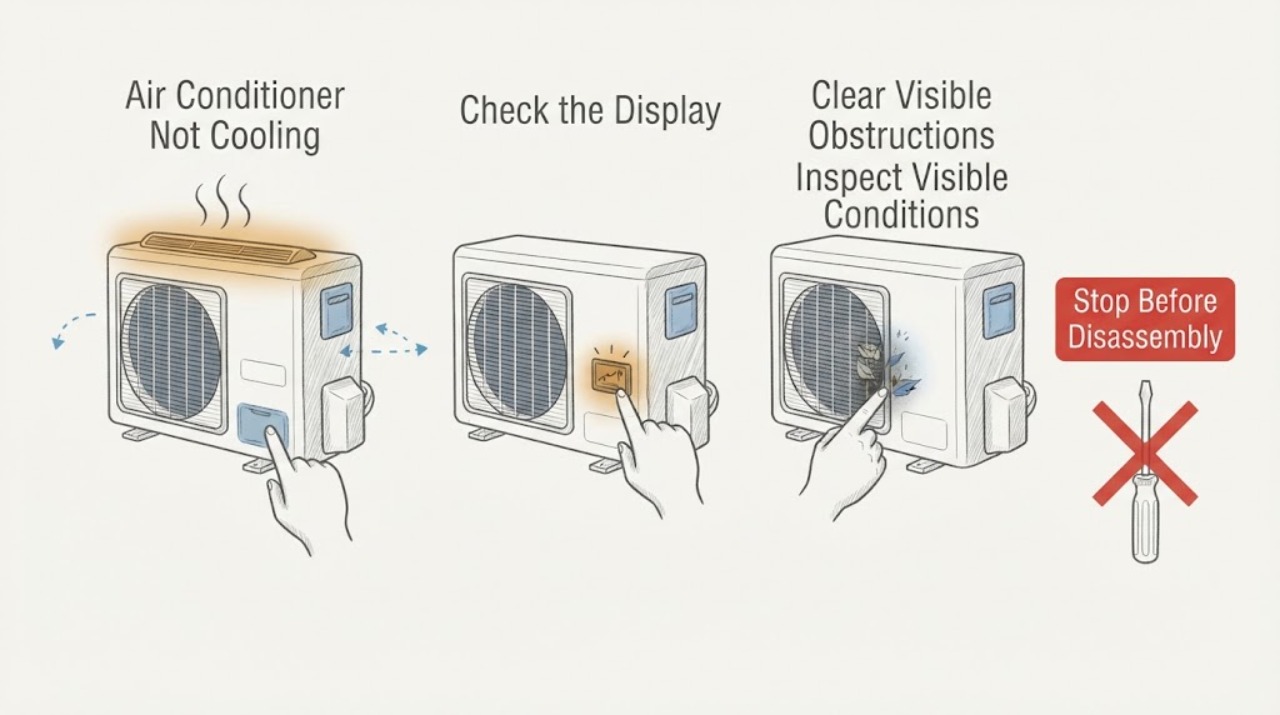
A capacitor can be one reason an air conditioner does not start, but a warm room or a humming outdoor unit does not prove that the capacitor has failed. Confirm the thermostat mode and target, inspect the accessible filter and registers, and observe whether the indoor airflow and outdoor fan start from a safe distance. If the fan does not start, the unit hums, ice appears, cooling is poor, or a breaker trips, leave the system off and request HVAC service. Do not open the cabinet, touch the capacitor or contactor, measure voltage, discharge the capacitor, or handle refrigerant; a capacitor can retain a dangerous electrical charge after power is removed.
Work through in order
Diagnostic checks
Use only checks that match the exact appliance or system and its official guide.
-
Check 1
Read the thermostat without opening it. Confirm Cool mode, set the target below the room reading, choose the documented fan setting, and note any delay, alert, blank display, or rapid cycling.
Expected result: The control is not calling for cooling, the fan runs without a cooling call, a delay or alert remains, or a normal call produces warm air.
Next step: Make only the documented external setting correction and allow one normal call. If the display remains abnormal, cooling stays absent, or cycling continues, keep the system off and request HVAC diagnosis.
Why this matters
Why: A setting or thermostat communication issue can resemble an equipment failure. A normal cooling call with warm air shifts attention toward airflow, the outdoor section, coils, refrigerant, or electrical controls; it does not identify the capacitor.
-
Check 2
With cooling stopped, inspect the accessible air filter and supply and return registers. Clean or replace the filter only according to the exact equipment instructions, and move a visible obstruction without opening the air handler.
Expected result: The filter is loaded, airflow is weak at several registers, one register is blocked, or airflow is normal while the room remains warm.
Next step: Make one normal observation after the safe filter or register correction. If airflow stays weak, the filter is wet, or the blower sounds abnormal, turn cooling off and arrange service.
Why this matters
Why: A restricted filter or air path can reduce cooling and contribute to coil icing. Normal airflow makes an outdoor start issue, capacitor, compressor, coil, refrigerant, or control condition more relevant.
-
Check 3
From a dry, safe position, look for frost or ice on accessible tubing, water around the indoor unit, and debris blocking the outdoor coil. Do not chip ice, pour water into equipment, wash an energized unit, or reach through the grille.
Expected result: Ice is visible, water is pooling, the outdoor area is blocked, or no ice or water is present.
Next step: If ice or water is present, leave cooling off and request HVAC service. If only loose debris outside the cabinet is blocking airflow, clear it without touching the equipment and make no more than one normal observation.
Why this matters
Why: Ice can follow restricted airflow or low refrigerant, and water can follow condensate trouble or thawing ice. Outdoor blockage can reduce heat rejection. None of these observations proves a capacitor fault.
-
Check 4
During one normal cooling call only, observe from outside the equipment boundary whether the outdoor fan starts and whether the indoor registers move air. Listen for a click or hum without startup, but do not remove a cover, touch the grille, or attempt to help the fan start.
Expected result: The outdoor unit is silent, a click or hum repeats, the fan does not move, the fan starts normally, or both sections run while cooling remains poor.
Next step: Turn cooling off for a non-starting fan, repeated click or hum, abnormal noise, or poor cooling. Request professional diagnosis rather than touching or testing the capacitor.
Why this matters
Why: A click or hum without fan startup can be a capacitor, motor, contactor, control, compressor, or power clue. A normal fan does not rule out other cooling faults, and a silent unit can have a thermostat, power, contactor, or control issue.
-
Check 5
Record the exterior model label and the complete pattern for the technician: thermostat setting, filter condition, airflow, ice or water, outdoor fan behavior, click or hum timing, cooling result, and any breaker event. Do not restart the system repeatedly to obtain another symptom.
Expected result: The system remains warm after safe checks, the outdoor fan will not start, a hum repeats, or a breaker or safety symptom appears.
Next step: Leave the system off when the cause is unresolved or unsafe and provide the record to an HVAC professional. Resume normal operation only after the fault and safety issue are addressed.
Why this matters
Why: A persistent no-cooling problem needs qualified checks of the capacitor, contactor, motors, compressor, thermostat, coils, refrigerant, wiring, and safety controls as appropriate.
Use your observations
Decision map
Find the observation that best matches what you see, then follow the next safe action.
-
PATH 01Next step
What you see
The thermostat is not calling for cooling, the fan setting is misleading, or a normal delay is displayed.
Do this next
Correct only the documented external setting and allow one normal call. If cooling remains absent or cycling persists, request HVAC service.
-
PATH 02Next step
What you see
The filter is loaded or airflow is weak at several registers.
Do this next
Clean or replace the filter as the exact manual permits and open blocked registers. If airflow remains weak, keep cooling off for blower, coil, and control diagnosis.
-
PATH 03Next step
What you see
The outdoor unit clicks or hums but the fan does not start.
Do this next
Leave the system off. A capacitor, contactor, motor, compressor, control, or electrical fault is possible; do not open the panel or handle a high-voltage part.
-
PATH 04Next step
What you see
The outdoor unit is silent or the breaker has tripped.
Do this next
Check only the external display and visible power state if dry and safe. Do not repeatedly reset the breaker; if it trips again, request qualified HVAC or electrical service.
-
PATH 05Next step
What you see
Ice or water is visible, or both sections operate while cooling remains poor.
Do this next
Turn cooling off and do not chip ice, open the cabinet, or handle wet equipment. Arrange service for airflow, condensate, coils, refrigerant, compressor, and control diagnosis.
-
PATH 06Next step
What you see
Smoke, burning odor, sparks, severe heat, water near powered equipment, or a breaker that trips again is present.
Do this next
Stop immediately and keep clear. From a dry, safe position, isolate power only if this can be done without touching water or damaged equipment; use emergency help for fire or active arcing and qualified service for the system.
Helpful context
Understand the symptom
A capacitor clue is not a capacitor diagnosis
The run capacitor helps a motor start and operate, so a click or hum with a fan that does not start can be a useful clue. The same symptom can come from a motor, contactor, compressor, control, power supply, or a safety lockout. The only safe homeowner contribution is to document the symptom and complete low-risk external checks.
Start with airflow and the cooling call
A thermostat in the wrong mode or a fan set to run continuously can make the air feel warm. A loaded filter can restrict airflow and contribute to coil icing. These checks can narrow the path without exposing anyone to the electrical compartment.
Keep the electrical boundary closed
A capacitor may remain charged after the equipment is switched off. Do not remove a service cover, touch a terminal, use a meter, place a tool near the fan, or try to discharge or replace the part. Give the technician the model, sound, timing, fan behavior, and cooling result.
Safety boundary
Stop conditions
- Stop immediately for smoke, a burning or electrical odor, visible sparks or arcing, severe equipment heat, a damaged disconnect, or a breaker that trips again.
- Stop and keep clear if water or ice is near powered equipment, the floor is wet, or the indoor unit is leaking. Do not handle wet electrical equipment.
- Do not remove panels, touch or discharge the capacitor, contactor, motor, compressor, wiring, or terminals, perform live electrical tests, or open the refrigerant circuit.
- Do not keep running a system with a non-starting outdoor fan, repeated click or hum, ice, rapid cycling, or worsening cooling.
Only after diagnosis
Potential parts
- run capacitor
Consider this category only if a qualified technician confirms a capacitor fault after observing the startup symptom and checking the system safely.
Electrical ratings, terminals, enclosure, and physical fit must match the exact equipment. A capacitor can retain a charge after power is removed.
When checks do not resolve it
Need a professional?
Request diagnosis for persistent no-cooling, a non-starting outdoor section, repeated click or hum, ice, water, a breaker event, or any capacitor suspicion.
Common questions
FAQ
Does a warm air conditioner mean the capacitor is bad?
No. A warm room can result from thermostat settings, restricted airflow, ice, coils, refrigerant, the compressor, a fan, or controls. A click or hum with a non-starting fan is only a capacitor clue and needs professional diagnosis.
Can I test or discharge an air conditioner capacitor?
No. Do not open the cabinet, touch terminals, measure voltage, discharge, or replace the capacitor. It can retain a high-voltage charge after power is removed; give the symptom and model to a qualified HVAC technician.
What should I check before calling for capacitor service?
Check the thermostat mode and fan setting, inspect the accessible filter and registers, look for ice or water, and observe whether the outdoor fan starts from a safe distance. Leave the system off for a non-starting fan, repeated hum, smoke, burning odor, sparks, or a breaker event.
Read the exact guide
Official sources
- AC Fan Not Spinning? Here’s Why and How to Fix ItCarrier · Air conditioner fan, filter, frozen coil, compressor, capacitor, high-voltage safety, and service escalation
- Maintenance ChecklistENERGY STAR · Air conditioner filter, condensate, controls, coils, blower airflow, and professional maintenance boundaries
- Air Conditioner Not Cooling | AC Not Blowing Cold AirCarrier · Air conditioner cooling failure causes involving thermostat, filter, airflow, coils, compressor, refrigerant, and outdoor unit
- AC Unit Not Turning On? Troubleshooting Steps & SolutionsCarrier · Air conditioner thermostat, filter, capacitor, contactor, compressor, electrical, and professional service clues
Community feedback
Share a repair observation
Share a plain-text repair observation. Accepted observations are published automatically; this page may take a moment to update.