
On this page
Start here
Quick answer
An air conditioner may not heat because it is a cooling-only system paired with a separate furnace, because a heat-pump thermostat is in the wrong mode or schedule, or because the thermostat has lost power or is not sensing the room correctly. First identify whether the outdoor unit is a heat pump and whether the thermostat offers Heat, Aux, or Emergency Heat. Then check the mode, setpoint, fan setting, schedule, display, batteries if applicable, and a clean accessible filter. Use Emergency Heat only when the exact heat-pump instructions allow it and the outdoor heat pump is unavailable; it is a temporary backup, not a repair. Do not remove the thermostat from its base, touch wiring, alter configuration terminals, or work on HVAC electrical, refrigerant, gas, or heating components. If the display is wrong, the system does not respond, the outdoor unit is iced, or heat still fails after safe control checks, arrange qualified HVAC service.
Before you begin
Safety first
- Keep the system off for smoke, gas or burning odor, exposed wiring, water near electrics, thick ice, loud mechanical noise, abnormal heat, repeated cycling, or repeated protective-device operation. Do not open covers or modify wiring.
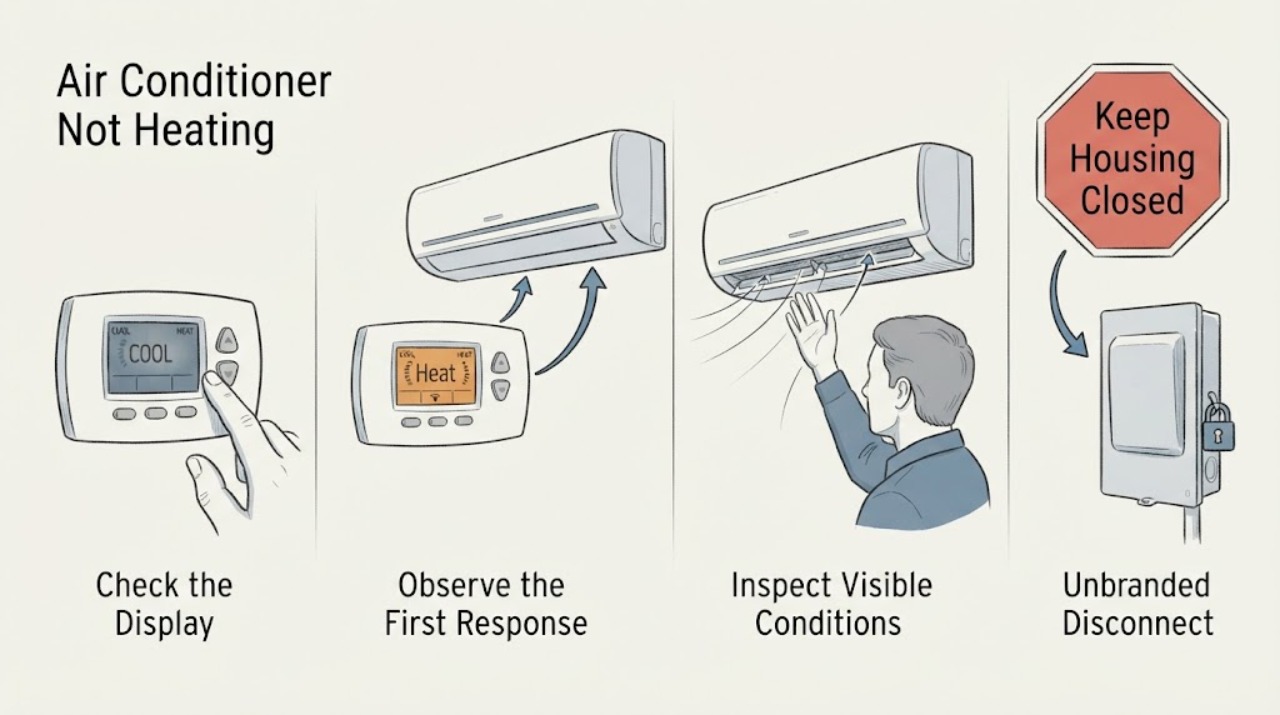
Work through in order
Diagnostic checks
Use only checks that match the exact appliance or system and its official guide.
-
Check 1
Read the equipment labels and thermostat menu from a normal user position, and note whether the control offers Heat, Aux, or Emergency Heat, whether a separate furnace or boiler exists, and whether the outdoor unit is described as a heat pump; do not open equipment covers or inspect internal terminals.
Expected result: The home has a cooling-only air conditioner with a separate heater, a heat pump with backup heat, or the system type remains unknown.
Next step: Use the exact thermostat and equipment manual for the identified system. If the type is unknown, give the model information to an HVAC professional rather than changing setup options.
Stop if: Stop if identification would require removing a panel, touching wiring, entering a restricted equipment area, or handling a gas appliance.
Why this matters
Why: A cooling-only unit is not expected to heat. A heat pump uses the thermostat to coordinate heating mode and may have a backup source, while an unknown configuration should not be guessed from the outdoor cabinet alone.
-
Check 2
At the thermostat, confirm the system mode is Heat rather than Cool or Fan, set the target above the current room reading, choose Auto fan unless the manual says otherwise, and cancel an active schedule, away state, or delay only through the documented user controls.
Expected result: The thermostat was in Cool or Fan, the target was not calling for heat, a schedule or delay was active, or the display shows a heat call but no equipment response.
Next step: Set one normal Heat request according to the manual and allow the system's documented response period. If the system still does not respond, stop changing settings and arrange HVAC service.
Stop if: Stop for exposed or frayed thermostat wiring, a wet or cracked control, a burning smell, smoke, or an error that returns after the manual's reset.
Why this matters
Why: A mode, target, schedule, fan, or normal equipment delay can look like a heating failure. A valid heat call with no response shifts attention to power, communication, safety controls, or the HVAC equipment.
-
Check 3
Observe whether the thermostat screen is bright, blank, flickering, or showing a low-battery or communication alert; if the model uses user-replaceable batteries, replace them only as the manual specifies and keep the thermostat mounted without disturbing its wiring.
Expected result: The screen is blank or unstable, a battery alert is present, the screen is normal but the indoor unit does not respond, or a recurring communication or system alert appears.
Next step: Use the exact manual for the alert and perform no more than one documented restart if it is allowed. If the screen remains blank, the alert returns, or the unit remains unresponsive, arrange HVAC service; do not remove the wall control or bridge terminals.
Stop if: Stop for exposed wiring, a loose wall plate, a hot or damaged control, smoke, burning odor, or any instruction that requires touching terminals.
Why this matters
Why: A battery or control-power issue can prevent a heat call, while a normal screen with no equipment response can indicate a system power, control-board, safety, or communication fault. An alert is model-specific.
-
Check 4
With the system off through its normal user control, inspect the accessible air filter and supply or return grilles; replace a visibly loaded filter with the exact type and orientation specified by the equipment manual, and make sure furniture or curtains are not blocking airflow.
Expected result: The filter is heavily loaded, airflow is weak at several grilles, airflow is normal but the air is not warming, or the indoor fan does not run.
Next step: After a safe filter change, make one normal Heat request. If airflow remains weak, the fan does not run, or the system still cannot warm the room, leave it for HVAC diagnosis rather than opening the air handler.
Stop if: Stop for water around the indoor unit, a frozen coil, burning odor, smoke, unusual noise, a hot electrical connection, or any need to reach the blower or wiring.
Why this matters
Why: Restricted airflow can make a heat pump deliver weak or lukewarm air and can trigger protective shutdowns. Normal airflow with no heat points more toward mode, outdoor operation, refrigerant, reversing, backup heat, or control faults.
-
Check 5
From a safe distance, observe the outdoor heat-pump unit during one normal Heat request and note whether it runs, is covered by light frost that clears, has thick ice, is blocked by leaves or snow, or remains silent while the thermostat calls for heat; do not remove guards, scrape ice, or touch refrigerant lines.
Expected result: The outdoor unit runs and later warms the home, briefly enters a defrost-like cycle, has thick persistent ice, is obstructed, or does not run.
Next step: Clear only loose debris that is plainly outside the unit and safe to reach, without touching the cabinet or coil. For thick ice, no operation, or recurring cold air, stop the heating request and arrange qualified HVAC service.
Stop if: Stop for thick ice, water near electrical equipment, smoke, burning odor, loud mechanical noise, repeated breaker operation, or any need to remove a cover or touch a coil or line.
Why this matters
Why: Brief defrost behavior can be normal for a heat pump. Persistent ice, no outdoor operation, or continued cold air can indicate airflow, power, refrigerant, reversing, defrost, or control trouble that a homeowner cannot assign to the thermostat alone.
-
Check 6
If the thermostat explicitly offers Emergency Heat or Aux Heat and the exact system manual identifies it as applicable, select the documented backup mode only when the primary heat pump is unavailable; note whether backup heat starts and return to normal Heat when qualified service directs it.
Expected result: The backup mode is unavailable, starts heating, starts but cannot maintain temperature, or produces an alert, unusual smell, repeated cycling, or no response.
Next step: Use backup heat only as a short-term, manual-approved measure and arrange HVAC service for the primary heat-pump fault. If backup heat behaves abnormally, turn the system off and stop troubleshooting.
Stop if: Stop for gas odor, smoke, burning odor, abnormal heat, electrical noise, repeated cycling, a tripped protective device, or any need to alter thermostat terminals or HVAC controls.
Why this matters
Why: Backup heat is a system-specific secondary source, not a universal thermostat fix. It may provide temporary comfort when a heat pump is unavailable, but a failed or abnormal backup call can involve electrical, gas, control, or safety equipment.
-
Check 7
Prepare a service note with the thermostat model, equipment type, display state, Heat/Aux/Emergency Heat options, setpoint and room reading, schedule or alert, battery result, filter and airflow observation, outdoor-unit state, and whether cooling still works; leave wiring, refrigerant, reversing, gas, and high-voltage diagnosis to a qualified HVAC technician.
Expected result: Safe thermostat and airflow checks do not restore heat, only backup heat works, cooling works but Heat does not, or the thermostat calls while the equipment is idle or repeatedly cycling.
Next step: Keep the system in the safe state identified by the manual and request HVAC service. Provide the exact sequence and avoid replacing a thermostat or changing its wiring until compatibility and the control fault are confirmed.
Stop if: Stop all user diagnosis for exposed wiring, refrigerant work, gas equipment, frozen coils, water near electrics, smoke, burning odor, or repeated protective-device operation.
Why this matters
Why: The remaining possibilities include an incorrect configuration, sensor or thermostat failure, control communication, reversing valve, defrost, refrigerant, power, auxiliary-heat, or equipment fault.
Use your observations
Decision map
Find the observation that best matches what you see, then follow the next safe action.
-
PATH 01Next step
What you see
The outdoor unit is a cooling-only air conditioner and the home has a separate furnace or other heater.
Do this next
Use the separate heater's manual and service path. Ask HVAC service to verify the thermostat's system configuration if the Heat option does not match the installed equipment.
Why this path and its safety boundary
Why it matters: The air conditioner itself is not expected to supply heat; the thermostat or separate heater controls the heating source.
-
PATH 02Next step
What you see
The thermostat is set to Cool, Fan, Away, a schedule that prevents a call, or a target that does not request heating.
Do this next
Select the documented Heat mode, set a reasonable target above the room reading, use the normal fan setting, and monitor one cycle.
Why this path and its safety boundary
Why it matters: The equipment may be operating as commanded rather than failing to heat.
-
PATH 03Next step
What you see
The thermostat screen is blank, flickering, or showing a low-battery or communication alert.
Do this next
Replace user-accessible batteries only when the manual permits and perform one documented restart if allowed. Arrange HVAC service if the display stays blank or the alert returns; do not touch wiring.
Why this path and its safety boundary
Why it matters: The wall control may lack battery or control power, or an HVAC control or safety circuit may be interrupting communication.
-
PATH 04Next step
What you see
A heat pump briefly blows cooler air or shows a light frost that clears during a normal cycle.
Do this next
Monitor whether the system returns to heating and the room approaches the target. Arrange service for constant cold air, thick persistent ice, or failure to recover.
Why this path and its safety boundary
Why it matters: A short defrost event can be normal for a heat pump and does not by itself prove thermostat failure.
-
PATH 05Next step
What you see
The heat-pump thermostat has a documented Emergency Heat or Aux Heat option and the primary outdoor unit is unavailable.
Do this next
Use the backup mode only as the exact manual permits while arranging HVAC service. Stop it for any abnormal smell, smoke, repeated cycling, or protective-device operation.
Why this path and its safety boundary
Why it matters: A configured secondary source may provide temporary heat, but it does not repair the primary system and may use more energy.
-
PATH 06Next step
What you see
The thermostat displays a valid Heat call but the indoor or outdoor equipment remains idle, repeatedly cycles, or never warms the room after safe airflow checks.
Do this next
Leave internal diagnosis to a qualified HVAC technician and provide the display, setpoint, airflow, filter, outdoor-unit, and mode results.
Why this path and its safety boundary
Why it matters: A control, power, safety, sensor, defrost, reversing, refrigerant, or heating-equipment fault is possible; the thermostat alone cannot identify it.
-
PATH 07Next step
What you see
Smoke, burning odor, gas odor, exposed wiring, water near electrical equipment, loud mechanical noise, thick ice, or a repeatedly opening protective device appears.
Do this next
Turn the system off using a safe accessible control, leave the area for gas or smoke concerns, and arrange emergency or qualified HVAC help. Do not restart to test.
Why this path and its safety boundary
Why it matters: Continued operation may create an electrical, fire, gas, water, or equipment hazard.
Helpful context
Understand the symptom
An air conditioner may not be a heater
People often call the outdoor unit an air conditioner even when it is a heat pump. A cooling-only air conditioner normally relies on a separate furnace, boiler, or other heater, so selecting Heat on a thermostat cannot make the cooling unit provide heat. A Heat, Aux, or Emergency Heat option is a clue that the system may be a heat pump, but the equipment label and exact manual are more reliable.
What the thermostat can and cannot prove
A lit screen shows that the wall control has some power; it does not prove that the indoor unit, outdoor unit, reversing function, backup heat, or safety controls are operating. Conversely, a blank screen can be caused by batteries, a lost control circuit, or an HVAC power issue. Use the display, setpoint, schedule, and system response to separate a control-state problem from an HVAC fault without removing the thermostat or touching its wiring.
Heat-pump air can feel cooler than furnace air
Heat-pump supply air may feel less hot than air from a gas furnace, and a short defrost event can temporarily change the air temperature. The useful question is whether the room temperature rises toward the setpoint and whether the system returns to normal. Constant cold air, a frozen outdoor unit, repeated delays, or a thermostat that calls for heat while the equipment stays idle needs HVAC diagnosis.
Safety boundary
Stop conditions
- Stop immediately for smoke, a burning or gas odor, an activated carbon-monoxide alarm, exposed or frayed thermostat wiring, water near electrical equipment, loud mechanical noise, or an abnormally hot unit.
- Do not remove the thermostat from its base, touch terminals or equipment wiring, alter heat-pump configuration, handle refrigerant or gas components, or open an HVAC cabinet.
- Stop after a documented user reset if the display alert returns, the breaker or other protective device operates again, the outdoor unit remains heavily iced, or the system still does not heat.
- Do not use Emergency Heat as a permanent workaround; keep the system in the manual-approved safe state and arrange qualified HVAC service.
Only after diagnosis
Potential parts
- thermostat or wall control
Consider a thermostat only after a qualified technician confirms that the existing control, sensing, power, and system compatibility are the cause of the heating failure.
Heat-pump, auxiliary-heat, dual-fuel, staging, and reversing-valve configurations differ. Confirm the exact equipment and wiring scheme before selecting a control. - thermostat battery
Consider user-replaceable batteries only when the exact thermostat manual identifies them and the display indicates low battery or loss of battery power.
Battery type and access vary by thermostat. Do not remove the control in a way that disturbs wiring or configuration. - temperature sensor or HVAC control component
Consider an internal sensor or control component only after qualified diagnosis confirms the fault; a wrong mode, filter, power, defrost, or refrigerant issue can look similar.
Sensors and control components are model- and system-specific and may involve high voltage or refrigerant-adjacent equipment. Confirm diagnosis and fit before replacement.
When checks do not resolve it
Need a professional?
The system type is uncertain or the thermostat options do not match the installed equipment., The thermostat remains blank or unresponsive after an applicable battery check or one documented restart., A valid Heat call produces no indoor or outdoor response, repeated cycling, or no rise toward the target temperature., A heat pump works in cooling but not heating, remains heavily iced, or repeatedly enters an abnormal defrost pattern., Emergency or auxiliary heat is unavailable, does not respond, or behaves abnormally., The suspected fault involves thermostat wiring, configuration terminals, control boards, electrical supply, refrigerant, reversing equipment, gas, or internal heating components.
Safety scope: Keep the system off for smoke, gas or burning odor, exposed wiring, water near electrics, thick ice, loud mechanical noise, abnormal heat, repeated cycling, or repeated protective-device operation. Do not open covers or modify wiring.
Common questions
FAQ
Can a regular air conditioner provide heat?
A cooling-only air conditioner normally cannot. Heating may come from a separate furnace or from a heat pump that reverses its refrigeration cycle. Check the equipment identity and thermostat options before changing settings or arranging a repair.
Why is my heat-pump thermostat set to Heat but the air feels cool?
A heat pump can deliver gentler heat than a furnace, and a short defrost event can temporarily change the air temperature. If cold air is constant, the room does not recover, the outdoor unit is heavily iced, or the system works in cooling but not heating, arrange HVAC service.
When should I use Emergency Heat?
Only when the thermostat and equipment manual identify Emergency Heat as applicable and the primary heat pump is unavailable. It is a temporary secondary source and does not repair the heat pump; stop for abnormal odor, smoke, repeated cycling, or a protective-device operation.
How do I know whether the thermostat or HVAC unit is at fault?
Note whether the display is powered, the Heat call appears, the indoor fan and outdoor unit respond, airflow is normal, and cooling still works. These observations narrow the service diagnosis, but do not justify removing the control or touching its wiring.
Can I replace the thermostat to fix no heat?
Do not replace it based on the symptom alone. A wrong mode, battery, filter, equipment power, communication, reversing, defrost, or refrigerant problem can look like thermostat failure. Have compatibility and the fault confirmed by the exact manual or a qualified HVAC technician.
Read the exact guide
Official sources
- CONTROLS FOR A HEAT PUMP WITH SECONDARY HEATING FOR HOMEOWNERSU.S. Department of Energy Building Science Education · General homeowner guidance for heat pumps with secondary heating; installed controls and switchover behavior are system-specific.
- Heat Pump Not Heating? Here’s How to TroubleshootCarrier · Carrier residential heat-pump guidance; exact equipment, thermostat, backup heat, and local installation details may differ.
- Common Thermostat Issues and How to TroubleshootCarrier · Carrier thermostat guidance; battery access, settings, delays, and compatibility are model-specific.
- HVAC Emergency RepairCarrier · Carrier Canada homeowner guidance; emergency response and equipment controls vary by location and model.
Community feedback
Share a repair observation
Share a plain-text repair observation. Accepted observations are published automatically; this page may take a moment to update.