
On this page
Start here
Quick answer
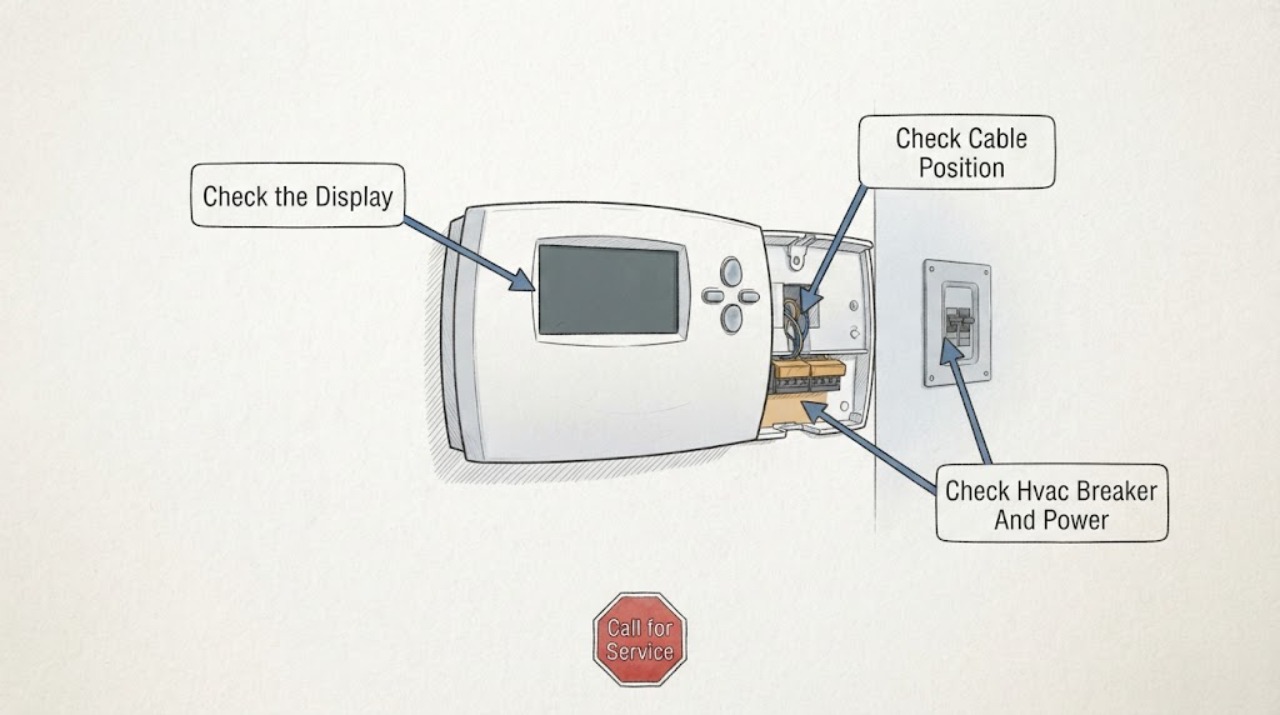
A blank air-conditioner thermostat usually means the thermostat has lost power, so first determine whether it uses batteries or receives power from the HVAC system. Replace batteries only in a battery-powered model, confirm the thermostat and HVAC breakers are not off, and use the thermostat's model manual for any approved reset. If the screen stays blank, the breaker trips again, or visible wiring is damaged, leave the system off and call a qualified HVAC technician or electrician. Do not jumper terminals, remove wiring, or assume the air conditioner itself is faulty until the thermostat's power path is checked.
Work through in order
Diagnostic checks
Use only checks that match the exact appliance or system and its official guide.
-
Check 1
Confirm that the thermostat screen is truly blank rather than dim, locked, or showing a temporary sleep screen. Check the thermostat manual or visible battery compartment to determine whether it is battery-powered or wired to the HVAC system, and note whether the indoor unit or outdoor unit is running.
Expected result: A blank display with no buttons responding indicates a thermostat power problem. A visible display with no equipment response points to a different communication, control, or HVAC power issue. Battery access suggests one possible user-level check; a wired unit has no user-replaceable power source at the thermostat itself unless the manual says otherwise.
Next step: Replace batteries only if the model uses them; otherwise proceed to a cautious HVAC power check and do not remove the thermostat faceplate to inspect wiring.
Stop if: Stop if the thermostat, wall, or nearby HVAC equipment is wet, scorched, cracked, or giving off a burning smell.
Why this matters
Why: Classifying the power type prevents a battery replacement attempt on a wired control and prevents assuming that a running HVAC unit makes a blank display normal. The next check depends on this distinction.
-
Check 2
If the thermostat is designed for batteries, turn off the HVAC call if the manual instructs you to do so, remove the old batteries, install the correct battery type and orientation, and close the compartment. Do not pull or rearrange any wires behind the thermostat.
Expected result: The display should return and retain the time or settings according to the model's normal behavior. If it remains blank with known-good, correctly oriented batteries, the battery compartment, display, thermostat electronics, or another power path may be at fault.
Next step: If the display returns, make one normal cooling or heating call and observe whether the indoor and outdoor equipment respond. If it remains blank, continue only with the safe breaker observation below.
Stop if: Stop if batteries leak, the compartment is damaged, the screen becomes hot, or the thermostat shows burning or liquid damage.
Why this matters
Why: A restored display supports depleted batteries as the immediate cause, but it does not prove the air conditioner is healthy. A display that stays blank after the battery check requires a professional check rather than repeated battery changes.
-
Check 3
If the thermostat is wired, or batteries did not restore a battery model, look at the labeled HVAC breaker or service switch without opening any cover. Only if the panel and equipment are dry and undamaged and you are comfortable doing so, make one reset attempt for a breaker that is clearly tripped; do not keep resetting it.
Expected result: A thermostat and HVAC unit may return after a single normal power restoration. A breaker that trips again, a switch that will not stay on, no indoor-unit response, or a blank display after power is present indicates a fault in the HVAC power or low-voltage path rather than a simple setting.
Next step: If power remains on and the display stays blank, leave the system off and arrange HVAC service. If the display returns, test one normal call and continue only if no hazard appears.
Stop if: Do not reset a breaker repeatedly, remove a disconnect cover, touch wiring, or operate equipment with arcing, smoke, burning odor, water, or heat damage.
Why this matters
Why: A single interruption can remove thermostat power, but repeated trips are a safety signal. The fault may involve a fuse, transformer, control board, wiring, or another component that requires qualified diagnosis.
-
Check 4
After the thermostat screen is restored, set a normal temperature call according to the manual and observe separately whether the indoor blower, outdoor unit, and supply air respond. Do not force a call by shorting terminals or changing installer settings.
Expected result: A working display with no indoor or outdoor response can indicate a tripped equipment circuit, service switch, control communication problem, or HVAC fault. If the indoor unit responds but the outdoor unit does not, record that split symptom rather than treating it as a thermostat-screen failure.
Next step: Record the response and any displayed message, then arrange qualified HVAC service if the equipment does not respond normally.
Stop if: Stop immediately for buzzing, smoke, burning odor, repeated breaker trips, or a fan that is obstructed or making a dangerous mechanical noise.
Why this matters
Why: Restoring the display proves only that the thermostat has power again; it does not establish that the air conditioner can run. The equipment response determines whether the next service call concerns the thermostat or the HVAC system as a whole.
-
Check 5
Without removing the thermostat or touching conductors, look for visible wall damage, moisture, loose trim, or obvious wire damage around the thermostat and HVAC equipment. Note whether direct sunlight, a nearby register, or a heat source affects the thermostat's temperature reading after the screen is restored.
Expected result: Visible corrosion, chewed or broken insulation, moisture, or intermittent display behavior supports a wiring or control problem. Sunlight or a nearby register can distort a temperature reading, but it does not explain a fully blank screen once power and batteries are known good.
Next step: Photograph or describe the visible condition for the service provider and arrange professional inspection if anything is damaged or the display remains unreliable.
Stop if: Do not remove the cover, pull wires, probe terminals, or work near exposed high-voltage components.
Why this matters
Why: The observation helps the technician distinguish a power/display fault from a placement or sensing issue. Repairing low-voltage wiring or opening the HVAC cabinet is not a safe continuation of this check.
Use your observations
Decision map
Find the observation that best matches what you see, then follow the next safe action.
-
PATH 01Next step
What you see
A battery-powered thermostat displays normally after correctly installed batteries.
Do this next
Make one normal HVAC call and observe indoor and outdoor equipment response.
-
PATH 02Next step
What you see
The display remains blank after a correct battery replacement, or the thermostat is wired with no display.
Do this next
Check the labeled HVAC power condition only within the safe homeowner boundary and do not manipulate thermostat wiring.
-
PATH 03Safety boundary
What you see
The HVAC breaker trips again, will not stay on, or the equipment shows arcing, smoke, burning odor, water, or heat damage.
Do this next
Stop resetting and leave the HVAC system off.
Why this path and its safety boundary
Safety stop: True
-
PATH 04Next step
What you see
The thermostat display returns but the indoor or outdoor equipment does not respond to a normal call.
Do this next
Treat the thermostat power issue as only one part of the symptom and record which equipment stage fails to respond.
-
PATH 05Safety boundary
What you see
Visible low-voltage wire damage, moisture, corrosion, or a cracked thermostat housing is present.
Do this next
Do not touch or remove the affected wiring or thermostat.
Why this path and its safety boundary
Safety stop: True
-
PATH 06Next step
What you see
The screen works but the temperature reading is inconsistent and the thermostat is in direct sunlight or next to a register or heat source.
Do this next
Document the placement and use the thermostat manual or a professional to correct the sensing/installation issue.
Helpful context
Understand the symptom
A blank screen is a power symptom first
The thermostat is the control that signals the furnace, heat pump, or air conditioner. When its display is blank, the immediate question is not whether the compressor is broken, but whether the thermostat has power. Battery-powered thermostats can have depleted batteries; wired thermostats can lose power through the HVAC circuit, low-voltage supply, wiring, or a control fault. A blank screen can therefore stop a heating or cooling call even if the outdoor unit is otherwise intact.
Separate the display from the system response
If new batteries or an approved power cycle restore the screen, test whether the air conditioner responds to a normal call. A lit thermostat with no indoor or outdoor response can indicate a separate HVAC power, communication, or equipment issue. If the display remains blank, the diagnostic boundary stays at batteries, visible controls, and a safe power check; thermostat wiring and HVAC electronics are professional work.
Do not turn a low-voltage problem into a larger one
Do not bridge terminals, pull wires from the wall, open the HVAC cabinet, or install a replacement thermostat based only on a blank screen. Heat pumps, multi-stage systems, zoned systems, and systems using a common wire may require configuration and compatibility checks. A qualified professional can determine whether the thermostat, transformer, wiring, fuse, or HVAC control is actually responsible.
Only after diagnosis
Potential parts
- thermostat
Consider this category only if a technician confirms the thermostat itself is not receiving or retaining power, or is sending incorrect control signals after batteries, circuit, wiring, and system compatibility are checked.
Confirm the existing HVAC type, stages, heat-pump or dual-fuel configuration, wiring, and manufacturer fit information before selecting any thermostat; a blank screen alone does not establish compatibility.
When checks do not resolve it
Need a professional?
Arrange qualified HVAC service when a correct battery check and safe power observation do not restore the display, when the display returns but the air conditioner does not respond, or when the thermostat repeatedly loses power.
Common questions
FAQ
What does a blank air-conditioner thermostat screen mean?
It usually means the thermostat is not receiving power. Battery models may have depleted batteries; wired models may have lost power through the HVAC circuit, low-voltage supply, wiring, or a control fault. Check only the battery and safe power items described in the manual, then arrange service if the display stays blank.
Should I replace the batteries when my thermostat is blank?
Only if the thermostat is designed for batteries. Install the correct type and orientation according to its manual without touching wiring. If the screen remains blank after known-good batteries, the problem may be elsewhere in the thermostat or HVAC power path and needs professional diagnosis.
Can a tripped breaker make the thermostat go blank?
Yes. The thermostat may share the HVAC power path, so a tripped breaker can remove power from the thermostat or equipment. Check the labeled breaker only if it is safe, make no repeated reset attempts, and call a professional if it trips again or the screen does not return.
Can I jump thermostat wires to test the air conditioner?
No. Do not bridge terminals or pull wires from a blank thermostat. Thermostat wiring and HVAC controls can be damaged or unsafe to handle; have a qualified HVAC technician inspect the thermostat power path and equipment communication.
Read the exact guide
Official sources
- AC Thermostats: Types, Features, & How They WorkCarrier · Residential AC thermostat power, blank display, HVAC communication, C-wire, and compatibility guidance
- Thermostat Controls TroubleshootingTrane · Residential thermostat blank-screen reset and professional boundary guidance
- Why Is My Thermostat Not Working?Trane · Residential thermostat blank-screen, battery, breaker, wiring, placement, and HVAC communication guidance
Community feedback
Share a repair observation
Share a plain-text repair observation. Accepted observations are published automatically; this page may take a moment to update.