
On this page
Start here
Quick answer
First determine whether the air handler has no airflow or is moving air that is not cool. Confirm that the thermostat is powered, set to Cool, and calling below the room temperature; then compare airflow at several registers. Check only the accessible filter, returns, registers, visible ice, and condensate area. A thermostat call with no blower response points toward a control, power, or blower fault; normal airflow that stays warm can involve the outdoor unit, coil, refrigerant, or controls. Leave the system off for ice, standing water, burning odor, unusual motor noise, exposed wiring, or a recurring fault, and have an HVAC technician handle the blower motor, high-voltage parts, and refrigerant.
Before you begin
Safety first
- Do not remove air-handler panels, touch the blower motor, capacitor, contactor, or wiring, perform electrical measurements, handle refrigerant, scrape ice, or bypass a safety switch.
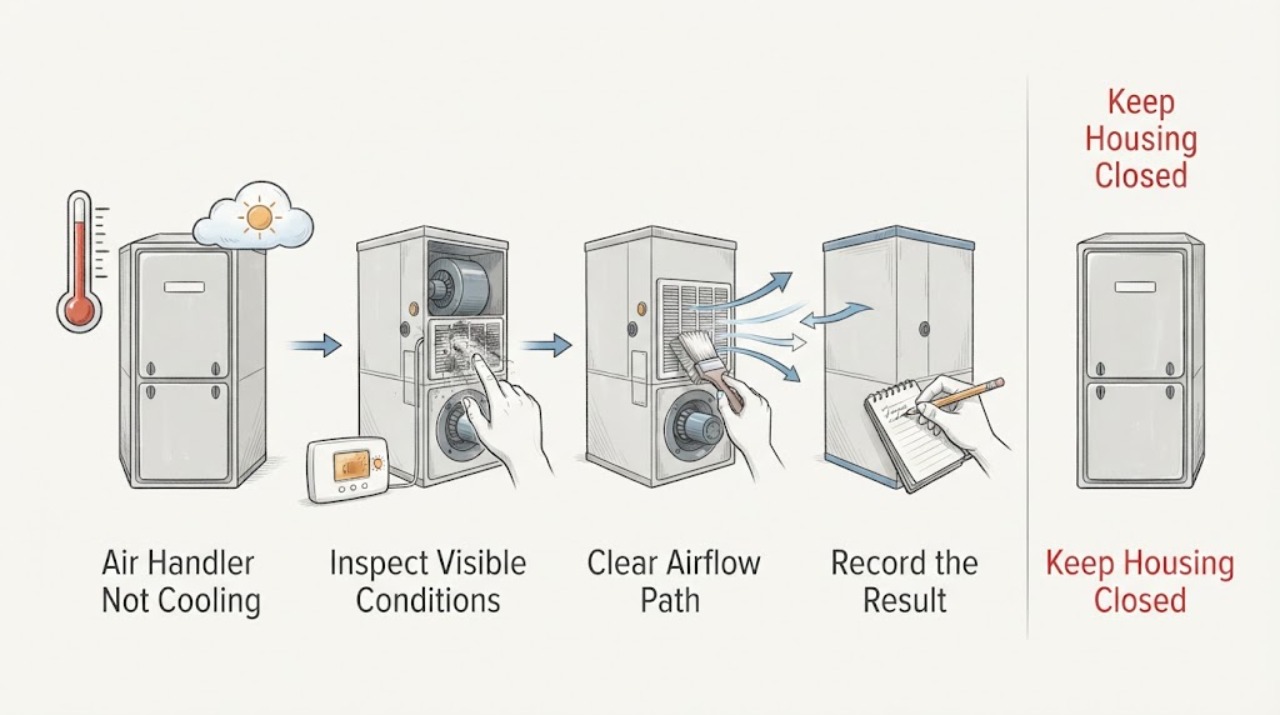
Work through in order
Diagnostic checks
Use only checks that match the exact appliance or system and its official guide.
-
Check 1
Look at the thermostat without removing it from the wall. Record whether the display is on, the mode, fan setting, room temperature, set temperature, cooling indicator, and any alert or delay message.
Expected result: The display is blank, the mode is Off or Heat, the set temperature is not below the room temperature, or the thermostat shows a cooling call.
Next step: Use only the thermostat's own battery or settings instructions, correct the mode or setpoint once, and observe the registers. Do not remove the thermostat or expose its wiring.
Stop if: Stop for a hot or cracked thermostat, exposed conductors, burning odor, or an alert that requires service.
Why this matters
Why: A blank display may indicate lost power or batteries; an incorrect mode or setpoint does not request cooling. A valid cooling call means the next distinction is airflow versus cooling capacity.
-
Check 2
With one cooling call active, compare airflow at several supply registers and check the return grille from the room side. Keep hands and objects out of the duct and air handler.
Expected result: There is no airflow anywhere, weak airflow at every register, normal airflow that feels warm, or normal cool airflow at some registers but not others.
Next step: Record the pattern and move to the safe filter and visible-condition checks. If the blower does not respond or the air remains warm after basic checks, call HVAC service.
Stop if: Stop for smoke, burning odor, unusual motor noise, water, ice, or any need to open the air handler.
Why this matters
Why: No or weak airflow favors a filter, return, blower, frozen-coil, control, or condensate-safety path. Normal airflow that is warm shifts attention toward the cooling circuit or outdoor equipment. A single weak register may be a grille or duct issue.
-
Check 3
Inspect only the accessible air filter and the room-side return and supply grilles. Confirm that the filter is seated in the correct direction, is not visibly blocked, and that furniture or a closed grille is not restricting the air path.
Expected result: The filter is heavily loaded, the return is blocked, a grille is closed, or the filter and visible air path are clear.
Next step: Replace the filter only with the size, type, and orientation specified for the system. Restore the airflow path and make one observation cycle; call HVAC service if airflow remains weak or the unit does not cool.
Stop if: Stop if the filter rack is damaged, the return is wet, the filter is contaminated, or replacement would require entering the equipment cabinet.
Why this matters
Why: A restricted filter or return can reduce airflow and contribute to freezing or equipment shutdown; a clear path makes an internal blower, coil, control, or refrigeration issue more likely but does not rule it out.
-
Check 4
From outside the air handler, look for visible ice on accessible tubing or coil surfaces, water in or below a condensate pan, or a drain overflow indicator. Do not scrape ice, pour water into the unit, or use heat to thaw it.
Expected result: Ice is visible, water is present, the drain appears to be backing up, or no ice or water is visible.
Next step: Turn the system off and arrange HVAC service for ice, standing water, or a recurring drain issue. Keep the area dry and do not open the equipment to investigate.
Stop if: Stop immediately for water near electrical equipment, a ceiling stain, sewage or mold contamination, rapid overflow, or ice that is spreading.
Why this matters
Why: Ice can follow restricted airflow or a refrigeration problem and can reduce cooling. Rising condensate can activate a safety switch on some systems and can damage the home. A clear exterior does not clear hidden coil or drain conditions.
-
Check 5
Observe the air handler and registers from a safe distance during one normal cooling call. Note whether the blower starts, hums without airflow, starts and stops, makes grinding or rubbing sounds, or runs continuously while the air remains warm.
Expected result: The blower is silent, hums, runs intermittently, makes abnormal noise, or runs normally while cooling is absent.
Next step: Do not access the motor, capacitor, wiring, or internal controls. Give the sound and timing to an HVAC technician and leave the system off if the motor overheats, smells, or repeatedly stops.
Stop if: Stop for grinding, smoke, burning odor, exposed wiring, arcing, or a motor enclosure that becomes visibly hot or damaged.
Why this matters
Why: A silent or abnormal blower response can indicate a motor, control, power, or mechanical fault. A normally running blower with warm air points more toward the coil, outdoor unit, refrigerant, or control path.
-
Check 6
Check the thermostat or equipment display for an exact alert, code, or delayed-start message, and record when it appears and whether it returns after one reset explicitly authorized by the owner's instructions.
Expected result: The alert clears once and cooling resumes, returns immediately, or cannot be cleared without opening the unit.
Next step: Use the exact manual for the air handler and give the code and timing to HVAC service. Do not bypass a safety switch or interpret a code from another system.
Stop if: Stop for a recurring fault, water or ice, a high-voltage warning, exposed wiring, or any request to open the cabinet.
Why this matters
Why: A single authorized reset may clear a temporary control state, while a recurring alert can indicate a safety switch, condensate condition, airflow fault, or internal control problem. Code meanings are model-specific.
-
Check 7
Prepare a service handoff with the air-handler and thermostat model, thermostat settings, register airflow pattern, filter condition, visible ice or water, blower sound, alerts, and whether the outdoor unit responded. Keep the equipment off if a safety symptom occurred.
Expected result: The system has no airflow, airflow is warm, cooling is weak, or the same fault returns after a safe filter or thermostat check.
Next step: Call a qualified HVAC technician to inspect the air handler and the connected cooling system. Do not buy or install a blower motor, contactor, capacitor, or refrigerant based only on the symptom.
Stop if: Stop homeowner diagnosis once internal access, electrical work, refrigerant work, or repeated cycling is involved.
Why this matters
Why: The remaining possibilities include a blower motor, contactor or other control, condensate safety, frozen or dirty coil, outdoor unit, or refrigerant problem that cannot be safely distinguished from outside.
Use your observations
Decision map
Find the observation that best matches what you see, then follow the next safe action.
-
PATH 01Next step
What you see
The thermostat is not calling for cooling.
Do this next
Use the thermostat's instructions for one safe settings or battery check; call HVAC service if the display remains unresponsive or the call cannot be established.
Why this path and its safety boundary
Why it matters: The problem may be mode, setpoint, schedule, battery, display, or thermostat communication rather than the air handler itself.
-
PATH 02Next step
What you see
The thermostat calls for cooling but there is no airflow at any register.
Do this next
Check the accessible filter and visible ice or water only; leave the cabinet closed and arrange HVAC service if airflow does not return.
Why this path and its safety boundary
Why it matters: A filter, return, frozen coil, condensate safety, blower motor, power, or control path may be stopping the air handler.
-
PATH 03Next step
What you see
Airflow is normal but the air remains warm or cooling is weak.
Do this next
Check the thermostat and filter, then call HVAC service for coil, outdoor-unit, refrigerant, and control diagnosis.
Why this path and its safety boundary
Why it matters: The blower may be operating while the evaporator, outdoor unit, controls, or refrigerant circuit is not providing cooling.
-
PATH 04Next step
What you see
Ice is visible or condensate water is rising or leaking.
Do this next
Turn the system off, keep clear of wet electrical areas, and arrange HVAC service; do not scrape, heat, or open the coil cabinet.
Why this path and its safety boundary
Why it matters: Restricted airflow, a coil or refrigeration condition, or condensate protection may be involved and continued operation can cause damage.
-
PATH 05Next step
What you see
The blower hums, grinds, repeatedly stops, smells hot, or does not start.
Do this next
Leave the system off and call HVAC service; do not reach into the air handler or attempt motor or capacitor work.
Why this path and its safety boundary
Why it matters: The blower motor or internal electrical or mechanical controls may be failing.
Helpful context
Understand the symptom
An air handler can appear to be not cooling for two different reasons: little or no air is leaving the registers, or air is moving but is not being cooled. The thermostat, filter, return path, evaporator coil, condensate protection, blower motor, and outdoor refrigeration system can create different patterns. The useful homeowner diagnosis is a set of visible and audible observations, not an attempt to open the air handler.
Start at the thermostat and registers. Record the mode, setpoint, room temperature, cooling indicator, airflow strength, and whether the air feels merely room-temperature or clearly warm. Compare more than one register so a closed grille or local duct problem is not mistaken for a failed blower.
A dirty filter can restrict airflow and contribute to a frozen coil, while a blocked condensate drain or safety switch can stop some indoor units. A visible filter or drain check can be useful, but a blower motor, coil, electrical control, and refrigerant diagnosis belongs to an HVAC professional.
Do not remove the air-handler panel, reach toward a blower motor, touch wiring, handle refrigerant, or use a tool inside the unit. Turn the system off and arrange service for ice, water, burning odor, smoke, arcing, or a motor that hums, grinds, or repeatedly stops.
When checks do not resolve it
Need a professional?
Safety scope: Do not remove air-handler panels, touch the blower motor, capacitor, contactor, or wiring, perform electrical measurements, handle refrigerant, scrape ice, or bypass a safety switch.
Common questions
FAQ
How can I tell whether the air handler is not cooling or not moving air?
Set a valid cooling call and compare airflow at several registers. No or weak airflow points toward the filter, return, frozen coil, condensate safety, blower, or controls. Normal airflow that stays warm points more toward the cooling circuit or outdoor equipment.
Can a dirty filter make an air handler stop cooling?
A blocked filter can restrict airflow and contribute to a frozen coil or protective shutdown on some systems. Replace it only with the specified filter and orientation; persistent weak airflow, ice, water, or warm air needs HVAC service.
Should I open the air handler to check the blower motor?
No. Observe the airflow and sound from outside the cabinet, then call HVAC service for a silent, humming, grinding, or repeatedly stopping blower. Internal motor, control, electrical, and refrigerant work is not a safe homeowner check.
Read the exact guide
Official sources
- Maintenance ChecklistENERGY STAR · Residential HVAC thermostat, condensate, controls, blower, airflow, and homeowner filter maintenance boundaries
- Air Handler TroubleshootingTrane · Residential air-handler airflow, filter, frozen coil, condensate, blower motor, and no-operation symptoms
- AC Not Blowing Cold Air? Learn What to DoTrane · Central air conditioner thermostat, filter, condensate, airflow, ice, and refrigerant-related no-cooling symptoms
- Heating and Air Conditioning Repair | HVAC ServicesCarrier · Residential AC no-airflow, blower, thermostat, filter, cooling, and service handoff symptoms
Community feedback
Share a repair observation
Share a plain-text repair observation. Accepted observations are published automatically; this page may take a moment to update.