
On this page
Start here
Quick answer
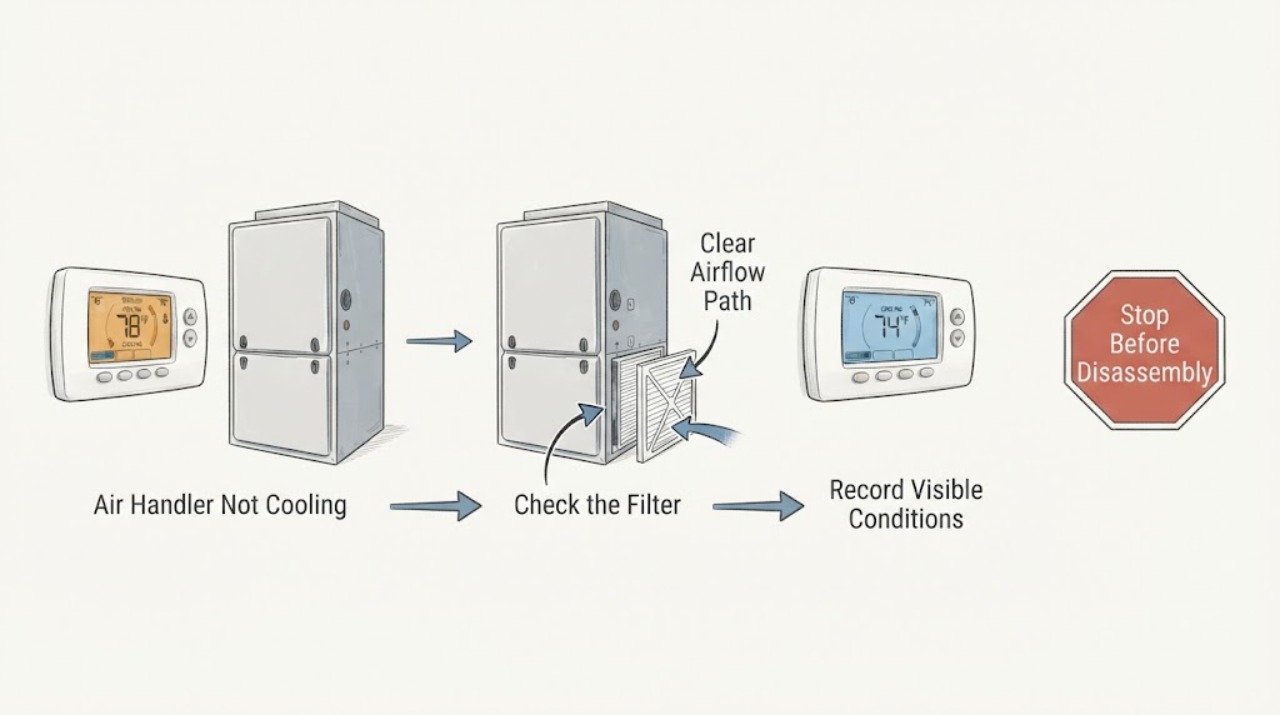
An air handler that is not cooling can have two different symptoms: little or no air movement at the registers, or normal airflow that is warm. First check that the thermostat is in Cool, the setpoint is below the room temperature, the schedule or hold is not overriding it, and the indoor fan is set as expected. Then check the filter, return and supply registers, visible ice, and condensate overflow from a dry, external position. If airflow is weak, the filter or blower path may be restricted; if airflow is normal but warm, the outdoor cooling equipment, refrigerant circuit, control signal, or thermostat may need an HVAC professional. Do not open the air handler, touch wiring, measure high voltage, handle refrigerant, or keep running a system that is iced, leaking, sparking, scorching, or repeatedly tripping.
Work through in order
Diagnostic checks
Use only checks that match the exact appliance or system and its official guide.
-
Check 1
At the thermostat, record the displayed room temperature, setpoint, mode, fan setting, schedule or hold status, battery or power warning, and any error message. Select Cool only if that is the intended mode, set a reasonable temporary cooling target below room temperature, and allow the system's normal start delay without repeatedly changing settings.
Expected result: A thermostat in Heat, Off, Fan Only, a schedule override, or a setpoint already met will not create a cooling call. A blank display, recurring warning, or control that will not stay selected points to power, wiring, configuration, or thermostat service rather than an airflow adjustment.
Next step: If the settings are correct, continue with the airflow check. If the display is blank or the issue began after wiring or thermostat work, leave the system off and arrange HVAC service; do not remove the thermostat cover or move wires.
Why this matters
Why: The thermostat is the user-visible request for cooling, but its display cannot prove that the air handler or outdoor equipment received the request.
-
Check 2
With the system calling for cooling, compare airflow at several supply registers and the return grille. Check that registers are open and not blocked by furniture, and listen for the indoor blower from a safe position. Do not reach through a grille or remove an air-handler panel.
Expected result: Little or no airflow at all registers points toward the air handler, return, filter, blower, power, or control path. One weak room with normal flow elsewhere points toward a closed register, blocked branch, damper, or duct issue. Normal airflow that remains warm is a different branch from an air-delivery failure.
Next step: For weak system-wide airflow, inspect only the intended filter access and visible return path. For normal airflow with warm air, continue observing the outdoor unit only if it is safe to do so, then arrange HVAC diagnosis if cooling does not start.
Why this matters
Why: Separating no airflow from warm airflow prevents a thermostat setting change from masking a blower, duct, or cooling-system fault.
-
Check 3
Turn the system off at the thermostat before inspecting the accessible filter. Note whether the filter is visibly loaded, collapsed, wet, or installed in the wrong direction, and check that the return path is not covered. Replace or clean it only if the system instructions permit that filter service and the cabinet is dry.
Expected result: A dirty or collapsed filter can reduce airflow and cooling performance. A wet filter or water in the return area suggests condensate or another leak, while a clean filter with weak airflow shifts attention to the blower, coil, duct, or control path.
Next step: Install only the size and type specified for the system, restore the access door, and retest once. If airflow is still weak, ice is present, or the filter becomes wet or heavily loaded again, leave the system off and call an HVAC professional.
Why this matters
Why: The filter is a low-risk airflow check, not proof that the blower motor, evaporator coil, or refrigerant system is healthy.
-
Check 4
From outside the equipment, inspect the visible coil or supply area and condensate drain or pan for ice, standing water, an overflow indicator, or a wet ceiling or wall. Do not chip ice, pour chemicals into an unknown drain, open the coil cabinet, or touch wet electrical equipment.
Expected result: Ice can accompany restricted airflow or a cooling-system fault. Standing water or an overflow signal indicates a drainage problem that can affect operation and damage the home. A clear, dry drain area does not rule out an internal coil or refrigerant issue.
Next step: Turn cooling off and let visible ice thaw without scraping if icing is present; use fan-only only if the system instructions and dry conditions allow it. For water damage, recurring overflow, or ice that returns, arrange prompt HVAC service.
Why this matters
Why: Ice and condensate are useful external clues, but neither authorizes coil, drain-pump, refrigerant, or electrical disassembly.
-
Check 5
If airflow is normal, observe the outdoor unit from a safe distance while the thermostat is calling for cooling. Note whether it starts, whether the indoor air becomes cooler, and whether there is unusual noise, smoke, ice on refrigerant lines, or a breaker interruption. Do not open the outdoor disconnect or cabinet and do not touch the fan or refrigerant lines.
Expected result: An outdoor unit that does not start can indicate a control, power, motor, or thermostat-signal problem. An outdoor unit that runs while the air stays warm can indicate airflow, coil, refrigerant, compressor, or control trouble. A repeated breaker trip, burning odor, smoke, or abnormal ice is a stop condition.
Next step: Leave the system off after a hazardous symptom or repeat electrical interruption. If the unit appears to run but does not cool after the filter and thermostat checks, arrange HVAC service rather than adding refrigerant or changing wiring.
Why this matters
Why: The outdoor observation helps an HVAC professional distinguish a no-call or no-start condition from a running-but-not-cooling condition without exposing the reader to high voltage or refrigerant work.
-
Check 6
Prepare a service record with the thermostat mode, setpoint, schedule state, display or error, airflow at return and registers, filter condition, ice or condensate observations, outdoor-unit behavior, recent maintenance, and when the symptom began. Keep all panels and wiring untouched.
Expected result: The record shows whether the failure is a thermostat call, no-airflow, icing or drainage, outdoor-unit no-start, or running-but-warm branch. A symptom that returns after a reset or filter change is important evidence rather than a reason to repeat the reset.
Next step: Give the record to an HVAC professional. Request inspection of thermostat signal, blower and airflow, condensate protection, coils, electrical controls, and refrigerant only by qualified personnel as applicable to the system.
Why this matters
Why: HVAC diagnosis depends on the split between airflow and cooling and on the exact sequence of events; a complete handoff reduces unsafe trial-and-error.
Use your observations
Decision map
Find the observation that best matches what you see, then follow the next safe action.
-
PATH 01Next step
What you see
The thermostat is not in Cool, the setpoint is already met, or a schedule or hold prevents a cooling call.
Do this next
Arrange qualified service and follow the exact model guidance.
Why this path and its safety boundary
Why it matters: Correct only the visible mode or setpoint and allow a normal start delay. If the setting will not stay selected or the display is blank, stop and arrange HVAC service without moving thermostat wires.
-
PATH 02Next step
What you see
There is little or no airflow at all supply registers.
Do this next
Arrange qualified service and follow the exact model guidance.
Why this path and its safety boundary
Why it matters: Check the accessible filter, return obstruction, and register positions. If the filter is clean or airflow remains weak, leave the unit off and have an HVAC professional inspect the blower, coil, duct, power, and control path.
-
PATH 03Next step
What you see
Only one room or register has weak airflow while other registers are normal.
Do this next
Arrange qualified service and follow the exact model guidance.
Why this path and its safety boundary
Why it matters: Treat it as a local register, damper, branch duct, or obstruction issue rather than a thermostat failure. Do not cut into ductwork; arrange HVAC or duct service if the visible register check does not resolve it.
-
PATH 04Next step
What you see
Airflow is normal but the air remains warm.
Do this next
Arrange qualified service and follow the exact model guidance.
Why this path and its safety boundary
Why it matters: The thermostat call may not be reaching the outdoor equipment, or the cooling equipment may have a control, coil, compressor, or refrigerant fault. Use only safe external observations and arrange HVAC service; do not add refrigerant or open panels.
-
PATH 05Next step
What you see
Ice is visible on the coil area or refrigerant line, or condensate is standing or overflowing.
Do this next
Arrange qualified service and follow the exact model guidance.
Why this path and its safety boundary
Why it matters: Turn cooling off and allow safe natural thawing; do not scrape ice or keep lowering the setpoint. Arrange prompt HVAC service for recurring ice, drain overflow, wet ceilings, or water damage.
-
PATH 06Next step
What you see
There is smoke, burning odor, sparking, a hot electrical smell, a repeated breaker trip, exposed wiring, or water near electrical equipment.
Do this next
Arrange qualified service and follow the exact model guidance.
Why this path and its safety boundary
Why it matters: Stop using the system immediately. If it can be done without entering water or touching damaged equipment, isolate power from a safe, clearly labeled control; otherwise leave the area and obtain emergency or qualified HVAC/electrical help. Do not reset and retest.
Helpful context
Understand the symptom
“Not cooling” does not identify one failed part. The air handler may be moving little air because of a filter, return, blower, or ice problem, or it may be moving normal air that is not being cooled because the thermostat call, outdoor equipment, refrigerant circuit, or control path is not completing. Separate airflow from cooling before escalating.
Keep the checks at the thermostat, registers, filter access intended for the homeowner, and visible drain area. Air-handler panels, blower wiring, capacitors, contactors, high-voltage components, refrigerant lines, and coil service are professional boundaries even when the symptom began after a thermostat change.
A condensate drain can affect cooling operation and can also damage the home if it overflows. Ice is evidence of an airflow or cooling-system problem, not an invitation to chip it away or keep lowering the setpoint.
Safety boundary
Stop conditions
- Stop immediately for smoke, flame, sparking, burning odor, a hot or damaged disconnect, repeated breaker trips, exposed wiring, or water near electrical equipment.
- Do not open air-handler or outdoor-unit panels, touch wiring, test voltage, discharge a capacitor, handle refrigerant, bypass a condensate safety switch, or change a pressure or control setting.
- Leave cooling off for visible icing, condensate overflow, active water damage, a blower that makes a severe noise, or a system that continues to run without cooling after the safe external checks.
Only after diagnosis
Potential parts
- thermostat
Consider this only when the thermostat display, configuration, or cooling call remains incorrect after safe external checks and a qualified diagnosis identifies the thermostat as the cause.
Confirm the exact HVAC system type, stages, heat-pump or conventional configuration, wiring scheme, and manufacturer compatibility before selecting or installing a thermostat. - HVAC air filter
Consider this only when the accessible filter is dirty, damaged, wet, or due for replacement under the system instructions.
Match the equipment's specified dimensions, orientation, and filter type; a new filter does not replace diagnosis of icing, weak airflow, or condensate problems.
Common questions
FAQ
Why is my air handler running but not cooling the house?
First separate normal airflow that is warm from weak airflow. Check the thermostat mode and setpoint, filter, return, registers, ice, and condensate from outside the equipment. Warm air with normal flow can require HVAC diagnosis of controls, coils, outdoor equipment, compressor, or refrigerant.
Can a thermostat cause an air handler not to cool?
Yes, a wrong mode, setpoint, schedule, hold, blank display, or failed cooling call can prevent normal operation. Correct only visible settings; do not remove the cover or move wires.
Should I keep running the system when the air handler is iced?
No. Turn cooling off and allow safe natural thawing without scraping or opening panels. A dirty filter, restricted airflow, drain condition, or cooling-system fault may be involved, so recurring ice needs HVAC service.
What if the air handler has water around it?
Stop cooling and keep away from wet electrical equipment. An overflowing condensate drain or pan can cause water damage and affect operation; arrange prompt HVAC service, and use qualified electrical help if water reached wiring or a circuit.
Read the exact guide
Official sources
- Energy Saver 101: Everything You Need to Know About Home CoolingU.S. Department of Energy · Air-handler and central cooling concepts, thermostat issues, dirty-filter airflow, drainage, ductwork, refrigerant, and professional service boundaries
- Clean Heating and CoolingENERGY STAR · Air-filter maintenance and HVAC professional service boundaries
- Maintenance ChecklistENERGY STAR · Central cooling thermostat settings, filters, condensate drains, blower airflow, coils, refrigerant, and professional maintenance boundaries
Community feedback
Share a repair observation
Share a plain-text repair observation. Accepted observations are published automatically; this page may take a moment to update.