
On this page
Start here
Quick answer
A loud air-handler noise is not automatically a blower failure, but a sudden or worsening change deserves attention. From a safe position, note whether the sound is rattling, scraping, squealing, humming, banging, or hissing; whether it occurs at startup, shutdown, or continuously; and whether airflow has changed. You may inspect a user-accessible filter and visible exterior obstructions without opening the cabinet. Stop the system with its normal thermostat control and arrange HVAC service for persistent or harsh noise, weak airflow, vibration, burning odor, water, smoke, sparks, or repeated electrical trips. Do not reach into the blower, remove panels, test live wiring, or attempt motor, capacitor, refrigerant, or duct repairs.
Before you begin
Safety first
- This article is limited to safe listening, a user-accessible filter check, and non-contact exterior observation. Do not open panels, reach into the blower, touch moving parts or wet electrical equipment, test live wiring, remove a motor or capacitor, adjust refrigerant, clean internal coils, alter ductwork, or bypass controls.
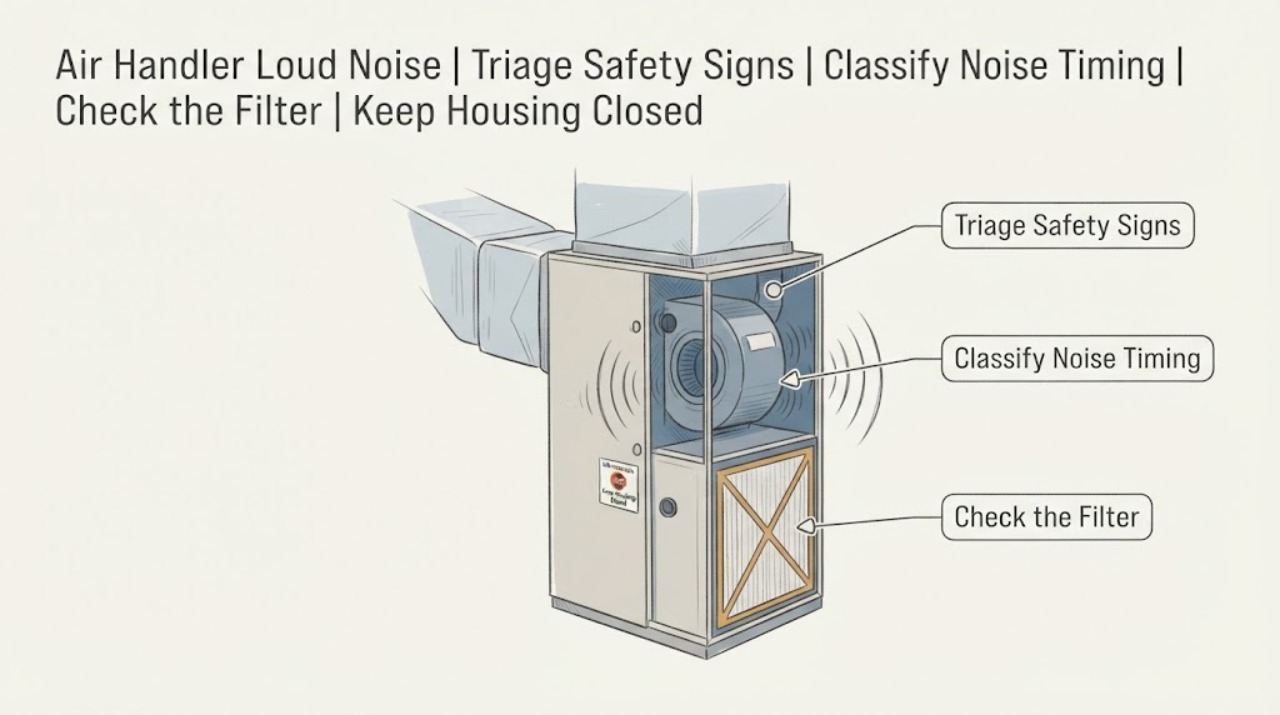
Work through in order
Diagnostic checks
Use only checks that match the exact appliance or system and its official guide.
-
Check 1
From a stable position outside the equipment cabinet, note whether the loud noise is accompanied by a burning or electrical odor, smoke, sparks, a hot or discolored cabinet, water near electrical equipment, no airflow, or a repeated electrical trip. If the area is dry and the normal thermostat is safely reachable, use that user control to stop the call for heating or cooling.
Expected result: Any smoke, sparks, fire, strong burning odor, hot or damaged equipment, water near electricity, repeated trip, or severe mechanical sound is present; or the noise is mild and there are no warning signs.
Next step: For smoke or fire, leave and contact emergency services. For other warning signs, keep people away, stop using the system if it can be done safely, and arrange urgent HVAC or electrical service. Otherwise continue only with the external checks below.
Stop if: Do not touch wet controls, open the cabinet, reach toward a fan or belt, reset a tripped protective device repeatedly, or continue listening when smoke, sparks, fire, or a strong burning odor is present.
Why this matters
Why: The warning signs can indicate electrical, mechanical, water, or fire risk and cannot be resolved by a sound-based homeowner diagnosis. A mild noise without warning signs may allow a short observation record, but it is not proof that the equipment is safe to keep running indefinitely.
-
Check 2
During one ordinary operating period, listen from the room and from a safe position near the air handler without removing a cover. Record whether the sound is a rattle, scrape, bang, squeal, hum, whistle, or hiss, and whether it occurs at startup, shutdown, only at one speed, or continuously.
Expected result: The noise is new, worsening, harsh, accompanied by excessive vibration, or continues beyond normal startup and shutdown; alternatively, it is a stable airflow sound that has not changed and has no other symptom.
Next step: Give the sound description and timing to the HVAC professional. If the noise is new, harsh, or vibrating, stop repeated test cycles and schedule service; if it is unchanged and mild, continue with the safe filter and exterior checks.
Stop if: Do not hold a panel, place a hand near the blower, insert an object to find the source, or deliberately run the system through repeated starts and stops.
Why this matters
Why: A changed or harsh pattern keeps loose cabinet parts, blower wheel, fan, motor, bearings, controls, duct airflow, or other system causes in consideration. A stable airflow sound may be normal for that installation, but only a comparison with the owner's normal operation and the model documentation can establish that.
-
Check 3
Stop the system with the normal thermostat control, wait for moving air to stop, and inspect only a filter that is already intended to be removed by the user. Do not remove an access panel or use tools to reach it.
Expected result: The filter is visibly packed with dust, wet, collapsed, damaged, installed in the wrong direction, or not the size and type specified for the unit; alternatively, it is clean, dry, intact, and correctly fitted.
Next step: If replacement is allowed by the installation instructions, fit the same size and type with the airflow direction shown by the unit or filter documentation, then observe normal operation once. If the noise remains, airflow is weak, or the filter becomes wet or collapses, stop and arrange HVAC service.
Stop if: Do not wash a disposable filter, force a filter into place, remove cabinet panels, reach through the filter opening, or continue if the area is wet, icy, hot, or difficult to access safely.
Why this matters
Why: A restricted or damaged filter can reduce airflow and make the blower work harder, which can contribute to noise or reduced performance. A clean and correctly fitted filter makes a filter restriction less likely but does not rule out a blower, cabinet, motor, control, coil, or duct problem.
-
Check 4
From outside the cabinet and without touching the equipment, look for an obviously loose exterior access cover, a blocked return or supply opening, visible debris around the unit, water or ice, and vibration transmitted to nearby ductwork or registers.
Expected result: A cover appears displaced, a return or supply path is obstructed, vibration is visible at the cabinet or duct, water or ice is present, or nothing unusual is visible.
Next step: Remove only loose household objects that are clearly outside the equipment and safe to handle; do not force a cover, disturb duct connections, chip ice, clean a coil, or move the air handler. Photograph the observation and request service when the noise persists or any abnormal condition is present.
Stop if: Stop for standing water, a slippery area, exposed wiring, sharp metal, unstable access, ceiling or attic hazards, a moving part, or any need to open the cabinet or climb to inspect it.
Why this matters
Why: A visible cover or airflow obstruction can contribute to rattling or whistling, while vibration, water, or ice raises the chance of a mechanical, airflow, coil, or drainage problem that requires professional assessment. No visible issue does not clear internal parts.
-
Check 5
Compare the current airflow and comfort with the home's normal operation from the room side, noting whether several registers are weak, one register is affected, the noise changes with airflow demand, or the system stops unexpectedly.
Expected result: Airflow is weak throughout the home, temperatures are uneven, the noise changes with demand, the blower stops, or the system repeatedly trips; alternatively, airflow remains normal and the sound is isolated and unchanged.
Next step: Keep the system off when the noise is harsh or warning signs are present and arrange HVAC service; provide the noise recording, timing, filter condition, airflow pattern, and any visible water or vibration.
Stop if: Do not bypass controls, test wiring, remove a motor or capacitor, adjust refrigerant, open the coil section, or use a repeated run cycle as a repair test.
Why this matters
Why: System-wide airflow loss or a blower that stops points beyond a simple room-side noise nuisance and may involve the filter, blower motor, coil, controls, or ductwork. Normal airflow with an isolated unchanged noise still leaves a loose cabinet, register, or model-specific sound possible.
Use your observations
Decision map
Find the observation that best matches what you see, then follow the next safe action.
-
PATH 01Next step
What you see
Smoke, fire, sparks, strong burning odor, hot or discolored equipment, water near electricity, or repeated electrical trips are present.
Do this next
Leave the area for smoke or fire and contact emergency services. Otherwise stop using the system if safely possible, keep clear, and arrange urgent HVAC or electrical service.
-
PATH 02Next step
What you see
A normally quiet air handler suddenly becomes loud, scrapes, bangs, rattles with strong vibration, or makes a noise that continues beyond normal startup or shutdown.
Do this next
Stop repeated cycles, use the normal thermostat control only if it is dry and safely reachable, and call an HVAC professional to assess the blower, motor, cabinet, controls, and duct connection.
-
PATH 03Next step
What you see
The filter is dirty, wet, collapsed, or incorrectly fitted, or airflow is weak throughout the home.
Do this next
Replace an allowed user-accessible filter only with the specified same size and type, observe one normal cycle, and arrange HVAC service if the noise, weak airflow, wetness, or filter collapse remains.
-
PATH 04Next step
What you see
A visible exterior cover is displaced, a return or supply opening is blocked, vibration reaches ductwork, or water or ice is present.
Do this next
Keep clear of the equipment, document the condition, and request HVAC assessment; do not force panels, disturb ducts, chip ice, clean coils, or move the unit.
-
PATH 05Next step
What you see
The sound is mild, unchanged, free of warning signs, airflow is normal, and the exterior and user-accessible filter show no abnormality.
Do this next
Record the sound and timing, consult the exact owner documentation, and schedule routine HVAC service if it persists, worsens, or changes; stop immediately if a safety sign appears.
Helpful context
Understand the symptom
Use the sound pattern to choose a safe next step
An air handler contains the blower that moves air through the filter, coil, and ducts. A rattle can be related to a loose cabinet or blower wheel, a hum can point toward the blower motor, and a high-pitched or hissing sound can have several possible causes. These patterns are clues rather than a diagnosis, so listen briefly from a safe location and record when the noise happens instead of repeatedly cycling the system.
The filter is the main user-accessible check
A dirty, wet, collapsed, or incorrectly fitted filter can restrict airflow and make the system work harder. If the filter is in a normal user-accessible slot, inspect it with the system stopped and replace it only with the same size and type specified for the installation. A filter change does not justify opening the air-handler cabinet or reaching toward a moving blower.
Know when observation must stop
Burning odor, smoke, sparks, a hot or discolored cabinet, water near electrical equipment, severe scraping, no airflow, or repeated breaker trips changes this from a nuisance-noise check to a safety and service call. Use only a normal user control when it is dry and safely reachable; leave electrical, motor, capacitor, refrigerant, coil, and internal cabinet work to a qualified HVAC professional.
Only after diagnosis
Potential parts
- air-handler air filter
Consider this only when the existing user-accessible filter is dirty, wet, collapsed, damaged, or the wrong specified type and the installation instructions allow user replacement; a filter is not a default fix for every loud noise.
Match the exact size, type, airflow direction, and installation requirements shown by the unit or owner documentation. - air-handler blower wheel
Consider this category only after a qualified HVAC professional confirms that a damaged, obstructed, or imbalanced blower wheel is the cause of the noise.
Fit depends on the exact air-handler model, wheel dimensions, motor arrangement, rotation, and approved service procedure; do not reach into or remove the blower yourself. - air-handler blower motor
Consider this category only when professional diagnosis links the noise, vibration, or loss of airflow to the blower motor or its bearings; noise alone does not identify a motor fault.
Confirm the exact model, motor type, electrical requirements, mounting, controls, and manufacturer service instructions with a qualified HVAC professional.
When checks do not resolve it
Need a professional?
Arrange HVAC service for a new, persistent, worsening, scraping, banging, squealing, rattling, or high-pitched air-handler noise; weak airflow, vibration, wetness, ice, a blower that stops, or uneven comfort; and any noise that remains after a correctly fitted user-accessible filter check. Seek urgent help for smoke, sparks, fire, strong burning odor, water near electrical equipment, or repeated electrical trips.
Safety scope: This article is limited to safe listening, a user-accessible filter check, and non-contact exterior observation. Do not open panels, reach into the blower, touch moving parts or wet electrical equipment, test live wiring, remove a motor or capacitor, adjust refrigerant, clean internal coils, alter ductwork, or bypass controls.
Have this ready
- The air-handler model and serial information from an existing safe-to-read label or manual
- A short description or recording of the sound and whether it occurs at startup, shutdown, one speed, or continuously
- Filter condition, airflow changes, register pattern, vibration, water, ice, or visible exterior observations
- When the noise began, whether it is worsening, and any recent installation, service, or airflow change
- Any burning odor, sparks, smoke, breaker trip, or other stop condition
Common questions
FAQ
Why is my air handler suddenly making a loud noise?
A sudden change can involve a loose cabinet, blower wheel, fan or motor, control, filter restriction, coil, or duct airflow. Record the sound type and timing from a safe position, stop repeated tests, and arrange HVAC service if it is loud, harsh, worsening, or paired with weak airflow or vibration.
Can a dirty filter make an air handler noisy?
A dirty or incorrectly fitted filter can restrict airflow and make the blower work harder, but it does not explain every loud noise. Inspect only a user-accessible filter with the system stopped, use the specified same size and type if replacement is allowed, and call HVAC service if the noise or weak airflow remains.
Should I open the air-handler cabinet to find the noise?
No. Do not open panels, reach toward the blower, touch moving parts, or test wiring. Non-contact listening, an allowed user-accessible filter check, and exterior observation are enough to prepare a professional service call.
What does rattling or humming from an air handler mean?
Trane lists a loose cabinet or motor problem among possible unusual-noise causes and notes that rattling can involve a blower wheel, fan, motor, or loose hardware. The sound pattern is not a parts diagnosis; stop the system for harsh or worsening noise and have an HVAC professional inspect it.
When is an air-handler noise an emergency?
Treat smoke, fire, sparks, a strong burning odor, a hot or discolored cabinet, water near electrical equipment, or repeated electrical trips as urgent safety signs. Leave for smoke or fire, keep clear, and obtain emergency, electrical, or HVAC help as appropriate.
Read the exact guide
Official sources
- Is This Normal? HVAC Smells and Sounds, ExplainedTrane · General residential HVAC sound triage, including indoor air-handler humming, rattling, high-pitched, and hissing sounds; not a model-specific diagnosis.
- Air Handler TroubleshootingTrane · General residential air-handler troubleshooting; model-specific manuals and a local HVAC professional control the repair.
- Air Handlers MaintenanceTrane · General residential air-handler observation guidance; exact filter access and maintenance depend on the installed model.
- What Is an Air Handler for HVAC?Carrier · General residential air-handler component and symptom context; exact equipment layout and service procedures vary by model.
Community feedback
Share a repair observation
Share a plain-text repair observation. Accepted observations are published automatically; this page may take a moment to update.