
On this page
Start here
Quick answer
A blank thermostat normally means the thermostat has lost power, not that the temperature setting is wrong. Start by determining whether it uses replaceable batteries, then check the HVAC or air-handler power path and look for a condensate-related shutdown without opening the equipment or touching thermostat wires. If a breaker is tripped, a safety switch may have operated, water is present near the air handler, the display stays blank after the safe manufacturer-directed reset, or the wiring is uncertain, leave the system off and have a qualified HVAC professional diagnose the power, control, and drain circuit.
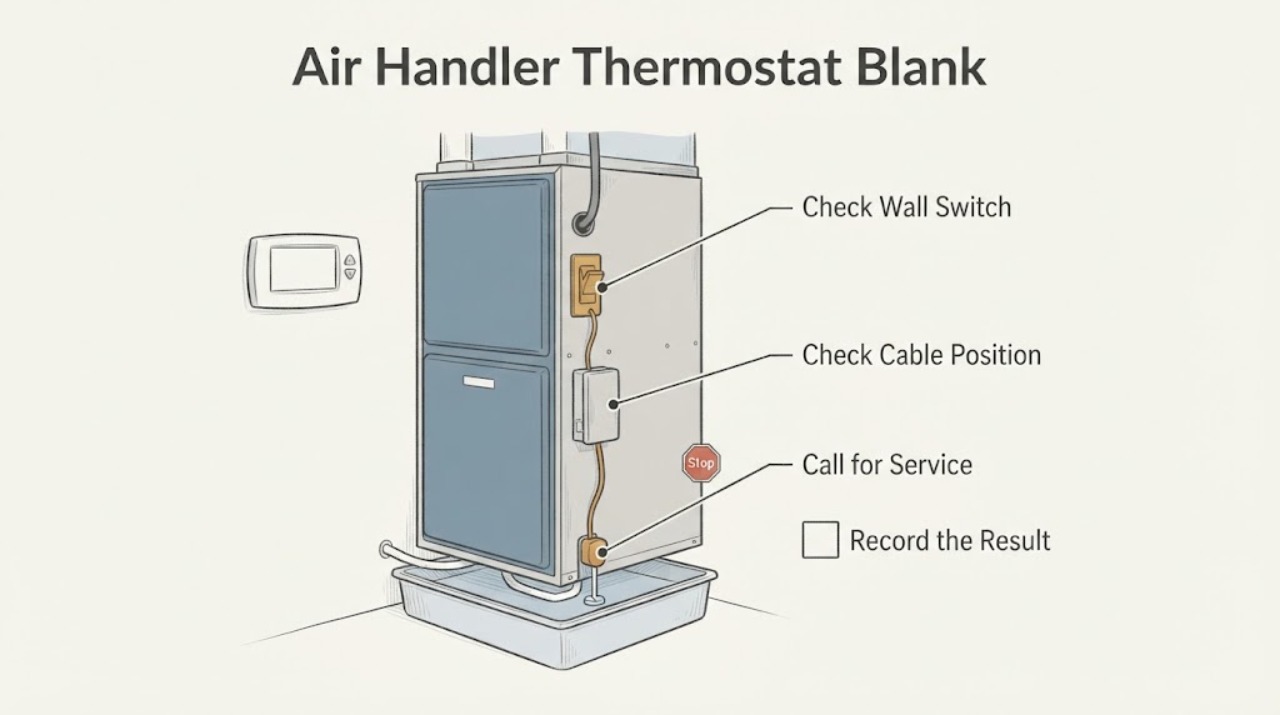
Work through in order
Diagnostic checks
Use only checks that match the exact appliance or system and its official guide.
-
Check 1
Press the thermostat wake, mode, or temperature control once and note whether the screen is completely blank, briefly flashes, or shows any icon; identify whether the thermostat has a battery compartment or is a wired wall control without removing wires.
Expected result: The display remains fully blank, returns briefly, or the thermostat is clearly battery-powered and its batteries are old or depleted.
Next step: If the design uses replaceable batteries, install the type specified by its owner guide and retest. If it is wired, the display stays blank, or the battery change does not help, continue to the system-power check without touching wiring.
Why this matters
Why: A fully blank display points to lost thermostat power; a brief flash suggests an unstable supply or contact; depleted batteries are a plausible cause only for a battery-powered design.
-
Check 2
Check the clearly labeled HVAC or air-handler breaker and the nearby equipment service switch from a dry, safe standing position; do not remove covers or repeatedly cycle a breaker that has tripped.
Expected result: The breaker or switch is off or tripped, the breaker immediately trips again, or the power indicators appear normal.
Next step: If a breaker has tripped or will not stay on, leave it off and arrange HVAC service. If the switch was simply turned off and the system is otherwise dry and safe, restore it once according to the equipment instructions, then retest; do not open the unit.
Why this matters
Why: An off switch can remove power from both the air handler and a wired thermostat; a repeated trip suggests an unresolved electrical or equipment fault rather than a display-only problem; normal visible power shifts suspicion to the thermostat control circuit or safety lockout.
-
Check 3
Look around the air handler, drain pan, condensate outlet, and nearby floor for visible water, a full pan, staining, or a wet safety-switch area; do not remove the access panel or bypass a float or safety control.
Expected result: Water or overflow evidence is present, the area is dry, or the air handler is inaccessible for a safe visual check.
Next step: If water is present, keep the system off and arrange HVAC service to diagnose the drain and safety circuit. If dry but the thermostat remains blank, continue only with the safe reset and professional boundary; do not clear concealed tubing as a first response.
Why this matters
Why: A condensate backup or safety control can interrupt HVAC operation and may remove the signal or power path needed for normal cooling; a dry visible area does not rule out a concealed drain or control issue.
-
Check 4
If the HVAC system is not running and you can safely identify the thermostat circuit switch, perform only the brief power cycle described in the thermostat's manufacturer instructions; do not power-cycle an active system or handle wiring.
Expected result: The thermostat display returns and stays on, remains blank, or returns but the air handler does not respond.
Next step: If the display remains blank or the air handler stays unresponsive, stop resetting and provide the observations to an HVAC professional. Do not repeat the cycle to force operation.
Why this matters
Why: A returning display suggests a temporary control lockup or interrupted power; a persistently blank display points to a battery, wiring, fuse, transformer, thermostat, or control fault; a live display with no air-handler response shifts the diagnosis downstream.
-
Check 5
If the display comes back, verify the thermostat is in the intended heating or cooling mode and note whether the air handler starts, the indoor fan runs, or an error message appears; do not remove an equipment panel to read internal indicators.
Expected result: The air handler runs normally, the display calls for heating or cooling but the unit is silent, or an error or safety message returns.
Next step: Monitor only if the system completes a normal cycle without a warning. For silence, recurring errors, unusual noise, burning smell, ice, or water, turn the system off and call a qualified HVAC professional.
Why this matters
Why: Normal operation after the reset supports a temporary power or control interruption; a live call with no response points to air-handler power, control, blower, safety, or wiring issues; a recurring fault needs diagnosis rather than repeated resets.
Use your observations
Decision map
Find the observation that best matches what you see, then follow the next safe action.
-
PATH 01Next step
What you see
The thermostat is battery-powered and the display returns after installing the specified fresh batteries.
Do this next
Treat depleted batteries as the likely immediate cause, but monitor for another blank display. A repeat failure calls for thermostat or HVAC service diagnosis rather than repeated battery changes.
-
PATH 02Next step
What you see
The thermostat is wired, remains blank after a battery check is not applicable, or a brief manufacturer-directed power cycle does not restore it.
Do this next
Stop at user-level checks. The likely path includes thermostat power, wiring, fuse, transformer, control board, or a safety circuit; do not touch wires and call a qualified HVAC professional.
-
PATH 03Next step
What you see
The HVAC or air-handler breaker is tripped, trips again, or the nearby service switch is off.
Do this next
Do not repeatedly reset it or turn the system back on to test. Leave the equipment off and arrange service to identify the electrical or equipment fault.
-
PATH 04Next step
What you see
Water, a full drain pan, staining, or condensate overflow is visible near the air handler.
Do this next
Keep the system off and call HVAC service for the condensate drain and safety circuit. Do not bypass the safety control or open the equipment panel.
-
PATH 05Next step
What you see
The thermostat display returns but the air handler does not run, or an error, burning odor, unusual noise, ice, or repeated shutdown appears.
Do this next
Treat the problem as an air-handler or HVAC fault rather than a blank-display issue. Turn the system off and obtain professional diagnosis.
Helpful context
Understand the symptom
A dark, white, or otherwise blank thermostat is a power-path symptom. The power may be missing at the thermostat because of depleted batteries, a tripped HVAC circuit, an indoor service switch, a control fuse or transformer, a wiring fault, or a safety control that has stopped the equipment. The display alone cannot identify which component failed.
Keep checks at the user-accessible level: batteries, the clearly labeled electrical panel, the nearby service switch, and visible water or damage around the air handler. Do not remove the air-handler access panel, touch low-voltage conductors, bypass a safety switch, replace a fuse, or repeatedly reset a breaker.
If the display returns but the system still does not run, the thermostat is no longer the only suspect. A condensate safety shutdown, control-board fault, blower problem, or other air-handler issue needs the model-specific service procedure and professional testing.
Only after diagnosis
Potential parts
- thermostat batteries
Only relevant when the installed thermostat is designed for replaceable batteries and the display returns after the correct battery type is installed.
Use the battery type and orientation specified for the exact thermostat; do not assume every thermostat uses replaceable batteries. - replacement thermostat
Only consider after an HVAC professional confirms that the thermostat itself has failed rather than the wiring, transformer, control board, or safety circuit.
Confirm system type, control voltage, staging, heat-pump or conventional configuration, wiring, and manufacturer compatibility before selection. - condensate safety switch or drain component
Only relevant when a professional confirms a failed safety switch or drain component after diagnosing water or condensate-related shutdown.
Match the air-handler model, drain arrangement, electrical ratings, and installation requirements; never bypass the safety circuit.
When checks do not resolve it
Need a professional?
Arrange service for a persistent blank display, tripped or recurring breaker, condensate water, control or wiring uncertainty, or a live thermostat call with an unresponsive air handler.
Have this ready
- Provide the thermostat brand and model, whether it uses batteries, display behavior, breaker and service-switch observations, air-handler water or error signs, recent outages or maintenance, and any reset or battery change already attempted.
Common questions
FAQ
What does a blank thermostat screen mean?
It usually means the thermostat has lost power. Depending on the design, that may be depleted batteries, a tripped HVAC circuit, an indoor switch, a wiring or control fault, or an equipment safety shutdown.
Can I remove the thermostat cover and check the wires?
Do not handle or rearrange thermostat wires as a homeowner troubleshooting step. If the thermostat is wired and remains blank, have an HVAC professional trace the low-voltage power and control circuit.
Should I reset a tripped HVAC breaker?
Do not repeatedly reset it. A trip can indicate an unresolved HVAC or electrical fault. Leave it off if it trips again or will not stay on and arrange professional service.
Why can a condensate drain make the thermostat or air handler stop?
Some HVAC systems use a safety control to stop operation when condensate backs up. If water or a full pan is visible near the air handler, keep the system off and have the drain and safety circuit inspected; do not bypass the control.
Read the exact guide
Official sources
- Thermostat Troubleshooting: Solutions for Common IssuesTrane · Trane smart and traditional thermostat troubleshooting
- Why Is My Thermostat Not Working?Trane · Trane residential thermostat troubleshooting
- AC Unit Not Turning On: Reasons Why And What To DoCarrier · Carrier residential HVAC power, thermostat, air-handler, and safety-shutdown troubleshooting
- The Problem Solver – Air HandlersTrane · Trane residential air-handler operation and service guidance
Community feedback
Share a repair observation
Share a plain-text repair observation. Accepted observations are published automatically; this page may take a moment to update.