
On this page
Start here
Quick answer
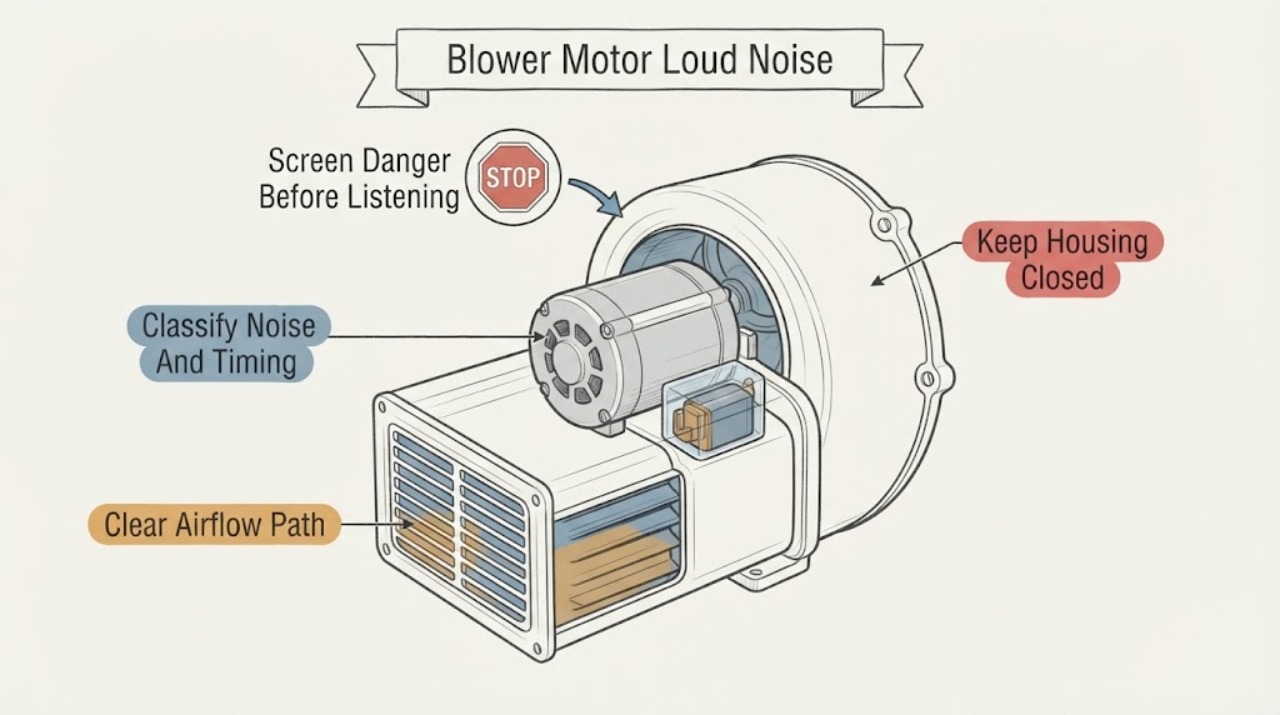
A loud blower-motor noise can come from restricted airflow, a loose panel or duct, a damaged blower wheel, worn bearings, an electrical fault, or a capacitor that is struggling to start the motor. Listen from outside the equipment for the timing and character of the sound: humming with no airflow, grinding or squealing, rattling, or a sudden bang each point to different professional checks. From a safe position, inspect only the user-accessible filter and visible grilles, and note whether the indoor blower and outdoor equipment respond. Do not open the cabinet, touch a capacitor or wiring, discharge a capacitor, test live voltage, or reach into a moving blower. Capacitors can retain a lethal charge after power is disconnected. Stop for burning odor, smoke, sparks, heat, water, ice, violent vibration, or a breaker trip, and call a qualified HVAC technician.
Before you begin
Safety first
- This article permits only safe listening and visible observation, thermostat/settings checks, and exact-manual filter or grille checks with power off. It does not authorize cabinet opening, capacitor inspection or discharge, live testing, blower access, wiring work, refrigerant/high-pressure work, safety bypass, or repeated restarts.
Work through in order
Diagnostic checks
Use only checks that match the exact appliance or system and its official guide.
-
Check 1
Stop normal use and observe the equipment from a dry, safe position without touching the cabinet, grille, wiring, or outdoor unit. Look and listen for smoke, sparks, arcing, burning odor, a hot enclosure, water, ice, exposed damage, violent vibration, or a breaker that has tripped.
Expected result: There is only a loud sound with no visible warning, or there is heat, odor, smoke, arcing, water, ice, exposed damage, severe vibration, or repeated electrical protection action.
Next step: For smoke, fire, arcing, shock, or immediate danger, move away and call emergency responders. Otherwise leave the system off and arrange urgent HVAC service for water, ice, heat, odor, damage, or violent vibration.
Stop if: Do not touch wet, hot, smoking, sparking, or damaged equipment, and do not use water on energized HVAC equipment.
Why this matters
Why: A bare noise can be documented for diagnosis; any accompanying warning sign can indicate fire, shock, water, mechanical, or refrigerant risk and is not a listening test.
-
Check 2
From outside the closed cabinet, record whether the sound is a hum, squeal, grind, bang, rattle, or high-pitched whistle and whether it occurs at startup, only during airflow, continuously, or at shutdown. Do not deliberately restart the system repeatedly to reproduce it.
Expected result: A hum accompanies no airflow or a failed start, grinding/squealing persists, a rattle changes with vibration, or the sound is only a short normal transition that does not recur.
Next step: Record the sound and timing for the HVAC technician. Keep the system off for persistent, worsening, or damaging noise rather than using the sound as a reason to access the blower or capacitor.
Stop if: Do not place hands or tools near a fan, blower, belt, shaft, or cabinet opening, and do not run a system that bangs, grinds, or vibrates violently.
Why this matters
Why: Hum with no start can be a motor-start or capacitor clue; grinding or squealing can indicate wear; rattling can involve a loose component or blower wheel; a brief transition may be normal for some systems but a new or worsening loud sound is not cleared by that possibility.
-
Check 3
During one safe thermostat call, observe the airflow at ordinary supply registers and whether the indoor blower responds. If an outdoor unit is part of the system, observe it only from a safe distance; do not approach a fan or compressor.
Expected result: Airflow is normal, weak, or absent; the indoor blower runs noisily, hums without turning, or remains silent; the outdoor unit has a separate symptom.
Next step: Record the indoor/outdoor response and stop operation if airflow is absent with loud noise, the motor hums without starting, or the sound worsens. Arrange HVAC service for motor, capacitor, control, compressor, and wiring diagnosis.
Stop if: Do not touch outdoor fan blades, compressor, disconnects, wiring, or refrigerant lines, and do not try to start a stalled motor by hand.
Why this matters
Why: Weak or absent airflow can accompany a blower, filter, control, or motor issue. An outdoor capacitor or compressor symptom cannot be diagnosed from an indoor blower noise, and separate response patterns help the technician choose the correct section.
-
Check 4
With the system off, and only where the exact manual identifies user access, inspect the filter for heavy dirt, collapse, wetness, damage, wrong size, or incorrect airflow direction. Look at return and supply grilles for obvious furniture, dust, or other blockage without removing ductwork.
Expected result: The filter is clean and correctly installed with clear grilles, or the filter is restricted/wet/damaged/misfit or a grille is blocked.
Next step: Install only the manual-specified filter size and type in the correct airflow direction, clear ordinary visible obstructions, and make one normal start attempt. If loud noise, weak airflow, or no start remains, stop and call HVAC service.
Stop if: Do not run without a filter, force one into place, reach beyond the rack, clean internal coils, or remove a blower panel.
Why this matters
Why: Restricted airflow can strain the blower and contribute to overheating or freezing; it can explain some noise but does not prove that the capacitor or motor is defective.
-
Check 5
With panels closed, look around the indoor unit for water, a full condensate pan if it is visible without opening the cabinet, ice, rust, or a wet floor, and note whether the cabinet or nearby duct visibly vibrates. Do not remove panels or touch the blower assembly.
Expected result: There is no water or ice and only minor visible vibration, or there is water, ice, corrosion, cabinet movement, or severe vibration.
Next step: Leave the system off for water, ice, corrosion, or severe vibration and arrange HVAC service. For minor vibration with persistent loud noise, document the location and timing for the technician.
Stop if: Do not enter standing water, scrape ice, wipe energized equipment, stabilize a moving cabinet, or pour chemicals into a drain.
Why this matters
Why: Water or ice can indicate a drain, airflow, coil, or refrigerant issue; severe vibration or cabinet movement can accompany a loose or damaged blower or motor. These observations do not authorize internal tightening or defrost work.
-
Check 6
If the noise remains after a safe filter and grille check, leave the cabinet closed and record whether the sound is a hum, failed start, squeal, grind, rattle, or repeated click. Do not inspect, touch, discharge, or test the capacitor or motor, even after switching power off.
Expected result: The motor hums but does not start, the sound is persistent or mechanical, the system trips protection, or the issue is intermittent.
Next step: Keep the system off and call a qualified HVAC technician for de-energization, capacitor discharge and testing, motor/blower inspection, and any compressor or high-pressure diagnosis.
Stop if: Do not open the cabinet, discharge a capacitor, use a meter, touch wiring, spin the blower, bypass a safety, or run the system to see if the part fails.
Why this matters
Why: The pattern may involve a capacitor, motor, bearing, blower wheel, control, wiring, or another internal/high-voltage part. Capacitor appearance alone cannot establish a safe replacement or rating.
-
Check 7
Give the technician the model and system type, sound description and timing, airflow, filter condition, grille observations, indoor/outdoor response, breaker behavior, water or ice, odor, visible vibration, and any recent service or filter change.
Expected result: The record shows a filter/airflow change, a persistent motor noise, a hum/no-start, a separate outdoor compressor symptom, or an electrical/water warning.
Next step: Leave the equipment off when the noise is persistent or a warning is present and schedule qualified HVAC service. Ask the technician to identify the root cause before selecting any capacitor or motor replacement.
Stop if: Do not purchase or install a capacitor by appearance or generic rating, and do not resume operation after smoke, heat, water, ice, arcing, or repeated trips.
Why this matters
Why: A symptom record helps separate airflow, blower, motor, capacitor, control, compressor, refrigerant, drain, and wiring paths without asking the homeowner to perform hazardous tests.
Use your observations
Decision map
Find the observation that best matches what you see, then follow the next safe action.
-
PATH 01Safety boundary
What you see
Loud noise is accompanied by smoke, fire, sparks, arcing, shock, burning odor, hot equipment, exposed wiring, water near electrical parts, or a breaker trip.
Do this next
Move away and call emergency responders for fire, smoke, arcing, shock, or immediate danger; otherwise keep the HVAC system off and arrange urgent service.
Why this path and its safety boundary
Why it matters: The noise may accompany an electrical, fire, water, or mechanical hazard.
Safety stop: Do not touch, open, reset, spray, or operate the equipment.
-
PATH 02Safety boundary
What you see
The filter is dirty, wet, damaged, misfit, or reversed, or return/supply airflow is visibly restricted.
Do this next
Correct the filter only according to the exact manual, clear ordinary visible grille blockage, and make one normal start attempt. Escalate if noise, weak airflow, or no start remains.
Why this path and its safety boundary
Why it matters: Airflow restriction can strain the blower and contribute to overheating or freezing, but it does not prove a capacitor failure.
Safety stop: Do not run without a filter or enter the blower compartment.
-
PATH 03Safety boundary
What you see
The motor hums or clicks at a call but the blower does not start, or starts and stops.
Do this next
Leave the system off and call a qualified HVAC technician to test the motor and capacitor safely.
Why this path and its safety boundary
Why it matters: A capacitor, motor, control, wiring, or mechanical problem is possible; a capacitor clue is not a user diagnosis.
Safety stop: Do not hand-start the blower, discharge or replace the capacitor, measure live parts, or repeatedly restart the unit.
-
PATH 04Safety boundary
What you see
The sound is grinding, squealing, banging, persistent rattling, or accompanied by visible vibration or poor airflow.
Do this next
Stop the system if the noise is new, worsening, or damaging and arrange HVAC inspection; provide the sound timing and location.
Why this path and its safety boundary
Why it matters: A bearing, blower wheel, motor, loose internal component, cabinet, or duct may be involved.
Safety stop: Do not open the cabinet, tighten internal parts, spin the wheel, or continue running through violent vibration.
-
PATH 05Safety boundary
What you see
Water, a full pan, ice, or a wet floor is visible around the indoor unit.
Do this next
Leave the system off and call HVAC service to inspect the drain, pan, coil, safety switch, and equipment; do not bypass the switch or remove ice.
Why this path and its safety boundary
Why it matters: A drain, coil, airflow, refrigerant, or condensate safety condition may be affecting the blower or system operation.
Safety stop: Do not enter standing water, restore power to wet equipment, scrape ice, or open the cabinet.
-
PATH 06Safety boundary
What you see
Indoor airflow is present but the outdoor compressor does not start, or an outdoor capacitor/fan symptom is observed from a safe distance.
Do this next
Leave the outdoor unit off and call a qualified HVAC technician for high-voltage and refrigerant-capable diagnosis.
Why this path and its safety boundary
Why it matters: The symptom may be in the outdoor capacitor, compressor, contactor, fan, refrigerant, or control path rather than the indoor blower motor.
Safety stop: Do not open the outdoor cabinet, touch the capacitor or compressor, approach moving fans, or open refrigerant lines.
-
PATH 07Safety boundary
What you see
Filter and visible grille checks are normal but loud noise continues, the unit will not operate normally, or the cause is unclear.
Do this next
Keep the system off as appropriate and schedule a qualified HVAC inspection rather than replacing a part based on sound alone.
Why this path and its safety boundary
Why it matters: Internal blower, motor, capacitor, control, wiring, compressor, refrigerant, or another model-specific fault remains possible.
Safety stop: Do not open the unit, test live parts, discharge a capacitor, bypass safeties, or repeatedly run a failing system.
Helpful context
Understand the symptom
Sound and timing are clues, not a capacitor diagnosis
A hum that starts when the system calls but produces little or no airflow can be consistent with a motor-start or capacitor problem, but the same symptom can involve the motor, control, wiring, or a mechanical obstruction. Grinding, squealing, or banging can indicate bearings or loose components. A rattle that changes with vibration may be a panel, blower wheel, or mounting issue. Note whether the sound occurs at startup, during steady airflow, or at shutdown without opening the unit.
The safe homeowner boundary
With the equipment off and the exact manual permitting access, a homeowner can inspect or replace the air filter and look for blocked return or supply grilles. A dirty filter can restrict airflow and strain the motor, but removing a filter to make a loud sound disappear is not a safe operating test. Do not remove a blower compartment panel, spin a wheel, tighten an internal part, or inspect a capacitor beyond any clearly visible exterior access that the manual specifically calls user-serviceable.
Why the capacitor stays with the technician
A capacitor stores electrical energy and helps a motor start and run. Carrier warns that it can retain a dangerous charge after power is disconnected; checking capacitance, discharging it, selecting a matching rating, and replacing it are technician tasks. An air-handler or outdoor-unit cabinet can also contain high-voltage wiring, moving parts, refrigerant, and high-pressure components. Leave those boundaries intact even if the noise seems to point to the capacitor.
Safety boundary
Stop conditions
- Stop immediately and move away for smoke, fire, arcing, sparks, shock, burning odor, hot equipment, exposed wiring, violent vibration, or a breaker that trips; use emergency responders for immediate danger.
- For water, ice, a full condensate pan, or a wet floor near electrical equipment, leave the system off and do not enter unsafe water or restore power to wet equipment.
- Do not open the cabinet, touch or discharge a capacitor, measure live voltage, handle wiring, reach into a blower, spin a fan, bypass a safety, open refrigerant lines, or perform high-pressure work. A capacitor can remain charged after power is disconnected.
- Do not run without a filter, repeatedly restart a noisy motor, reset a tripped breaker repeatedly, or choose a capacitor by appearance or generic rating. Persistent noise, no-start, weak airflow, or compressor symptoms require qualified HVAC service.
When checks do not resolve it
Need a professional?
Call a qualified HVAC technician for persistent or worsening blower noise, a hum/no-start, grinding or squealing, weak or absent airflow, repeated trips, water or ice, a separate compressor symptom, or any unresolved cause. Use emergency responders for smoke, fire, arcing, shock, or immediate danger.
Safety scope: This article permits only safe listening and visible observation, thermostat/settings checks, and exact-manual filter or grille checks with power off. It does not authorize cabinet opening, capacitor inspection or discharge, live testing, blower access, wiring work, refrigerant/high-pressure work, safety bypass, or repeated restarts.
Common questions
FAQ
Can a bad capacitor cause a loud blower-motor noise?
It can be a clue when a motor hums, struggles to start, or repeatedly stops, but the same sound can involve the motor, control, wiring, or mechanical parts. Do not test or replace the capacitor yourself because it can retain a dangerous charge after power is disconnected.
What can I safely check before calling HVAC service?
From a dry, safe position, note the sound and timing, check thermostat settings, inspect the user-accessible filter according to the exact manual, and look for blocked return or supply grilles. Do not open the cabinet or reach the blower or capacitor.
Should I keep running an HVAC system that is making a new loud noise?
No. A new or worsening loud noise, grinding, persistent rattle, poor airflow, heat, odor, water, ice, or repeated trip is a reason to stop and arrange HVAC service. A short normal transition cannot be used to clear a persistent sound.
Is a capacitor safe after I turn off the breaker?
No. Carrier states that HVAC capacitors can retain electrical charge even after power is disconnected. Do not touch, discharge, or measure one; a qualified HVAC technician must make the equipment safe and perform the test.
Read the exact guide
Official sources
- Furnace Blower Motor Repair & Replacement GuideCarrier · Manufacturer blower guidance applied to the blower-motor symptom; exact air-handler design and model manual control.
- AC Fan Not Working? Reasons Why It Stopped SpinningTrane · Manufacturer fan troubleshooting used for safe symptom separation; exact equipment and manual control.
- Air Handlers MaintenanceTrane · Manufacturer air-handler maintenance guidance used for visible filter and noise checks; exact equipment instructions control.
- Troubleshooting the HVAC Air Handler Overflow SwitchTrane · Manufacturer explanation of condensate safety behavior; not every air handler has the same switch or reset.
- Is This Normal? HVAC Smells and Sounds, ExplainedTrane · Manufacturer explanation of sound patterns; a qualified technician must determine the actual model-specific cause.
- Maintenance ChecklistENERGY STAR · Government energy-efficiency guidance used for routine filter/maintenance boundaries; exact equipment instructions and qualified service control.
- What is an AC Capacitor? | Cost, Signs of Failure & ReplacementCarrier · Manufacturer capacitor guidance used for safety and conditional symptom interpretation; exact unit specifications and licensed service control.
Community feedback
Share a repair observation
Share a plain-text repair observation. Accepted observations are published automatically; this page may take a moment to update.