
On this page
Start here
Quick answer
A Carrier central air conditioner is short cycling when it starts and stops repeatedly before completing a normal cooling run. First distinguish a normal compressor-protection delay from a fault: a brief 3 to 5 minute Cool On delay after a power interruption can be normal, while repeated rapid starts, poor cooling, or high indoor humidity is not. Check the thermostat mode, setpoint, fan setting, schedule, the correctly sized accessible air filter, return airflow, and the outdoor unit for visible obstructions. Replace a dirty disposable filter only with the specified size and orientation, and do not open panels or work on refrigerant, capacitors, wiring, or other high-voltage parts. Turn the system off for ice, burning smell, exposed wiring, smoke, a breaker that trips again, or a damaged outdoor fan; arrange qualified HVAC service for persistent cycling, weak or warm airflow, suspected refrigerant loss, or an oversized, control, or compressor problem.
Before you begin
Safety first
- A homeowner may check ordinary thermostat settings, an accessible filter, unobstructed registers, visible outdoor debris, and one clearly tripped breaker if dry and safe. A qualified technician must handle refrigerant, leak testing, electrical parts, wiring, capacitors, compressors, control boards, cabinet panels, and concealed airflow or sizing faults.
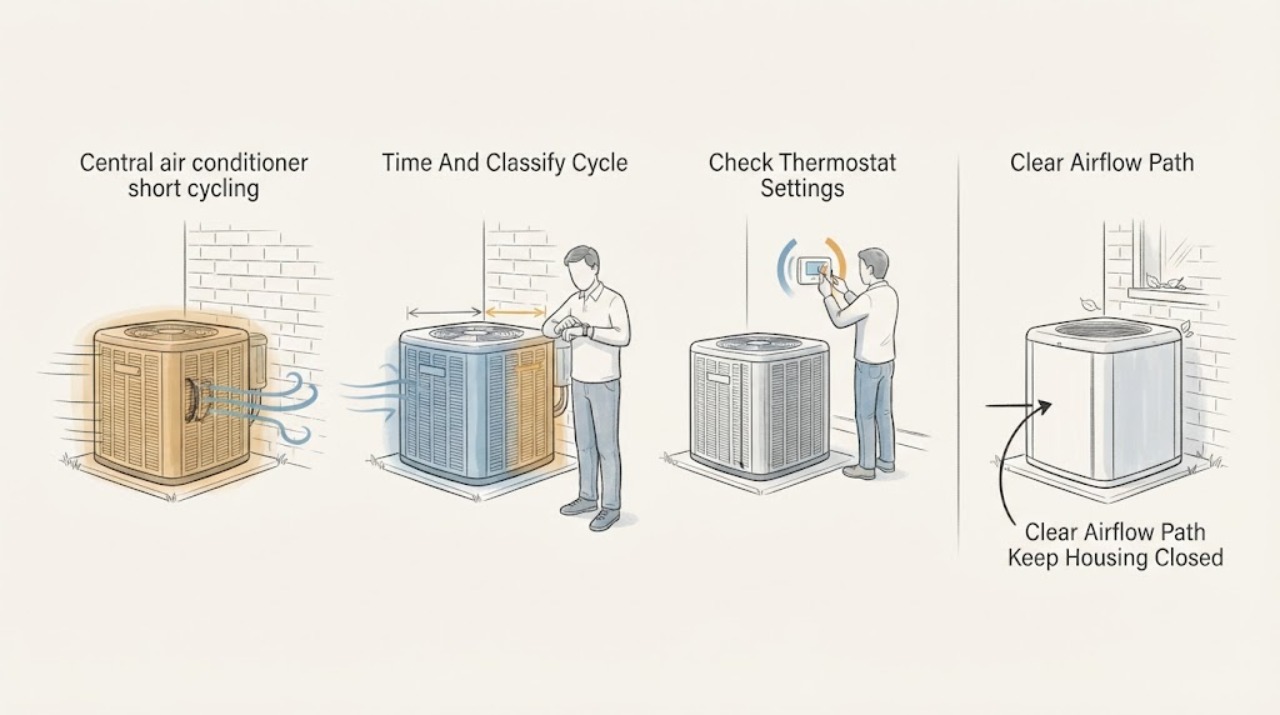
Work through in order
Diagnostic checks
Use only checks that match the exact appliance or system and its official guide.
-
Check 1
From a safe position, record one cooling call: note the thermostat call, outdoor-unit start, run duration, shutdown, and the next attempted start; also note whether Cool On flashes after a power interruption.
Expected result: Classify the pattern as a single normal delay followed by a sustained run, repeated starts and stops before the home cools, or a unit that never starts; note poor cooling or high humidity.
Next step: If it is only a brief delay and the system then runs normally, monitor without forcing another restart. If short cycling repeats, continue only with the safe checks below and keep the timing record for the HVAC technician.
Stop if: Do not repeatedly toggle power or lower the setpoint to provoke starts. Stop immediately for smoke, burning odor, exposed wiring, a loud damaging noise, or a breaker trip.
Why this matters
Why: Carrier describes short cycling as frequent on-off operation without a full cooling cycle. A built-in compressor-protection delay of roughly 3 to 5 minutes can be normal, but repeated rapid restarts or short runs point to a control, airflow, refrigeration, sizing, or equipment problem.
-
Check 2
At the thermostat, verify Cool mode, a setpoint below the current room temperature, the intended fan setting (normally Auto for a call that should end), and the schedule or hold; make only ordinary menu changes.
Expected result: Record whether the mode, setpoint, fan, schedule, display, and any Cool On delay are normal, or whether the thermostat is changing settings, showing an error, or calling for cooling unexpectedly.
Next step: Correct an obvious setting once and observe one normal call. If the call still ends and restarts repeatedly, leave the settings documented and move to the filter and airflow check; arrange HVAC service for persistent errors or suspected wiring faults.
Stop if: Do not remove the thermostat from its base, touch terminals, bypass controls, or work on wiring. Stop for frayed or exposed conductors, a burning smell, or a persistent error after the ordinary setting check.
Why this matters
Why: An incorrect mode, fan or schedule can imitate a cycling complaint. A persistent thermostat error, unstable display, exposed or damaged wire, or correct settings with repeated cycling makes a control, sensor, wiring, or equipment issue more likely.
-
Check 3
Turn the system off at the thermostat, then inspect the accessible filter and return and supply openings; if the filter is disposable and visibly loaded, replace it with the exact specified size and airflow direction, without opening the equipment cabinet.
Expected result: Record whether the filter is clean, dirty, wet, missing, or the wrong size; note blocked registers, weak return airflow, weak supply airflow, ice on the indoor coil or refrigerant line, and water from thawing ice.
Next step: Restore a clean, correctly fitted filter and open unobstructed registers, then allow one normal call. If ice or water is present, leave cooling off so the coil can thaw and arrange service; do not use heat or a tool to accelerate thawing.
Stop if: Do not run with a missing or loose filter, remove cabinet panels, scrape ice, or continue cooling through a frozen coil. Stop for water near electrical equipment or any exposed wiring.
Why this matters
Why: A clogged filter or blocked airflow can contribute to short cycling and coil freeze-up. Ice, water, or very weak airflow can indicate a frozen coil or a deeper fault; a clean filter with persistent cycling makes thermostat, refrigerant, sizing, or equipment causes more likely.
-
Check 4
From outside and without removing the service panel, look for leaves, vegetation, or other visible debris restricting the outdoor unit; check the labeled air-conditioner breaker once for a clearly tripped position, only if the panel and area are dry and safe.
Expected result: Record whether the outdoor area is clear, whether the outdoor fan starts during a call, whether the breaker is tripped, and whether the breaker trips again or the unit makes an abnormal sound.
Next step: Clear only loose exterior debris without reaching through grilles or touching components. If the breaker is clearly tripped and there are no red flags, reset it once and observe; if it trips again or the unit still cycles abnormally, leave it off and arrange HVAC service.
Stop if: Do not remove panels, touch the fan, test a capacitor, move wiring, spray the unit, or reset a breaker repeatedly. Stop for a wet electrical area, smoke, burning odor, arcing, damaged fan, or repeat trip.
Why this matters
Why: A visible obstruction or one tripped breaker may explain a no-start or abnormal call, but a repeat trip, a fan that does not start, or abnormal noise suggests an electrical, motor, capacitor, or compressor fault that cannot be safely diagnosed by repeated resets.
-
Check 5
After the safe settings, filter, airflow, and visible outdoor checks, document the cycle timing, indoor and outdoor symptoms, thermostat display, filter condition, ice or water, breaker behavior, and any recent power interruption for a qualified HVAC technician.
Expected result: Note whether short cycling remains with a clean filter and correct settings, whether airflow is weak or warm, whether ice returns, whether humidity stays high, and whether the outdoor fan or compressor behaves abnormally.
Next step: Arrange qualified HVAC diagnosis and give the technician the timing log, model information, filter details, thermostat observations, and photographs taken from safe access. Keep cooling off when a red flag is present.
Stop if: Stop using the air conditioner for smoke, burning smell, exposed wiring, repeated breaker trips, severe noise, active water near electrical equipment, persistent ice, or a damaged outdoor fan; do not open the cabinet or add refrigerant.
Why this matters
Why: Persistent cycling after basic checks is consistent with causes Carrier lists such as low refrigerant, thermostat or sensor problems, an oversized system, or electrical and compressor issues. These symptoms do not identify a part reliably and should not be used to authorize a DIY refrigerant or electrical repair.
Use your observations
Decision map
Find the observation that best matches what you see, then follow the next safe action.
-
PATH 01Safety boundary
What you see
Cool On appears briefly after a power interruption, the compressor waits, and the system then starts and completes a normal cooling run without repeated restarts.
Do this next
Leave the thermostat and power controls alone and monitor a normal call. Seek service if repeated short runs, poor cooling, or high humidity develops.
Why this path and its safety boundary
Why it matters: This pattern is consistent with the thermostat or system's compressor-protection delay rather than true short cycling.
Safety stop: Do not force starts by toggling power or repeatedly resetting the thermostat.
-
PATH 02Safety boundary
What you see
The thermostat was in the wrong mode, had an unintended setpoint, fan setting, schedule, or hold, and the cycling stops after one ordinary correction.
Do this next
Record the corrected setting and watch one or two normal calls. Arrange service if the display changes by itself, an error returns, or cycling resumes with correct settings.
Why this path and its safety boundary
Why it matters: The observed behavior was more likely a control or schedule interaction than a confirmed mechanical failure, although recurrence still matters.
Safety stop: Do not remove the thermostat or touch its terminals to investigate wiring.
-
PATH 03Safety boundary
What you see
The filter is visibly dirty or airflow is obstructed, there is no ice or water, and the system runs normally after the correct filter is installed and openings are cleared.
Do this next
Keep the correct filter installed and check it on the interval in the equipment instructions. If short cycling, weak airflow, or high humidity returns, arrange HVAC diagnosis.
Why this path and its safety boundary
Why it matters: Restricted airflow was a plausible contributor, but improvement does not prove that the filter was the only cause.
Safety stop: Do not operate without a filter, use a loose or wrong-size filter, or open the cabinet to chase airflow.
-
PATH 04Safety boundary
What you see
Ice is visible on the indoor coil or refrigerant line, or water appears as ice thaws after a short-cycling complaint.
Do this next
Turn cooling off, leave the equipment closed, protect nearby belongings from thaw water, and arrange qualified HVAC service. Do not scrape ice or add refrigerant.
Why this path and its safety boundary
Why it matters: A frozen coil or airflow or refrigeration fault is possible; continued cooling can strain the compressor and worsen water damage.
Safety stop: Keep the system off for persistent ice, active water near electrical equipment, or any exposed wiring.
-
PATH 05Safety boundary
What you see
The breaker trips again, the outdoor fan does not start, or the outdoor unit makes abnormal noise after the safe visual check.
Do this next
Leave the breaker or system off and provide the technician the exact trip and sound or fan observations. Do not attempt a second reset or open the service panel.
Why this path and its safety boundary
Why it matters: An electrical, motor, capacitor, compressor, or related outdoor-unit fault is more likely than a simple thermostat setting.
Safety stop: Stop for smoke, burning odor, arcing, a hot cabinet, damaged fan, or wet electrical equipment.
-
PATH 06Safety boundary
What you see
The thermostat settings and accessible airflow are correct, the filter is clean, the visible outdoor area is clear, and the system still starts and stops repeatedly or fails to cool normally.
Do this next
Schedule qualified HVAC diagnosis and share the cycle log, photos, model information, filter result, and any ice, humidity, airflow, or breaker observations.
Why this path and its safety boundary
Why it matters: Persistent short cycling can involve refrigerant charge or leak, thermostat or sensor controls, system sizing, electrical components, or the compressor; the symptom alone cannot identify which part is at fault.
Safety stop: Do not open panels, test high-voltage parts, change wiring, release or add refrigerant, or continue operation through a red flag.
Helpful context
Understand the symptom
Tell a normal delay from true short cycling
Write down when the thermostat calls for cooling, when the outdoor unit starts, how long the system runs, when it stops, and when it tries again. Carrier notes that a thermostat can show Cool On during a built-in compressor-protection delay of about 3 to 5 minutes after an interruption. That pause by itself is not the same as a system that repeatedly starts and stops before the home is cooled. Repeated quick restarts, short runs with poor cooling, or rising humidity deserves investigation. Do not repeatedly switch power or the thermostat to force a restart.
Begin with settings and accessible airflow
Confirm the thermostat is in Cool, the setpoint is below the room temperature, and the fan is set as intended; a schedule or temperature change can look like a fault. Inspect the accessible return and supply openings for blocked furniture or closed registers, and inspect the filter. A dirty filter can reduce airflow, contribute to a frozen coil, and make an air conditioner short cycle. Replace a disposable filter only with the size and airflow direction specified for the equipment.
Know when the cause needs HVAC service
Low refrigerant, a frozen evaporator coil, thermostat wiring or sensor faults, an incorrectly sized system, and electrical parts can all require diagnosis beyond homeowner checks. Ice on the indoor coil or refrigerant line, weak or warm airflow, hissing, water from thawing ice, a breaker that trips again, burning odor, or an outdoor fan that does not start are reasons to stop troubleshooting. Leave panels closed and arrange qualified service; do not release refrigerant, test capacitors, or handle exposed wiring.
Safety boundary
Stop conditions
- Turn cooling off and arrange service for persistent short cycling, poor or warm airflow, high humidity, recurring ice, or water from thawing ice.
- Do not open electrical panels, test capacitors, handle exposed wiring, bypass the thermostat, or work on a compressor or refrigerant circuit.
- Do not repeatedly reset a breaker or power-cycle the system to force a start; leave it off if the breaker trips again.
- Stop immediately for smoke, burning odor, arcing, exposed or frayed wiring, a hot cabinet, severe noise, or a damaged outdoor fan.
- Keep water away from electrical equipment and stop if a check requires entering a crawlspace, attic, roof, or other unsafe area.
When checks do not resolve it
Need a professional?
Call a qualified HVAC professional when short cycling continues after the thermostat, filter, airflow, and visible-obstruction checks; when cooling is weak or warm; when indoor humidity remains high; or when ice, water, hissing, abnormal noise, a non-starting outdoor fan, a repeat breaker trip, or a thermostat fault is present.
Safety scope: A homeowner may check ordinary thermostat settings, an accessible filter, unobstructed registers, visible outdoor debris, and one clearly tripped breaker if dry and safe. A qualified technician must handle refrigerant, leak testing, electrical parts, wiring, capacitors, compressors, control boards, cabinet panels, and concealed airflow or sizing faults.
Common questions
FAQ
How can I tell if my Carrier AC is short cycling?
Track one cooling call. Repeated starts and stops before the home cools, especially with poor cooling or high humidity, fit the short-cycling symptom. A single brief Cool On compressor-protection delay after an interruption can be normal.
Is a short Cool On delay normal?
Carrier describes a built-in compressor-protection delay of about 3 to 5 minutes after certain interruptions. If the system then starts and runs normally, that pause is different from repeated rapid cycling.
Can a dirty filter cause short cycling?
Yes, Carrier warns that a clogged filter can restrict airflow and contribute to short cycling or a frozen coil. Replace an accessible disposable filter only with the specified size and airflow direction; persistent symptoms need service.
Should I keep running the AC if I see ice?
No. Turn cooling off, leave the equipment closed, and arrange qualified HVAC service. Ice can accompany airflow or refrigeration faults, and continued operation can worsen the problem; do not scrape it or add refrigerant.
What should a technician know about repeated short cycling?
Provide the cycle timing, thermostat settings and messages, filter condition and size, airflow observations, ice or water, outdoor-unit behavior, power interruptions, and breaker trips. The technician can then evaluate refrigerant, controls, sizing, electrical components, and the compressor safely.
Read the exact guide
Official sources
- Common Thermostat Issues and How to TroubleshootCarrier · Carrier thermostat symptoms, short cycling, thermostat delay, wiring red flags, and service boundary
- AC Filter Replacement GuideCarrier · Carrier residential air conditioner filter replacement, airflow direction, and short-cycling or frozen-coil warning
- What Is AC Short Cycling: Causes & TroubleshootingCarrier · Carrier residential air conditioner short cycling definition, causes, effects, and safe troubleshooting boundary
- Troubleshoot an Air Conditioner: 6 Steps to Fix an AC Not WorkingCarrier · Carrier residential air conditioner thermostat, filter, refrigerant, breaker, frozen coil, and outdoor-unit checks
- ‘Cool On’ Flashing on Thermostat: Causes & FixesCarrier · Carrier thermostat Cool On compressor-protection delay, safe checks, and repeated restart warning
Community feedback
Share a repair observation
Share a plain-text repair observation. Accepted observations are published automatically; this page may take a moment to update.