
On this page
Start here
Quick answer
A Carrier heat pump that turns on and off rapidly may have a temperature-sensing problem, but short cycling is not proof that the sensor is bad. First log whether the compressor and indoor fan stop together, whether the thermostat still calls for heat, the displayed room temperature, outdoor conditions, airflow, and any error code. Carrier notes that short cycling can also result from a clogged filter, refrigerant issue, frozen coil, wiring, safety control, or a thermostat affected by its location. Check the thermostat mode and batteries if applicable, replace a visibly clogged air filter, clear leaves and snow from the outdoor unit without opening it, and keep registers unobstructed. Do not jumper thermostat terminals, open the outdoor unit, measure live voltage, adjust refrigerant, or replace a sensor by appearance. If the displayed temperature is implausible, the cycle continues after basic checks, a breaker trips, the outdoor coil is frozen, or wiring or burning odor is present, stop and request a qualified Carrier HVAC dealer. Give the technician the exact model, cycle timing, sensor or thermostat reading, weather, filter condition, and error history.
Before you begin
Safety first
- Keep the system off for electrical or burning signs, severe icing, refrigerant concerns, repeated trips, or unsafe operation. Do not open cabinets, jumper controls, measure live voltage, force defrost, or replace a sensor or refrigerant component yourself.
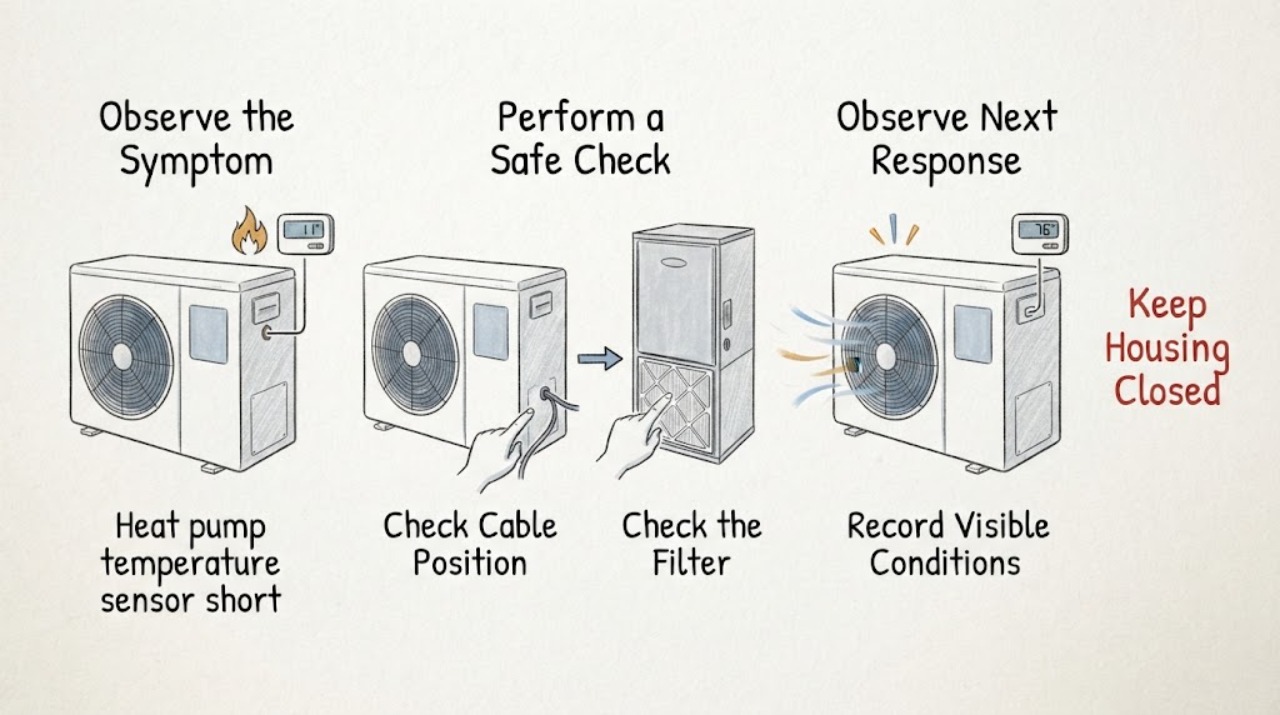
Work through in order
Diagnostic checks
Use only checks that match the exact appliance or system and its official guide.
-
Check 1
From a safe position, record several events without opening either unit: thermostat call, displayed room temperature, compressor and outdoor-fan sound, indoor-air-handler operation, start-to-stop time, restart delay, outdoor temperature, and any error or blinking display. Do not touch refrigerant lines or energized equipment.
Expected result: The compressor stops while the fan continues, all equipment stops together, the thermostat still calls, the call ends normally, or a hazard or error is present.
Next step: Stop for burning odor, exposed wiring, smoke, repeated breaker trips, or unsafe equipment and obtain qualified or emergency help. Otherwise preserve the log and continue with low-risk checks.
Why this matters
Why: Different stop times can separate a thermostat or temperature decision from an airflow, refrigerant, safety, or electrical shutdown. A continuing call with rapid equipment dropouts is more concerning than a normal satisfied call; a hazard or persistent code needs immediate escalation.
-
Check 2
Check the thermostat or controller without opening its wiring: verify Heat or the intended mode, fan setting, schedule, setpoint, battery status if applicable, and whether the displayed room temperature changes implausibly when compared with a nearby room thermometer placed away from drafts, sunlight, doors, and vents.
Expected result: The mode or schedule is wrong, the display is blank, the displayed temperature differs substantially from the room, the thermostat is in a draft or sunbeam, or settings and location appear normal.
Next step: Correct only an obvious mode, schedule, battery, or environmental issue described by the thermostat manual. Do not open the wall plate, bridge terminals, or change installer calibration; arrange service for an implausible reading or continued cycling.
Why this matters
Why: A wrong mode, weak battery, poor location, or miscalibrated reading can create an inappropriate heat call and resemble a sensor fault. A normal reading does not rule out an indoor coil, outdoor sensor, wiring, refrigerant, or control problem.
-
Check 3
Inspect the indoor air filter and registers and the outdoor unit's visible clearance. Replace a heavily clogged filter with the exact type specified for the system if this is an owner task, keep registers open, and remove only loose leaves or snow that can be cleared without touching the coil or fan.
Expected result: The filter is heavily loaded, registers are blocked, the outdoor coil is obstructed, the outdoor unit is iced over, or airflow and clearance look normal.
Next step: Make only the low-risk filter, register, and loose-debris correction. Do not wash, scrape, or heat a frozen coil, enter the cabinet, or continue cycling a visibly frozen unit; request qualified service if ice or the symptom remains.
Why this matters
Why: Carrier identifies restricted airflow and blocked or frozen outdoor equipment as causes of poor heat-pump performance and premature cycling. An iced coil or normal airflow with repeated cycling points beyond a simple filter change.
-
Check 4
Check the indoor and outdoor breakers or disconnect indicators from a dry, safe position and note whether either breaker trips again. Do not reset a breaker repeatedly, remove disconnect covers, or perform electrical tests; keep the thermostat and system off if electrical damage or burning odor is visible.
Expected result: Power is stable, a breaker is tripped once, a breaker trips again, the thermostat is blank, or wiring shows damage or overheating.
Next step: Follow only the normal reset guidance for the exact system once. Stop for repeated trips, exposed or frayed wiring, smoke, or burning odor and obtain qualified HVAC or electrical service.
Why this matters
Why: A one-time power event can reset controls, but recurring trips, a blank display, or damaged wiring can shut the heat pump down independently of a temperature sensor and create a shock or fire risk.
-
Check 5
Compare the cycle log with operating conditions: note whether the issue occurs only in heat or cooling, only during defrost or cold weather, only when auxiliary heat appears, only in one zone or schedule, or on every call. Record any outdoor ice, weak airflow, unusual noise, and whether the displayed sensor value follows actual room conditions.
Expected result: Cycling is mode-specific, weather-specific, tied to auxiliary heat or defrost, tied to one thermostat or zone, or present in every mode.
Next step: Do not force a defrost, auxiliary, or cooling cycle to reproduce the issue. Provide the conditions and timing to a qualified Carrier dealer for sensor, control, airflow, refrigerant, and system-performance tests.
Why this matters
Why: A mode or weather pattern can point toward defrost, reversing-valve, outdoor sensor, auxiliary-stage, or control logic; one-zone behavior points toward thermostat or wiring; every-mode cycling makes a simple room-sensor explanation less certain and broadens the diagnosis.
-
Check 6
Prepare the service record: exact Carrier model and serial, thermostat or controller model, sensor or room readings, cycle durations, setpoints, filter date and condition, outdoor weather, error codes, breaker behavior, coil frost, and recent installation or wiring work. Keep the system at a safe setting and do not alter installer parameters.
Expected result: The model is known, the symptom began after thermostat or sensor work, the reading is implausible, the problem is intermittent, or the model and sensor location are unknown.
Next step: Give the complete record to a qualified Carrier HVAC dealer. Do not order a sensor, board, thermostat, or refrigerant service from a symptom alone.
Why this matters
Why: The correct sensor, wiring, control logic, and test procedure are model-dependent. A post-installation or post-repair onset raises configuration and wiring questions; an unknown sensor location makes parts or resistance claims unsafe.
Use your observations
Decision map
Find the observation that best matches what you see, then follow the next safe action.
-
PATH 01Next step
What you see
The thermostat reading is implausible or changes with a draft, sunlight, vent, or nearby heat source, and the system follows that reading while basic airflow is normal.
Do this next
Correct only an obvious environmental or battery issue allowed by the manual. If rapid cycling remains, have a qualified technician verify sensor, thermostat, wiring, and control operation without bridging terminals.
Why this path and its safety boundary
Why it matters: Thermostat placement, calibration, battery, or sensor input is more likely than a refrigerant or compressor fault, but the exact sensor and calibration are model-specific.
-
PATH 02Next step
What you see
The thermostat reading appears reasonable, but a clogged filter, blocked registers, outdoor debris, or an iced outdoor unit is present.
Do this next
Replace the filter or clear loose debris only as a homeowner task. Do not scrape or heat ice; if the unit remains frozen or cycles rapidly, stop and request Carrier service.
Why this path and its safety boundary
Why it matters: Restricted airflow, blocked heat transfer, or defrost trouble can cause premature shutdown and mimic a temperature-sensor problem.
-
PATH 03Next step
What you see
The system cycles in one mode or weather condition, shows outdoor frost, has weak airflow, blows cold in heat mode, or uses auxiliary heat unexpectedly.
Do this next
Do not add refrigerant, force defrost, alter the reversing-valve signal, or keep running a frozen system. Arrange qualified Carrier diagnosis of the mode, sensors, refrigerant circuit, and controls.
Why this path and its safety boundary
Why it matters: Defrost, outdoor sensor, reversing valve, refrigerant, auxiliary-stage, or control logic is more plausible than a room sensor alone.
-
PATH 04Next step
What you see
A breaker trips again, wiring is exposed or hot, a burning smell or smoke is present, the outdoor unit is severely frozen, or the compressor repeatedly starts and stops with no safe explanation.
Do this next
Stop the system from a safe location and obtain qualified HVAC or electrical service, with emergency help for smoke, fire, or immediate danger. Do not reset repeatedly or open the cabinet.
Why this path and its safety boundary
Why it matters: An electrical, mechanical, refrigerant, or safety fault may damage equipment or create personal danger; a sensor replacement is not a safe first response.
-
PATH 05Next step
What you see
Basic thermostat, filter, register, outdoor-clearance, and power checks are normal, but the temperature sensor reading or cycling remains abnormal or returns after a reset.
Do this next
Request a qualified Carrier dealer to test the sensor against the exact model specifications and evaluate airflow, refrigerant, controls, and system capacity. Do not order or replace parts by appearance.
Why this path and its safety boundary
Why it matters: A sensor, harness, control board, contactor, compressor, refrigerant, sizing, or installation issue remains possible; public guidance cannot identify the correct component without model-specific tests.
Helpful context
Understand the symptom
Separate a sensor reading from a true short cycle
Short cycling means rapid equipment starts and stops before a normal call is satisfied. The compressor, indoor blower, outdoor fan, thermostat call, and safety controls may not change at the same time. A thermostat display that is wrong can provoke a call, but a normal-looking display with a system that drops out can point toward airflow, refrigerant, defrost, electrical, or protective controls. Time each event before replacing a sensor.
What to check without opening the system
Carrier's homeowner guidance starts with thermostat mode and temperature, filters, power, outdoor-unit clearance, and unobstructed registers. Keep the outdoor coil free of leaves or snow and replace a clogged filter when the model instructions allow. These checks can change airflow and heat transfer enough to mimic a sensor problem, while refrigerant, wiring, and internal controls require professional tools.
A temperature sensor is model-specific
A sensor can be remote, built into the thermostat, mounted in the indoor unit, or part of an outdoor or coil assembly depending on the Carrier system. The displayed room temperature is not automatically the same measurement used by every control. Use the exact model documentation and do not infer sensor resistance, location, connector, or compatibility from another Carrier unit.
When repeated cycling needs service
Carrier says persistent rapid cycling taxes equipment and recommends professional diagnosis for returning error codes, exposed wiring, burning smells, frozen equipment, refrigerant concerns, or a system that continues after basic maintenance. A temporary reset may clear a control state but cannot establish that a sensor or board is healthy.
Safety boundary
Stop conditions
- Stop immediately for smoke, burning electrical odor, exposed or frayed wiring, repeated breaker trips, fire risk, refrigerant concerns, severe outdoor-unit ice, or a system that makes loud abnormal noises. Keep clear and obtain qualified or emergency help.
- Do not open indoor or outdoor cabinets, jumper thermostat or safety terminals, measure live voltage, adjust refrigerant, force defrost, alter reversing-valve wiring, or replace a sensor without the exact model procedure.
- Do not keep resetting or repeatedly running a heat pump that short cycles, remains frozen, loses airflow, or fails to heat. A reset may clear a control state but does not prove the cause is fixed.
- Stop when the displayed temperature is implausible, the sensor location is unknown, the cycle cannot be safely observed, or basic checks do not resolve the symptom. Arrange qualified Carrier HVAC diagnosis.
Only after diagnosis
Potential parts
- room, outdoor, coil, or discharge temperature sensor
Consider this category only when qualified testing confirms an implausible or failed sensor is causing the observed cycling and the exact model identifies that sensor.
Carrier sensor type, location, resistance curve, connector, and control role vary by model. Do not select a sensor by appearance or generic rating. - thermostat or heat-pump control
Consider this category only when diagnosis confirms the thermostat or its control logic is creating an incorrect heat demand after sensor, wiring, and system checks.
Heat-pump stages, reversing-valve terminals, auxiliary heat, and communicating controls require exact compatibility verification. - sensor harness or low-voltage wiring
Consider this category only if qualified testing finds an open, short, loose connection, or damaged harness associated with the sensor reading or cycling event.
Wiring and connectors are model-specific and may be near hazardous voltage. Do not bridge or repair them as a homeowner experiment. - defrost, fan, or airflow component
Consider this category only when diagnosis links mode-specific cycling, icing, weak airflow, or poor heat transfer to that component rather than to the sensor alone.
Defrost boards, fan motors, coils, and airflow parts vary by system. Confirm exact model and professional diagnosis first.
When checks do not resolve it
Need a professional?
Arrange qualified Carrier HVAC service when rapid cycling continues after correcting thermostat mode, filter, airflow, outdoor clearance, and obvious power issues; when the sensor reading is implausible; or when cycling is tied to defrost, auxiliary heat, one zone, a recent wiring change, or a recurring error. Treat smoke, burning odor, exposed wiring, repeated breaker trips, severe icing, and refrigerant concerns as urgent.
Safety scope: Keep the system off for electrical or burning signs, severe icing, refrigerant concerns, repeated trips, or unsafe operation. Do not open cabinets, jumper controls, measure live voltage, force defrost, or replace a sensor or refrigerant component yourself.
Common questions
FAQ
Does short cycling prove the Carrier heat-pump temperature sensor is bad?
No. Carrier says short cycling can also involve airflow restriction, refrigerant, frozen coils, wiring, safety controls, or thermostat location. Compare the displayed reading with room conditions and log the compressor, fan, thermostat call, and cycle timing before any sensor is considered.
What can I check safely when a Carrier heat pump cycles rapidly?
Verify the thermostat mode and batteries if applicable, inspect the air filter, keep registers open, clear loose debris around the outdoor unit, and check normal power indicators. Do not open cabinets, test live wiring, adjust refrigerant, force defrost, or bridge thermostat terminals.
Could thermostat location cause a Carrier heat pump to short cycle?
Yes. Carrier notes that a thermostat exposed to direct sunlight, drafts, exterior doors, vents, or nearby heat can read the room inaccurately. Correct only an obvious environmental issue allowed by the manual; continued rapid cycling needs professional sensor, wiring, and system diagnosis.
Should I replace a Carrier temperature sensor before checking the filter?
No. A clogged filter or restricted airflow can make the equipment shut down prematurely and mimic a sensor problem. Check the filter and outdoor clearance first, then have a qualified technician test the exact sensor and control circuit if cycling remains.
When is rapid cycling on a Carrier heat pump urgent?
Stop for smoke, burning odor, exposed wiring, repeated breaker trips, severe outdoor icing, refrigerant concerns, loud abnormal noise, or unsafe operation. Keep clear and obtain qualified or emergency help; do not keep resetting or running the unit to test it.
Read the exact guide
Official sources
- Common Thermostat Issues and How to TroubleshootCarrier · Official Carrier thermostat troubleshooting guidance; the exact thermostat and heat-pump wiring determine applicability.
- Heat Pump Service & Maintenance TipsCarrier · Official Carrier heat-pump maintenance guidance; refrigerant, electrical, defrost, and internal component work requires professional service.
- Heat Pump Thermostat Guide: How They Work, Features, SettingsCarrier · Official Carrier overview of heat-pump thermostat roles; terminal wiring, sensor location, and compatibility remain model-specific.
- Heat Pump Repair: Troubleshooting & Professional SolutionsCarrier · Official Carrier repair guidance; diagnostic tests and internal repairs belong to a qualified HVAC professional.
- Heat Pump Not Heating? Here’s How to TroubleshootCarrier · Official Carrier residential heat-pump troubleshooting guidance; model-specific controls and internal repairs require a qualified dealer.
Community feedback
Share a repair observation
Share a plain-text repair observation. Accepted observations are published automatically; this page may take a moment to update.