
On this page
Start here
Quick answer
When a heat pump short-cycles and the temperature sensor is suspected, compare the thermostat display with an independent room-temperature trend while noting where the sensor sits. A display that changes unlike the room, or a sensor exposed to direct sun, supply airflow, a draft, doorway, or heat source, can make the control end a call too early. A correctly placed sensor with a matching room trend shifts attention to the filter, airflow, outdoor coil, defrost behavior, refrigerant, sizing, or another control fault. Use only the display and safe visual checks; do not remove the thermostat, alter sensor wiring, or perform a live test.
Before you begin
Safety first
- This article covers user-level observation only. A qualified HVAC technician should handle thermostat removal, sensor wiring, electrical testing, control changes, panel access, defrost or refrigerant diagnosis, and permanent repair.
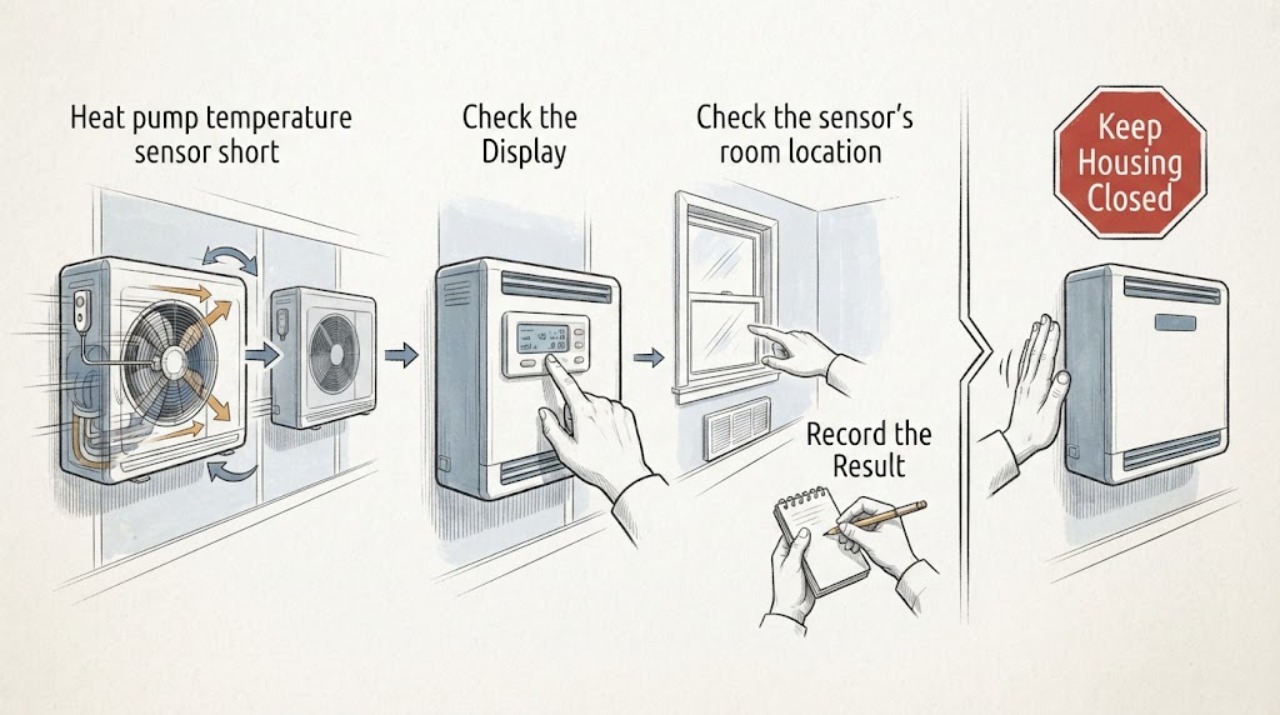
Work through in order
Diagnostic checks
Use only checks that match the exact appliance or system and its official guide.
-
Compare the display with an independent room trend
During several ordinary heat-pump calls, record the thermostat's displayed indoor temperature, the set temperature, whether the system starts and stops before comfort is reached, and the independent room-temperature trend from a separate thermometer placed in the same living area. Do not create extreme setpoints or force a cycle.
Expected result: The display tracks the room, reads consistently warmer or cooler, changes abruptly, shows a sensor or control alert, or cannot be compared safely.
Next step: Photograph the display and record the mode, setpoint, cycle pattern, and independent reading trend without claiming an exact error threshold.
Stop if: Stop if there is smoke, burning odor, sparking, water near electrical equipment, exposed wiring, or any need to open the control.
Why this matters
Why: If the display moves sharply or disagrees with the independent room trend while the system cycles, the thermostat or temperature-sensor path becomes a focused suspect. If both readings track but cycling continues, the sensor is not proven to be the cause.
-
Check the sensor's room location
From a standing position, visually note the thermostat or remote sensor's location relative to direct sunlight, supply-air vents, doors, windows, drafts, appliances, fireplaces, corners, curtains, and furniture. Do not remove the thermostat cover or move a wired sensor.
Expected result: The sensor is in representative open room air, near sun or a heat source, in a draft or duct airflow, behind an obstruction, or its location is unknown.
Next step: Photograph the sensor location and list the nearby heat, airflow, and draft sources for the HVAC technician; ask whether the current location represents the controlled room.
Stop if: Stop for a loose cover, exposed wiring, unsafe ladder access, or any need to detach, relocate, or rewire the sensor.
Why this matters
Why: A sensor in a localized hot, cold, drafty, or stagnant-air pocket can report a different temperature from the room the heat pump is meant to control and can contribute to premature cycling.
-
Identify which indoor sensor controls the system
Use only the thermostat's normal user-visible screens or the owner's documentation to note whether control is based on the wall unit's internal sensor, a wired indoor sensor, a wireless remote sensor, or an average of multiple sensors. Do not change installer settings or sensor wiring.
Expected result: The wall sensor is selected, a wired remote is selected, a wireless remote is selected, multiple sensors are averaged, or the selection is not visible.
Next step: Record the selected sensor name, location, battery or communication warning if shown, and the model information; have a technician confirm the intended sensor and compatible replacement path.
Stop if: Stop for a blank or damaged display, repeated communication alerts, exposed low-voltage wiring, or any need to access terminals.
Why this matters
Why: The displayed indoor temperature may come from a selected remote sensor rather than the wall unit, so a comfortable location and a misleading selected sensor are different problems. Wired and remote options are model-dependent and are not interchangeable by appearance.
-
Separate sensor evidence from heat-pump causes
Make safe, external comparisons before blaming the sensor: note the filter-change reminder or an obviously loaded accessible filter, blocked supply or return airflow, outdoor-coil ice or obstruction from the ground, and whether the short cycling occurs during a defrost event or only in one mode. Do not open the outdoor unit or touch the coil.
Expected result: The filter or airflow is restricted, the outdoor unit is iced or obstructed, the behavior occurs around defrost, no competing clue is visible, or the comparison is unsafe.
Next step: Record the mode, weather, filter or airflow clue, outdoor-unit appearance, and any fault message, then request HVAC diagnosis instead of cleaning, charging, or repairing sealed or electrical parts.
Stop if: Stop for ice, moving equipment, refrigerant odor or hissing, electrical exposure, or any need to remove panels, wash coils, measure voltage, or handle refrigerant.
Why this matters
Why: Restricted airflow, outdoor-unit conditions, defrost behavior, refrigerant problems, or another heat-pump fault can also produce abnormal cycling. A sensor mismatch is stronger evidence only when these competing clues do not explain the pattern.
-
Give the technician a sensor-focused handoff
Prepare the service handoff with display and independent-temperature trends, cycle timing, thermostat and remote-sensor locations, selected sensor mode, model details, operating mode, filter or airflow observations, outdoor-unit and defrost clues, and any displayed alert.
Expected result: The evidence points toward sensor placement or selection, a thermostat fault, an airflow or outdoor-unit issue, or an unresolved combination.
Next step: Keep settings normal and request qualified HVAC service if the system keeps cycling before comfort is reached or the readings disagree; do not bypass the thermostat or continue repeated test cycles.
Stop if: Stop and escalate immediately for smoke, burning odor, sparking, exposed wiring, water near electrical equipment, severe icing, or suspected refrigerant release.
Why this matters
Why: This record helps the technician decide between sensor placement or selection, thermostat/remote-sensor compatibility, airflow service, outdoor-unit or defrost diagnosis, and refrigerant or control work.
Use your observations
Decision map
Find the observation that best matches what you see, then follow the next safe action.
-
PATH 01Safety boundary
What you see
The wall display disagrees with an independent room trend, and the sensor is near direct sunlight, a supply vent, a draft, doorway, appliance, or other localized heat or cold.
Do this next
Request thermostat or sensor-placement assessment and ask the technician whether a better-positioned wired or remote sensor is supported by the system.
Why this path and its safety boundary
Safety stop: Do not remove the thermostat, move the sensor, alter wiring, or change installer settings yourself.
-
PATH 02Safety boundary
What you see
The display names a wired or wireless remote sensor, averages multiple sensors, or shows a sensor communication warning while the controlled room does not match the reading.
Do this next
Provide the selected sensor and location and request model-specific control, communication, and compatibility diagnosis before ordering a sensor or thermostat.
Why this path and its safety boundary
Safety stop: Do not pair, rewire, or substitute a sensor by appearance alone.
-
PATH 03Safety boundary
What you see
The display and independent room trend generally agree, but the heat pump still starts and stops before reaching comfort.
Do this next
Request broader HVAC assessment of filter and airflow, system sizing, controls, outdoor coil, defrost behavior, refrigerant, and other heat-pump causes rather than treating the sensor as confirmed.
Why this path and its safety boundary
Safety stop: Do not open panels, measure live voltage, clean a powered coil, or handle refrigerant.
-
PATH 04Safety boundary
What you see
Short cycling appears only in a particular mode or around outdoor-unit icing or defrost behavior, or an airflow restriction is visible.
Do this next
Tell the technician the mode, weather, defrost or icing pattern, and filter or airflow observation so the heat-pump system can be assessed as a whole.
Why this path and its safety boundary
Safety stop: Do not scrape ice, bypass a defrost control, change sealed-system charge, or operate equipment with exposed parts.
-
PATH 05Safety boundary
What you see
The thermostat is blank or damaged, wiring is exposed, there is smoke or burning odor, water near electrical equipment, severe icing, or suspected refrigerant release.
Do this next
Stop using the system if safe, keep people clear, and obtain prompt qualified HVAC service or emergency help appropriate to the hazard.
Why this path and its safety boundary
Safety stop: Do not touch exposed wiring, switch equipment in a hazardous area, enter refrigerant clouds, or attempt live testing.
-
PATH 06Safety boundary
What you see
The display, independent trend, sensor selection, and placement cannot be compared safely or the cause remains uncertain.
Do this next
Leave the controls and equipment unaltered and request HVAC inspection with the observations and model information.
Why this path and its safety boundary
Safety stop: Do not open the thermostat, disconnect a remote sensor, climb, or create repeated forced cycles.
Helpful context
Understand the symptom
Confirm what temperature the control is seeing
A heat-pump thermostat uses an indoor temperature sensor to decide when to call for heating or stop. During ordinary operation, compare the displayed temperature with an independent room trend in the same living area and record whether short cycling occurs before comfort is reached. A mismatch is a sensor clue, not proof of a failed sensor.
Look at the sensor's environment
From a safe standing position, note direct sun, supply-air flow, drafts at doors or windows, nearby appliances, fireplaces, corners, curtains, or furniture. These localized conditions can make the sensor read unlike the room. Do not remove the control, move a wired sensor, or change wiring.
Check sensor selection without opening the control
User-visible menus or the owner's documentation may identify an internal wall sensor, wired indoor sensor, wireless remote, or multiple-sensor average. A displayed remote reading means the control may not be using its internal sensor. Sensor selection and wired-versus-remote compatibility are model-dependent, so document them for a technician.
Keep other heat-pump causes separate
When the display and room trend agree, short cycling may instead involve a loaded filter, restricted airflow, outdoor-coil condition, defrost behavior, refrigerant, sizing, or another control fault. Observe only external clues and do not open panels, perform a live test, or handle sealed-system components.
Safe service handoff
Provide the display and independent-temperature trends, cycle timing, sensor locations, selected sensor mode, operating mode, model details, filter or airflow clue, outdoor-unit and defrost observations, and alerts. Ask the technician to separate sensor placement or selection from broader heat-pump diagnosis.
Safety boundary
Stop conditions
- Keep the system and area in the safest state and stop use for smoke, burning odor, sparking, water near electrical equipment, severe icing, or suspected refrigerant release.
- Do not remove the thermostat, alter sensor wiring, measure live voltage, open panels, scrape ice, handle refrigerant, or bypass controls.
- Do not choose a thermostat, filter, or sensor by appearance; confirm the system, selected sensor, fit, and diagnosed cause first.
- Persistent short cycling, sensor mismatch, control alerts, airflow restrictions, defrost clues, or unresolved uncertainty require qualified HVAC assessment.
Only after diagnosis
Potential parts
- heat pump thermostat
Consider only after a technician confirms a thermostat or control replacement is the diagnosed path and verifies compatibility.
Match the heat-pump control system, communication method, wiring, software, and manufacturer guidance; a thermostat cannot correct airflow, defrost, refrigerant, or sizing faults. - HVAC air filter
Consider only when the system documentation or technician identifies filter replacement as appropriate; do not use it to explain a sensor mismatch without checking the control reading.
Match the equipment and filter dimensions and follow the owner's maintenance guidance; a filter cannot correct a sensor-placement or sealed-system fault. - temperature sensor
Consider only after the selected sensor, placement, communication, and exact compatible part are confirmed by a technician.
Match the control platform, sensor type, wiring or wireless method, location, and manufacturer guidance; a sensor is not universal.
When checks do not resolve it
Need a professional?
Request HVAC service when short cycling persists, the display disagrees with the room trend, a remote sensor or control alert appears, or filter, outdoor-unit, defrost, refrigerant, and sensor causes cannot be separated safely.
Safety scope: This article covers user-level observation only. A qualified HVAC technician should handle thermostat removal, sensor wiring, electrical testing, control changes, panel access, defrost or refrigerant diagnosis, and permanent repair.
Common questions
FAQ
How can I tell if the heat-pump temperature sensor is misleading the system?
Compare the thermostat display with an independent room-temperature trend in the controlled area while recording short cycling. A persistent mismatch, especially with sun, drafts, vents, or heat sources near the sensor, supports sensor-placement or control assessment but does not prove a failed part.
Where should a room or remote sensor not be located?
Avoid direct sunlight, supply-air or duct drafts, doors and windows, appliances or fireplaces, corners, curtains, and blocked areas. Do not relocate or rewire a sensor during a user check; document the location for a technician.
How do wired and remote sensors change the diagnosis?
The thermostat may use its internal sensor, a wired indoor sensor, a wireless remote, or an average of multiple sensors. The selected source and compatibility are model-dependent, so record what the display or manual identifies before considering a replacement.
Could a filter, outdoor unit, defrost, or refrigerant issue cause the same cycling?
Yes. If the display and independent room trend agree, check only safe external clues such as an accessible filter reminder, blocked airflow, outdoor icing, or a mode and weather pattern. Filter, defrost, outdoor-unit, refrigerant, and control work needs qualified HVAC diagnosis.
Can I open the thermostat or test its wiring?
No. Do not remove the control, alter sensor wiring, measure live voltage, open panels, scrape ice, handle refrigerant, or bypass a control. Request qualified service for persistent cycling, sensor alerts, exposed wiring, or hazardous conditions.
Read the exact guide
Official sources
- Heat Pump Service & Maintenance TipsCarrier · Supports separating filter, airflow, outdoor-coil, defrost, and refrigerant issues from a sensor-focused diagnosis and routing complex HVAC work to a professional.
- Bad Thermostat: Signs, Symptoms & What to Do NextCarrier · Supports that a thermostat uses indoor temperature sensing, that sensor misplacement or inaccurate readings can contribute to short cycling, and that direct sun, drafts, and heat sources can distort the room reading.
- 68-0280—01 - VisionPRO 8000 Touchscreen Programmable ThermostatResideo · Supports the distinction between an internal thermostat sensor and optional wired or remote indoor sensors, as well as placement away from drafts, ducts, sunlight, appliances, and dead-air areas; wiring work remains professional scope.
Community feedback
Share a repair observation
Share a plain-text repair observation. Accepted observations are published automatically; this page may take a moment to update.