
On this page
Start here
Quick answer
A dirty or incorrectly seated Carrier mini split air filter can restrict airflow and make the system cool poorly, but the filter may not be the only cause. First confirm that the unit is actually calling for cooling rather than Fan, Dry, Heat, Quiet, or an unintended setting, then turn the system off before opening the indoor filter access. Inspect the filter for dust, clean it only by the exact model instructions, let a washed filter dry completely, and reinstall it in its original tracks. Check the louvers and visible airflow, and from a safe exterior position clear loose leaves or debris around the outdoor unit without opening its electrical compartment. Ice on the coil or lines, water from the indoor unit, hissing, a breaker that trips, no outdoor operation, weak airflow after a clean filter, or cooling that remains inadequate points beyond a filter and needs licensed HVAC service. Do not run the mini split without its filter, scrape coils, open panels, handle refrigerant, or perform live electrical tests.
Before you begin
Safety first
- This article covers normal control checks, filter care, and loose exterior or room-side obstruction observations only. A licensed technician handles coil and blower cleaning, drain access, electrical testing, refrigerant diagnosis, fan repair, panels, and component replacement.
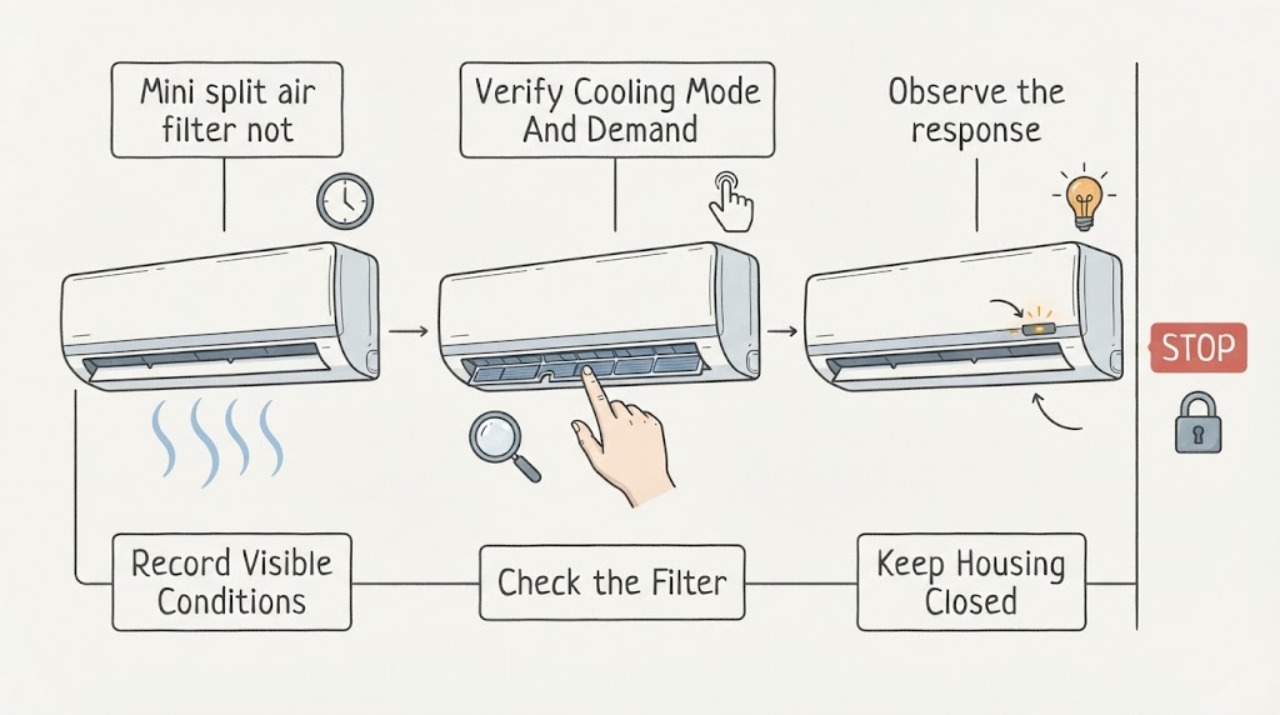
Work through in order
Diagnostic checks
Use only checks that match the exact appliance or system and its official guide.
-
Check 1
From a dry, stable position, note whether the indoor unit is running, whether air is warm or merely weak, and whether there is water, ice, smoke, an electrical or burning odor, a hissing sound, a tripped breaker, or visible damage. Do not open electrical covers or touch refrigerant lines.
Expected result: The unit has no warning sign and is simply cooling poorly, or there is ice, water, odor, hissing, repeated power interruption, visible damage, or no operation at all.
Next step: For ice, water, hissing, smoke, burning odor, repeated breaker trips, or damaged wiring, turn the system off and arrange licensed HVAC service. For an ordinary cooling complaint, continue only with the safe checks below.
Stop if: Do not restart the system to reproduce a hazardous symptom, enter an electrical compartment, or handle a suspected refrigerant leak.
Why this matters
Why: A no-warning cooling complaint permits an ordinary filter and settings check. Ice, water, hissing, burning odor, repeated breaker operation, or visible damage can indicate a coil, drain, refrigerant, electrical, or component fault beyond the filter.
-
Check 2
Use the remote or wall controller to verify that the system is in its cooling mode, the set temperature is below the room temperature, the fan is not set to a non-cooling-only mode, and no timer, quiet, dry, heat, or multi-zone mode is overriding the request.
Expected result: The control is in cooling with a valid demand, or the system was in Fan, Dry, Heat, Quiet, a timer state, or an unintended multi-zone mode; note whether the indoor fan responds.
Next step: Correct only the obvious control setting using the model's normal controls and allow one normal cooling cycle. If the setting was already correct or cooling remains inadequate, continue with the power-off filter inspection.
Stop if: Do not enter installer or service menus, change wiring or configuration values, or repeatedly reset the system to hide a fault code.
Why this matters
Why: An incorrect mode or control state can look like a filter failure even when airflow is normal. A valid cooling demand with warm or weak air keeps the filter, airflow, outdoor unit, and refrigeration branches open.
-
Check 3
Turn the system off, open only the normal indoor-unit filter access described by the exact Carrier manual, and inspect the filter for a dust film, matting, moisture, damage, or incorrect seating. Clean it with the model-approved vacuum or mild-water method and let it dry completely before seating it in the original tracks and closing the grille.
Expected result: The filter is visibly restricted, damp or damaged, incorrectly seated, or clean, dry, intact, and correctly seated.
Next step: After the filter is fully dry and correctly installed, make one normal cooling observation. Replace a damaged filter only with model-confirmed compatibility; arrange service if airflow or cooling remains poor.
Stop if: Do not run the unit without a filter, use abrasive brushes or harsh chemicals, force the grille, spray liquid into the indoor unit, or reach beyond the filter area.
Why this matters
Why: A visibly loaded filter can reduce airflow and cooling performance. A wet, damaged, or poorly seated filter can also create an airflow or equipment-protection problem. A clean, dry, correctly seated filter shifts attention to airflow, outdoor operation, coil, drain, control, or refrigerant causes.
-
Check 4
With the filter reinstalled and the system still off for inspection, look at the louver and accessible indoor air path for a closed louver, furniture or curtain blocking discharge, heavy visible dust, condensation, or ice; do not remove the coil cover or blower housing.
Expected result: The discharge path is obstructed, airflow is weak despite a clear path, visible ice or water is present, or the accessible path looks clear and dry.
Next step: Remove only a loose room-side obstruction without touching the unit, then make one normal observation. For weak airflow, ice, water, or visible internal buildup, stop and request licensed service.
Stop if: Do not scrape ice, brush the coil, insert tools into the fan, spray cleaner into the cabinet, or open the blower or coil compartment.
Why this matters
Why: A blocked louver or room-side obstruction can make cooling feel weak. Weak airflow with a clear filter and path, or ice or water near the indoor unit, suggests a deeper blower, coil, drain, airflow, or refrigerant issue.
-
Check 5
From outside the outdoor unit's safe perimeter, observe whether the fan runs during a valid cooling demand and whether leaves, grass, snow, or other loose debris block the cabinet's air path; clear only loose material that can be removed without touching the unit, and do not open its electrical compartment.
Expected result: The outdoor unit is not running, the air path is obstructed, the fan runs but cooling remains poor, or ice, oil-like residue, damaged fins, or unusual noise is visible or audible.
Next step: Remove only loose exterior debris with the system safely off as the model guidance allows. If the outdoor unit does not run, cooling remains poor, or damage, ice, residue, or unusual noise is present, turn the system off and arrange licensed service.
Stop if: Do not remove the outdoor grille, bend fins, use high-pressure spray, touch wiring or terminals, or attempt refrigerant or fan repair.
Why this matters
Why: Outdoor airflow and operation affect cooling, but a non-running unit, ice, oil-like residue, damaged equipment, or unusual noise can indicate electrical, refrigerant, fan, coil, or control trouble. A clear outdoor cabinet does not prove the system is healthy.
-
Check 6
After a correctly cleaned and fully dry filter is installed, run one normal cooling cycle and record airflow, discharge temperature relative to before, room response, outdoor-unit behavior, water or ice, run time, and any display code without repeatedly opening the unit.
Expected result: Cooling and airflow improve and remain stable, or the system still blows warm or weak air, runs continuously, freezes, leaks, cycles abnormally, or shows a fault.
Next step: Keep the filter installed and arrange licensed Carrier HVAC service for a persistent or recurring problem. Provide the model, filter result, settings, timing, photos, and any warning signs.
Stop if: Do not continue operating a system with ice, water leakage, hissing, burning odor, repeated breaker trips, or a persistent failure while waiting for a part.
Why this matters
Why: Improvement supports filter restriction as a contributor. No improvement or a returning freeze, leak, abnormal run pattern, or fault means the filter was not the complete cause and a professional diagnosis is needed.
Use your observations
Decision map
Find the observation that best matches what you see, then follow the next safe action.
-
PATH 01Next step
What you see
The unit was in cooling mode, the filter was visibly loaded or incorrectly seated, airflow improves after the filter is cleaned and dry, and no ice, water, odor, or fault returns.
Do this next
Keep the filter correctly seated and follow the model's maintenance interval. Arrange service if cooling or airflow deteriorates again sooner than expected.
Why this path and its safety boundary
Why it matters: Filter restriction was a plausible contributor to the poor cooling, although the rest of the system has not been electrically or refrigerant-tested.
-
PATH 02Next step
What you see
The filter is clean and dry, but the controller was not calling for cooling, the fan or mode was wrong, a louver was closed, or a room-side obstruction reduced perceived airflow.
Do this next
Restore only the normal cooling setting or remove the loose room-side obstruction. If the mode is correct and comfort remains poor, continue to professional diagnosis.
Why this path and its safety boundary
Why it matters: The symptom is more consistent with an operating setting or discharge obstruction than with a dirty filter.
-
PATH 03Next step
What you see
The filter is correctly installed and the controller is in cooling, but airflow remains weak; visible internal dust, ice, water, unusual noise, or abnormal louver behavior is present.
Do this next
Turn the system off for ice, water, or an unusual sound and arrange licensed HVAC service. Do not open the indoor cabinet beyond normal filter access.
Why this path and its safety boundary
Why it matters: A blower wheel, evaporator coil, drain, louver, mounting, or other internal issue is more likely than the filter alone. Carrier reserves deeper cleaning and inspection for trained service.
-
PATH 04Next step
What you see
The indoor filter and airflow path are clear, but the outdoor unit does not run during a valid cooling call, cooling remains weak, ice or oil-like residue is visible, or hissing and long run time occur.
Do this next
Stop testing and request licensed service. Do not open the outdoor unit, measure live power, or add or release refrigerant.
Why this path and its safety boundary
Why it matters: The issue may involve outdoor power, fan or coil operation, refrigerant charge or leakage, controls, or another system component; the filter is not a sufficient explanation.
-
PATH 05Next step
What you see
There is smoke, burning or electrical odor, water near wiring, a repeated breaker trip, exposed or damaged wiring, active refrigerant concern, or a broken part that cannot be assessed safely.
Do this next
Turn the system off if it can be done safely, keep people away from the hazard, and obtain licensed HVAC or electrical help from a safe location.
Why this path and its safety boundary
Why it matters: The immediate electrical, water, or refrigerant hazard takes priority over filter maintenance.
Helpful context
Understand the symptom
A filter problem usually shows up as an airflow problem
The indoor filter protects the air path and evaporator area. When it is covered with dust, airflow can fall even though the indoor fan still runs, so the room may feel warm or take much longer to cool. Carrier's troubleshooting guidance also lists operating mode, fan speed, louvers, the outdoor unit, coil cleanliness, and refrigerant as separate possibilities. Treat a filter check as a focused first branch, not proof that the filter is the failed component.
Use the exact Carrier filter procedure
Carrier's owner-manual example says to turn the unit off, remove the filter carefully, vacuum or wash it as specified, dry a washed filter in the shade, and seat its edges correctly before closing the grille. Filter shape, access, and cleaning method vary by model. Do not use a wet filter, abrasive brush, chemical spray, or an improvised replacement, and do not operate the unit with the filter removed.
Know when the filter is not the root cause
A clean filter with weak airflow can leave dirt on the blower wheel or evaporator coil, a blocked louver or outdoor coil, a control or power problem, or low refrigerant in question. Carrier specifically treats ice buildup, water leakage, reduced airflow, strange noises, hissing, long run time, and unresolved cooling as reasons for professional attention. The indoor coil, blower wheel, outdoor electrical compartment, refrigerant circuit, and sealed connections are not ordinary filter-maintenance targets.
Record the model and the result
Carrier systems differ by indoor unit and outdoor-unit combination. Record the complete model information, filter condition, mode and setpoint, airflow before and after cleaning, visible ice or water, outdoor-unit behavior, and any display code. This lets a licensed technician distinguish an airflow restriction from a coil, drain, refrigerant, compressor, control, or installation issue without asking you to open the system.
Safety boundary
Stop conditions
- Stop and arrange licensed HVAC service for ice or freezing, water leakage, hissing, smoke, burning or electrical odor, repeated breaker trips, exposed wiring, an outdoor unit that will not run, or a broken part.
- Do not run the Carrier mini split without its air filter, use abrasive or harsh cleaning agents, spray liquid into the indoor unit, or install a wet filter.
- Do not remove indoor or outdoor panels, reach into the blower or fan, bend coil fins, perform live electrical tests, open refrigerant lines, or add or release refrigerant.
- If the filter is clean, dry, correctly seated, and cooling remains inadequate or the fault returns, keep the system off as appropriate and request professional diagnosis.
Only after diagnosis
Potential parts
- mini split air filter
Consider only when the installed filter is missing, damaged, or no longer serviceable after the model-approved cleaning procedure and a model-specific diagnosis confirms replacement.
Confirm the complete indoor-unit model, filter dimensions, material, and manufacturer fit information; do not substitute by appearance alone. - indoor blower wheel or fan assembly
Consider only when a licensed technician confirms persistent weak airflow or noise from a dirty, damaged, or unbalanced blower after the filter and room-side path are correct.
Confirm the exact indoor-unit model, wheel geometry, motor arrangement, and approved fit; installation requires professional access. - evaporator coil or drain component
Consider only when professional inspection confirms a damaged coil, drain pan, or condensate component associated with ice, water, or restricted indoor airflow.
Confirm model-specific fit and refrigerant or condensate procedures; do not open the sealed system or drain assembly as a homeowner. - outdoor fan or control component
Consider only when a licensed diagnosis confirms the outdoor fan or control is not operating during a valid cooling call after power and airflow observations.
Confirm the complete system combination and electrical specifications; never replace or test the component while energized.
When checks do not resolve it
Need a professional?
Call a licensed HVAC professional when cleaning and correctly reinstalling the Carrier filter does not restore cooling or airflow, or when ice, water leakage, hissing, long run time, strange noise, a non-running outdoor unit, repeated breaker trips, a fault display, visible damage, or suspected refrigerant trouble is present. Use electrical help for a confirmed electrical hazard.
Safety scope: This article covers normal control checks, filter care, and loose exterior or room-side obstruction observations only. A licensed technician handles coil and blower cleaning, drain access, electrical testing, refrigerant diagnosis, fan repair, panels, and component replacement.
Common questions
FAQ
Can a dirty Carrier mini split filter cause poor cooling?
Yes. Carrier says dust on the filter can restrict airflow and deteriorate performance. Clean it only by the exact model instructions, let it dry completely, and reinstall it correctly. If cooling remains poor, another airflow, coil, outdoor-unit, control, or refrigerant issue may be involved.
Can I run a Carrier mini split while the filter is drying?
No. Carrier's filter guidance says not to run a mini split without its air filter. Keep the system off until the filter is fully dry and correctly seated, or use a model-confirmed replacement filter.
What if the filter is clean but the Carrier mini split still is not cooling?
Verify the normal cooling mode and set temperature, then check for weak airflow, a blocked louver or outdoor air path, ice, water, unusual noise, or a non-running outdoor unit from safe positions. Persistent poor cooling, ice, hissing, long run time, or no outdoor operation needs licensed HVAC diagnosis; do not open panels or handle refrigerant.
How often should I inspect a Carrier mini split air filter?
Carrier's maintenance guidance gives an every-four-to-six-weeks inspection and cleaning interval as a general recommendation, while the exact model instructions take priority. Dust, pets, smoke, construction, and high use can require more frequent attention.
Should I clean the Carrier mini split coil when the filter is dirty?
Do not turn a filter check into an internal coil or blower cleaning job. Carrier says deeper coil and blower cleaning is difficult to access and lists ice, water leakage, reduced airflow, and unusual sounds as reasons to call a professional. Keep the filter installed and arrange service when those signs occur.
Read the exact guide
Official sources
- Carrier 1121250221.indbCarrier · Carrier ductless indoor-unit owner's manual example for air-filter cleaning, seating, poor cooling causes, unusual conditions, and service escalation; exact installed model manual controls
- What is a Mini Split Air Filter? | Complete Guide & MaintenanceCarrier · Carrier mini split filter cleaning, drying, seating, airflow, replacement compatibility, and no-filter operation warning
- Ductless Mini Split Maintenance | Service & Cleaning Tips (Carrier)Carrier · Carrier homeowner filter care, outdoor debris care, professional mini split maintenance, and stop-service signs
- Mini Split Repair Guide | Troubleshooting & Service | CarrierCarrier · Carrier ductless mini split troubleshooting for filters, cooling mode, airflow, outdoor operation, ice, refrigerant symptoms, and professional service
Community feedback
Share a repair observation
Share a plain-text repair observation. Accepted observations are published automatically; this page may take a moment to update.