
On this page
Start here
Quick answer
First confirm that the LG mini split is in normal Cooling mode, the target temperature is below the room temperature, and the remote command is being received. Then clean the indoor filter only as the exact model manual allows, clear loose obstructions around the outdoor unit without opening its panels, and check that the dedicated power supply has not tripped. A short delay after restarting can be normal, but no cooling after the delay, ice on the indoor coil, water leakage, a repeated error code, unusual noise, or an outdoor unit that never starts needs qualified HVAC service. Do not open the refrigerant circuit, perform live electrical tests, or order a compressor or refrigerant part from the symptom alone.
Before you begin
Safety first
- This article supports remote-setting checks, dry external observations, model-approved filter care, safe removal of loose airflow obstructions, and one user-authorized reset. A qualified professional should handle panels, live electrical testing, refrigerant, compressors, fans, control boards, communication wiring, coil repair, inaccessible drainage, and any work requiring tools or elevated access.
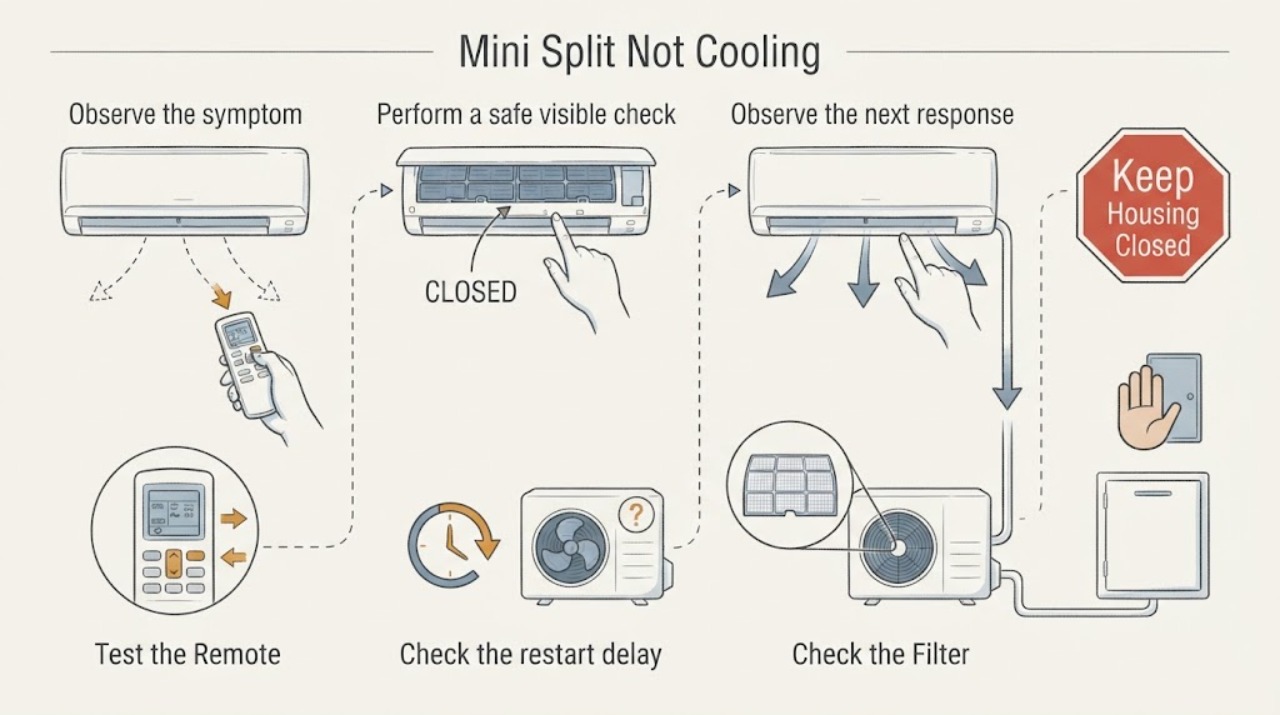
Work through in order
Diagnostic checks
Use only checks that match the exact appliance or system and its official guide.
-
Confirm Cooling mode, target, and remote response
Use the LG remote or the model's documented control to select normal Cooling, set the target below the current room temperature, and direct the outlet air into the room. Check that the indoor unit acknowledges the command and that the remote display and batteries are working. Do not use a special test mode just to force cooling.
Expected result: The unit was in fan, dry, air-cleaning, energy-saving, or another mode; the target was not below room temperature; the remote command is not acknowledged; or the indoor unit acknowledges Cooling but the air remains warm.
Next step: Correct only the setting or remote issue supported by the exact model guide and observe one normal cooling run. If the command is received but cooling does not begin, continue to the filter and outdoor checks.
Stop if: Do not repeatedly toggle the system, force buttons, or use a service/test mode whose procedure is not in the model manual.
Why this matters
Why: A wrong mode, high target, or remote problem can prevent a normal cooling request. If Cooling is acknowledged with a meaningful demand and air remains warm, continue to power, airflow, and outdoor-unit observations rather than changing several settings at once.
-
Check the restart delay and external power state
If the mini split was just stopped and restarted, leave it in the selected Cooling mode and wait through the restart delay described by the model or LG guidance. From a dry, safe position, check the labeled air-conditioner breaker and any visible power connection once. Do not remove covers or touch wiring.
Expected result: The outdoor unit starts after the delay; the indoor unit runs but the outdoor unit stays silent; the breaker is off or trips again; the plug or disconnect shows heat or damage; or the display is completely dead.
Next step: If the breaker trips again, a connection is damaged or hot, or the outdoor unit remains inactive after the documented delay, turn the system off and arrange qualified HVAC or electrical service. If power is stable, continue with airflow checks.
Stop if: Do not repeatedly reset a tripping breaker, use an extension cord or power strip in place of the required supply, or open an electrical cover.
Why this matters
Why: A brief compressor protection delay can be normal. A missing outdoor supply, repeated trip, damaged connection, or dead display points toward a power or equipment fault rather than a temperature setting.
-
Clean the indoor filter using the model procedure
Turn the unit off and isolate power as the exact LG manual directs before opening the indoor filter area. Remove only the user-accessible filter identified for that model, remove dust with the approved method, and reinstall it only when fully dry. Do not wash a deodorizing, allergy, carbon, or other functional filter unless the manual says it is washable.
Expected result: The filter is visibly loaded with dust; the filter is damaged or missing; airflow improves after correct cleaning; the filter is clean but supply air is still warm; or the filter type and removal method are unclear.
Next step: Restore the correct dry filter and run one supervised Cooling test. If airflow remains weak, frost or water appears, or cooling does not improve, continue to outdoor observations and service escalation.
Stop if: Do not run the unit without its required filter, reinstall a wet filter, bend the coil fins, or clean inside the electrical or refrigerant sections.
Why this matters
Why: Restricted intake can weaken cooling and contribute to noise or condensation. A clean filter with persistent warm air shifts concern toward outdoor ventilation, icing, power, refrigerant, sensor, or control conditions; an unknown filter procedure is a reason to consult the manual, not to pry the cover.
-
Inspect outdoor airflow and indoor air circulation
From a stable, safe location, look for boxes, leaves, snow, screens, or other loose obstructions around the outdoor unit and for a closed ventilation opening if the unit is in an enclosure. Clear only movable items that can be removed without tools. Indoors, make sure curtains or furniture do not block the return or supply path. Do not climb, bend the outdoor coil, remove panels, or spray into electrical areas.
Expected result: The outdoor unit is boxed in or its discharge path is blocked; the heat exchanger is visibly packed with dirt; the indoor intake or outlet is blocked; or the airflow paths look clear but cooling is still absent.
Next step: Remove only safe external obstructions and observe one normal run. Arrange qualified cleaning or HVAC service if the coil needs tools, the unit is inaccessible, the outdoor fan does not run, or the symptom persists.
Stop if: Do not access the roof or a precarious balcony, wash the coil with power connected, bend fins, or open the outdoor service panel.
Why this matters
Why: LG links poor outdoor ventilation and blocked heat exchange with weak or absent cooling. Clear external obstruction is a plausible environmental cause, while a clear path with warm air makes an internal refrigeration, fan, sensor, or control issue more likely.
-
Look for ice, water, or drain symptoms
With the unit off, look without touching for ice or frost on the indoor coil or piping, water dripping from the indoor unit, a kinked or disconnected visible drain hose, or unusual condensation. Do not chip ice or continue running a unit that is leaking onto walls, floors, or electrical equipment.
Expected result: Ice blocks the indoor airflow; water is present; the visible drain hose is disconnected, torn, kinked, or improperly routed; or there is no ice or water but air remains warm.
Next step: Keep the unit off and arrange service for recurring ice, leakage, inaccessible drainage, or suspected refrigerant trouble. If the manual identifies a safe external drain-hose correction, follow only that procedure and stop if it does not restore drainage.
Stop if: Do not scrape coils, puncture ice, add refrigerant, open the refrigerant circuit, or keep operating while water reaches electrical parts.
Why this matters
Why: Ice can block airflow and prevent effective cooling, while a drain problem can create water damage. A visible hose issue may be model-specific and serviceable only as the manual allows; recurring ice or warm air without an external airflow cause can indicate refrigerant, fan, sensor, or control trouble.
-
Record error codes and make one permitted reset
Photograph any displayed code, blinking lamp pattern, or remote message and record whether the indoor fan, outdoor fan, and compressor sound or motion are present. If the exact LG support page or manual calls for a user power reset, perform that reset once using the labeled disconnect or breaker and the documented waiting period. Do not reset repeatedly to suppress a recurring code.
Expected result: The code clears and the system cools normally; the code returns; the system shows a sensor or communication code; the system reports a compressor, refrigerant, wiring, or outdoor-unit issue; or no code appears but cooling remains absent.
Next step: If any code returns, the unit will not cool after a permitted reset, or the outdoor unit does not start, stop use and request qualified LG or HVAC service with the code and observations. Do not select a part from a code family without exact model diagnosis.
Stop if: Do not bypass an error, disconnect communication wiring, open panels, test live voltage, or replace internal parts yourself.
Why this matters
Why: A cleared code can reflect a temporary power or communication event, but a repeated code indicates a fault requiring model-specific service. No code does not rule out an airflow, refrigerant, fan, or control problem.
Use your observations
Decision map
Find the observation that best matches what you see, then follow the next safe action.
-
PATH 01Next step
What you see
The mini split was not in normal Cooling mode, the target was not below room temperature, or the remote command was not reaching the indoor unit, and cooling returns after the documented setting or remote correction.
Do this next
Use the exact LG manual for the remote and normal Cooling settings, then monitor one ordinary run. If the unit still ignores commands or loses the setting, arrange service for the remote, receiver, or control system.
Why this path and its safety boundary
Why it matters: A control selection or remote-input issue was more likely than a failed refrigeration system.
-
PATH 02Next step
What you see
The indoor filter is dusty, the indoor intake is blocked, or the outdoor unit is surrounded by obstructions or poor ventilation, and cooling improves after safe external correction.
Do this next
Keep the filter maintained according to the model manual and keep the outdoor airflow path open. Arrange qualified cleaning if dirt is inside the coil or access requires tools.
Why this path and its safety boundary
Why it matters: Restricted air intake or outdoor heat rejection was more likely than a failed compressor or refrigerant circuit.
-
PATH 03Next step
What you see
The system was just restarted and the outdoor unit begins after the documented protection delay, or the dedicated breaker was off but remains stable after one safe correction.
Do this next
Avoid repeated Start and Stop commands and observe one normal cooling run. If the breaker trips again, the supply is damaged, or the outdoor unit remains inactive, stop use and call qualified service.
Why this path and its safety boundary
Why it matters: A normal compressor restart delay or a supply-state issue may explain the initial lack of cooling.
-
PATH 04Safety boundary
What you see
Ice blocks the indoor airflow, water leaks from the indoor unit, or the visible drain path is disconnected or kinked, especially when the symptom returns after the filter and airflow checks.
Do this next
Turn the unit off, protect the area from water, and arrange qualified HVAC service for recurring ice, leakage, inaccessible drainage, or suspected refrigerant trouble. Follow only a model-approved external drain correction.
Why this path and its safety boundary
Why it matters: A drainage, airflow, coil-temperature, or refrigerant-related problem is more likely and continued operation can cause water damage.
Safety stop: Do not chip ice, open the refrigerant circuit, add refrigerant, or run water onto electrical parts.
-
PATH 05Safety boundary
What you see
Cooling mode and target are correct, the filter and external airflow are reasonable, power is stable, but the outdoor unit never starts, cooling remains absent, or an error code returns after one permitted reset.
Do this next
Stop testing and request qualified LG or HVAC service. Provide the full model number, error display, mode and target, filter condition, outdoor-unit behavior, ice or water observations, breaker history, and whether the issue began after installation or relocation.
Why this path and its safety boundary
Why it matters: An internal fan, compressor, refrigerant, sensor, communication, wiring, or control fault remains possible and cannot be distinguished safely by external checks.
Safety stop: Do not disassemble the indoor or outdoor unit, perform live electrical measurements, bypass protection, or replace a compressor, board, sensor, or refrigerant component from the symptom alone.
Helpful context
Understand the symptom
Separate a setting problem from a cooling-system problem
A mini split can blow room-temperature air when it is in fan, dry, air-cleaning, energy-saving, or another mode rather than normal Cooling. The target temperature also affects whether the outdoor unit is asked to run. LG recommends checking the mode and target first, then allowing a normal cooling run rather than judging the air immediately after a command or restart. Use the exact remote and manual for the model because button names and indicators vary.
Airflow is a user-level check; refrigerant work is not
Dust on the indoor filter or restricted heat rejection at the outdoor unit can reduce cooling. LG's guidance says filter removal and washing differ by model, and some functional filters must not be washed. Clear loose objects around the outdoor unit and keep its airflow path open from a safe position. Frost, a hissing or suspected refrigerant leak, oil-like residue, or persistently warm supply air after the external checks is a service diagnosis, not a reason to open a panel or add refrigerant.
Do not mistake a restart delay for a failed compressor
LG explains that the outdoor compressor may wait after the system is turned off and on again. Avoid repeatedly pressing Start and Stop while waiting; each new restart can extend the protection interval. If the indoor unit never begins normal cooling after the model's restart delay, or the breaker trips again, stop testing and arrange service.
Use errors and water as decision changes
An LG error display is not a generic filter reminder. LG groups different codes with communication, sensor, outdoor compressor, wiring, or refrigerant-related conditions and warns users not to disassemble the air conditioner or replace internal parts themselves. Water at the indoor unit, a damaged drain hose, or ice that returns after airflow is corrected likewise needs model-specific inspection. Photograph the display and record what the indoor and outdoor units are doing before calling.
Safety boundary
Stop conditions
- Stop using the mini split for smoke, burning odor, arcing, a hot or damaged plug, repeated breaker trips, exposed wiring, or water reaching electrical equipment.
- Turn the system off for recurring ice, indoor leakage, severe condensation, suspected refrigerant leakage, or an outdoor unit that overheats or makes an abnormal sound.
- Do not open service panels, test live voltage, bypass electrical or compressor protection, disconnect communication wiring, or handle refrigerant.
- Do not repeatedly reset a breaker or error code, repeatedly cycle Start and Stop, or keep running the system when the filter is missing or drainage is uncontrolled.
- Arrange qualified HVAC or LG-authorized service when safe mode, filter, airflow, power, and one permitted reset do not restore cooling, or whenever an internal component or refrigerant circuit is suspected.
Only after diagnosis
Potential parts
- LG indoor air filter
Consider this category only if the exact model manual identifies a replaceable filter and the existing filter is damaged, missing, or no longer serviceable after cleaning.
Confirm the complete LG model and filter type; some functional filters have different care or replacement rules and are not interchangeable by appearance. - LG indoor or outdoor fan component
Consider this category only after qualified testing confirms that a fan or fan-control fault explains absent airflow or an inactive outdoor unit after settings, power, and ventilation checks.
Confirm the exact model, zone configuration, and professional diagnosis; do not infer a fan part from warm air alone. - LG control or temperature sensor component
Consider this category only when a recurring model-specific code or qualified testing identifies a sensor, communication, or control fault.
Confirm the exact model and fault code or test result; internal electrical replacement requires qualified service.
When checks do not resolve it
Need a professional?
Arrange qualified HVAC or LG-authorized service when the LG mini split remains warm after the mode, filter, airflow, and power checks; when the outdoor unit does not start after the documented restart delay; when ice or water returns; when the breaker trips; when an error code returns after one permitted reset; or when a fan, compressor, sensor, control, wiring, or refrigerant fault is possible. Treat smoke, arcing, a hot or damaged electrical connection, exposed wiring, or water near electrical equipment as an immediate stop-use condition.
Safety scope: This article supports remote-setting checks, dry external observations, model-approved filter care, safe removal of loose airflow obstructions, and one user-authorized reset. A qualified professional should handle panels, live electrical testing, refrigerant, compressors, fans, control boards, communication wiring, coil repair, inaccessible drainage, and any work requiring tools or elevated access.
Common questions
FAQ
Why is my LG mini split blowing room-temperature air?
Confirm normal Cooling mode and a target below the room temperature, then check that the remote command is received. Clean the model-approved indoor filter and clear safe external obstructions around the outdoor unit. If the outdoor unit does not start after the restart delay or cooling remains absent, arrange qualified service.
Can a dirty filter stop an LG mini split from cooling?
A dusty filter can restrict intake and weaken cooling, and LG says filter removal and washing vary by model. Clean only the filter type and method described in the exact manual, reinstall it fully dry, and seek service if airflow or cooling remains poor.
Why does the LG mini split outdoor unit not start right away?
LG documents a compressor protection delay after the system is stopped and restarted. Leave the system in Cooling mode through the documented delay and avoid repeatedly pressing Start and Stop. If the outdoor unit remains inactive or the breaker trips, call qualified service.
What should I do if my LG mini split has ice or water?
Turn the system off and do not chip ice or keep operating while water reaches electrical equipment. Look only for safe, visible filter or drain-hose conditions that the model manual permits; recurring ice, indoor leakage, or suspected refrigerant trouble needs qualified HVAC service.
What does an LG mini split error code mean when it will not cool?
The meaning depends on the exact code and model. LG groups some codes with communication, sensors, compressor or circuit-board, wiring, test-run, or refrigerant-related conditions. Photograph the code, perform only the model-approved single reset, and request service if it returns; do not open the unit or replace internal parts yourself.
When should I call an HVAC technician for an LG mini split?
Call when correct Cooling settings, safe filter care, outdoor airflow, and stable power do not restore cooling; when the outdoor unit never starts; when ice or leakage recurs; when a breaker trips; or when an error code returns. Stop immediately for smoke, arcing, damaged electrical connections, exposed wiring, or water near electrical equipment.
Read the exact guide
Official sources
- [LG Air Conditioner for Cooling] Cooling operation fails. No cold airLG USA Support · Official LG USA support guidance written for LG air conditioners; exact mini split model instructions control for filter type and controls.
- [LG Air Conditioner Power] Power not turned onLG USA Support · Official LG USA support guidance for LG air conditioners; electrical configuration and disconnect details vary by mini split installation.
- [LG air conditioner operation] Is the air conditioner not working or has the cooling performance deteriorated?LG USA Support · Official LG USA support guidance for LG air conditioners; exact mini split installation controls access and outdoor-unit arrangement.
- [LG Air Conditioner Cooling] Cooling is mild. No cool air blowsLG USA Support · Official LG USA support guidance for LG air conditioners; it notes that images and content vary among models, including wall-mounted systems.
- How to Troubleshoot Error Codes CH05, 53, E0, CH32, 33, 36, 38, F4, CH66, 90, 91, 92, and 93 on Your LG Air ConditionerLG USA Support · Official LG USA support error-code guidance; the displayed code and exact mini split model determine the applicable diagnosis.
- LG Air Conditoner - Takes A While to Start CoolingLG USA Support · Official LG USA support guidance for LG air conditioners; exact restart behavior and controls should be checked in the mini split model manual.
- How to Troubleshoot Error Codes CH01, CH02, CH06, CH12, CH41, CH42, CH43, CH44, CH45, CH46, CH47, CH48, E1, E2, E3, E7, E8, F2, F3, CH21, CH23, CH26, CH29, and E9 on Your LG Air ConditionerLG USA Support · Official LG USA support error-code guidance; exact code and model determine whether the indoor or outdoor system is implicated.
- [LG Air Conditioner] Perform a Pre-Summer Check to Stay CoolLG USA Support · Official LG USA support checklist covering wall-mounted and other LG air-conditioner forms; exact mini split manual controls removal and drainage details.
Community feedback
Share a repair observation
Share a plain-text repair observation. Accepted observations are published automatically; this page may take a moment to update.