
On this page
Start here
Quick answer
When a GREE mini split is not cooling, first confirm that the indoor unit is calling for cooling rather than fan, dry, heat, or a multi-zone mode conflict, then check the set temperature, remote batteries or signal, indoor filter, and visible indoor and outdoor airflow. GREE lists dirty filters, blocked airflow, an improper setting, open doors or windows, and low voltage among the first checks for insufficient cooling; persistent poor cooling can involve coils, refrigerant, controls, or another internal fault. Make only external, model-directed checks. Stop for a burning smell, overheating or damaged wiring, repeated breaker trips, ice, water leakage, or abnormal sounds, and arrange qualified HVAC service when the basic checks do not restore cooling.
Before you begin
Safety first
- This article covers remote settings, batteries and signal, user-accessible filter care, visible airflow and room-load checks, safe outdoor observation, and one supervised reassessment. A qualified technician must handle electrical measurement, panels, coils, fans, refrigerant, compressor, controls, error diagnosis, and sealed-system repairs.
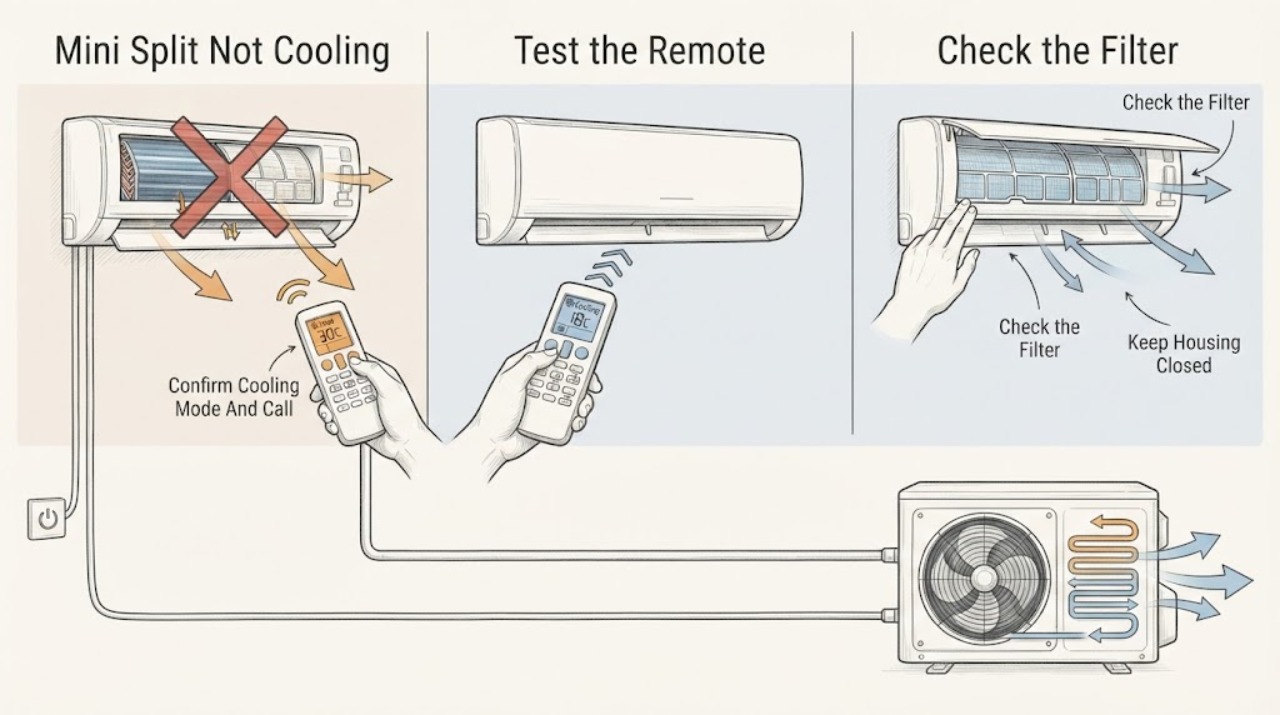
Work through in order
Diagnostic checks
Use only checks that match the exact appliance or system and its official guide.
-
Check 1
Use the GREE remote to confirm the unit is on and set to COOL, not FAN, DRY, HEAT, AUTO, or a timer state. Lower the setpoint only to a normal value shown by the model manual and note whether the indoor unit acknowledges the command.
Expected result: The unit was in a non-cooling mode, a multi-zone system shows a mode conflict, the remote does not change the display, or COOL is selected and the unit acknowledges the command but the air remains warm.
Next step: Correct the mode or signal issue and allow one normal start sequence. If the unit acknowledges COOL but does not produce cooling, continue with filter and airflow checks; do not repeatedly switch modes or use an extreme setpoint as a test.
Stop if: Stop for a burning smell, arcing, damaged wiring, repeated breaker trips, abnormal sound, or water near electrical parts.
Why this matters
Why: A wrong mode, timer, or multi-zone conflict can explain a warm room without a mechanical failure. A remote that is not communicating points first to batteries, signal path, or control issues. Correct mode and an acknowledged cooling call with warm air shifts attention to airflow, outdoor operation, and service diagnosis.
-
Check 2
Check the remote display and batteries, point it at the indoor receiver with a clear path, and note whether the indoor display or indicator responds. From a safe position, check whether the dedicated disconnect or breaker is visibly tripped; do not remove covers or perform electrical work.
Expected result: The remote display is faint or unresponsive, the receiver responds after a battery or signal correction, the breaker is tripped, the unit has no indication of power, or the unit powers up but still does not cool.
Next step: Replace remote batteries only when needed and make one normal command attempt. Do not repeatedly reset a tripped breaker; arrange qualified service for a repeat trip, missing power, loose wiring, or a unit that remains warm after an acknowledged cooling call.
Stop if: Do not open the disconnect, electrical compartment, or indoor panel, and do not touch wiring or terminals.
Why this matters
Why: A weak remote battery or blocked signal can prevent a cooling call. A tripped breaker or missing display can indicate a supply or equipment fault, and GREE directs professional help for wiring or breaker problems. Power and command confirmed with no cooling shifts attention to air delivery and refrigeration performance.
-
Check 3
Turn the system off and remove only the user-accessible indoor air filter described by the GREE manual. Inspect it for dust or lint, then rinse or vacuum it as directed, let it dry completely, and reinstall it before operating the unit.
Expected result: The filter is visibly dirty, the filter is clean and airflow is normal, or the filter cannot be removed without tools or a fixed cover.
Next step: Reinstall the dry filter and perform no more than one supervised cooling reassessment. If cooling remains weak, airflow is low, or ice is visible, stop and arrange HVAC service rather than cleaning inside the coil housing.
Stop if: Do not operate the unit without its filter, scrub it with a harsh tool, spray water into the cabinet, or remove the coil, fan, or electrical cover.
Why this matters
Why: GREE says a dirty filter can result in poor cooling and recommends regular filter care. A clean filter makes restriction less likely but does not rule out a dirty coil, fan fault, ice, refrigerant problem, or blocked outdoor coil. A filter that is not user-accessible is a service boundary.
-
Check 4
With the filter installed, inspect the indoor air inlet and outlet, louvers, furniture, curtains, doors, and windows. Remove only visible obstructions from the airflow path, close doors and windows that should not be open, and note strong versus weak airflow from the indoor unit.
Expected result: The indoor inlet or outlet is blocked, furniture or a curtain redirects air, doors or windows are open, airflow is strong but warm, or airflow is weak despite a clean path.
Next step: Clear only the visible path and allow one cooling cycle with the room closed. If airflow remains weak or air is still warm, do not remove the fan or coil cover; record the result for a technician.
Stop if: Do not put hands or objects into the inlet or outlet, force louvers, or spray cleaner into the indoor unit.
Why this matters
Why: A blocked path or open room can make cooling insufficient even when the system is operating. Strong airflow that remains warm points beyond a simple room obstruction, while weak airflow with a clean filter raises concern for a dirty coil, fan, icing, or another internal issue.
-
Check 5
From a safe distance, inspect the outdoor unit for leaves, grass, packaging, snow, or other visible obstruction around its air path. Also note direct sun, unusual indoor heat sources, or a recent large heat load; do not open the outdoor cabinet or touch the coil and fan.
Expected result: The outdoor inlet or outlet is obstructed, the unit is surrounded by debris, the room has unusual heat gain, or the outdoor path and room conditions are reasonable but cooling is still absent.
Next step: Remove only loose debris that is plainly outside the unit and safe to reach, then allow one reassessment. Keep the area clear and arrange service if the outdoor fan or compressor does not operate as expected, the coil is iced, or cooling remains absent.
Stop if: Do not remove panels, clean a live unit, touch moving or sharp components, spray a high-pressure stream, or attempt electrical or refrigerant tests.
Why this matters
Why: GREE identifies outdoor obstructions and indoor heat sources as conditions that can reduce effective cooling. A clear outdoor path with a valid cooling call but warm supply air makes a refrigerant, compressor, coil, control, or other service diagnosis more likely.
-
Check 6
Inspect the visible indoor coil area and refrigerant lines for frost or ice and note any displayed error code, water, abnormal noise, odor, or repeated stop-start behavior. After any safe setting, filter, or obstruction correction, perform at most one brief supervised cooling reassessment and record whether supply air becomes cooler.
Expected result: Ice is present, an error code appears, water is leaking, the unit makes an abnormal sound or odor, cooling returns after an external correction, or the unit remains warm with normal-looking external conditions.
Next step: Turn the unit off and let ice melt naturally; do not chip it or apply heat. Use the exact model error-code guide and arrange qualified service for ice that returns, water, a persistent code, abnormal sound or odor, or cooling that does not recover.
Stop if: Do not attach gauges, add refrigerant, bypass a safety, remove panels, test live voltage, or keep running a frozen, leaking, or abnormal unit.
Why this matters
Why: Ice can follow airflow restriction or a refrigerant or control fault; an error code can identify a model-specific protection or sensor condition. GREE treats water leakage, abnormal operation, and burning smell as reasons to stop and seek service. Recovery after a simple correction supports that condition, while persistent warm air needs professional diagnosis.
Use your observations
Decision map
Find the observation that best matches what you see, then follow the next safe action.
-
PATH 01Next step
What you see
The unit is in FAN, DRY, HEAT, AUTO, timer, or a conflicting multi-zone mode, or the remote command is not reaching the indoor receiver.
Do this next
Correct the mode, setpoint, batteries, or signal path using the remote and allow one normal start sequence. Call service if COOL is acknowledged but the unit remains warm.
Why this path and its safety boundary
Why it matters: The system may not be making a normal cooling call, so a warm room does not yet establish a refrigeration fault.
-
PATH 02Next step
What you see
The filter is dirty, the indoor or outdoor air path is visibly blocked, or room doors and windows or heat sources are defeating the cooling effort.
Do this next
Clean and dry the user-accessible filter, clear only loose visible obstructions, close the room, and reassess once. Arrange service if airflow stays weak or cooling stays insufficient.
Why this path and its safety boundary
Why it matters: Airflow restriction or excessive heat load is more likely than an immediately failed compressor, although a dirty coil or other fault can coexist.
-
PATH 03Safety boundary
What you see
The unit has no display, a breaker trips, commands are not acknowledged, or an error persists after the model-directed reset or command check.
Do this next
Do not keep resetting the breaker or open an electrical cover. Record the display or error and arrange qualified HVAC or electrical service as appropriate.
Why this path and its safety boundary
Why it matters: A supply, wiring, controller, sensor, or protection condition is more likely than a simple temperature-setting problem.
Safety stop: Stop immediately for overheating wiring, smoke, burning odor, arcing, or repeated breaker trips.
-
PATH 04Next step
What you see
The filter and visible airflow path are reasonable, but supply air is warm, cooling is poor, ice returns, or the outdoor unit does not operate as expected.
Do this next
Turn the unit off if it is frozen or abnormal and arrange qualified HVAC diagnosis. Do not attach gauges, add refrigerant, or select a compressor or board from the symptom alone.
Why this path and its safety boundary
Why it matters: A coil, fan, refrigerant, compressor, control, or other internal problem becomes more likely; the symptom does not identify which part failed.
-
PATH 05Next step
What you see
Cooling returns after one external correction and remains stable, or the unit stays warm after the setting, filter, airflow, and outdoor checks.
Do this next
Monitor only when the unit is cooling normally and safely. Otherwise keep it off and give the technician the model, mode, displayed error, filter and airflow results, outdoor observations, and timing.
Why this path and its safety boundary
Why it matters: Stable recovery supports a correctable setting, filter, obstruction, or heat-load cause. Persistent warmth means the system needs a professional performance and fault diagnosis rather than repeated user resets.
Helpful context
Understand the symptom
Start with the operating state, not a replacement part
A mini split can appear to be running while it is in fan, dry, heat, timer, or another mode that is not actively cooling the room. In a multi-zone installation, indoor units may also need compatible operating modes. GREE's homeowner guidance says to check the remote setting, mode, temperature, batteries, and clear signal path before assuming an equipment failure. An indoor fan running by itself is not proof that the outdoor compressor is cooling.
Airflow and heat load can make cooling feel ineffective
GREE's troubleshooting guidance points to dirty filters, blocked indoor or outdoor air paths, open doors or windows, and room heat sources when cooling is insufficient. A filter or obstruction can reduce delivered airflow, while sun, people, equipment, or a room that is not closed off can add heat faster than the unit can remove it. Correct only visible, low-risk conditions and reassess once rather than repeatedly changing the setpoint.
Know when a cooling symptom needs service
GREE tells homeowners to contact a qualified HVAC professional when the basic checks do not resolve the problem and lists refrigerant checks, coil cleaning, water-leak inspection, and overall system performance as maintenance work. Ice, poor cooling after a clean filter, an error code, abnormal sound, a burning smell, or electrical symptoms should not be treated as a DIY refrigerant or electrical repair.
Safety boundary
Stop conditions
- Turn the unit off and stop testing for a burning smell, smoke, arcing, overheating or damaged wiring, repeated breaker trips, abnormal sound, water leakage, or water near electrical parts.
- Do not remove indoor or outdoor panels, touch the fan or coil, put objects into an inlet or outlet, or operate the system with required covers or filters removed.
- Do not attach refrigerant gauges, add refrigerant, open the sealed circuit, bypass a safety, test live voltage, or replace a control or compressor based on symptoms alone.
- Do not chip ice, apply a flame or heat gun, spray cleaner or water into the cabinet, or use high pressure on the coils or electrical parts.
- Do not repeatedly reset the breaker, change modes, or run a frozen or abnormal unit to reproduce the no-cooling symptom. Arrange qualified HVAC service when the basic external checks do not restore cooling.
Only after diagnosis
Potential parts
- GREE mini split air filter
Consider this category only if the user-accessible filter is damaged, missing, or no longer fits after the manual-directed cleaning check.
Confirm the exact indoor-unit model, filter dimensions, frame, and washable or replaceable design before ordering. - GREE remote controller
Consider this category only if a technician or documented model check confirms that the remote is defective after batteries, signal path, and indoor receiver checks.
Confirm the exact indoor-unit model, remote protocol, functions, and pairing or setup requirements before ordering. - GREE indoor fan or coil assembly
Consider this category only when professional diagnosis confirms an internal fan or coil fault after filter and visible airflow checks.
Confirm the exact indoor-unit model, assembly revision, electrical specification, and service procedure before ordering. - GREE control or sensor assembly
Consider this category only when the model's error and electrical diagnosis confirms a failed control or sensor rather than a mode, wiring, airflow, or refrigerant issue.
Confirm the exact model, board or sensor revision, connector layout, programming, and qualified installation requirements before ordering.
When checks do not resolve it
Need a professional?
Arrange qualified HVAC service when GREE COOL mode is acknowledged but the unit remains warm after one external setting, filter, room-airflow, and outdoor-obstruction check; when airflow is weak, ice returns, an error persists, the outdoor unit does not operate as expected, or coil, refrigerant, control, and electrical diagnosis is needed. Seek prompt help for burning odor, smoke, arcing, overheating or damaged wiring, repeated breaker trips, abnormal sound, water leakage, or water near electrical parts.
Safety scope: This article covers remote settings, batteries and signal, user-accessible filter care, visible airflow and room-load checks, safe outdoor observation, and one supervised reassessment. A qualified technician must handle electrical measurement, panels, coils, fans, refrigerant, compressor, controls, error diagnosis, and sealed-system repairs.
Common questions
FAQ
Why is my GREE mini split running but not cooling?
Confirm COOL mode and the remote command first, then check the filter, indoor and outdoor airflow, room doors and windows, and displayed error codes. If the unit acknowledges cooling but the air remains warm or airflow is weak after one external correction, a coil, fan, refrigerant, compressor, control, or power fault may need qualified service.
Can a dirty GREE filter cause weak cooling?
Yes. GREE's manual lists a dirty filter as a cause of insufficient cooling, and the homeowner guide recommends regular filter cleaning. Rinse or vacuum only the user-accessible filter as directed, dry it fully, and arrange service if airflow or cooling remains poor.
Why does the indoor fan keep running when the GREE is not cooling?
GREE says the fan may continue moving air past the indoor sensor to keep the room-temperature reading accurate. Judge the problem by whether COOL is selected, the outdoor system operates, and the room actually cools rather than by fan motion alone.
What should I do if my GREE mini split shows an error code?
Record the exact code and use the official GREE error-code guidance for the model. Some codes represent mode conflict or a condition where a simple documented restart may be appropriate, while others require a licensed HVAC professional. Do not bypass a protection or open the unit to test boards or wiring.
Can I add refrigerant if my GREE mini split is not cooling?
No. GREE places refrigerant checks and related maintenance with professional service, and warm air or ice does not identify the charge or the cause. Keep the unit off if it is frozen or abnormal and have a qualified technician test for the underlying fault.
When should I stop troubleshooting a GREE mini split?
Stop for burning odor, smoke, arcing, overheating or damaged wiring, repeated breaker trips, abnormal sounds, water leakage, water near electrical parts, or visible ice. Also stop after the setting, filter, airflow, and outdoor checks fail to restore cooling; arrange qualified HVAC service with the recorded observations.
Read the exact guide
Official sources
- FAQsGREE Comfort · Official GREE Comfort FAQ; model documentation controls exact equipment behavior and procedures.
- Mini Split MaintenanceGREE Comfort · Official GREE Comfort maintenance guidance; the assigned system's manual controls homeowner-accessible maintenance.
- MINI-FLOOR CONSOLE A SERIES OWNER'S MANUAL - INDOOR UNITGREE Comfort · Official GREE Comfort owner manual for CONS09HP230V1AF, CONS12HP230V1AF, and CONS18HP230V1AF indoor units; other GREE models may differ.
- Homeowners Quick GuideGREE Comfort · Official GREE Comfort homeowner guidance; the exact GREE model manual controls functions and reset procedures.
Community feedback
Share a repair observation
Share a plain-text repair observation. Accepted observations are published automatically; this page may take a moment to update.