
On this page
Start here
Quick answer
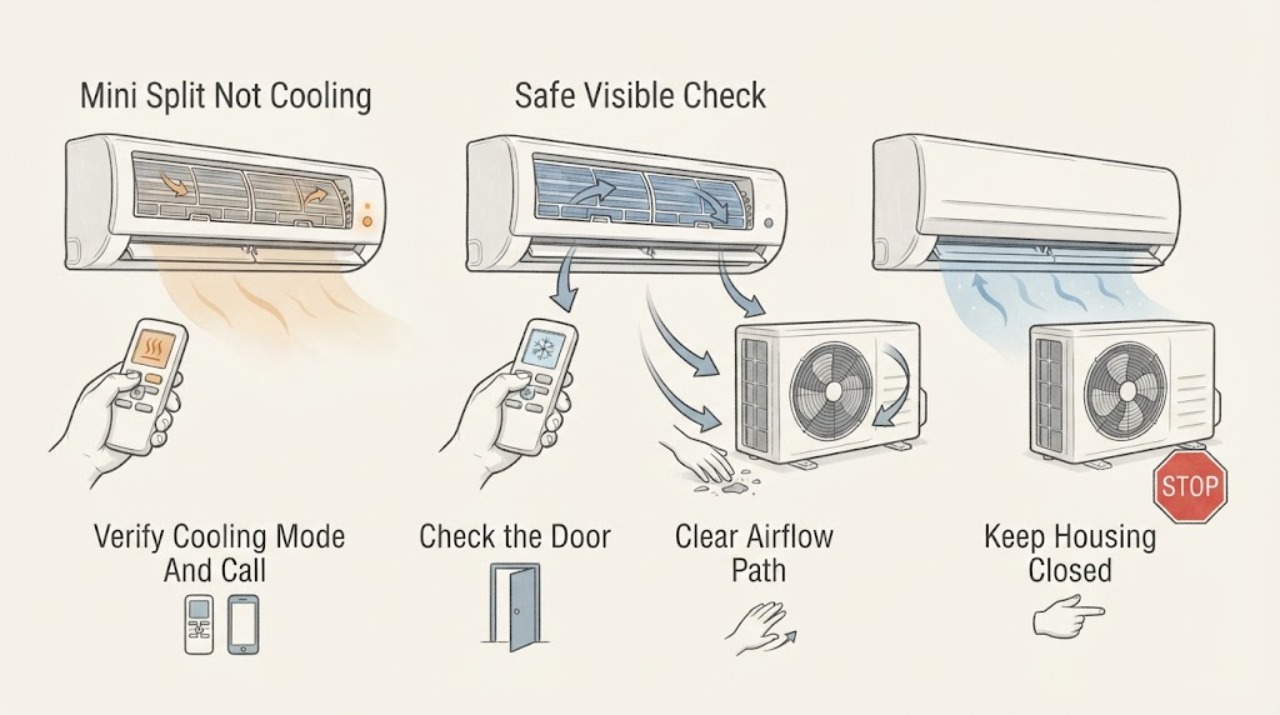
When a Carrier mini split is not cooling, first confirm that the remote is calling for Cool rather than Fan, Dry, Heat, or an unintended schedule, then check visible power and the user-serviceable air filter. From a safe position, verify that the indoor unit has normal airflow and that the outdoor unit starts; clear only loose debris outside and only with power off. Ice on the coil, a clean filter with weak airflow, a silent outdoor unit, hissing, long run time with warm air, or more than one affected indoor head points beyond routine cleaning. Turn the system off for ice, electrical, or suspected refrigerant problems and arrange qualified HVAC service rather than opening panels, testing live wiring, or handling refrigerant.
Work through in order
Diagnostic checks
Use only checks that match the exact appliance or system and its official guide.
-
Check 1
Use the Carrier remote or normal controller to confirm the affected indoor head is set to Cool, the set temperature is below room temperature, the fan is not in a mode that only circulates air, and any timer or schedule is not overriding the call. Check remote batteries if the display is weak or commands are not reaching the unit.
Expected result: The controller is in Fan, Dry, Heat, Auto, or Off; the setpoint is not calling for cooling; the remote does not respond; or the mode and call are correct.
Next step: Correct only the mode, setpoint, timer, or batteries allowed by the controller, then allow one normal startup. If the unit still does not cool, continue with the power and airflow checks; if the controller cannot command the unit, arrange service.
Stop if: Do not repeatedly force-start the system, change installer settings, open the controller, or bypass a sensor or safety control.
Why this matters
Why: A wrong mode, setpoint, schedule, or weak remote can produce warm air without a mechanical cooling failure. A correct call shifts attention to power, airflow, outdoor operation, ice, or refrigerant.
-
Check 2
From a dry, safe position, check whether the indoor display or indicator responds and whether the labeled breaker and outdoor disconnect appear on. After a normal cooling call, observe the outdoor unit without removing its cover: note whether its fan or compressor starts and whether the indoor head continues to blow air.
Expected result: The indoor head is dark, the breaker or disconnect is off, the outdoor unit is silent, the outdoor fan runs, or the system starts but produces no cool air.
Next step: Correct only a clearly tripped or switched-off control when it can be done safely and without opening equipment. If the breaker trips again, the disconnect or wiring is damaged, or the outdoor unit remains silent, leave the system off and arrange HVAC service.
Stop if: Do not reset a repeatedly tripping breaker, remove disconnect covers, touch terminals, or test energized electrical components.
Why this matters
Why: A dark indoor unit or missing visible power can prevent a cooling call. A silent outdoor unit with a valid call points toward a power, control, capacitor, motor, or compressor path; an operating outdoor unit makes airflow, coil, refrigerant, or sensor issues more likely.
-
Check 3
Turn the system off using its normal control and open only the Carrier indoor-unit filter access. Inspect the filter for dust and confirm that it is seated correctly; clean a user-washable filter with the model's approved method, let it dry fully, and reinstall it. From outside, keep the outdoor unit's air path free of loose leaves and debris without bending fins or removing panels.
Expected result: The filter is heavily loaded or mis-seated, airflow is weak, the filter is clean but air remains weak, or the indoor and outdoor air paths appear clear.
Next step: After the filter is fully dry and installed, make one normal cooling call. If airflow or cooling does not improve, turn the system off and arrange service for internal cleaning, fan, coil, or system diagnosis.
Stop if: Do not run the unit without a filter, use a wet filter, spray cleaner into the cabinet, pressure-wash the coil, or open the blower or electrical compartment.
Why this matters
Why: A dirty filter can restrict airflow and reduce cooling, and can contribute to coil icing. A clean filter with weak airflow suggests indoor coil or blower buildup, a fan fault, or another service issue; clear outdoor airflow does not rule out refrigerant or compressor faults.
-
Check 4
With the system off, look through the normal filter opening and around the accessible indoor outlet for frost or ice; do not touch the coil. After the filter is clean and any ice has thawed naturally, make one short cooling test and compare the airflow and temperature with the expected cooling response, without using gauges or opening the circuit.
Expected result: Ice returns, airflow is weak, air is room-temperature or warm with normal airflow, hissing or unusual noise is present, or the air becomes cool after filter care and thawing.
Next step: Turn the system off and arrange qualified HVAC service for recurring ice, hissing, weak cooling, or warm air after a clean filter. If cooling returns normally, monitor the unit and follow the Carrier maintenance schedule.
Stop if: Do not scrape ice, use a heat gun or open flame, attach gauges, add refrigerant, or keep operating through repeated freeze-thaw cycles.
Why this matters
Why: Recurring ice can result from restricted airflow, low refrigerant, or another system fault; continuing to run can add meltwater and stress the equipment. Normal airflow with warm air points more toward outdoor operation, refrigerant, compressor, or control diagnosis. Improvement after filter care makes restriction more likely but does not prove the system is healthy.
-
Check 5
If the Carrier system serves more than one indoor head, set each head to its normal cooling call one at a time and note which head is warm, weak, or normal. For a single-zone system, record whether the symptom began after cleaning, a power interruption, a long shutdown, or a change in weather; include the model number and any indicator code for the technician.
Expected result: Only one head is affected, every connected head is warm, the problem returns after a power cycle, or the unit cools briefly and then stops cooling.
Next step: Keep affected equipment off if it ices, runs abnormally, or has an electrical warning. Arrange qualified service with the zone pattern, timing, model, and any visible code; do not open line-set or control connections.
Stop if: Do not swap wiring between zones, reset protection devices repeatedly, or use a power cycle as a substitute for diagnosing a recurring failure.
Why this matters
Why: One affected head makes a local filter, airflow, sensor, drain, or indoor connection issue more likely. All heads being warm points toward a shared outdoor, power, mode, or refrigerant path. A recurring or brief-cooling pattern needs diagnosis rather than repeated resets.
Use your observations
Decision map
Find the observation that best matches what you see, then follow the next safe action.
-
PATH 01Next step
What you see
The Carrier remote is in Fan, Dry, Heat, Auto, or Off, the setpoint is not below room temperature, or the remote does not command the head.
Do this next
Correct the user-level mode, setpoint, timer, or batteries and make one normal call. If the control still cannot command cooling, arrange service.
Why this path and its safety boundary
Why it matters: The equipment may not be receiving a normal cooling call, so warm air does not yet prove a refrigeration fault.
-
PATH 02Next step
What you see
The indoor display is dark, visible power is absent, or the outdoor unit remains silent during a valid cooling call.
Do this next
Correct only a safely accessible switched-off control. Leave the system off for a repeated trip, damaged disconnect, or silent outdoor unit and use qualified HVAC service.
Why this path and its safety boundary
Why it matters: A supply, disconnect, control, motor, or compressor path is more likely than a filter-only issue.
-
PATH 03Next step
What you see
The filter is dirty or mis-seated, airflow is weak, and cooling improves after proper filter care.
Do this next
Keep the filter clean and dry and monitor one normal cooling cycle. Escalate for weak airflow, recurring ice, or no cooling after filter care.
Why this path and its safety boundary
Why it matters: Restricted airflow is more likely, but a return of weak airflow or ice can indicate internal coil, blower, or system trouble.
-
PATH 04Next step
What you see
Ice returns after the filter is clean, the system has weak cooling or hissing, or it runs for a long time with warm air.
Do this next
Turn the system off and arrange qualified HVAC service for coil, airflow, electrical, refrigerant, and compressor diagnosis. Do not add refrigerant or continue running it to force cooling.
Why this path and its safety boundary
Why it matters: A frozen coil, low refrigerant, airflow fault, or compressor/control problem is more likely and cannot be confirmed safely by appearance alone.
-
PATH 05Next step
What you see
One indoor head is warm while another cools normally, or all indoor heads are warm after a valid cooling call.
Do this next
Record the zone pattern and arrange Carrier-qualified HVAC service. Do not open interconnect wiring or refrigerant connections to compare zones.
Why this path and its safety boundary
Why it matters: One affected head makes a local indoor-unit issue more likely; all heads being warm makes a shared outdoor, power, mode, or refrigerant path more likely.
Helpful context
Understand the symptom
Separate a control problem from a capacity problem
A Carrier mini split can appear to run without cooling when the remote is in Fan or the setpoint is not calling for cooling. If the mode is correct but airflow is weak, a dirty filter or indoor buildup can restrict air. If airflow is normal but the air stays warm, the outdoor unit is silent, the coil ices, or the system runs for a long time without reaching the setting, the next checks involve equipment that needs trained service.
Multi-zone Carrier systems need a head-by-head comparison
For a multi-zone system, compare the affected indoor head with another head only from normal user controls. One head that is warm while another cools normally points toward that head's filter, airflow, sensor, or connection; every head being warm makes a shared outdoor, power, mode, or refrigerant path more likely. Do not open the outdoor unit to compare wiring or refrigerant lines.
Only after diagnosis
Potential parts
- Carrier mini-split air filter
Only consider this category when the existing user-serviceable filter is dirty, damaged, or missing and the exact indoor-unit model confirms the required filter.
Filter type and dimensions vary by model; confirm the model and follow Carrier's maintenance instructions before selecting a replacement.
When checks do not resolve it
Need a professional?
Arrange qualified HVAC service when the Carrier mini split remains warm after the mode, power, filter, and airflow checks; the outdoor unit is silent; ice returns; airflow is weak with a clean filter; hissing or other abnormal sounds occur; multiple indoor heads are affected; a breaker trips; electrical parts are wet or damaged; or refrigerant, coil, compressor, fan, sensor, or control work is suspected. Turn the system off for recurring ice or abnormal operation. Do not open electrical covers, disturb refrigerant lines, scrape ice, add refrigerant, or keep resetting a protection device.
Common questions
FAQ
Why is my Carrier mini split running but not cooling?
Confirm the remote is calling for Cool and not Fan, Dry, Heat, Auto, or a schedule. Then check the filter, indoor airflow, and whether the outdoor unit runs. Normal airflow with warm air, recurring ice, hissing, or long run time makes refrigerant, coil, compressor, or control diagnosis more likely.
Can a dirty filter make a Carrier mini split stop cooling?
Yes. A loaded filter restricts airflow across the indoor coil and can reduce cooling or contribute to icing. Turn the system off, clean the user-serviceable filter as the model guide directs, let it dry fully, and reinstall it. If airflow remains weak or ice returns, arrange service.
What should I do if my Carrier mini split has ice on the coil?
Turn the system off and let the ice thaw naturally. Do not scrape it or apply a heat gun. A dirty filter may have restricted airflow, but recurring ice can also indicate low refrigerant or another fault that needs qualified HVAC diagnosis.
Why does one Carrier mini split zone cool while another does not?
One warm indoor head with another normal head makes a local filter, airflow, sensor, or indoor-unit issue more likely. If all heads are warm, a shared outdoor, power, mode, or refrigerant path is more likely. Record the zone pattern and arrange service without opening interconnect wiring.
Read the exact guide
Official sources
- What is a Mini Split Air Filter? Complete Guide & MaintenanceCarrier · Carrier mini-split filter location, cleaning, drying, airflow, and no-filter operating guidance
- Ductless Mini Split RepairCarrier · Carrier ductless mini-split mode, power, filter, outdoor-unit, airflow, refrigerant, and professional-repair guidance
- Why is My AC Not Blowing Cold Air?Carrier · Carrier air-conditioner cooling diagnosis, thermostat and filter checks, outdoor coil, ice, refrigerant, and professional boundary
Community feedback
Share a repair observation
Share a plain-text repair observation. Accepted observations are published automatically; this page may take a moment to update.