
On this page
Start here
Quick answer
Set the Fujitsu mini split to Cooling, choose a reasonable temperature, and check that the remote batteries, timer, intake grille, outlet, filter, doors, and windows are not preventing cooling. A brief restart delay can be a normal compressor protection function, not a failed compressor. If the indoor fan runs but the air does not cool, airflow, outdoor heat load, an iced coil, power or control fault, or a refrigerant problem may be involved. Stop for a burning smell, water leak, blinking indicators, exposed wiring, heavy ice, or any need to open the unit; Fujitsu's guidance places persistent performance, electrical, and installation problems with authorized service.
Before you begin
Safety first
- Owner checks are limited to normal remote settings, accessible batteries, filter care as directed, clear grilles and room conditions, safe external observation, visible model identification, and documentation. A qualified professional must handle cabinet access, live electrical testing, refrigerant or pressure work, coil or blower service, drainage, sensors, controls, tubing, and installation correction.
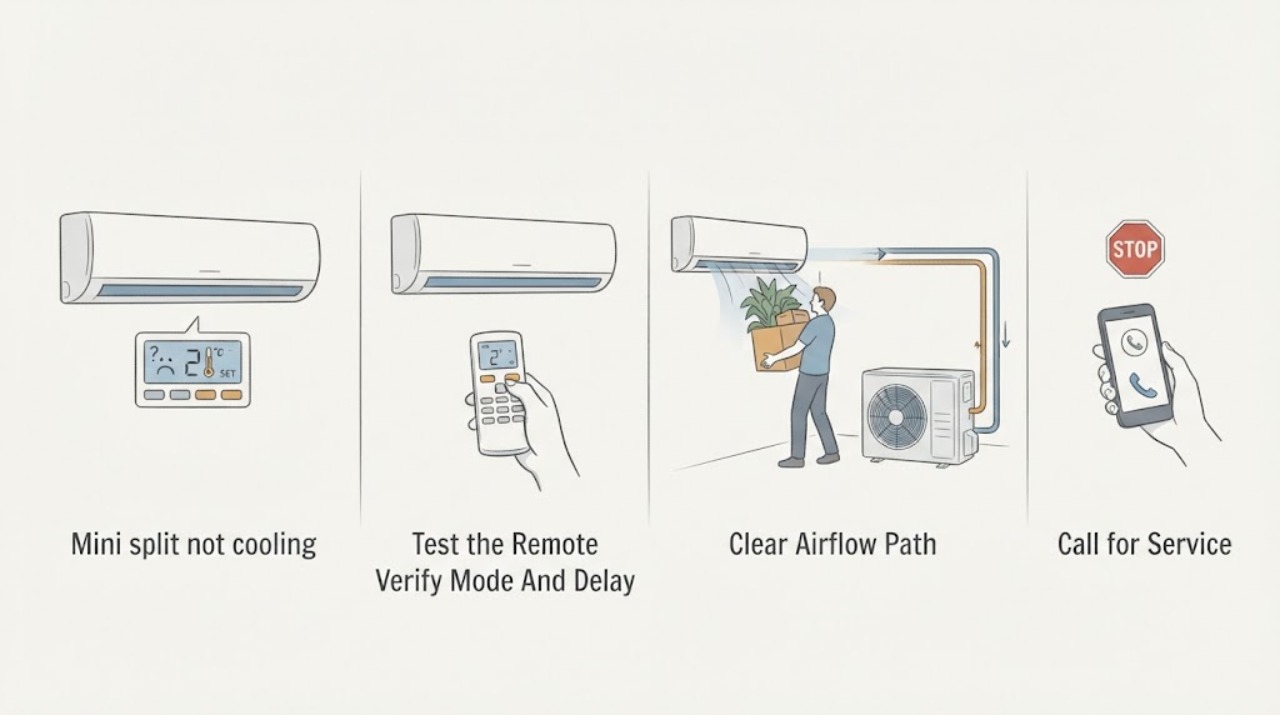
Work through in order
Diagnostic checks
Use only checks that match the exact appliance or system and its official guide.
-
Check 1
Use the remote to confirm the Fujitsu mini split is in Cooling rather than Heat, Dry, Fan, or Auto, and set a stable cooling demand. After a recent stop or power interruption, allow the built-in compressor protection delay to pass without repeatedly toggling power.
Expected result: The unit was in the wrong mode; the timer or monitor mode is active; the indoor fan runs but the compressor has not yet restarted; or the unit remains in Cooling with no cooling output.
Next step: Correct only an obvious user-level mode or timer setting and observe one normal call. If the unit remains in Cooling without producing cool air, continue with external checks and prepare a service record.
Stop if: Stop for a burning smell, smoke, water leak, blinking fault indicators, loud abnormal noise, or any need to open the unit or handle wiring.
Why this matters
Why: A wrong mode, timer, monitor state, or normal restart delay can imitate no cooling. Continued lack of cooling after a stable Cooling call keeps airflow, outdoor unit, control, refrigerant, and capacity issues in consideration.
-
Check 2
Check that the remote batteries are installed correctly and that the display command reaches the indoor unit. Clear an obvious timer or schedule setting only through normal remote controls; do not remove the indoor-unit cover or change custom codes or wiring as a trial.
Expected result: The remote display is blank or inconsistent; the indoor unit does not acknowledge commands; a timer or quiet setting is active; or the unit responds correctly to Cooling commands.
Next step: Install fresh batteries of the type specified by the remote manual and cancel only an obvious timer or user setting. If commands remain unreliable or cooling does not return, arrange qualified service rather than changing hidden configuration.
Stop if: Stop for a damaged remote, hot or damaged control, a persistent indicator fault, or any request to open the unit or alter control wiring.
Why this matters
Why: Dead or incorrectly loaded batteries, a timer, or a command mismatch can leave the unit in a non-cooling state. A unit that responds correctly but does not cool points away from a simple remote issue.
-
Check 3
Turn the unit off at the remote and inspect the accessible air filter, intake grille, and outlet port. Clean the filter only according to the exact model manual and remove curtains, furniture, or other loose obstructions from the airflow path; do not touch aluminum fins or spray cleaner into the indoor unit.
Expected result: The filter is dirty; the intake or outlet is blocked; airflow is weak; the filter and openings are clean; or ice or water is visible behind the grille.
Next step: Correct only the accessible filter or obstruction and observe one normal Cooling call. If airflow remains weak, ice or water is present, or the unit still does not cool, leave it off as appropriate and call authorized HVAC service.
Stop if: Stop for ice, water behind the grille, sharp fins, mold or heavy contamination, a filter that cannot be accessed safely, or any need to open panels or reach the blower or coil.
Why this matters
Why: Fujitsu identifies a dirty filter and blocked intake or outlet as common poor-cooling checks. Weak airflow with a clean external path, or ice or water behind the grille, suggests an internal coil, blower, drain, refrigerant, or control problem.
-
Check 4
With the mini split operating safely, close an open window or door, shade strong direct sunlight, and turn off an unnecessary indoor heat source such as a computer or portable heater. Keep the indoor outlet unobstructed and do not lower the setting repeatedly to force faster cooling.
Expected result: Cooling improves after the room heat load is reduced; the room remains warm despite clear airflow; only one zone is affected; or the outdoor unit does not appear to run during a cooling demand.
Next step: Keep a stable setting and document the room conditions. If the outdoor unit never responds, the room cannot approach the setting, or the symptom is limited to one connected zone, arrange model-specific diagnosis; do not move or rewire the system.
Stop if: Stop for water, smoke, burning odor, abnormal outdoor noise, exposed wiring, or any need to access the outdoor cabinet or refrigerant lines.
Why this matters
Why: Openings, sunlight, occupants, and heat-producing equipment can exceed the zone's current cooling demand. No improvement with a normal external load keeps capacity, outdoor-unit, refrigerant, sensor, or control causes in consideration.
-
Check 5
From a safe position, observe the indoor and outdoor units for ice, water, blinking operation or timer indicators, unusual noise, or a fan that stops during a mode where it should be delivering cooling. Do not scrape ice, pour water on coils, or keep restarting a unit with a fault indication.
Expected result: No ice or fault is visible; light frost or a brief normal mode change appears; ice grows or remains; water leaks; or an indicator blinks or an unusual noise persists.
Next step: Keep the system off for persistent ice, water, blinking indicators, or abnormal noise and call authorized service. Provide the mode, indicator behavior, and photos taken without touching the equipment.
Stop if: Stop immediately for a water leak, burning smell, smoke, exposed wiring, heavy ice, electrical noise, or a flooded outdoor unit.
Why this matters
Why: Some low fan speeds, sounds, and mode changes can be normal, but persistent ice, water, blinking indicators, or abnormal noise point to a fault, drainage issue, refrigerant or sensor problem, or an unsafe condition.
-
Check 6
Record the Fujitsu model and serial information from paperwork or a safely visible label, remote mode and settings, whether the indoor fan and outdoor unit respond, filter condition, airflow, room heat load, ice or water, indicator behavior, and any recent installation or service. Do not remove covers to find the label.
Expected result: Cooling returns after an external correction; it remains absent with normal commands and airflow; the problem began after installation or relocation; or the source remains uncertain.
Next step: Give the record to an authorized Fujitsu contractor or qualified HVAC technician. Keep operation limited or off if the unit leaks, freezes, smells hot, makes abnormal noise, or shows a fault.
Stop if: Stop owner troubleshooting when the next step requires refrigerant, pressure, electrical, control, sensor, coil, blower, tubing, or cabinet access.
Why this matters
Why: A simple mode, filter, or room-load correction can explain some symptoms, while persistence, installation timing, or uncertain outdoor response makes a control, refrigerant, sensor, capacity, or installation issue more likely.
Use your observations
Decision map
Find the observation that best matches what you see, then follow the next safe action.
-
PATH 01Next step
What you see
The unit is in Dry, Fan, Auto, Quiet, timer, or monitor operation, or the remote batteries and commands are unreliable.
Do this next
Restore a user-level Cooling command, use correctly installed batteries, and observe one normal call. If command response remains unreliable, arrange service rather than changing hidden configuration.
Why this path and its safety boundary
Why it matters: The selected operation or remote command may explain the lack of cooling without proving an equipment failure.
-
PATH 02Next step
What you see
The filter is dirty, the intake or outlet is blocked, windows or doors are open, sunlight or heat sources are high, or cooling improves when those conditions are corrected.
Do this next
Keep the filter and airflow path clear and use a stable setting. Call service if airflow stays weak or cooling remains poor after the external correction.
Why this path and its safety boundary
Why it matters: Airflow restriction or room heat load is more likely than an immediate refrigerant or compressor diagnosis.
-
PATH 03Next step
What you see
The indoor fan runs but the air remains warm, the outdoor unit does not respond to a valid Cooling demand, or cooling never returns with a clear filter and reasonable room load.
Do this next
Keep the unit off or operation limited and call an authorized Fujitsu contractor. Do not open the cabinet, adjust refrigerant, or reset a safety repeatedly.
Why this path and its safety boundary
Why it matters: Outdoor-unit power or control, refrigerant circuit, sensor, compressor, or capacity problem is more likely and cannot be safely separated by owner checks.
-
PATH 04Next step
What you see
Ice grows or remains, water leaks, a timer or operation indicator blinks, or abnormal noise accompanies the no-cooling symptom.
Do this next
Turn the unit off and obtain qualified service. Photograph the indication or ice from a safe distance and do not scrape, wash, or restart it to test.
Why this path and its safety boundary
Why it matters: A coil, drainage, defrost, sensor, control, electrical, or refrigerant issue is more likely than a simple remote or setting problem.
-
PATH 05Next step
What you see
The unit was just restarted, the compressor pauses briefly, the fan runs slowly in Dry or monitor operation, or a heating-mode defrost event is observed without a persistent cooling complaint.
Do this next
Allow the normal mode or restart protection to complete, then verify the selected Cooling command. Escalate if cooling remains absent after the delay or a fault condition appears.
Why this path and its safety boundary
Why it matters: A protection delay or normal mode behavior may be present rather than a no-cooling failure.
Helpful context
Understand the symptom
Verify the selected mode before judging cooling
A Fujitsu mini split can heat, cool, dry, monitor the room, or run a quiet fan mode. Confirm Cooling is selected and that a timer or remote-control problem has not changed the command. After a stop or power interruption, the compressor may delay its restart for protection; do not repeatedly toggle the power to bypass that delay.
Airflow and room heat load can look like a failed unit
A dirty filter or blocked intake and outlet reduces delivered cooling. Fujitsu also lists open windows or doors, direct sunlight, computers or other heat sources, many occupants, and a quiet fan setting as reasons cooling may seem poor. Correct only these external conditions and observe one normal call.
Do not confuse normal sounds or defrost with cooling failure
Refrigerant-flow sounds, low fan speed in dry or monitor operation, and steam or a stopped outdoor fan during automatic defrost can be normal behaviors. Persistent lack of cooling, heavy ice, blinking indicators, or unusual noises are different and need model-specific service.
Refrigerant, wiring, sensors, and installation are professional checks
A mini split's indoor and outdoor units communicate through refrigerant tubing, wiring, sensors, and controls. Do not open covers, test live circuits, adjust charge, disconnect tubing, or move the unit. Record the exact model and visible indication so an authorized contractor can inspect the system.
Safety boundary
Stop conditions
- Stop operation for a burning smell, smoke, water leaking from the unit, exposed wiring, a flooded outdoor unit, or any electrical hazard; do not touch wet equipment or a wet disconnect.
- Do not open indoor or outdoor covers, test live circuits, disconnect refrigerant tubing, adjust charge or pressure, bypass a safety, or manipulate sensors or control wiring.
- Do not scrape ice, pour water or direct heat on a coil, spray cleaner into the unit, or keep restarting a unit with a blinking indicator or persistent fault.
- Do not treat a three-minute restart protection delay as permission to repeatedly toggle power; allow the model's protection sequence to complete.
- Call authorized Fujitsu or qualified HVAC service when safe mode, remote, filter, airflow, and room-load checks do not restore cooling, or when the next step requires internal, electrical, refrigerant, drainage, or installation work.
Only after diagnosis
Potential parts
- Fujitsu mini split air filter
Consider this only when the accessible filter is visibly dirty and the exact model manual identifies a replaceable rather than washable filter.
Confirm the exact Fujitsu model, filter type, dimensions, orientation, and cleaning or replacement instructions before ordering. - remote-control batteries
Consider this only when the remote display is weak, blank, or not reliably sending commands and the remote model accepts user-replaceable batteries.
Use the battery type specified by the exact remote manual and do not open the indoor unit to bypass remote controls. - Fujitsu temperature sensor or control component
Consider this only after a qualified diagnosis confirms a sensor or control fault and rules out mode, airflow, coil, refrigerant, and power causes.
Verify the exact indoor and outdoor model, control architecture, and authorized service information; do not select a generic sensor or board by appearance. - condensate drain component
Consider this only when water or a drainage symptom is confirmed and a technician identifies a blocked, damaged, or model-specific drain or pump component.
Confirm the exact model, installation route, drain configuration, and local requirements; concealed drainage work belongs with qualified service.
When checks do not resolve it
Need a professional?
Call an authorized Fujitsu contractor or qualified HVAC technician when cooling remains absent after correct Cooling mode, remote, filter, intake, outlet, window, sunlight, and heat-load checks; when the outdoor unit does not respond; when a fault or blinking indicator returns; when ice or water is present; when the system was recently installed or relocated; or when refrigerant, sensors, controls, wiring, coils, blower, drainage, or cabinet access is needed. Call urgently for smoke, burning smell, water near electrical equipment, exposed conductors, a flooded outdoor unit, or severe property damage.
Safety scope: Owner checks are limited to normal remote settings, accessible batteries, filter care as directed, clear grilles and room conditions, safe external observation, visible model identification, and documentation. A qualified professional must handle cabinet access, live electrical testing, refrigerant or pressure work, coil or blower service, drainage, sensors, controls, tubing, and installation correction.
Common questions
FAQ
Why is my Fujitsu mini split not cooling?
Check Cooling mode, remote batteries and timer, filter, intake and outlet airflow, open windows or doors, sunlight, heat sources, and quiet mode. If those are normal, outdoor response, ice, controls, refrigerant, or installation may need service.
How long should I wait after restarting a Fujitsu mini split?
Fujitsu describes a compressor protection delay after a stop or power interruption. Allow the model's normal delay to finish rather than repeatedly toggling power; persistent no cooling is a service symptom.
Can the Fujitsu remote make the mini split seem like it is not cooling?
Yes. Dead or incorrectly loaded batteries, a timer, or a wrong mode can change the command. Correct only obvious user settings and arrange service if command response remains unreliable.
Can a dirty filter cause a Fujitsu mini split to stop cooling?
Fujitsu lists a dirty filter and blocked intake or outlet as poor-cooling checks. Clean the accessible filter only as the model manual directs, and call service if airflow stays weak or cooling remains poor.
Why is the fan running but the air is not cold?
The indoor fan can run while the outdoor unit, refrigerant circuit, coil, sensor, control, or room heat load prevents effective cooling. Check only the external filter, airflow, mode, and room conditions, then arrange diagnosis.
Should I set the temperature much lower to make the mini split cool faster?
Do not keep lowering the setting as a test. Use a stable Cooling demand and address airflow, sunlight, open windows, and heat sources; a persistent problem needs model-specific service.
Is low airflow in Dry or Quiet mode a failure?
Fujitsu notes that the fan may run slowly during Dry, monitor, or Super Quiet operation. Verify the selected mode before concluding that cooling airflow has failed.
What if the outdoor fan stops during operation?
Some mode changes or automatic defrost behavior can temporarily stop a fan, but a nonresponsive outdoor unit during a valid Cooling demand or persistent stop needs qualified diagnosis. Do not open the cabinet.
What does ice on a Fujitsu mini split mean?
Light or temporary frost can occur in normal operation, but growing or persistent ice can indicate airflow, refrigerant, sensor, or defrost trouble. Turn it off and call service; do not scrape or heat the coil.
When is a Fujitsu mini split no-cooling problem urgent?
Stop for burning smell, smoke, water leak, exposed wiring, heavy ice, blinking indicators, flooded equipment, or water near electrical parts. Keep clear and obtain qualified HVAC or electrical help.
Read the exact guide
Official sources
- AIRSTAGE MINI-SPLITS FAQsGENERAL / Fujitsu General United States & Canada · Fujitsu General official FAQ used to establish indoor and outdoor unit relationship, authorized-contractor installation, maintenance manuals, and qualified technical support boundaries.
- AIRSTAGE MINI-SPLITS TroubleshootingGENERAL / Fujitsu General United States & Canada · Fujitsu General official AIRSTAGE troubleshooting FAQ used for model-family no-cooling checks and normal-operation distinctions; exact unit behavior and manual still govern.
- AIRSTAGE SINGLE-ROOM MINI-SPLIT SYSTEMS AccessoriesGENERAL / Fujitsu General United States & Canada · Fujitsu General official accessories page used only to establish that remote controls, remote sensors, safety switches, and condensate pumps vary by system; it does not establish fitment for an unspecified model.
Community feedback
Share a repair observation
Share a plain-text repair observation. Accepted observations are published automatically; this page may take a moment to update.