
On this page
Start here
Quick answer
Honeywell Home's own no-heat guide separates no air, room-temperature air, weak warm air, and cold air, then routes a fan that does not operate with a fan call to service. Start by recording the Honeywell thermostat model, furnace manufacturer/model, fuel type, and whether the vents have no airflow or weak airflow. Verify Heat mode and a setpoint above room temperature, observe any Heat On or alert message, and visually confirm the furnace power switch, breaker, and closed access cover from a safe location. You may use the thermostat's Fan On setting as an outside-only observation; do not remove panels, access the blower compartment, handle furnace wiring, or work on high-voltage components. If airflow is absent or weak despite a valid fan call, the blower motor or its control path may need professional diagnosis; if gas odor, smoke, a carbon-monoxide alarm, or possible CO symptoms occur, leave immediately and obtain emergency help.
Before you begin
Safety first
- This article is limited to normal thermostat controls, room-side airflow observation, and safe visual checks of the switch, breaker, and seated cover. Blower motor, high-voltage, internal electrical, ignition, gas, combustion, venting, and safety-control work belongs to qualified HVAC personnel.
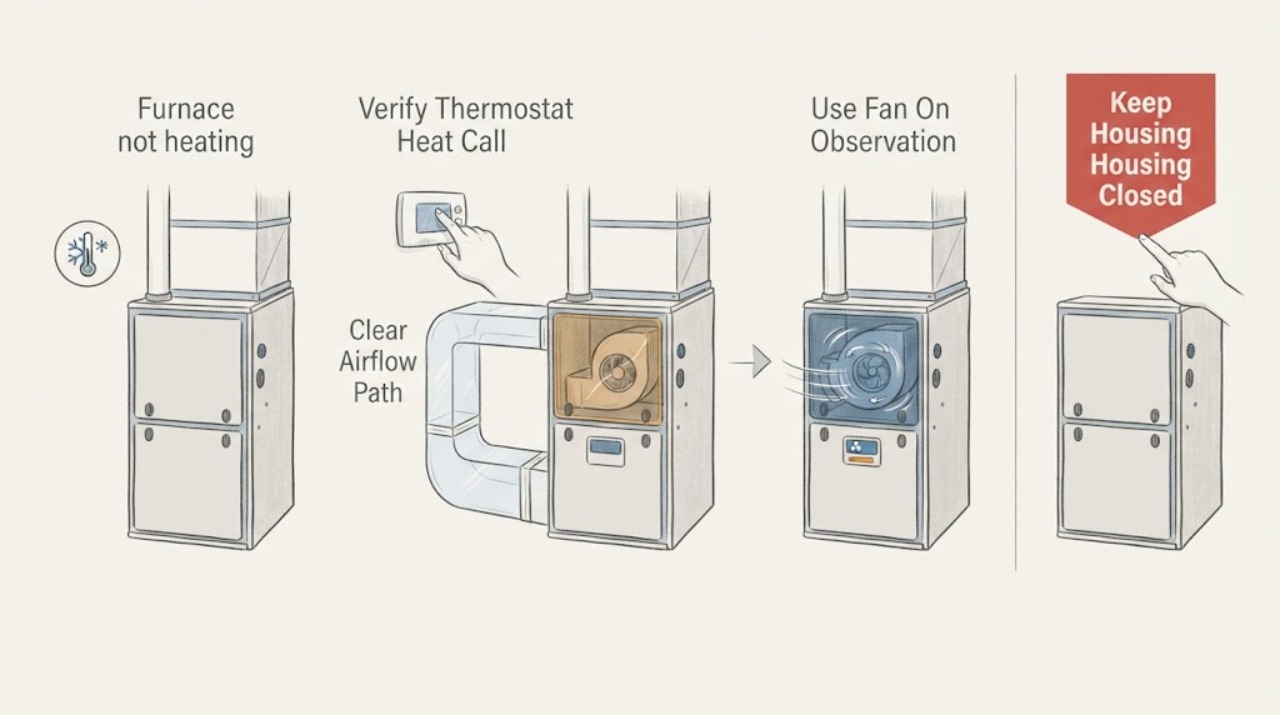
Work through in order
Diagnostic checks
Use only checks that match the exact appliance or system and its official guide.
-
Check 1
From the room side of the system, feel and listen at several supply registers while the Honeywell thermostat is calling for heat; do not open the furnace.
Expected result: Record no air, room-temperature air, weak warm air, cold air, or normal airflow and whether all rooms behave similarly.
Next step: Record the result with the thermostat and furnace models, then continue to the normal thermostat call and fan observation.
Stop if: Stop for smoke, gas odor, burning electrical odor, abnormal heat, a CO alarm, or water near electrical equipment.
Why this matters
Why: Honeywell's official guide uses these four observations to route the next check. No air or weak air keeps the blower call, power, and airflow path in scope; cold or room-temperature air can indicate the heating path rather than the blower motor.
-
Check 2
At the Honeywell thermostat, verify Heat mode and set the requested temperature above the room reading using normal controls only.
Expected result: Note whether Heat On, a flame or heat icon, or an equivalent call appears; record a blank screen, active alert, no call, or a call that disappears while the room remains cool.
Next step: Follow only the exact thermostat user guide for mode or battery checks; do not change installer settings or disturb wires.
Stop if: Do not remove the thermostat from its wall plate, expose terminals, or alter wiring.
Why this matters
Why: Honeywell says the thermostat should indicate a call when the room is below the heat setpoint. A missing or unstable call makes thermostat mode, configuration, or power more likely than a confirmed blower-motor failure.
-
Check 3
Use the Honeywell thermostat's normal Fan On setting for one outside-only observation, then return it to the intended fan setting.
Expected result: Record whether air moves at the registers, airflow is weak, or there is no airflow while the fan call is present; note whether the thermostat display remains stable.
Next step: Keep the appliance closed and arrange HVAC service for no airflow or weak airflow that persists; do not inspect the G terminal or blower yourself.
Stop if: Stop for a grinding or burning sound, smoke, abnormal heat, sparking, or a breaker event.
Why this matters
Why: Honeywell routes weak warm air to its Fan section and says that if a G-wire is present but the fan is not working properly, the system may need service. This observation cannot distinguish a blower motor from controls, wiring, or another furnace fault.
-
Check 4
From a dry, safe location, visually confirm that the furnace power switch and circuit breaker appear on and that the accessible furnace cover is fully seated.
Expected result: Record an off breaker or switch, a cover that is not seated, repeated breaker operation, or normal visible power and cover position.
Next step: If there is no hazard, restore only a visibly off switch or breaker once according to the equipment instructions; arrange service for a repeat trip or persistent no-air symptom.
Stop if: Do not open panels, reset a breaker repeatedly, touch wet equipment, or approach a hot, smoking, or damaged furnace.
Why this matters
Why: Honeywell notes that a furnace cover may contain a safety switch and that some systems will not power up when the cover is open. A breaker that trips again is not a normal reset result and may indicate a fault.
-
Check 5
Observe any furnace status light or code that is visible without opening the cabinet, and photograph the exact sequence together with the thermostat display.
Expected result: Record no light, a steady light, a repeating flash pattern, or an alphanumeric alert, plus when the blower and heat stop.
Next step: Give the exact furnace manufacturer/model and code to an HVAC professional; do not open the cover to read or reset an internal control.
Stop if: Stop use for a fault light paired with gas odor, smoke, soot, unusual flame sound, abnormal heat, or a CO alarm.
Why this matters
Why: Honeywell says furnaces commonly use flashing lights and that their code references are model-specific. A status code can direct a technician but does not prove the blower motor is the failed component.
-
Check 6
Compare the Fan On airflow observation with the normal Heat call without opening the furnace or changing wiring.
Expected result: Record airflow on Fan On but cold air on Heat, airflow that is weak in both modes, or no airflow in either mode.
Next step: Arrange qualified HVAC diagnosis and provide the comparison; leave internal blower, ignition, gas, and high-voltage work to the technician.
Stop if: Do not continue operating if the furnace short-cycles, overheats, smells abnormal, or shows a safety lockout.
Why this matters
Why: Airflow in Fan On but no heat makes the heat-producing or thermostat configuration path more likely; weak or absent airflow in both modes keeps the blower system or its control path in scope. Neither pattern selects a motor part.
-
Check 7
If there are no safety warnings, the thermostat call is stable, the furnace cover is seated, and airflow is present, observe one normal heat call from the room side.
Expected result: Record whether the blower starts, warm air reaches the registers, the call completes, the blower stops normally, or the no-heat/no-air symptom returns.
Next step: Stop testing after one failed call and arrange HVAC service with the recorded timing and observations.
Stop if: Stop immediately for smoke, gas odor, burning smell, abnormal heat, CO alarm, sparking, or a repeating lockout.
Why this matters
Why: A single normal call after correcting a mode, cover, or visible power condition does not prove the blower motor is healthy. Recurrence means the underlying control, motor, airflow, or furnace fault remains unresolved.
-
Check 8
Prepare a service record with the Honeywell thermostat model, furnace manufacturer/model, fuel type, vent-airflow category, thermostat call state, Fan On result, breaker and cover observations, and any status code.
Expected result: Note whether the blower is absent, weak, noisy, intermittent, or normal; whether heat is absent despite airflow; and whether the thermostat goes blank or reboots.
Next step: Arrange qualified HVAC service and keep the furnace off when the blower is absent, weak with overheating, a code repeats, or a safety warning appears.
Stop if: Do not open the blower compartment, handle furnace wiring, use a meter, or keep cycling the system to reproduce the fault.
Why this matters
Why: These observations give the technician a safe distinction between thermostat/control behavior, blower operation, and heat-production faults without exposing the homeowner to internal or high-voltage work.
Use your observations
Decision map
Find the observation that best matches what you see, then follow the next safe action.
-
PATH 01Safety boundary
What you see
The Honeywell thermostat is not in Heat, the setpoint is not above room temperature, the display is blank, or no heat call appears.
Do this next
Use the exact thermostat user guide for normal mode or battery checks and arrange HVAC service for a blank or unstable display.
Why this path and its safety boundary
Why it matters: Thermostat mode, configuration, or power is more likely than a confirmed blower-motor failure.
Safety stop: Do not remove wires, change installer wiring, or access the furnace to compensate for a missing call.
-
PATH 02Safety boundary
What you see
The thermostat shows a valid heat or fan call, but there is no airflow at the registers in Fan On or Heat mode.
Do this next
Keep the furnace closed and arrange qualified HVAC diagnosis of the blower system and controls.
Why this path and its safety boundary
Why it matters: Honeywell's guide places a non-working fan in the service path. A blower motor, its control, wiring, power, or another internal airflow fault is possible, but the source does not identify a replaceable part.
Safety stop: Do not open the blower compartment, handle high-voltage wiring, or bypass a safety device.
-
PATH 03Safety boundary
What you see
Air is present but weak or warm, especially when Fan On also produces weak airflow, and the symptom persists with a stable thermostat call.
Do this next
Provide the airflow comparison to an HVAC technician for blower, duct, filter, and control diagnosis; do not open the furnace.
Why this path and its safety boundary
Why it matters: A fan or airflow-path problem is more likely than a thermostat-only problem, but a blower motor cannot be confirmed from register airflow alone.
Safety stop: Stop for abnormal heat, grinding, burning odor, smoke, or a repeated safety shutdown.
-
PATH 04Safety boundary
What you see
Fan On produces normal airflow, but a Heat call produces room-temperature or cold air while the thermostat remains stable.
Do this next
Arrange HVAC service and provide the normal-fan versus heat-call comparison; do not access ignition, gas, flame, or internal controls.
Why this path and its safety boundary
Why it matters: The blower is moving air, so the no-heat path is more likely to involve the heat-producing system, system type, configuration, or furnace controls than the blower motor alone.
Safety stop: Stop for gas odor, soot, smoke, abnormal flame sound, CO alarm, or possible CO symptoms.
-
PATH 05Safety boundary
What you see
The furnace switch or breaker is off, the cover is not seated, the breaker trips again, or a visible furnace status light or code appears.
Do this next
Correct only an obvious safe switch or cover condition once; arrange professional service for a repeat trip, error light, or continuing no heat.
Why this path and its safety boundary
Why it matters: Power interruption, cover safety interlock, or a furnace-specific fault is more likely; the code cannot be mapped to a blower motor without the furnace manufacturer and model.
Safety stop: Do not repeatedly reset the breaker or open the cabinet to read internal instructions.
-
PATH 06Safety boundary
What you see
A carbon-monoxide alarm sounds, anyone has possible CO symptoms, or gas odor, soot, smoke, burning electrical odor, or abnormal heat is present.
Do this next
Leave for fresh air, call emergency services or the applicable gas emergency service from outside, and do not re-enter or reuse the furnace until qualified personnel clear it.
Why this path and its safety boundary
Why it matters: This is an emergency safety condition, not a blower-motor troubleshooting branch. Fuel-burning furnaces can produce CO when malfunctioning or improperly vented.
Safety stop: Never stay inside to locate the source, operate switches near gas odor, or restart the furnace after an alarm.
Helpful context
Understand the symptom
Keep the Honeywell control separate from the furnace diagnosis
Honeywell Home makes thermostats and control products used with many furnace brands. Record both the Honeywell thermostat model and the furnace manufacturer/model before interpreting a blower symptom. The Honeywell name alone does not prove a furnace blower-motor design, voltage, error-code meaning, or replacement part.
Classify the air at the vents first
Honeywell's heating guide asks whether there is no air, room-temperature air, weak warm air, or cold air. No air makes the furnace power, blower call, or blower system more relevant; weak warm air can follow the fan path; cold or room-temperature air points toward the heating call or heat-producing system. This classification is safer and more useful than assuming the blower motor is bad.
Use the thermostat only for normal controls
Set the mode to Heat and the requested temperature above the current room reading, then observe whether the thermostat shows a Heat On or equivalent call. Use Fan On only as a normal control observation. Do not remove wires or change installer configuration: Honeywell warns that incorrect wiring or configuration can damage the system.
Check the furnace from the outside
From a dry, safe location, visually confirm that the furnace switch and breaker appear on and that the access cover is seated. Observe any visible status light or code without opening the cabinet. Honeywell notes that some systems will not operate with a cover open and directs error-code symptoms to the furnace manufacturer or a professional.
A blower motor is an internal service diagnosis
If the thermostat makes a normal fan call but there is no airflow, or airflow is weak and the issue persists, a blower motor, control, wiring, or airflow problem is possible. Honeywell's guidance directs a fan that is not working properly to service; it does not authorize a homeowner to access the blower or select a motor. Internal blower and high-voltage work belongs to qualified HVAC personnel.
Recognize combustion and electrical boundaries
Do not open the furnace to inspect a motor, flame, limit, heat exchanger, or wiring. A gas odor, soot, smoke, burning electrical odor, unusual heat, CO alarm, or possible CO symptoms changes this from a no-heat check to a safety event. Leave as appropriate and do not operate the furnace again until trained personnel clear it.
Safety boundary
Stop conditions
- Stop and leave for fresh air if a carbon-monoxide alarm sounds or anyone has possible CO symptoms; call emergency services from outside and do not re-enter until cleared.
- Stop for gas odor, smoke, soot, burning electrical odor, sparking, abnormal furnace or vent heat, a damaged cord, or a repeating breaker trip.
- Do not open the furnace cabinet or blower compartment, handle internal wiring, access ignition or gas components, use a meter, or bypass any safety interlock.
- Do not infer a blower-motor failure, voltage, wiring fault, or compatible part from register airflow, a thermostat message, or a code without the exact furnace documentation.
- Do not continue operating when airflow is absent or weak with overheating, the blower is noisy or intermittent, a lockout repeats, or the cover is damaged or cannot seat.
- After one safe thermostat, visible power/cover, vent-airflow, and Fan On observation, arrange qualified HVAC service for unresolved no heat or blower symptoms.
Only after diagnosis
Potential parts
- furnace blower motor
Consider this category only after qualified diagnosis confirms that the blower motor itself, rather than its control, wiring, airflow path, or furnace safety system, is the cause.
Match the furnace manufacturer/model, motor type, mounting, electrical specification, and approved service documentation; Honeywell thermostat branding does not establish fit. - blower motor control or furnace control board
Consider this category only when service diagnosis links absent, weak, or intermittent blower operation to a control or relay fault.
Confirm the exact furnace model, control revision, connectors, and safety approvals before selection. - Honeywell thermostat or fan-call control component
Consider this category only when a technician confirms that the Honeywell thermostat, fan call, configuration, or low-voltage control path is the cause of the recorded symptom.
Match the exact thermostat model and furnace system type; do not change wiring or configuration based only on a no-heat symptom.
When checks do not resolve it
Need a professional?
Arrange qualified HVAC service when the Honeywell thermostat makes a valid call but the furnace has no airflow or weak airflow, when Fan On confirms a non-working fan, when heat is absent despite normal airflow, when the furnace status light or breaker indicates a fault, or when the problem returns after one safe observation. Leave immediately and contact emergency services for a CO alarm or possible CO symptoms; treat gas odor, smoke, burning electrical odor, or abnormal heat as urgent.
Safety scope: This article is limited to normal thermostat controls, room-side airflow observation, and safe visual checks of the switch, breaker, and seated cover. Blower motor, high-voltage, internal electrical, ignition, gas, combustion, venting, and safety-control work belongs to qualified HVAC personnel.
Common questions
FAQ
Does no air from the vents prove the Honeywell blower motor is bad?
No. Honeywell's guide routes no air through furnace power, cover, thermostat, and fan checks, and a no-air result can involve control, wiring, power, airflow, or the blower system. The blower motor is an internal service diagnosis.
How can I use Fan On to check the blower safely?
Use the thermostat's normal Fan On setting and observe airflow at the registers without opening the furnace or touching wiring. If airflow is absent or weak, keep the unit closed and arrange qualified HVAC service.
Why is there airflow but no heat?
Normal Fan On airflow with cold or room-temperature air makes the heat-producing system, system type, or thermostat configuration more likely than the blower motor alone. Honeywell directs persistent no-heat symptoms to the furnace manufacturer or a professional.
Is Honeywell the furnace manufacturer?
Honeywell Home documentation primarily covers thermostat and control behavior, and a Honeywell thermostat may control a furnace made by another manufacturer. Record both model numbers before selecting any part or interpreting a furnace status code.
Can I open the furnace to inspect the blower motor?
No. Do not open the blower compartment, handle internal or high-voltage wiring, use a meter, or bypass a safety switch. Honeywell routes a fan that is not working properly to service.
When is a no-heat furnace problem an emergency?
A CO alarm, possible CO symptoms, gas odor, smoke, soot, burning electrical odor, sparking, or abnormal heat is an emergency or urgent safety condition. Leave as appropriate, contact emergency or gas-safety services from outside, and do not reuse the furnace until trained personnel clear it.
Read the exact guide
Official sources
- My thermostat is set to heat, but my gas furnace isn't coming on. Why?Honeywell Home · Official Honeywell Home support article for a Honeywell thermostat with a gas furnace; do not extend its wiring assumptions to other systems.
- Why Is My Heating System Not Working?Honeywell Home · Official Honeywell Home support guide for thermostat-controlled forced-air heating systems; furnace manufacturer and model remain separate and control internal service.
- Why is my WiFi 9000 Color Touchscreen Thermostat set to heating, but I feel cool or mild air and not heat?Honeywell Home · Official Honeywell Home WiFi 9000 support article; use its wiring and system-type observations only for that thermostat family and do not generalize to other models.
- Carbon Monoxide Fact SheetU.S. Consumer Product Safety Commission · Official U.S. CPSC safety guidance for fuel-burning appliances including furnaces; emergency instructions supersede ordinary thermostat or airflow troubleshooting.
- Why is my Heating not Working?Honeywell Home · Official Honeywell Home FAQ intended for forced-air systems and especially newly installed or previously non-heating thermostats; incorrect wiring/configuration can damage equipment and internal work is excluded.
Community feedback
Share a repair observation
Share a plain-text repair observation. Accepted observations are published automatically; this page may take a moment to update.