
On this page
Start here
Quick answer
When a mini-split is running but the indoor air is warm, first verify that the remote or wall controller is in Cool mode and set below the room temperature, then check that the indoor filters are clean and the outdoor unit has clear airflow. Confirm the outdoor unit actually runs when cooling is requested and note any ice, water, hissing, unusual odor, or error display. Warm air can result from a mode or airflow problem, but ice, persistent lukewarm air, a non-running outdoor unit, or long operation without cooling can indicate a refrigerant, coil, electrical, or compressor issue. Do not open the sealed refrigerant circuit, remove panels, or keep operating a frozen or damaged system; arrange qualified HVAC service when the basic checks do not restore cooling.
Before you begin
Safety first
- This article supports controller checks, ordinary-access filter care, and non-contact visual observations only. It does not authorize refrigerant work, live electrical testing, cabinet removal, fan or blower access, ice removal, drain disassembly, or safety bypass.
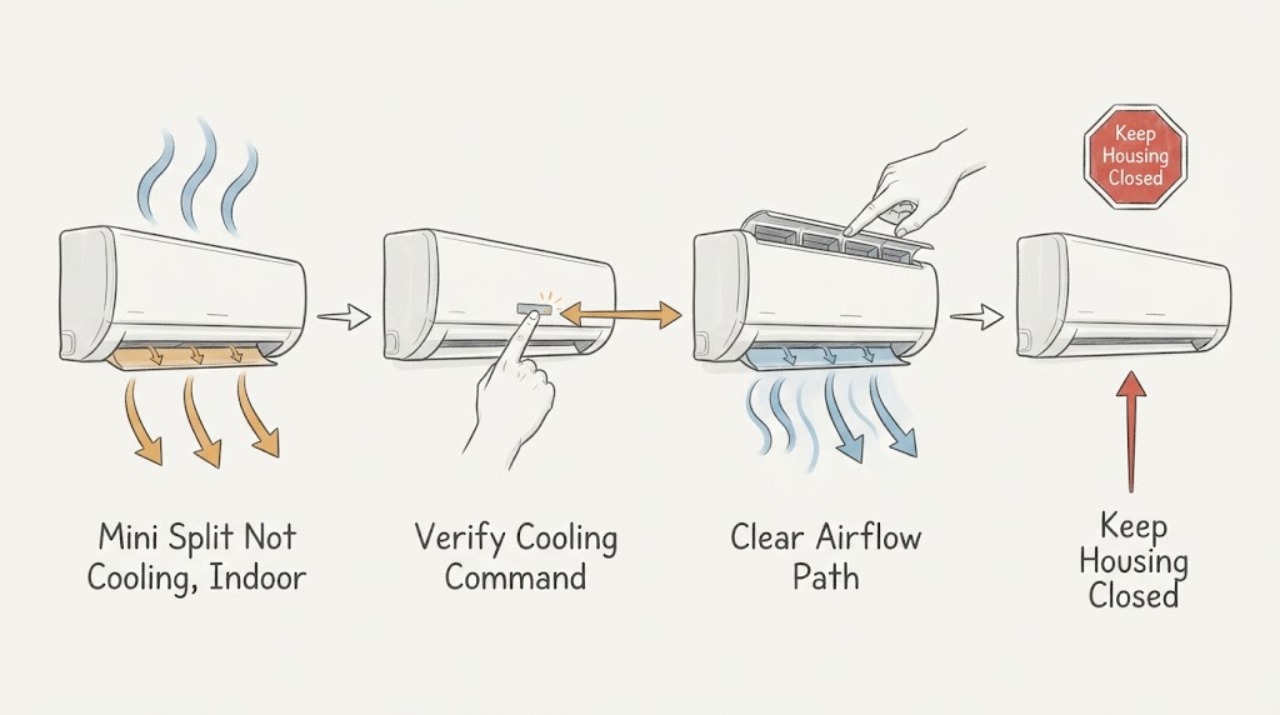
Work through in order
Diagnostic checks
Use only checks that match the exact appliance or system and its official guide.
-
Check 1
From the normal user position, verify that the mini-split remote or wall controller is powered, set to Cool rather than Fan, Dry, Heat, or an automatic mode, and set below the current room temperature; do not change installer settings.
Expected result: Record the displayed mode, target temperature, room temperature estimate, fan setting, any timer or sleep symbol, and whether the indoor unit acknowledges the command.
Next step: Correct only the documented user setting, allow the system to respond once, and continue to the airflow and outdoor-operation checks if the discharge remains warm.
Stop if: Stop if the controller is damaged, shows an error that the manual does not explain, the unit starts and stops abnormally, or operation produces smoke, burning odor, arcing, or water near electrical parts.
Why this matters
Why: Trane and Carrier identify an incorrect operating mode or target as a common reason a mini-split does not deliver cold air. A Fan setting can move room-temperature air without active cooling. A command that is accepted but produces warm discharge after a normal delay points toward airflow, outdoor operation, or a refrigeration or component issue.
-
Check 2
Turn the indoor unit off and, using only the access described in the exact owner manual, inspect the removable air filters and visible inlet or outlet for dust, blockage, or a filter that is wet or not seated.
Expected result: Classify the filters as clean and dry, visibly loaded with dust, wet or contaminated, damaged, missing, or inaccessible without deeper disassembly; note whether indoor airflow is weak or normal.
Next step: Clean or replace only the user-removable filter as the manual directs, let a washed filter dry fully before refitting, restore it correctly, and reassess airflow; arrange service if airflow remains weak or the coil is iced.
Stop if: Do not scrape the coil, reach into the blower, spray liquid into the indoor unit, operate with a missing filter, or continue if the unit is leaking, frozen, or has exposed wiring.
Why this matters
Why: Both Trane and Carrier identify dirty filters or restricted airflow as causes of poor or absent cooling. A dirty filter can reduce air crossing the indoor coil and may contribute to freezing. A wet, damaged, or deeply blocked assembly may indicate a drain or coil problem rather than a routine filter-cleaning task.
-
Check 3
With the controller calling for cooling and from a safe distance, observe whether the outdoor unit starts and whether its air path is visibly blocked by leaves, dirt, snow, or nearby objects; do not remove panels or touch the fan or coil.
Expected result: Record outdoor unit running and discharging air, outdoor unit silent, repeated starts and stops, a visible obstruction, ice, water, unusual noise, or an error indication on the indoor or outdoor unit.
Next step: Clear only loose debris that can be removed without contact and as the manual permits; if the outdoor unit remains silent, iced, repeatedly cycles, or has an error, stop operation and arrange qualified HVAC diagnosis.
Stop if: Do not reach through the grille, wash a powered unit, remove guards, reset a tripping breaker repeatedly, or operate around exposed conductors, smoke, burning odor, or a damaged disconnect.
Why this matters
Why: Carrier identifies a tripped breaker or outdoor shutoff, an outdoor unit that is not running, and blocked outdoor airflow as separate causes that can leave indoor air warm. Ice, repeated cycling, abnormal noise, or a silent unit after a valid cooling command can indicate a refrigeration, electrical, or component problem that a visual check cannot repair.
-
Check 4
After turning cooling off, make a non-contact visual check of the accessible indoor outlet, coil area, drain outlet, and outdoor unit for frost, ice, condensate leakage, or a blocked drain path; do not chip ice or remove the cabinet.
Expected result: Record no ice or leakage, frost that melts after shutdown, a solid ice buildup, water dripping indoors, a blocked or kinked visible drain hose, or a musty or unusual odor.
Next step: Leave the system off long enough to avoid continuing operation with ice or leakage, protect nearby belongings from water if it can be done without touching electrical parts, and provide the observations to an HVAC technician.
Stop if: Do not chip ice, pour water into the unit, open the coil cabinet, clear a concealed drain, or resume cooling while ice, active leakage, or exposed electrical parts remain.
Why this matters
Why: Trane links a frozen indoor evaporator coil with dirty filters or refrigerant issues, while Carrier notes that frozen coils can restrict airflow and that drain problems can cause leaks. Ice or water changes the next step from more cooling tests to a service diagnosis; melting ice does not prove the underlying cause is fixed.
-
Check 5
If the mode, filter, and outdoor airflow checks are normal, document the cooling call and symptom from the user position without opening the sealed system: note whether the indoor fan is moving air, whether the outdoor unit runs continuously or cycles, and whether the room temperature changes.
Expected result: Classify the pattern as normal airflow but persistently warm, weak airflow with clean filters, outdoor unit running but no cooling, outdoor unit not running, short cycling, long operation without reaching the target, or a recurring code or abnormal sound.
Next step: Turn the system off if the air stays warm, the unit is iced, leaking, noisy, or repeatedly cycles; give the technician the controller, filter, outdoor-unit, ice or leak, and run-time record.
Stop if: Do not add refrigerant, loosen line fittings, open electrical covers, bypass a control, or keep operating a system with hissing, smoke, burning odor, arcing, ice, or water near electrical components.
Why this matters
Why: Carrier identifies lukewarm air, long run times, ice, hissing, and a non-running outdoor unit as patterns that can accompany low refrigerant or a larger fault. These observations narrow the technician's inspection but cannot establish a leak, compressor failure, reversing-valve fault, or electrical part without model-specific testing.
Use your observations
Decision map
Find the observation that best matches what you see, then follow the next safe action.
-
PATH 01Safety boundary
What you see
The controller was in Fan, Heat, Dry, an automatic setting, or a target that did not call for cooling, and the indoor unit responds normally after the documented correction.
Do this next
Leave the corrected user setting in place and monitor whether the unit produces cooling; seek service if the controller changes modes again or the air remains warm.
Why this path and its safety boundary
Why it matters: The warm air was more consistent with an operating command than a confirmed mechanical fault.
Safety stop: Do not alter installer parameters or continue if the controller shows an unexplained error or the unit behaves erratically.
-
PATH 02Safety boundary
What you see
The mode and target are correct, filters are visibly dirty or airflow is weak, and cooling improves after the manual-approved filter cleaning and refit.
Do this next
Follow the model's filter-care interval, keep the indoor inlet and outlet clear, and arrange service if the filter quickly loads, airflow stays weak, ice appears, or warm air returns.
Why this path and its safety boundary
Why it matters: Restricted indoor airflow was a plausible contributor, but the result does not rule out a dirty coil, drain issue, or recurring restriction.
Safety stop: Do not run the unit without its filter or reach into the blower or coil to perform deep cleaning.
-
PATH 03Safety boundary
What you see
The controller calls for cooling, but the outdoor unit is silent, repeatedly starts and stops, or has a visible airflow obstruction; the indoor fan may still blow warm air.
Do this next
Clear only loose, safely accessible debris as directed by the manual, check the breaker position once without repeated resetting, and arrange qualified HVAC service if operation does not normalize.
Why this path and its safety boundary
Why it matters: A power, disconnect, outdoor-airflow, control, or component issue is more likely than a simple indoor filter problem. A silent outdoor unit after normal user checks needs professional diagnosis.
Safety stop: Do not remove the disconnect cover, reach into the outdoor unit, wash a powered unit, or repeatedly reset a tripping protective device.
-
PATH 04Safety boundary
What you see
Ice, hissing, indoor leakage, persistent lukewarm air, long run time without reaching the target, or an outdoor unit that runs without producing cooling remains after clean filters and correct mode.
Do this next
Stop cooling and arrange qualified HVAC service; provide photos or descriptions of ice, water, sound, run time, controller state, and filter condition.
Why this path and its safety boundary
Why it matters: Low refrigerant, a frozen or dirty coil, a drain problem, or another sealed-system or component fault is plausible. The observation cannot distinguish a leak from a restriction or failed part.
Safety stop: Do not chip ice, add refrigerant, loosen refrigerant fittings, open cabinets, or restart repeatedly to see whether the fault clears.
-
PATH 05Safety boundary
What you see
The mode and target are correct, filters and visible airflow are normal, the outdoor unit runs, but indoor air remains warm and the target is not reached.
Do this next
Stop extended operation and request model-specific ductless HVAC diagnosis rather than selecting a part from the symptom.
Why this path and its safety boundary
Why it matters: A refrigerant, coil, compressor, reversing-valve, sensor, control, capacity, or installation issue remains possible; a homeowner check has reached its limit.
Safety stop: Do not open electrical or refrigerant covers, bypass sensors or controls, or keep operating when abnormal sounds, odors, ice, water, or repeated cycling are present.
Helpful context
Understand the symptom
Warm discharge air is a symptom, not a refrigerant diagnosis
A ductless mini-split moves heat from the room to the outdoor unit when it is in cooling mode. Warm air indoors can therefore begin with a controller setting, restricted airflow, or an outdoor unit that is not operating. If those observations are normal but the room remains warm, low refrigerant, a frozen or dirty indoor coil, a failed component, or a capacity and installation issue becomes more plausible. The visible symptom cannot identify a refrigerant charge, compressor, or board part by itself.
Start with the controller and airflow path
Check the mode and target temperature before assuming the system is broken. Then clean reusable indoor filters according to the exact manual and make sure furniture or other objects are not blocking the indoor unit. From a safe distance, look around the outdoor unit for leaves, branches, dirt, or other obstructions and keep the unit powered off for any cleaning the manual permits. If airflow is weak, a filter or blower restriction can make the discharge feel warm even when the control is calling for cooling.
Know when a professional boundary has been reached
Ice on the indoor coil or outdoor unit, hissing, persistent lukewarm air after clean filters, water leakage, a non-running outdoor unit, repeated shutdowns, or an error display points beyond ordinary user checks. Refrigerant leaks must be located and repaired by a trained technician, and deep coil, blower, electrical, compressor, or reversing-valve work needs model-specific service. Record the pattern instead of adding refrigerant or repeatedly resetting power.
Safety boundary
Stop conditions
- Stop cooling for ice or frost, active indoor leakage, exposed wiring, smoke, burning odor, arcing, a damaged disconnect, hissing, or repeated protective-device operation.
- Do not open the sealed refrigerant circuit, add refrigerant, loosen line fittings, or attempt to locate or repair a refrigerant leak.
- Do not remove outdoor guards or indoor cabinets, reach into the fan or blower, chip ice, pour liquid into the unit, or bypass a sensor, control, or safety device.
- Do not repeatedly reset a breaker or disconnect, restart a frozen or leaking system, or continue long cooling runs when the indoor air remains warm.
- Do not choose a compressor, board, coil, sensor, or refrigerant part from the warm-air symptom alone; arrange qualified ductless HVAC diagnosis.
Only after diagnosis
Potential parts
- model-specific indoor air filter
Consider this category only when the exact manual identifies a replaceable filter and inspection confirms it is damaged, missing, or no longer serviceable after approved cleaning.
Confirm the complete indoor-unit model and filter design with the manufacturer; do not operate without the specified filter or substitute by size alone. - model-specific condensate drain component
Consider this category only when a qualified diagnosis confirms a damaged drain hose, pan, or related condensate component after leakage is documented.
Verify the indoor-unit model, routing, connection, and manufacturer procedure; concealed drain or wall work should be handled by qualified service. - model-specific cooling component
Consider a coil, sensor, compressor, control, or related cooling component only after qualified diagnosis isolates the fault; warm air alone does not select one part.
Confirm exact model, system configuration, refrigerant and electrical requirements, and manufacturer fit information before ordering or installation.
When checks do not resolve it
Need a professional?
Arrange qualified HVAC service when correct Cool settings, clean filters, and clear visible airflow do not restore cool air; when the outdoor unit is silent or repeatedly cycles; when the system runs without reaching the target; or when ice, water, hissing, abnormal noise, an error display, or a persistent warm discharge appears. Refrigerant, sealed-system, electrical, compressor, coil, blower, sensor, reversing-valve, and deep-cleaning work require model-specific professional diagnosis. Treat smoke, burning odor, arcing, exposed wiring, active water near electrical parts, and repeat breaker operation as urgent stop conditions.
Safety scope: This article supports controller checks, ordinary-access filter care, and non-contact visual observations only. It does not authorize refrigerant work, live electrical testing, cabinet removal, fan or blower access, ice removal, drain disassembly, or safety bypass.
Common questions
FAQ
Why is my mini-split blowing warm air when it is turned on?
Check that the controller is in Cool mode and below the room temperature, then inspect the indoor filters and outdoor airflow. If the unit runs but stays warm, low refrigerant, ice, a coil, electrical, or other component fault needs professional diagnosis.
Can Fan mode make a mini-split feel like it is not cooling?
Yes. Fan mode can move room-temperature air without an active cooling call. Confirm the exact mode and target setting on the remote or wall controller before judging the refrigeration system.
What does ice on a mini-split mean?
Ice can be associated with restricted airflow, a dirty or frozen indoor coil, or low refrigerant. Turn cooling off, do not chip the ice, and arrange service if the condition persists or returns after the unit is allowed to thaw.
What if the indoor unit runs but the outdoor unit does not?
Check the controller and the breaker or disconnect position only from ordinary access and without repeated resetting. A silent outdoor unit during a cooling call can indicate a power, control, or component problem that needs qualified HVAC service.
Can I add refrigerant to make a mini-split cool again?
No. Warm air does not prove a charge problem, and low refrigerant usually requires finding and repairing a leak. Do not open the sealed circuit or loosen line fittings; have a trained technician diagnose and service it.
Read the exact guide
Official sources
- Mini Split Maintenance: What Do Ductless Systems Need?Trane · Official Trane maintenance guidance for ductless indoor filters, outdoor coil airflow, condensate drainage, and professional electrical or refrigerant inspection.
- Ductless Mini Split RepairCarrier · Official Carrier residential guidance for ductless mini-split repair and symptoms including warm air, weak airflow, outdoor-unit problems, ice, hissing, and low refrigerant.
- Do Mini Splits Heat and Cool? How Ductless Systems WorkCarrier · Official Carrier explanation of how ductless mini-splits move heat in cooling mode and the maintenance context for indoor and outdoor units.
- Mini-Split Not Cooling: Causes and SolutionsTrane · Official Trane residential guidance for mini-splits that are not blowing cold air, including settings, filters, outdoor debris, refrigerant, and frozen-coil checks.
Community feedback
Share a repair observation
Share a plain-text repair observation. Accepted observations are published automatically; this page may take a moment to update.