
On this page
Start here
Quick answer
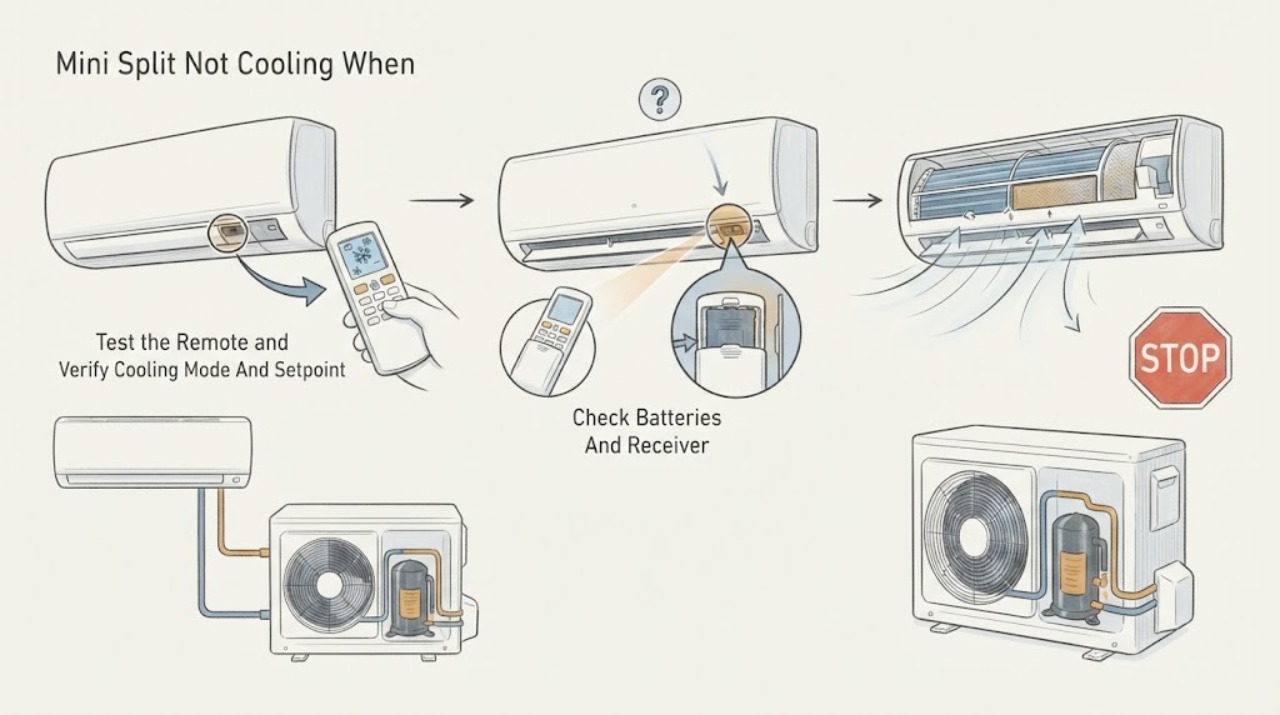
If a mini split remote calls for cooling but the room does not cool, first separate a command problem from a cooling problem. Confirm that the remote display changes, the indoor unit acknowledges the command, the selected mode is Cool rather than Fan, Dry, Auto, or a timer-only function, and the setpoint is calling for cooling. Replace weak remote batteries, clear the indoor receiver, and use the exact model manual for pairing or multi-unit selection. Then check only the accessible filter and visible airflow around the indoor and outdoor units. A clean filter and a confirmed command do not prove that the system has refrigerant, a working compressor, or an unobstructed coil. Do not open the indoor or outdoor cabinet, handle refrigerant, measure live voltage, or force a test mode. Turn the mini split off and arrange qualified HVAC service if the remote sends a command but the unit does not respond, the outdoor unit does not run, airflow is weak, ice or water appears, the system blows room-temperature air after a normal call, or a breaker, burning smell, or other safety warning occurs.
Work through in order
Diagnostic checks
Use only checks that match the exact appliance or system and its official guide.
-
Check 1
Point the supplied remote at the indoor unit and press the power, mode, and temperature controls once each; watch for a display change, chime, indicator change, louver response, or other model-described acknowledgement without repeatedly sending commands.
Expected result: The remote display is blank, the display changes but the indoor unit gives no acknowledgement, the unit acknowledges the command, or a beep or symbol indicates a function is unavailable.
Next step: Record the remote display and indoor-unit response, then check batteries and receiver clearance. Do not force a mode or test sequence when the manual does not describe it.
Stop if: Do not open the remote or indoor unit beyond the battery cover, repeatedly press controls, or continue if there is smoke, a burning smell, exposed wiring, water near power, or another immediate hazard.
Why this matters
Why: A blank remote, no acknowledgement, or an unsupported symbol keeps batteries, signal path, receiver, pairing, unit selection, and model-specific function limits in focus. An acknowledgement shifts attention toward the selected mode, airflow, outdoor unit, refrigerant, compressor, and controls rather than the remote alone.
-
Check 2
Using the exact owner’s manual, verify that the remote shows Cool, the desired temperature is below the room condition, fan and timer settings are understood, and no Auto, Fan-only, Dry, sleep, or energy-saving function is preventing the expected cooling call.
Expected result: The remote is in Fan, Auto, Dry, or a timer function, the setpoint is not calling for cooling, the mode is correct, or a multi-unit or central-control restriction is shown.
Next step: Correct only an obvious setting according to the manual and observe one normal call. If the unit still does not cool or another controller limits the mode, document the display and arrange HVAC service.
Stop if: Do not invent button combinations, defeat a central lockout, change hidden installer settings, or repeatedly switch modes to force operation.
Why this matters
Why: A remote can appear to call for cooling while the unit is only circulating air or following another schedule. A correct Cool call with an acknowledgement means settings are less likely to be the whole fault and the air path and outdoor system should be checked.
-
Check 3
Replace the remote batteries with the type specified by the manual, make sure the indoor unit’s infrared receiver is not covered, and if the model permits it use a phone-camera check of the transmitter without exposing the unit to water or opening it.
Expected result: The remote display returns after new batteries, a transmitter light is visible on a compatible phone camera, the indoor unit acknowledges the signal, or the receiver still does not respond.
Next step: Use the manual’s pairing or unit-selection procedure only if needed and record the result. If the receiver remains unresponsive or the unit acknowledges but does not cool, arrange service.
Stop if: Do not open the remote beyond its battery compartment, expose the receiver to liquid, stare into an unknown infrared source, or remove the indoor cover to reach the receiver.
Why this matters
Why: A blank or unstable display points to remote power or remote failure. A visible transmitter signal with no indoor response shifts attention to receiver obstruction, pairing, unit selection, control, or the appliance itself. A phone camera cannot prove that every remote command or receiver function works, and some phones cannot detect the signal.
-
Check 4
Turn the mini split off and inspect the accessible indoor filter and air inlet, then check from a safe position that the indoor discharge and outdoor unit are not blocked by curtains, furniture, leaves, snow, or other loose debris; clean only as the model manual directs.
Expected result: The filter is visibly dirty, the indoor intake or discharge is blocked, the outdoor unit has an obstruction, airflow is weak, or the paths are clear.
Next step: Restore only clean, dry, correctly installed accessible filters and clear loose external obstacles without touching coils or wiring. Observe one normal cooling call; arrange service if airflow or cooling remains poor.
Stop if: Do not reach into a fan, remove coil covers, bend fins, climb, spray water into the unit, or operate with a missing filter or damaged grille.
Why this matters
Why: Restricted indoor or outdoor airflow can reduce cooling and can make a valid remote call look ineffective. Clear paths and a clean filter make refrigerant, coil, fan, compressor, control, and drain diagnosis more important if the unit still blows warm or room-temperature air.
-
Check 5
During one correctly configured cooling call, observe externally whether the indoor fan runs, airflow is weak or normal, the outdoor unit starts, the air remains room-temperature, and ice, water, unusual noise, or an error indication appears; do not remove panels or force a test run.
Expected result: The indoor unit runs with weak airflow, the indoor unit runs but the air is not cool, the outdoor unit does not start, ice or water appears, or cooling improves after the filter and airflow check.
Next step: Record the sequence, location, and display indication. Turn the system off for ice, a severe leak, smoke, burning odor, damaged wiring, or a damaging noise; otherwise arrange qualified HVAC service when cooling does not return.
Stop if: Do not touch the outdoor fan or electrical compartment, add refrigerant, reset a recurring breaker, chip ice, or continue operation after a serious warning.
Why this matters
Why: Weak airflow keeps filter, indoor coil, blower, or air-path issues in focus. Normal airflow with no cooling keeps refrigerant, outdoor fan, compressor, coil, or controls possible. An outdoor unit that does not start, ice, water, noise, or an error indication requires professional diagnosis rather than a remote replacement.
-
Check 6
Prepare the indoor and outdoor model labels, remote display and battery result, mode and setpoint, acknowledgement or beep, unit-selection or controller status, filter and airflow condition, outdoor-unit response, duration, weather, frost or water, and any error indication.
Expected result: The remote sends a command but cooling does not start, cooling is weak, the outdoor unit is silent, the problem is intermittent, or a warning symptom is present.
Next step: Give the record to a qualified HVAC technician and request diagnosis of the complete command and cooling sequence. Keep the system off when it is unsafe or causing water or electrical damage.
Stop if: Do not perform live voltage tests, open the refrigerant circuit, install a control board, replace a compressor, or bypass an interlock or sensor.
Why this matters
Why: This record lets a technician separate a remote or receiver path from airflow, control, fan, compressor, refrigerant, drain, and installation issues. A remote command alone does not identify a failed part or justify ordering one.
Use your observations
Decision map
Find the observation that best matches what you see, then follow the next safe action.
-
PATH 01Next step
What you see
The remote display works, but the indoor unit gives no chime, indicator, louver, or other model-described response after batteries and receiver clearance are checked.
Do this next
Use only the model manual’s pairing or unit-selection instructions and arrange HVAC service if the unit remains unresponsive. Do not open the indoor unit or guess at a receiver part.
Why this path and its safety boundary
Why it matters: A transmitter, receiver, pairing, unit-selection, power, or control path is more likely than a refrigerant-only cooling problem.
-
PATH 02Next step
What you see
The indoor unit acknowledges Cool, but airflow remains room-temperature or the room does not cool after the accessible filter and airflow checks.
Do this next
Stop at external observations and arrange qualified HVAC diagnosis; do not add refrigerant or replace a compressor or board from the symptom alone.
Why this path and its safety boundary
Why it matters: The remote path is less likely to be the primary fault. Refrigerant, indoor or outdoor coil, fan, compressor, drain, control, or installation problems remain possible.
-
PATH 03Next step
What you see
The unit acknowledges cooling but airflow is weak and the filter, indoor intake, or outdoor airflow path is visibly restricted.
Do this next
Clean or restore the accessible filter and clear only loose external obstacles according to the manual. Arrange service if airflow remains weak, ice appears, or cooling does not return.
Why this path and its safety boundary
Why it matters: An airflow restriction is more likely to be contributing than a remote communication fault, although a dirty coil or blower problem may remain after the filter is clean.
-
PATH 04Next step
What you see
A confirmed Cool command and indoor airflow are present, but the outdoor unit does not start, ice forms, water leaks abnormally, or an error indication appears.
Do this next
Turn the system off for a severe leak, ice, abnormal noise, or safety warning and call a qualified HVAC technician. Do not access the outdoor cabinet.
Why this path and its safety boundary
Why it matters: An electrical, control, fan, refrigerant, coil, drain, or protection fault is more likely than a simple remote-setting issue.
-
PATH 05Next step
What you see
The remote shows cooling, but a second controller, unit-selection indicator, central restriction, unsupported-function beep, or another indoor unit prevents the requested mode.
Do this next
Document the controller and display state and follow the exact system manual. If the restriction cannot be resolved without installer access, arrange qualified HVAC service.
Why this path and its safety boundary
Why it matters: The command may be valid for the remote but not permitted for that indoor unit or system configuration; this is a control and configuration branch, not proof of a failed cooling component.
Helpful context
Understand the symptom
A remote command is not proof that cooling is operating
The remote can display Cool while the indoor unit is not receiving the infrared signal, is assigned to another indoor unit, or is in a different function. If the unit acknowledges the command but delivers room-temperature air, the remote path is less likely to be the only problem. Airflow restriction, an obstructed outdoor unit, refrigerant loss, compressor or fan trouble, and control faults require different checks and often professional testing.
Use model-specific remote behavior
Remote layouts, pairing, unit-selection, timers, and supported modes vary by model. An unfamiliar symbol, repeated beep, or missing response should be compared with the owner’s manual rather than guessed. In a system with multiple indoor units or a central controller, another control may limit which mode can be selected; document that condition for the technician.
Keep the checks outside the refrigeration and electrical boundaries
A homeowner can replace remote batteries, clear a receiver, verify a mode, clean an accessible filter, and remove loose obstacles from around the outdoor unit when the manual permits it. Do not remove covers, touch terminals, open refrigerant lines, add refrigerant, or run an undocumented forced-cooling procedure.
Safety boundary
Stop conditions
- Stop troubleshooting if the indoor unit or outdoor unit is unresponsive after the model-specific remote checks, if access requires removing covers, or if there is ice, water near electrical parts, smoke, a burning or electrical odor, exposed wiring, severe vibration, a refrigerant concern, or a repeatedly tripping breaker. Turn the system off and arrange qualified HVAC service for persistent no cooling, weak airflow, an outdoor unit that does not start, an error indication, or a remote command that is acknowledged but produces room-temperature air. Do not open the cabinet, measure live voltage, handle refrigerant, add refrigerant, force a test mode, chip ice, bypass controls, or replace a part from the remote symptom alone.
Only after diagnosis
Potential parts
- wireless remote control
Consider this only if the model manual and professional testing confirm that the remote transmitter fails while the indoor receiver and appliance operate correctly.
Confirm the exact indoor-unit model and supported remote before selecting a replacement; a similar display does not establish compatibility. - infrared receiver or receiver board
Consider this only if the remote sends a valid signal but the indoor unit fails to receive it and professional testing rules out power, pairing, and control issues.
Verify the exact indoor-unit model and manufacturer service information before selecting a receiver component. - indoor air filter
Consider this only when the model manual identifies a damaged or non-serviceable filter after airflow restriction has been confirmed.
Match the filter to the indoor-unit model and manual; do not substitute a restrictive or incorrectly sized filter.
When checks do not resolve it
Need a professional?
Call a qualified HVAC technician when the remote sends or the indoor unit acknowledges a cooling call but the mini split does not cool after the manual-approved settings, battery, receiver, filter, and visible-airflow checks. Call promptly for a persistent code, no outdoor-unit operation, ice, water, damaged wiring, smoke, burning odor, severe noise, or repeated breaker trips.
Have this ready
- Provide indoor and outdoor model labels, remote display and battery result, mode and setpoint, acknowledgement or beep, controller or unit-selection status, filter and airflow observations, outdoor-unit response, timing, weather, frost or water, and any code.
Common questions
FAQ
Why does my mini split respond to the remote but not cool?
A response confirms that at least some command path is working, but it does not prove that the system is in Cool mode or that the outdoor compressor, fan, coils, refrigerant, and controls are working. Verify the mode and filter and outdoor airflow, then arrange service if the unit still blows room-temperature air.
What should I check when the remote says Cool but the mini split blows warm air?
Confirm the remote is actually in Cool rather than Fan, Auto, or Dry, then check the accessible filter and visible outdoor airflow path. If the indoor unit acknowledges the command but air remains warm or the outdoor unit does not start, refrigerant, fan, compressor, control, or electrical diagnosis is needed.
Can weak remote batteries cause a mini split not to cool?
Yes, weak batteries can prevent a command from reaching the unit or make the remote display and signal unreliable. Replace them with the type specified by the manual and confirm an indoor-unit acknowledgement; if the unit acknowledges but does not cool, investigate the cooling system separately.
How can I tell whether the mini split remote is sending a signal?
LG describes using a compatible phone camera to look for the remote transmitter light, while cautioning that some phones may not detect infrared. A visible transmitter signal with no indoor response points toward receiver, pairing, unit-selection, power, or appliance controls rather than proving the remote is fully compatible.
Can a dirty mini split filter cause no cooling?
A dirty filter can restrict airflow and reduce cooling performance, but it does not prove that the filter is the only fault. Clean an accessible filter only as the model manual directs; persistent weak airflow, ice, or no cooling requires HVAC diagnosis.
When should I call a technician for a mini split that will not cool?
Call when the remote command is acknowledged but cooling does not return after the manual-approved settings, battery, filter, and visible-airflow checks, or when the outdoor unit does not start, ice or water appears, a code displays, airflow is weak, or there is a burning smell, smoke, damaged wiring, severe noise, or a repeatedly tripping breaker.
Read the exact guide
Official sources
- Do Mini Splits Heat and Cool? How Ductless Systems WorkCarrier · Manufacturer explanation of indoor and outdoor units, compressor, refrigerant lines, mode operation, filter care, and outdoor clearance.
- Mini Split Repair Guide | Troubleshooting & ServiceCarrier · Manufacturer guidance on remote mode, filter, outdoor unit, refrigerant, ice, airflow, electrical, compressor, and professional diagnosis paths.
- Ductless Heating & CoolingENERGY STAR · Government-backed guidance applicable to ductless mini-splits for outdoor airflow, explicit mode selection, fan use, and filter care.
- [LG Air Conditioner] Perform a Pre-Summer Check to Stay CoolLG · Manufacturer guidance on remote batteries and signal, filter cleaning, outdoor obstructions, indoor airflow, and model-specific operation checks.
- [LG Air Conditioner] Remote Control Not WorkingLG USA Support · Manufacturer support for remote display, infrared signal, receiver obstruction, compatible remote, and multi-unit selection checks.
Community feedback
Share a repair observation
Share a plain-text repair observation. Accepted observations are published automatically; this page may take a moment to update.