
On this page
Start here
Quick answer
Start with the controls and airflow, not the refrigerant circuit. Confirm that the Mitsubishi mini split is powered, set to Cool rather than Fan or another mode, and given a lower target temperature than the room. Check the remote batteries and timer or central-control indicators, clean the accessible indoor filter as the model manual allows, and make sure the indoor outlet and outdoor unit are not blocked. A short delay after restarting can be normal, but an operation lamp that flashes, a displayed error code, repeated breaker trips, water leakage, unusual noise, or an outdoor unit that never starts is a reason to turn the system off and call qualified HVAC service. Do not open the electrical covers, add refrigerant, loosen refrigerant fittings, or attempt a board, compressor, fan, or sensor repair.
Before you begin
Safety first
- This article covers controller checks, model identification, accessible filter care, safe visual air-path checks, and recording indicators only. Qualified HVAC service is required for electrical testing, refrigerant work, coil or drain access, control boards, sensors, fan motors, compressors, and sealed-system diagnosis.
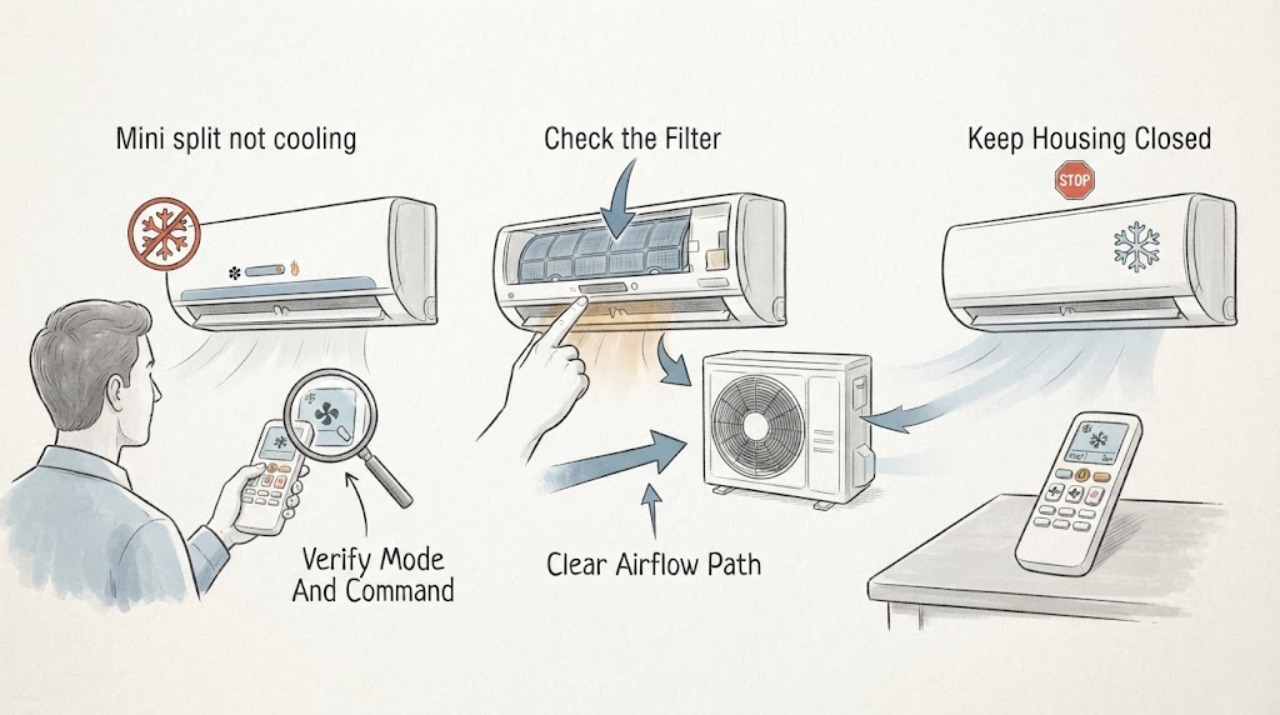
Work through in order
Diagnostic checks
Use only checks that match the exact appliance or system and its official guide.
-
Check 1
Use the Mitsubishi remote or controller without opening the unit: confirm the unit is on, the operating mode is Cool, the target temperature is below the room temperature, and no timer or central-control lock is active.
Expected result: Record whether the indoor unit responds, the target and room temperatures shown, the selected mode, any timer or control-lock indication, and whether the remote display is weak or blank.
Next step: Replace remote batteries only as the remote instructions allow, clear an unintended timer, and allow the system's normal start delay. If the mode is correct but cooling does not begin, continue with airflow and indicator checks.
Stop if: Do not open the remote or indoor unit, repeatedly cycle power, or override a central controller or safety lock.
Why this matters
Why: A Fan, Dry, Auto, timer, lock, or weak-remote condition can make a working system appear not to cool. A correct Cool command with normal response points the next check toward airflow and the outdoor unit.
-
Check 2
From ordinary access, remove and inspect only the accessible indoor air filter using the exact Mitsubishi model instructions; clean it with the permitted method and reinstall it fully dry and seated.
Expected result: Record whether the filter is visibly loaded with dust, whether airflow improves after cleaning, and whether the indoor coil or cabinet shows ice, water, or contamination that is not reachable by routine filter care.
Next step: Run one normal cooling test after the filter is correctly installed. If airflow remains weak, ice or leakage is present, or cooling does not improve, turn the unit off as appropriate and arrange qualified HVAC service.
Stop if: Do not wash electrical parts, pour water or spray into the unit, scrape a coil, or operate with a wet, damaged, or missing filter.
Why this matters
Why: A dirty filter can reduce airflow and cooling. Ice, water, a contaminated coil, or unchanged weak airflow points beyond routine filter maintenance and may indicate airflow, drain, refrigerant, or control service needs.
-
Check 3
With the system off if an obstruction must be moved, inspect the indoor air inlet and outlet and the outdoor unit's visible surrounding space without opening panels or touching the fan, coil, wiring, or refrigerant lines.
Expected result: Record whether curtains, furniture, dust, leaves, snow, stored items, or another obstruction limits airflow, and whether the outdoor fan operates during a normal cooling call.
Next step: Remove only loose items that are plainly safe to move away from the air path, then allow one normal cooling call. If the fan does not run, ice remains, or the outdoor unit is damaged, stop and call HVAC service.
Stop if: Do not reach through a grille, hose the unit, straighten coil fins, move the outdoor unit, or remove an outdoor cover.
Why this matters
Why: A blocked inlet or outlet can reduce delivered cooling and may stress the system. An outdoor unit that remains off, is iced, is damaged, or has a repeated abnormal sound requires diagnosis rather than a forced restart.
-
Check 4
Read the indoor display, operation lamp, remote message, and any error indication without opening the electrical compartment; write down the exact code or flashing pattern and the time it appears.
Expected result: Classify the result as no fault indication, an error code, a flashing operation display, a power or breaker symptom, water leakage, or unusual noise.
Next step: Use the exact model manual to identify the meaning without attempting internal repair. Turn the main switch off and contact a qualified service provider for a code, flashing lamp, repeated trip, leak, or unusual noise.
Stop if: Do not clear a recurring fault by repeated resets, bypass a safety device, or work on live electrical parts.
Why this matters
Why: A code or flashing lamp is the system's diagnostic clue and can represent a preserved safety or control state. A breaker that trips, water leak, or unusual noise is not a filter-cleaning problem.
-
Check 5
After the mode, filter, and clear-air-path checks, make one normal cooling call and observe the indoor air, outdoor unit, operation lamp, and any condensate without opening the system.
Expected result: Record whether the air becomes cooler, airflow is normal, the outdoor unit starts, the target temperature is approached, and no code, leak, ice, trip, or unusual noise appears.
Next step: If operation is normal, monitor it without repeated power cycling. If cooling remains inadequate or any abnormal condition returns, turn the system off as appropriate and arrange qualified HVAC service with the model and observations.
Stop if: Stop immediately for water entering the room, ice that persists, a flashing lamp, frequent breaker trips, burning smell, exposed wiring, unusual noise, or an outdoor unit that cannot operate normally.
Why this matters
Why: Improved cooling after a settings or filter correction supports a user-accessible airflow or control cause. No improvement or a returning abnormal indication leaves airflow, refrigerant, drain, fan, electrical, sensor, or compressor faults unresolved.
Use your observations
Decision map
Find the observation that best matches what you see, then follow the next safe action.
-
PATH 01Safety boundary
What you see
The unit responds but is in Fan, Dry, Auto, a timer state, or a target temperature that does not request cooling, or the remote is not communicating.
Do this next
Set Cool and a lower target as the exact remote instructions allow, clear an unintended timer, replace weak batteries, and allow the normal start delay before one test.
Why this path and its safety boundary
Why it matters: The symptom is consistent with a command or controller condition rather than a failed refrigerant system.
Safety stop: Do not override a central controller, repeatedly cycle the power, or open the unit to repair the remote path.
-
PATH 02Safety boundary
What you see
The mode is correct, the filter is heavily dusty, or the indoor or outdoor air path is visibly blocked, and there is no leak, ice, code, or electrical warning.
Do this next
Clean and reinstall the filter as the exact model manual permits, clear only safe loose obstructions, and make one normal cooling test.
Why this path and its safety boundary
Why it matters: Restricted airflow is plausible, but a filter correction cannot prove that the coil, fan, drain, or refrigerant circuit is healthy.
Safety stop: Do not spray the unit, reach into grilles, scrape coils, or continue running if ice, water, damage, or abnormal noise appears.
-
PATH 03Safety boundary
What you see
An error code is displayed, the operation lamp flashes, the receiver display flashes, or the system enters a repeated diagnostic state.
Do this next
Write down the exact code or pattern and the model name, turn the main switch off as the manual directs, and contact a qualified service provider.
Why this path and its safety boundary
Why it matters: The unit has identified a condition that requires model-specific interpretation; a generic reset or filter cleaning is not a repair.
Safety stop: Do not open electrical covers, bypass a sensor or interlock, or keep resetting a repeated fault.
-
PATH 04Safety boundary
What you see
The indoor fan runs in a correct cooling call, but the outdoor unit never starts, the breaker trips, or the outdoor unit makes an unusual sound.
Do this next
Stop repeated restarts, note the breaker and indicator behavior, and arrange qualified HVAC diagnosis.
Why this path and its safety boundary
Why it matters: Power, communication, fan, inverter, compressor, control, or protection faults are possible and cannot be distinguished from safe visual checks.
Safety stop: Do not remove covers, test live voltage, touch capacitors or terminals, or force the outdoor fan or compressor to run.
-
PATH 05Safety boundary
What you see
Ice persists, water leaks indoors, airflow remains poor after filter care, or the unit blows room-temperature air despite a correct cooling call.
Do this next
Turn the system off as appropriate, protect nearby materials from water, and arrange qualified HVAC service. Ask the technician to assess airflow and any refrigerant leakage rather than adding charge by guesswork.
Why this path and its safety boundary
Why it matters: A drain, coil, fan, refrigerant, sensor, or control problem remains possible; the symptom does not identify a safe refrigerant action.
Safety stop: Do not thaw ice with heat, puncture it, loosen refrigerant fittings, add refrigerant, or operate a leaking unit.
-
PATH 06Safety boundary
What you see
The unit starts after its normal restart delay, the filter and air paths are clear, the outdoor unit runs, and cooling returns without codes, leaks, trips, or unusual noise.
Do this next
Leave the settings and filter in their correct state and monitor normal operation; record the model and conditions if the symptom returns.
Why this path and its safety boundary
Why it matters: The initial symptom may have been a control setting, restricted airflow, or normal compressor restart protection rather than a failed component.
Safety stop: Do not keep cycling power or ignore a recurring code, lamp flash, leak, ice condition, or breaker trip.
Helpful context
Understand the symptom
Verify the requested cooling
A mini split can run its fan without actively cooling. Check the remote's operating mode, target temperature, fan setting, timer, and any central-control or locked indication. After a restart, Mitsubishi manuals describe a short compressor-protection delay; do not keep cycling power to defeat it. If the remote display is blank or commands are not received, replace batteries as the remote instructions allow and note whether the indoor unit responds.
Restore ordinary airflow only from safe access
Dust on the accessible filter can reduce airflow and cooling performance. Clean or wash it only as the exact Mitsubishi model manual permits and let it dry before reinstalling. Check that curtains, furniture, dust, or stored items are not blocking the indoor outlet or outdoor unit. Never pour water or flammable spray onto the unit, and do not remove covers to reach a coil, fan, terminal, or control board.
Treat fault indicators and refrigerant symptoms as service boundaries
A flashing operation lamp, remote error code, water leak, frequent breaker trip, unusual noise, ice, or a warm indoor unit with a non-running outdoor unit needs model-specific diagnosis. The manual directs users not to repair the system themselves in these conditions. Refrigerant charge, leaks, electrical components, sensors, inverter controls, fan motors, and compressor faults require qualified service and should not be guessed from airflow alone.
Safety boundary
Stop conditions
- Do not open electrical covers, test live circuits, touch capacitors or terminals, or bypass a safety device.
- Do not add refrigerant, loosen refrigerant fittings, thaw ice with heat, or attempt a leak repair.
- Do not pour water or flammable spray onto the unit, hose the outdoor unit, reach through a grille, or scrape coils.
- Stop for an error code, flashing operation lamp, frequent breaker trip, water leak, persistent ice, burning smell, exposed wiring, or unusual noise.
- Stop repeated resets and call qualified HVAC service when correct settings and permitted filter care do not restore cooling.
Only after diagnosis
Potential parts
- model-specific air filter
Consider this category only when the exact model's accessible filter is damaged, missing, or cannot be restored by permitted cleaning.
Confirm the indoor-unit model, filter dimensions, frame, and manufacturer documentation; do not operate with an ill-fitting filter. - model-specific remote controller
Consider this category only when the exact remote is damaged or cannot communicate after permitted battery and setting checks, and the indoor unit is otherwise responsive.
Confirm the indoor-unit series and controller compatibility with Mitsubishi Electric or a qualified technician before ordering. - model-specific indoor or outdoor control component
Consider this category only after qualified diagnosis identifies a failed sensor, control board, fan component, or other model-specific part; lack of cooling alone does not justify replacement.
Confirm the complete indoor and outdoor model, revision, wiring, firmware or control family, and installation requirements with qualified service.
When checks do not resolve it
Need a professional?
Arrange qualified HVAC service when correct Cool-mode settings, permitted filter care, and safe air-path checks do not restore cooling, or when the outdoor unit does not run. Call promptly for an error code, flashing operation lamp, water leak, persistent ice, frequent breaker trips, unusual noise, burning smell, exposed wiring, or any need to open the electrical or refrigerant system. Mitsubishi Electric guidance says not to attempt repairs yourself in fault-indicator conditions.
Safety scope: This article covers controller checks, model identification, accessible filter care, safe visual air-path checks, and recording indicators only. Qualified HVAC service is required for electrical testing, refrigerant work, coil or drain access, control boards, sensors, fan motors, compressors, and sealed-system diagnosis.
Common questions
FAQ
Why is my Mitsubishi mini split running but not cooling?
Confirm Cool mode and a lower target temperature, then check the accessible filter and clear air paths. If the outdoor unit does not run, a code or flashing lamp appears, or cooling remains weak, arrange qualified HVAC diagnosis rather than adding refrigerant.
How long should I wait after restarting a Mitsubishi mini split?
Mitsubishi Electric manuals describe a normal compressor restart-protection delay. Allow the period specified by the exact model manual and avoid repeated power cycling; persistent non-cooling needs service.
Can a dirty filter stop a Mitsubishi mini split from cooling?
A dirty filter can reduce airflow and cooling performance. Clean it only with the exact model's permitted method, reinstall it dry and seated, and call service if airflow remains weak or ice or water appears.
What does a flashing operation lamp or error code mean?
It is a diagnostic clue that needs the exact model manual. Record the code or pattern and model, turn the main switch off as directed, and contact a qualified service provider instead of opening the unit or repeatedly resetting it.
Should I add refrigerant when a Mitsubishi mini split is not cooling?
No. Lack of cooling does not prove low charge, and refrigerant work requires qualified diagnosis for leaks, airflow, controls, and safe charging. Do not loosen fittings or add refrigerant yourself.
Read the exact guide
Official sources
- 4. TroubleshootingMitsubishi Electric · Mitsubishi Electric operating manual for a different model family; it is used for general manufacturer troubleshooting principles, not for unverified model-specific settings.
- 6. TroubleshootingMitsubishi Electric · Mitsubishi Electric operating manual for the model family shown in the opened PDF; use the installed unit's exact manual for controls and maintenance details.
Community feedback
Share a repair observation
Share a plain-text repair observation. Accepted observations are published automatically; this page may take a moment to update.