
On this page
Start here
Quick answer
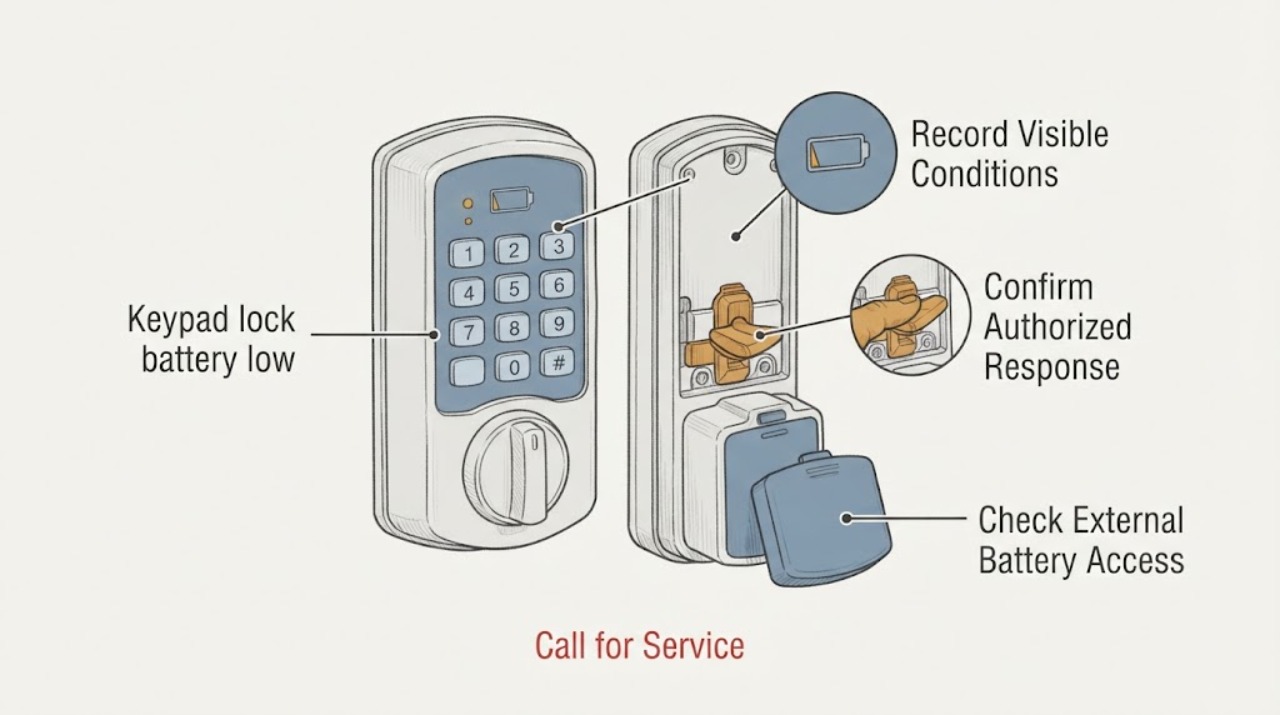
Treat a low-battery warning as a time-sensitive maintenance signal, not as a reason to disable or bypass the lock. Observe the keypad light, tone, app status, and whether an authorized code produces the normal response. If the manufacturer documents an externally accessible battery compartment, follow only that model's battery instructions without removing the lock body or forcing a cover. Keep a physical key, authorized backup access, or another safe entry plan available before testing anything; never lock the only route while the battery is low. If the keypad is unresponsive, the battery compartment is inaccessible or damaged, the lock is already securing the door, or someone may be locked out or at life-safety risk, stop and call a qualified locksmith or the manufacturer's support service. Do not pick, bypass, defeat, or force the lock.
Work through in order
Diagnostic checks
Use only checks that match the exact appliance or system and its official guide.
-
Check 1
From the normal outside or inside position, record the keypad's light pattern, low-battery icon, audible tone, app notification, and the time the warning first appeared. Do not repeatedly press keys or try unverified codes to make the warning recur.
Expected result: The keypad shows a clear low-battery signal, the app reports low power, the keypad is silent or dark, or the warning is intermittent with another fault indication.
Next step: Record the exact model and follow only its ordinary battery guidance, with an authorized backup access plan ready. Escalate if the lock is unresponsive or the indication is unclear.
Stop if: Stop if there is no safe backup entry, the keypad is hot or damaged, the lock is already securing the door, or repeated input would risk lockout.
Why this matters
Why: A manufacturer-defined low-battery signal supports a battery-maintenance path; a dark or unresponsive keypad may mean the battery is already depleted or that another lock or power issue exists. The signal does not identify the correct battery type without the model documentation.
-
Check 2
If the door is currently accessible and a backup entry method is ready, make at most one ordinary authorized code or credential attempt and observe the normal light, tone, and lock response. Do not test by closing the door, repeated guessing, forcing the handle, or trying to defeat the latch.
Expected result: The authorized attempt works normally, works slowly or inconsistently, produces a low-battery warning, or produces no response.
Next step: Keep the door accessible and follow the model's documented battery path only if the compartment is externally accessible without lock removal. Otherwise call a locksmith or manufacturer support.
Stop if: Stop immediately for no response, an unexpected latch state, repeated error tones, a jammed handle, or any risk of locking someone out.
Why this matters
Why: A successful but warned response suggests maintenance is due; delayed or inconsistent response may indicate battery depletion or a mechanical/electronic issue. No response requires service rather than bypass or repeated attempts.
-
Check 3
Using the exact manufacturer manual for the identified model, observe whether the battery compartment or keypad cover is designed to open from the permitted side without removing the lock or exposing its internal security mechanism. Do not pry, force, remove the lock assembly, or use tools not specified by that manual.
Expected result: The manual shows a normal external battery access path, the cover is stuck or damaged, the compartment is inside an inaccessible room, or the model instructions cannot be found.
Next step: Use only the model-approved battery information when access is normal and secure a backup entry method first. Call service for any force, uncertainty, lock-body access, or inaccessible compartment.
Stop if: Stop for resistance, a damaged cover, exposed electronics, missing documentation, or any need to remove the keypad or lock from the door.
Why this matters
Why: A documented external compartment may support a normal battery replacement; a stuck, damaged, internal-only, or unidentified compartment makes the task a locksmith or manufacturer-service decision. Different keypads can use different battery chemistry and counts.
-
Check 4
Record the battery type and replacement history only from the label, manual, or app already available, and note recent moisture, temperature exposure, installation, firmware, or lock-behavior changes. Do not mix battery types, insert an unknown substitute, reset the lock, or erase codes as a guess.
Expected result: The battery information is clear, the battery is old or unknown, the lock has recent environmental or installation history, or the keypad has other warnings.
Next step: Provide the model, warning signal, battery history, access state, and other symptoms to service. Preserve existing authorized credentials and backup entry options.
Stop if: Stop when the next step would change programming, erase codes, open the lock body, or use an unverified battery or emergency method.
Why this matters
Why: Clear model and battery information helps avoid an incompatible replacement; unknown information or additional symptoms point toward manufacturer or locksmith diagnosis. Resetting or changing credentials can create an access or security problem unrelated to the battery.
-
Check 5
Before any battery work or door closure, confirm that an authorized spare key, another permitted entry route, or a responsible person with access is available, and note whether anyone depends on this door for medication, mobility, emergency egress, or immediate shelter. Do not lock the only route to test the keypad.
Expected result: A reliable backup is available, the backup is uncertain, someone may be locked out, or there is an immediate life-safety dependency.
Next step: Keep the door in a safe accessible state and contact a locksmith or emergency service when access or life safety could be compromised.
Stop if: Stop all maintenance for a lockout, a person in danger, a blocked emergency exit, or any situation where access cannot be guaranteed.
Why this matters
Why: A backup route turns low-risk battery maintenance into a controlled task; no backup or a life-safety dependency makes lockout unacceptable. Access planning takes priority over troubleshooting.
Use your observations
Decision map
Find the observation that best matches what you see, then follow the next safe action.
-
PATH 01Next step
What you see
The low-battery signal is clear, the door is accessible, and a reliable authorized backup entry is ready
Do this next
Follow only the identified model's externally accessible battery instructions and use the documented battery type. Do not remove the lock body, reset credentials, or force the cover.
-
PATH 02Next step
What you see
The keypad is dark, unresponsive, inconsistent, or gives an unexpected latch response
Do this next
Stop repeated input and keep the door accessible if possible. Request qualified lock service; do not bypass, pick, force, or defeat the lock.
-
PATH 03Next step
What you see
The battery compartment is stuck, damaged, internal-only, or the model instructions are unavailable
Do this next
Do not pry or remove the lock. Contact a locksmith or the manufacturer with the model and visible condition.
-
PATH 04Next step
What you see
No backup entry is available, the only route may lock, or someone has an immediate life-safety need
Do this next
Do not close or lock the door for testing. Arrange locksmith or emergency assistance and preserve the safe access route.
-
PATH 05Next step
What you see
A normal documented battery change does not clear the warning or the lock remains unreliable
Do this next
Stop further maintenance and request professional diagnosis for the battery contacts, keypad, lock mechanism, or control electronics.
Helpful context
Understand the symptom
A warning is different from a dead keypad
Manufacturers use different battery sizes, indicators, compartments, and emergency-access designs. A flashing low-battery symbol, tone, or app notification can be a straightforward maintenance warning, while no keypad response may also involve a depleted battery, a connection issue, a lock condition, or a model-specific fault. Record the signal and model before selecting a battery or replacement lock.
Keep access and security intact
Do not remove the lock from the door, expose internal electronics, manipulate the latch, enter an unverified code repeatedly, or try to defeat the lock. Do not close and lock a door when no authorized backup entry is available. A locksmith can preserve the security boundary while restoring access or replacing a failed component.
Only after diagnosis
Potential parts
- lock-battery
Only consider a battery after the lock model and manufacturer instructions confirm the required battery type and the compartment is designed for safe external access.
Match the exact model, battery chemistry, size, count, orientation, and manufacturer guidance; do not mix types or use an unverified substitute. - keypad-lock-replacement
Consider a replacement lock only when professional diagnosis shows that battery maintenance, contacts, keypad, or electronics cannot restore reliable authorized operation.
Confirm door preparation, backset, handing, security grade, connectivity, credential migration, and manufacturer fit with a locksmith or exact product documentation.
When checks do not resolve it
Need a professional?
Call a qualified locksmith or manufacturer support when the keypad is unresponsive, the low-battery signal persists after a documented battery change, the compartment is stuck or inaccessible, the lock is already securing the door, there is no backup entry route, or a person has an immediate life-safety need. Do not attempt bypass or forced entry.
Have this ready
- Provide the lock brand and model if visible, keypad light and tone pattern, app status if already configured, authorized response behavior, battery type and history, compartment condition, door accessibility, backup-entry status, and any moisture or impact history.
Common questions
FAQ
What does a low-battery warning on a keypad lock mean?
It usually means the lock or keypad needs the battery replaced according to its exact manufacturer instructions, but a dark or unresponsive keypad can have another fault. Record the indicator and model, preserve a backup entry method, and avoid repeated code attempts.
Can I replace the keypad lock battery myself?
Only when the exact manual shows a normal externally accessible battery compartment and you have authorized backup access. Do not remove the lock body, force a cover, reset credentials, or use an unverified battery; call a locksmith if access is unclear.
What if the keypad lock stops responding completely?
Keep the door and any authorized backup route safe, stop repeated input, and contact a qualified locksmith or manufacturer support. Do not pick, bypass, defeat, or force the lock, especially when someone may be locked out or has a life-safety need.
Read the exact guide
Official sources
- Changing the BatterySchlage · Schlage lock family manual; other keypad locks require their own documentation.
- Troubleshooting your Yale Smart KeypadYale Home · Yale Smart Keypad support; use the exact product manual for battery access and credentials.
- Everyday Use with the Yale Smart Keypad 2 - FingerprintYale Home · Yale Smart Keypad 2 support; other locks may use different battery warnings and procedures.
Community feedback
Share a repair observation
Share a plain-text repair observation. Accepted observations are published automatically; this page may take a moment to update.