
On this page
Start here
Quick answer
Replacing a keypad lock can improve how you control entry, but a keypad does not automatically make a weak door, loose frame, misaligned deadbolt, or unmanaged code secure. First check whether the existing door closes squarely and whether the bolt extends and retracts smoothly into the strike without force. Then define the upgrade you actually need: keyless entry, separate guest codes, temporary access, automatic locking, remote alerts, or simply a new local keypad. Compare the candidate lock's door preparation, deadbolt and strike requirements, power and emergency-entry method, credential reset process, and any app/account update policy with the existing door. Test a replacement with the door open before closing it, keep a reliable inside exit and fallback method, and stop for a loose frame, binding bolt, damaged door, unknown prior administrator, or any installation that requires structural door work or leaves the lock unable to secure.
Before you begin
Safety first
- Do not force a binding bolt, disable inside egress, drill or enlarge the door or frame by guesswork, defeat a fire-rated or controlled-egress door, rely on a former owner's code or account, or leave a replacement installed when it cannot fully secure and release normally. Keep the door supervised during testing and use qualified service for structural, glass, electrical, or access-control work.
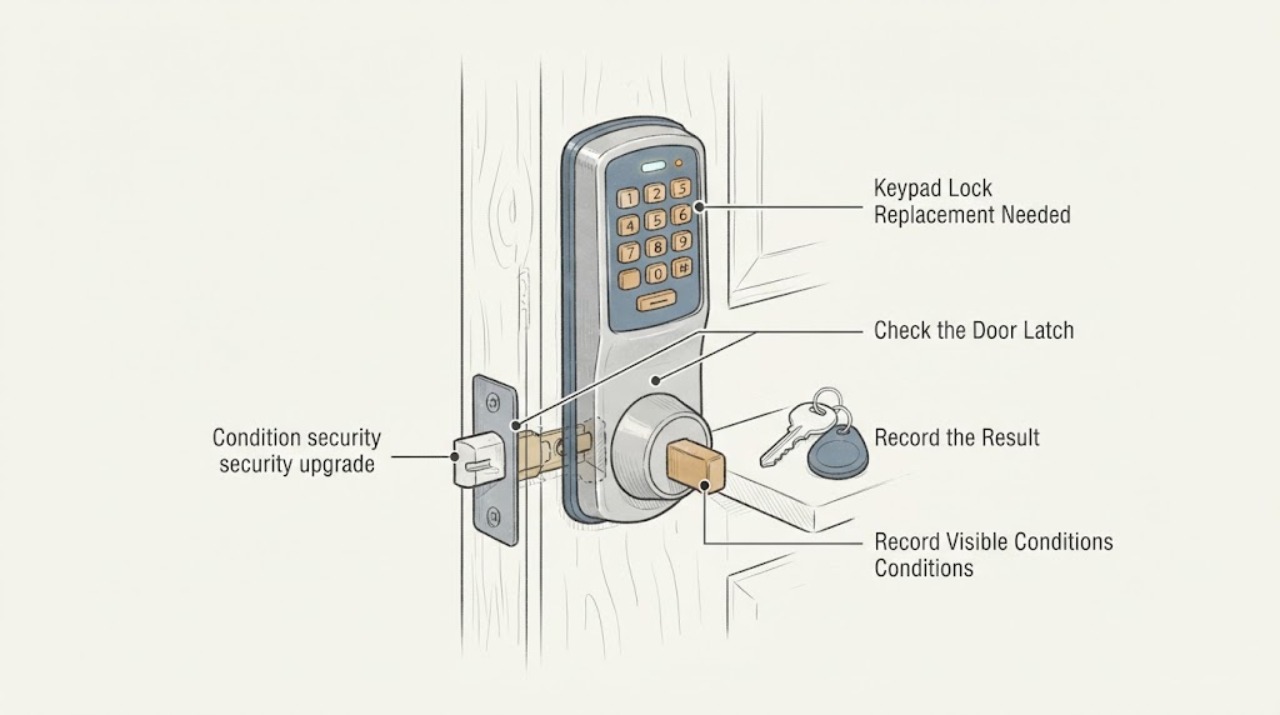
Work through in order
Diagnostic checks
Use only checks that match the exact appliance or system and its official guide.
-
Check 1
With the door open, operate the existing deadbolt and inspect the latch, strike, door edge, frame, hinges, and visible fasteners. Then close the door normally and try the lock without forcing the key, thumbturn, or bolt.
Expected result: The bolt moves smoothly only with the door open; it binds or stops when the door is closed; the strike or frame is loose; the door rubs or does not latch; or the existing hardware works smoothly in both positions.
Next step: Repair or arrange locksmith service for a loose frame, damaged strike, rubbing door, or binding bolt before selecting a keypad. Do not force the bolt or use the new lock to compensate for a door that cannot close and latch correctly.
Stop if: Stop if the door cannot be opened from inside normally, the bolt jams, the frame moves, the strike is pulled out, or the door cannot remain securely closed.
Why this matters
Why: Binding only when closed points to door, jamb, strike, or alignment rather than a keypad feature. A loose or damaged frame is a physical security defect that a new electronic lock may not correct. Smooth operation in both positions supports moving on to access and compatibility requirements.
-
Check 2
Write down the actual upgrade objective before comparing locks: keyless entry only, separate household and guest codes, temporary access, automatic locking, local operation during an outage, remote alerts, or a record of entry. Note whether the opening is an exterior door, garage entry, side door, or another controlled passage.
Expected result: The need is local code entry; multiple or temporary credentials; remote control and alerts; easier access without a key; or replacement of a damaged mechanical lock.
Next step: Use the objective to create a short requirement list and reject features that do not solve it. Do not treat remote access, auto-lock, or a backlit keypad as proof of stronger resistance to forced entry.
Why this matters
Why: A battery keypad can address local code entry without requiring connected services, while remote functions introduce account, network, update, and privacy dependencies. A damaged mechanical lock or weak opening needs physical repair regardless of the desired electronics.
-
Check 3
Compare the candidate lock's official installation guide with the existing opening without drilling or removing the current lock: check the door thickness range, bore and edge preparation, backset, latch and strike arrangement, interior clearance, handing process, and whether the door and frame are suitable for the stated lock type.
Expected result: The existing opening matches the guide; the guide requires a different preparation; the strike or jamb opening is shallow or offset; the interior assembly would interfere with trim or glass; or the measurements cannot be confirmed.
Next step: Choose only a lock whose manufacturer documentation matches the opening, or have a locksmith assess the door and make any structural preparation. Do not enlarge holes, move a strike, or alter a fire-rated or specially secured door based on guesswork.
Stop if: Stop if the guide and opening do not match, the frame is deteriorated, the door is fire-rated or part of a controlled egress system, or preparation would require structural cutting.
Why this matters
Why: A physical mismatch can make the bolt bind, prevent full extension, pinch a cable, or leave the strike weak. Compatibility cannot be inferred from the keypad face or from a lock that looks similar to the existing one.
-
Check 4
Review the lock's documented power and credential-failure behavior: low-battery warning, battery replacement access, emergency entry or physical fallback, inside operation, code limits and deletion process, auto-lock controls, and whether a connected model requires an account or app. Record which person will own the administrator access.
Expected result: The lock has a clear local fallback; batteries are inaccessible or warnings are unclear; old codes cannot be confirmed or removed; there is no controlled administrator account; or the desired remote feature depends on an unsupported phone, network, or service.
Next step: Prefer a documented fallback and an administrator process that the owner can control. For a previously installed smart lock, reset or transfer it according to the manufacturer and remove prior access before relying on it; use qualified service if ownership cannot be cleared.
Stop if: Stop if no authorized person can open the door from inside, a prior owner or administrator still controls the connected lock, or the documented fallback cannot be tested safely.
Why this matters
Why: A lock is not a complete upgrade if a depleted battery, forgotten code, retained former-user credential, or lost account can prevent authorized entry or leave access uncontrolled. Connected features add account and update obligations beyond the keypad itself.
-
Check 5
After installation or service, test the lock with the door open: confirm the latch and bolt move freely, the keypad accepts the intended code, unwanted or old codes are removed, the inside mechanism works, and the emergency fallback is available. Close the door only after those checks pass, then confirm the bolt fully engages without pushing or pulling the door.
Expected result: The lock works only while the door is open; the bolt binds when closed; the code or auto-lock behavior is unexpected; the inside release is difficult; or all intended functions work with the door aligned.
Next step: Leave the door unsecured only while supervised during testing, then stop using the replacement as a security device until a locksmith or the manufacturer's documented procedure corrects any binding, credential, or egress issue. Do not force the bolt or repeatedly cycle a failed lock.
Stop if: Stop immediately if the lock cannot be opened from inside, the bolt remains partly extended, the door cannot be secured, or a code is accepted that should have been deleted.
Why this matters
Why: A door-open success followed by closed-door binding indicates alignment or strike trouble, not a code problem. An unexpected code, auto-lock, or account result is an access-control failure that should be corrected before the lock is trusted.
Use your observations
Decision map
Find the observation that best matches what you see, then follow the next safe action.
-
PATH 01Next step
What you see
The door and existing deadbolt are aligned and sound, the need is local keyless entry or controlled guest codes, and remote access is not required.
Do this next
Compare the official installation and programming documentation, preserve inside egress, and test codes and bolt travel with the door open before trusting the lock.
Why this path and its safety boundary
Why it matters: A non-connected keypad replacement may satisfy the access objective while limiting account and network dependencies, provided the chosen lock's preparation and fallback match the door.
-
PATH 02Next step
What you see
The bolt works with the door open but binds when closed, the strike is loose or offset, the frame is damaged, or the door does not latch squarely.
Do this next
Arrange locksmith or qualified door service to correct alignment, frame, strike, or structural issues before installing or relying on electronic access hardware.
Why this path and its safety boundary
Why it matters: The opening's physical condition is the primary defect. A keypad can add another failure mode without improving resistance if the bolt and strike cannot engage correctly.
-
PATH 03Next step
What you see
The desired upgrade includes remote control, alerts, temporary app-based access, or an entry history, and the owner can maintain the required account and updates.
Do this next
Set up the account under the current owner, remove prior access, review permissions, apply available updates, and retain a documented local fallback. Do not rely on a former occupant's account or code.
Why this path and its safety boundary
Why it matters: A connected smart lock may fit the goal, but security now includes administrator ownership, privacy settings, phone or network dependency, and critical software updates.
-
PATH 04Next step
What you see
The keypad has weak battery warnings, no clear emergency-entry method, a difficult inside release, or the household cannot maintain the administrator or backup credential.
Do this next
Choose a documented fallback and establish battery, code, and ownership procedures before installation, or have a locksmith evaluate alternatives. Do not disable inside egress or hide an unmanaged spare credential.
Why this path and its safety boundary
Why it matters: The proposed upgrade may create lockout or egress risk even if its normal keypad function works. Convenience features do not compensate for an untested failure path.
-
PATH 05Next step
What you see
The door is fire-rated or part of a controlled egress system, the frame or glass is damaged, preparation requires structural cutting, or the lock cannot be tested without force.
Do this next
Stop the replacement and arrange qualified locksmith, door, or building-safety service that can verify the opening's requirements and document the approved hardware and installation.
Why this path and its safety boundary
Why it matters: This exceeds a routine keypad swap. Door function, egress, fire performance, or access-control requirements may be affected by an unapproved change.
Helpful context
Understand the symptom
A security upgrade has two separate layers
A keypad changes how a person presents a credential; it does not repair a door that will not close, a strike that is loose, or a deadbolt that cannot reach its opening. Physical security starts with the door, frame, latch, bolt, and strike. Access security then depends on who has a code, whether old codes can be removed, what happens when batteries fail, and whether a connected lock's account and updates remain under your control. Evaluate both layers before choosing a replacement.
Preserve safe exit and fallback access
A lock upgrade must not prevent occupants from leaving normally or leave the property inaccessible when power, batteries, a phone, or a network is unavailable. Keep the inside mechanism usable, confirm the documented emergency-entry method, and avoid storing a code or backup credential where an unauthorized person can find it. Do not disable a required egress function, defeat a latch, or make changes that leave the door unable to secure.
Only after diagnosis
Potential parts
- keypad electronic deadbolt or lever
Consider this category only after the door, frame, strike, bolt travel, access objective, and documented fallback are confirmed, and only when the candidate's preparation matches the opening.
Confirm door thickness, bore and edge preparation, backset, latch and strike arrangement, interior clearance, power method, egress requirements, and manufacturer fit information. Similar appearance does not establish compatibility. - matching strike or door-frame reinforcement component
Consider this category only when the existing strike or frame is loose, damaged, offset, or the approved lock installation documentation calls for a matching component.
Confirm the door and frame material, approved fastener pattern, lock model, and any fire or egress requirements. Do not substitute structural hardware by appearance or cut a frame without qualified assessment. - replacement batteries or documented emergency-entry accessory
Consider this category only after the selected lock's manual identifies the correct battery type or emergency-entry method and the owner has a practical maintenance and fallback plan.
Match the exact lock model and manufacturer instructions. Do not infer battery type, emergency connector, or electrical compatibility from another keypad.
When checks do not resolve it
Need a professional?
Stop and arrange qualified locksmith or door service for a binding or partly extending bolt, a loose or damaged strike or frame, a door that will not latch, cracked or damaged door material, fire-rated or controlled-egress openings, unknown prior smart-lock ownership, an untestable emergency fallback, or any installation requiring structural cutting or force. Do not trust a keypad upgrade until the door secures and releases normally from both sides.
Safety scope: Do not force a binding bolt, disable inside egress, drill or enlarge the door or frame by guesswork, defeat a fire-rated or controlled-egress door, rely on a former owner's code or account, or leave a replacement installed when it cannot fully secure and release normally. Keep the door supervised during testing and use qualified service for structural, glass, electrical, or access-control work.
Common questions
FAQ
Does replacing a keypad lock automatically improve security?
No. It can improve credential control and convenience, but physical security still depends on the door, frame, deadbolt, strike, and alignment. Verify that the bolt extends smoothly and fully when the door is closed, then review code management, battery failure, inside egress, and any connected account before calling it an upgrade.
Why does the keypad lock work with the door open but bind when closed?
That pattern usually points toward door alignment, jamb depth, strike position, or frame movement rather than the entry code. Kwikset identifies alignment and jamb-hole conditions as installation causes, and Schlage stresses a properly aligned door for a secure deadbolt installation. Correct the opening before relying on the new lock.
Is a connected smart lock safer than a local keypad?
It is a different access model, not an automatic safety ranking. Remote access and entry history add useful controls for some households but also add account, privacy, phone or network, and update dependencies. Choose connected features only when the owner can maintain the account and a local fallback remains available.
What should I do with old codes when replacing a keypad lock?
Do not assume that replacing the visible keypad removes every prior credential, especially on a connected device. Follow the manufacturer's reset and setup process, remove prior users and administrator access, create the current owner's codes, and review privacy and update settings before relying on the lock.
How should I test a replacement keypad lock?
Test with the door open first: verify the code, bolt travel, inside release, code deletion, and fallback. Then close the door while supervised and confirm that the bolt enters the strike without pushing or pulling the door. Stop if it binds, partly extends, or leaves an unwanted code active.
Read the exact guide
Official sources
- Buying or selling a “smart” home? Read this.Federal Trade Commission · Government consumer guidance for connected keypad-lock ownership changes and account hygiene
- How to install a deadbolt lockSchlage · Manufacturer guidance for checking the physical door and frame before deadbolt replacement
- 260 SmartCode Contemporary Electronic DeadboltKwikset · Manufacturer support guidance for diagnosing keypad-lock installation, latch, battery, cable, and alignment problems
- Schlage Keypad lock FAQsSchlage · Manufacturer support guidance for evaluating a keypad lock and its user and installation documentation
Community feedback
Share a repair observation
Share a plain-text repair observation. Accepted observations are published automatically; this page may take a moment to update.