
On this page
Start here
Quick answer
When a solar battery does not release power during an outage, first determine whether the home is actually in the system's backup state, whether the affected outlet is on a backed-up circuit, and what the app or local display says about charge, overload, standby, or a fault. Solar panels alone normally shut off when the grid fails; backup requires a properly configured inverter, storage, and transfer equipment. From a safe location, reduce obvious high-power loads and document the status, but do not open the battery or inverter, remove covers, test live wiring, or reset breakers by guesswork. A fault, failed transfer, heat, smoke, burning odor, physical damage, or loss of all expected backed-up circuits needs qualified solar or electrical service.
Before you begin
Safety first
- A qualified professional verifies the backup architecture, transfer path, inverter, protective devices, battery condition, and circuit design, then performs any restricted testing, reset, repair, or replacement.
Work through in order
Diagnostic checks
Use only checks that match the exact appliance or system and its official guide.
-
Check 1
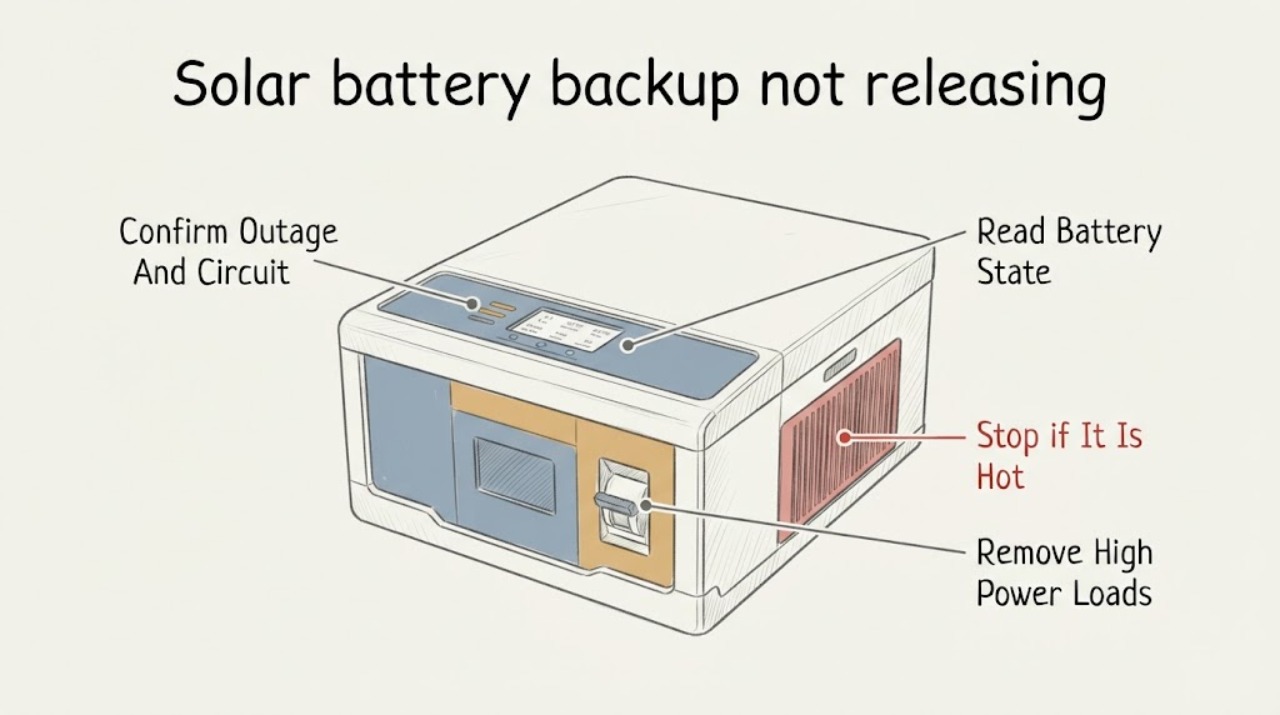
From a safe location, confirm that the utility outage is real and read the solar-storage app or local display for on-grid, off-grid, backup, or no-communication status; test only a known low-risk light or outlet that the installation documents identify as backed up.
Expected result: Record whether the system reports an outage, whether the app is blank or current, and whether no power affects one room, the documented essential-load circuits, or the whole home.
Next step: Save a screenshot or photograph, identify the exact outlets or circuits affected, and continue only with the matching low-risk check; do not test an unknown circuit by opening the panel.
Stop if: Stop for exposed conductors, arcing, smoke, burning odor, water near electrical equipment, an unstable battery or inverter, or any need to open a cover.
Why this matters
Why: Power on selected essential circuits with other rooms dark can be expected partial backup. A system that reports off-grid with all known backed-up circuits dead points toward transfer, inverter, or distribution trouble. A blank app alone may be a communications problem and does not prove that the battery is empty.
-
Check 2
Read the battery percentage, reserve setting, solar input, and exact alert text in the manufacturer app or display without touching the battery, inverter, gateway, or electrical panel.
Expected result: Classify the state as providing power, low energy or standby, overloaded, waiting for solar or grid, breaker or switch open, disabled, rapid-shutdown, backup-switch fault, or no data.
Next step: Follow only user-level instructions in the exact model manual. If the alert is a fault, remains after the documented safe action, or the display is unavailable, send the alert and timestamp to the installer or qualified solar electrician.
Stop if: Do not remove covers, toggle an unfamiliar disconnect, bypass a warning, or use a reset sequence copied from another battery model.
Why this matters
Why: Low energy or standby can stop discharge until enough solar or grid power is available; an overload can stop output until high loads are removed. An open connection, disabled state, rapid-shutdown message, or transfer fault indicates an installation or equipment issue requiring the exact manufacturer's service path.
-
Check 3
If there is no heat, smoke, water, or exposed wiring, turn off obvious high-power appliances at their normal controls, such as electric heat, air conditioning, vehicle charging, a dryer, or a range; leave the electrical panel and battery controls alone.
Expected result: Note whether the battery resumes output after the loads are removed, whether it attempts to restart and drops out again, or whether the same no-power condition remains.
Next step: Keep energy-intensive loads off during the outage, document which load changed the result, and arrange service if the system does not remain stable with ordinary essential loads.
Stop if: Do not create a load test, start appliances to provoke an alert, reset a tripped breaker repeatedly, or handle a hot, damaged, or wet appliance.
Why this matters
Why: Recovery after removing a large load supports an overload or output-capacity problem. Repeated dropouts with ordinary essential loads, or no change while the display says backup-ready, makes a transfer, inverter, wiring, or battery fault more likely.
-
Check 4
Compare the dark outlet or room with the installation handoff, essential-load schedule, or labels that identify backed-up circuits, viewing the equipment only from outside and without removing a panel cover.
Expected result: Determine whether the affected load is documented as backed up, not backed up, or not identified in the available records; note whether another documented essential circuit still works.
Next step: Use the installation record and affected-circuit list when requesting service; do not move circuits, change breaker positions, or connect a portable source to the home's wiring.
Stop if: Stop if the only way to identify the circuit is to remove a cover, enter a restricted equipment area, or handle a breaker or disconnect whose state is uncertain.
Why this matters
Why: A dead non-backed-up circuit is an expected design boundary, not proof that the battery failed to discharge. A dead documented essential circuit while the battery reports adequate energy points toward transfer equipment, inverter output, a tripped protective device, or an installation fault.
-
Check 5
If the battery is low or waiting for solar, observe the app's solar-production state during ordinary daylight from the ground or indoors; do not climb onto the roof or clear panels while the outage or weather is unsafe.
Expected result: Record whether there is adequate daylight, whether solar production is shown, whether the battery is charging, and whether clouds, snow, shade, or the time of day explain low input.
Next step: Reduce essential loads while waiting for documented recharge behavior; if daylight is adequate but charging never starts or a solar fault remains, provide the production screenshot and request qualified service.
Stop if: Do not climb, wash, scrape, or electrically isolate panels, and do not operate roof or exterior disconnects during severe weather or without exact model instructions.
Why this matters
Why: An empty battery may remain unavailable until enough solar can both power the home and recharge it, and night or poor weather can delay recovery. Adequate daylight with no production or a persistent solar/inverter fault makes a generation or inverter issue more likely.
-
Check 6
After utility power returns, check the app or display from a safe location for on-grid status, normal solar charging, and any persistent backup or inverter alert; do not manually re-energize a questionable breaker or disconnect.
Expected result: Record whether the system reconnects and begins charging normally, remains in a fault or disabled state, or returns to normal grid power while the backup function still fails.
Next step: Keep the event log, alert screenshots, outage duration, affected circuits, and load changes for the installer; request a backup-function assessment before relying on the system for the next outage.
Stop if: Stop and keep clear for heat damage, smoke, burning odor, swelling, liquid, unusual noise, or any sign of arcing or physical damage.
Why this matters
Why: Normal reconnection after an empty or overloaded state supports a temporary capacity condition. Persistent alerts, no charging, or a later test showing no backup on documented essential circuits points toward a service issue even if ordinary grid power is restored.
Use your observations
Decision map
Find the observation that best matches what you see, then follow the next safe action.
-
PATH 01Safety boundary
What you see
The system reports off-grid or backup-ready and adequate energy, but documented essential-load circuits are all dead.
Do this next
Keep high-power loads off, do not open the equipment, and arrange qualified solar or electrical service with the alert and affected-circuit record.
Why this path and its safety boundary
Why it matters: The battery has energy but the expected output path is not energizing; transfer equipment, inverter output, protective devices, or installation wiring become more likely than a simple low-charge condition.
Safety stop: No breaker probing, live testing, bypassing, generator backfeed, or panel disassembly.
-
PATH 02Safety boundary
What you see
The app reports low energy, standby, waiting for solar, or overload, and power changes after high loads are removed or adequate daylight returns.
Do this next
Keep essential loads modest, follow only the exact model's user-level recovery instructions, and monitor charging or stable output without opening the system.
Why this path and its safety boundary
Why it matters: The symptom is more consistent with available energy or output capacity than with a failed release command, although repeated recurrence with ordinary loads still needs assessment.
Safety stop: Stop for a fault alert, heat, smoke, physical damage, or failure to recover under the documented conditions.
-
PATH 03Safety boundary
What you see
Some known essential circuits work, but the dark outlet or room is not listed as backed up.
Do this next
Use the installation schedule to confirm the boundary and ask an electrician about any desired design change; do not move circuits yourself.
Why this path and its safety boundary
Why it matters: The result is likely an intentional partial-backup boundary rather than a battery-release failure; backup capacity and circuit selection are design-specific.
Safety stop: Do not connect the dark circuit to backup equipment or alter the panel.
-
PATH 04Safety boundary
What you see
A disabled, open-connection, rapid-shutdown, inverter, or transfer fault remains, or there is heat damage, smoke, burning odor, swelling, liquid, arcing, or physical damage.
Do this next
Keep people away, avoid touching the equipment, and request urgent qualified service; use emergency services when there is an active fire or immediate danger.
Why this path and its safety boundary
Why it matters: This is an equipment or electrical safety boundary, not a user-adjustment problem. Continued operation or repeated resets could increase the hazard or obscure the fault.
Safety stop: No opening, reset, bypass, water cleanup near energized equipment, or attempt to extinguish an electrical or battery fire with improvised methods.
-
PATH 05Safety boundary
What you see
The installation has solar and a battery but no documented backup transfer equipment or the exact system is configured for on-grid operation only.
Do this next
Ask the original installer or a qualified solar professional to verify the as-built backup design and whether a compliant backup configuration is possible.
Why this path and its safety boundary
Why it matters: A battery can operate for energy management while still providing no outage power. The missing backup function is a system-design or commissioning question, not proof that the battery failed to release energy.
Safety stop: Do not improvise a grid-islanding connection or connect a battery output to household wiring.
Helpful context
Understand the symptom
A charged battery is not the same as an energized backup circuit
During a utility outage, the inverter and transfer equipment must separate the home from the grid and establish a safe local power system. The battery can show charge while a particular room remains dark because that circuit is not included in the backup design, because the system is still on-grid, or because a transfer or inverter fault has stopped output. Start with the app or display and a known low-risk backed-up outlet rather than assuming every receptacle is protected.
Treat status words as clues, not permission to open the equipment
Manufacturer alerts commonly separate low energy or standby, overload, an open connection, disabled operation, and a backup-switch or transfer fault. Those states change the next safe step: reduce loads for an overload, wait for adequate sunlight or grid restoration when the battery is empty, and arrange service for a fault or a persistent open connection. The exact wording and user controls vary by model, so use the installed system's manual and do not copy a switch or reset procedure from another model.
Keep high-power loads out of the first test
Air conditioning, electric heat, vehicle charging, dryers, ranges, pumps, and other motor or heating loads can exceed the output available in an outage. If it is safe to turn ordinary appliance controls off, remove those loads and observe whether the system recovers; do not open a panel or repeatedly cycle a tripped breaker. If only nonessential circuits remain dead, compare the circuit list with the original installation plan instead of adding loads or moving wires.
Safety boundary
Stop conditions
- Do not open, disassemble, bypass, live-test, or repair the battery, inverter, gateway, transfer equipment, or electrical panel.
- Stop for smoke, burning odor, heat damage, swelling, liquid, arcing, unusual noise, fire, physical damage, or unsafe weather and keep people clear.
- Do not reset breakers, disconnects, or backup equipment by guesswork, and do not backfeed household wiring with a portable source.
- Do not climb onto the roof or handle exterior solar equipment during an outage, storm, snow, rain, or other unsafe access condition.
Only after diagnosis
Potential parts
- backup transfer switch or gateway
Consider this only after a qualified professional confirms that the transfer path is the diagnosed failed component; a replacement cannot correct a non-backup design, low charge, or an inverter fault.
Match the exact battery, inverter, service rating, utility requirements, firmware, and installation instructions before ordering. - solar-storage inverter or inverter control module
Consider this only after fault diagnostics identify the inverter or its control module; no-backup power can instead be caused by circuit scope, overload, or transfer equipment.
Use the exact model and electrical design approval; this is restricted electrical work for a qualified installer. - battery system replacement module
Consider this only when the manufacturer or qualified service provider confirms an internal battery fault and an approved replacement path.
Do not open or service the battery yourself; confirm model, firmware, warranty, and approved installation procedure.
When checks do not resolve it
Need a professional?
Request qualified solar or electrical service when documented backed-up circuits remain dead with adequate battery energy, a fault or disabled state persists, solar is not charging in adequate daylight, the backup design is unclear, or the system has been unreliable. Treat smoke, burning odor, heat damage, liquid, swelling, arcing, fire, or physical damage as an immediate safety escalation and keep clear.
Safety scope: A qualified professional verifies the backup architecture, transfer path, inverter, protective devices, battery condition, and circuit design, then performs any restricted testing, reset, repair, or replacement.
Have this ready
- Battery and inverter make/model, if safely visible, plus the app or display alert text
- Outage start and restoration times, charge percentage, solar-production state, and whether the system reported on-grid or off-grid
- Exact rooms, outlets, or documented essential-load circuits that were dead or still working
- High-power loads turned off and whether output recovered or dropped out again
- Photos or screenshots taken from a safe location and any heat, odor, liquid, noise, or physical-damage observation
Common questions
FAQ
Why do my solar panels produce no power during an outage?
Solar panels normally shut down when the grid fails for safety. Outage operation requires a properly configured inverter, battery storage, and transfer or islanding equipment; a solar-only installation is not expected to energize the home during a utility outage.
Why does the battery show charge but my room has no power?
The room may be on a non-backed-up circuit, or the system may have charge but a transfer, inverter, or protective-device problem. Compare the dark outlet with the documented essential-load list and do not open the panel.
Can a large appliance stop a solar battery from releasing power?
Yes. Electric heat, air conditioning, vehicle charging, dryers, ranges, pumps, and other high-power loads can exceed available backup output. Turn off obvious loads at their normal controls and follow the exact manufacturer's status guidance; do not create a load test or repeatedly reset breakers.
What does waiting for solar or low energy mean?
It usually means the battery has reached a low-energy or standby state and needs enough solar or grid power to resume. Nighttime, clouds, shade, snow, or continuing household loads can delay recovery. If adequate daylight produces no charging or a fault remains, request service.
Should I reset the battery or backup switch?
Only use a restart or reset explicitly permitted by the exact installed model's owner instructions and only when the conditions are safe. Do not copy another brand's sequence, open equipment, reset a tripped breaker by guesswork, or bypass a fault; persistent faults and any heat, smoke, odor, or damage need qualified service.
Read the exact guide
Official sources
- How Powerwall WorksTesla · Supports the distinction between a battery configured with backup equipment and one configured for on-grid operation only; it is an example, not a claim about every brand.
- Solar and Resilience BasicsU.S. Department of Energy · Supports the distinction between solar-only systems and properly configured solar-plus-storage backup during a grid outage.
- Troubleshooting Your PowerwallTesla · Supports using status and app observations, avoiding troubleshooting during outages or extreme weather, and escalating heat damage, open connections, or unavailable data.
- What Can Powerwall Back UpTesla · Supports checking whether the affected load is within the installed backup scope and avoiding assumptions that every household circuit is backed up.
- Solar Integration: Inverters and Grid Services BasicsU.S. Department of Energy · Supports why an inverter and controllable battery source are required for solar-plus-storage operation without the utility grid.
- Best Practices During Power OutagesTesla · Supports reducing energy-intensive loads, understanding low-energy standby, and waiting for sufficient solar; it is not a universal procedure for every battery model.
- System Alerts and NotificationsTesla · Used as a clearly labeled manufacturer example for interpreting low-energy, overload, open-breaker, disabled, solar-production, and backup-switch alerts; exact meanings and controls vary by system.
Community feedback
Share a repair observation
Share a plain-text repair observation. Accepted observations are published automatically; this page may take a moment to update.