
On this page
Start here
Quick answer
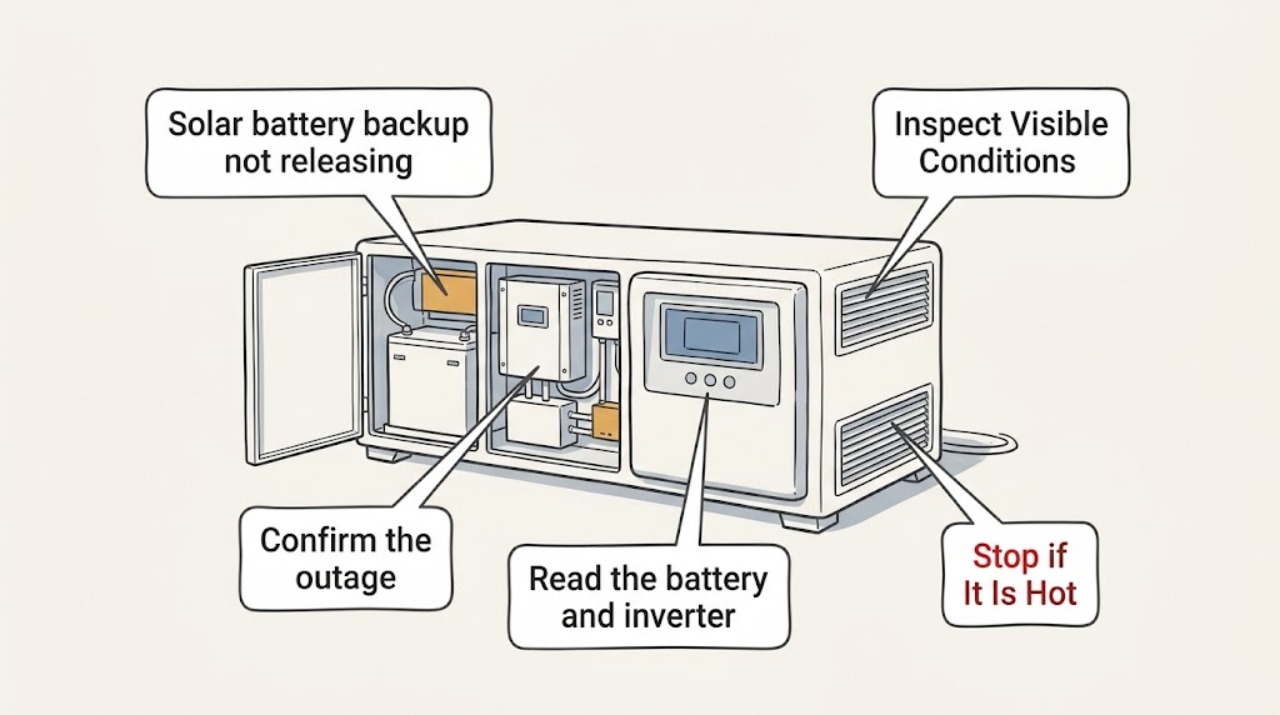
First confirm that the home is actually in an outage or approved backup state and check the battery app for charge level, reserve, overload, breaker, inverter, or system-fault messages. A solar-plus-storage system must detect the grid loss and form a safe island before it can discharge; a battery that is empty, reserved, overloaded, disconnected, or configured only for selected circuits may appear not to release power. Turn off large loads at their normal controls and check only clearly labeled user-accessible indicators. Do not open the battery, remove covers, test live DC wiring, or operate an unlabeled disconnect. If the battery enclosure has smoke, an unusual odor, heat, impact, water intrusion, or a fault that remains after load reduction, leave the area and contact emergency responders and the qualified installer.
Work through in order
Diagnostic checks
Use only checks that match the exact appliance or system and its official guide.
-
Confirm the outage and the backed-up circuit
Check whether utility power is out at the service and whether the battery-backed lights or outlets are also dead; compare a known backed-up circuit with a circuit that may be outside the backup panel, without opening an electrical panel.
Expected result: Only non-backed-up circuits are off, all circuits are off, or the utility appears on while the system reports an outage or backup mode.
Stop if: Stop if the enclosure, panel, or wiring is warm, damaged, wet, arcing, or making a new sound; keep clear and call the installer or emergency responders as appropriate.
Why this matters
Why: If only selected circuits are off, the issue may be a tripped load breaker or a backup-panel problem rather than a battery that will not discharge. If the entire home is off, continue with battery state and alerts. If the utility is on but the app reports off-grid, do not manipulate transfer equipment; the system may need installer service.
-
Read the battery and inverter status
Open the manufacturer's monitoring app or local display and record the operating mode, state of charge, backup reserve, last event, and any messages such as low energy, waiting for solar, overload, breaker open, disabled, calibration, or service required.
Expected result: The battery is empty or waiting to recharge, a high-load or overload alert is present, the system is disabled or disconnected, or no fault is shown.
Stop if: Do not guess at an alert that refers to internal faults, isolation, rapid shutdown, or a disabled system; save a screenshot and arrange service.
Why this matters
Why: Low energy can make the system wait for enough solar or grid power before it resumes. An overload points to excessive simultaneous demand. A breaker-open, disabled, inverter, or service-required message points to an electrical or control issue that should be handled through the manufacturer's instructions and qualified installer, not by opening the equipment.
-
Reduce normal loads and observe the response
At the appliance controls, switch off energy-intensive backup loads such as electric heating, air conditioning, pumps, vehicle charging, cooking equipment, or other large motors; leave the battery enclosure, inverter covers, and electrical panel closed.
Expected result: The battery begins supplying the backed-up circuits, retries and then stops again, or remains inactive with no change.
Next step: If backup returns, keep large loads off, record which load was running, and monitor the app for another overload or low-energy event.
Stop if: If backup does not return after normal loads are off, continue only with status recording and safe visual checks; do not perform live electrical tests.
Why this matters
Why: Recovery after load reduction supports an overload or inrush-demand explanation; keep only essential loads running during the outage. A repeated retry or no response points to capacity, transfer, inverter, or control trouble and needs installer diagnosis rather than repeated cycling.
-
Separate an app/connectivity problem from a power problem
Check whether the home still has internet or cellular connectivity and compare the app's last update with the actual status of a backed-up light or outlet; use the manufacturer's local-monitoring method only if it is explicitly provided for the installed system.
Expected result: The app is stale or unavailable but backed-up circuits work, the app is current and shows a fault, or both the app and backup circuits show no operation.
Next step: If only monitoring is unavailable, preserve the last screenshot and contact the installer if local monitoring also fails.
Stop if: If current status and physical output both indicate failure, stop troubleshooting at the user-observation level and request an urgent qualified service visit.
Why this matters
Why: A stale app with working backup is a communications problem, not proof that the battery is failing to release power. A current fault or dead backed-up circuits points to a battery, inverter, transfer, breaker, or configuration issue. An outage can interrupt internet without stopping a properly configured system, so verify the physical backed-up load before drawing conclusions.
Use your observations
Decision map
Find the observation that best matches what you see, then follow the next safe action.
-
PATH 01Next step
What you see
Only non-backed-up circuits are dead while the battery app shows normal operation
Do this next
Confirm the home's backup design and inspect only clearly labeled, accessible indicators; the circuit may not be connected to the battery backup.
-
PATH 02Next step
What you see
The app reports low energy, waiting for solar, or overload
Do this next
Reduce large loads and allow the system to follow its normal recovery behavior; record the alert and contact the installer if it does not resume.
-
PATH 03Next step
What you see
The app reports disabled, breaker open, inverter fault, transfer fault, or service required
Do this next
Do not open or bypass equipment. Save the alert, keep clear of the hardware, and arrange qualified solar-storage service.
-
PATH 04Next step
What you see
There is smoke, unusual odor, visible damage, flooding, severe heat, or fire
Do this next
Leave the area, keep others away, contact emergency responders, and follow the installed manufacturer's emergency guidance; do not approach or open the battery.
Helpful context
Understand the symptom
What backup release requires
A home battery does not simply energize every circuit whenever the grid goes down. The system has to detect the outage, isolate the home from the grid, and use its inverter and transfer equipment to form a stable backup supply. The installer may have configured whole-home backup or only an essential-loads panel, and the battery may hold energy in reserve or stop temporarily to protect itself. Those differences make the app status, which circuits are actually backed up, and the system's exact model important.
Do not bypass the safety controls
Never open the battery enclosure, remove an inverter or gateway cover, probe live DC conductors, disconnect solar panels, or bypass transfer equipment to force output. A battery can remain electrically hazardous even when the app is offline or the grid is down. The exact reset sequence, if any, is model-specific; use it only when the manufacturer's owner instructions or support team explicitly identify the control and conditions.
Only after diagnosis
Potential parts
- energy-monitor
Only when a qualified installer confirms that the monitoring device or gateway, rather than the battery or inverter, is the failed component.
Match the installed battery, inverter, gateway, and communications system exactly; this is not a user-swappable generic part.
When checks do not resolve it
Need a professional?
Call urgently for smoke, unusual odor, fire, heat, impact, flooding, exposed wiring, or a battery fault. For a non-emergency outage, call the installer when status remains failed after safe load reduction and the system's user-visible checks.
Common questions
FAQ
Why does the solar battery have charge but not power my home during an outage?
Stored energy is only one part of backup operation. The system also needs a functioning inverter and transfer or gateway control, and the home's circuits must be included in the backup design. An overload, disabled system, breaker or transfer fault, reserve behavior, or configuration that backs up only selected loads can all make a charged battery appear not to release power.
Can a solar battery stop releasing power because the load is too high?
Yes. Large motors, heating equipment, vehicle charging, pumps, and multiple appliances can exceed the system's available power or cause a retry. Turn those loads off at their normal controls and observe the manufacturer's status. If output does not recover, stop and call the installer.
What if the monitoring app is offline?
An outage can interrupt internet or cellular service while the battery continues operating. Compare the app with a known backed-up light or outlet and use the system's documented local-monitoring method if available. Do not infer an internal battery failure solely from a stale app.
Is it safe to reset or open the battery myself?
Do not open the enclosure, remove covers, probe live DC wiring, or bypass transfer equipment. A reset may be allowed for some models only under manufacturer-specific conditions. Use the owner's instructions or installer support, and treat smoke, odor, flooding, heat, or damage as an emergency rather than a reset opportunity.
Read the exact guide
Official sources
- Solar and Resilience BasicsU.S. Department of Energy · DOE explains that solar-plus-storage systems can detect grid loss, switch to islanded operation, and use an inverter and storage system to provide power during an outage; solar panels alone generally shut off when the grid fails.
- Powerwall Emergency Response GuideTesla · The guide says smoke, fire, suspicious odor, or severe impact require isolation, evacuation, trained responders, and manufacturer guidance; it specifically warns not to approach or open the product.
- Best Practices During Power OutagesTesla · The page explains that excessive loads can stop backup output, reducing loads may allow a retry, low energy can place the system in standby, and reset or restart actions are manufacturer-specific.
- System Alerts and NotificationsTesla · This manufacturer documentation identifies user-visible states such as low energy, waiting for solar or grid, overload, breaker open, disabled, calibration, and backup-switch faults; exact messages and controls vary by system.
Community feedback
Share a repair observation
Share a plain-text repair observation. Accepted observations are published automatically; this page may take a moment to update.