
On this page
Start here
Quick answer
A solar battery does not become unsafe or unusable merely because it reaches a certain age, and a reduced backup runtime does not by itself prove end of life. First record the model, installation or activation date, service history, state of charge, usable runtime under a comparable ordinary load, and any exact alert. Gradual capacity loss with no fault indicator can be normal aging; an abrupt loss of capacity, a battery that will not charge or discharge, stale telemetry, or a new fault message points to a system or safety issue that needs diagnosis before replacement. Check the exact warranty and owner documentation, but do not open the battery, inverter, gateway, or disconnects or perform a live capacity test. Arrange qualified solar service for a persistent decline, warranty assessment, replacement decision, or any heat, smoke, swelling, arcing, water intrusion, or enclosure damage.
Before you begin
Safety first
- Observation from normal user controls and safe exterior viewing only. No enclosure access, live testing, disconnect work, reset experimentation, wiring changes, battery handling, removal, transport, or disposal.
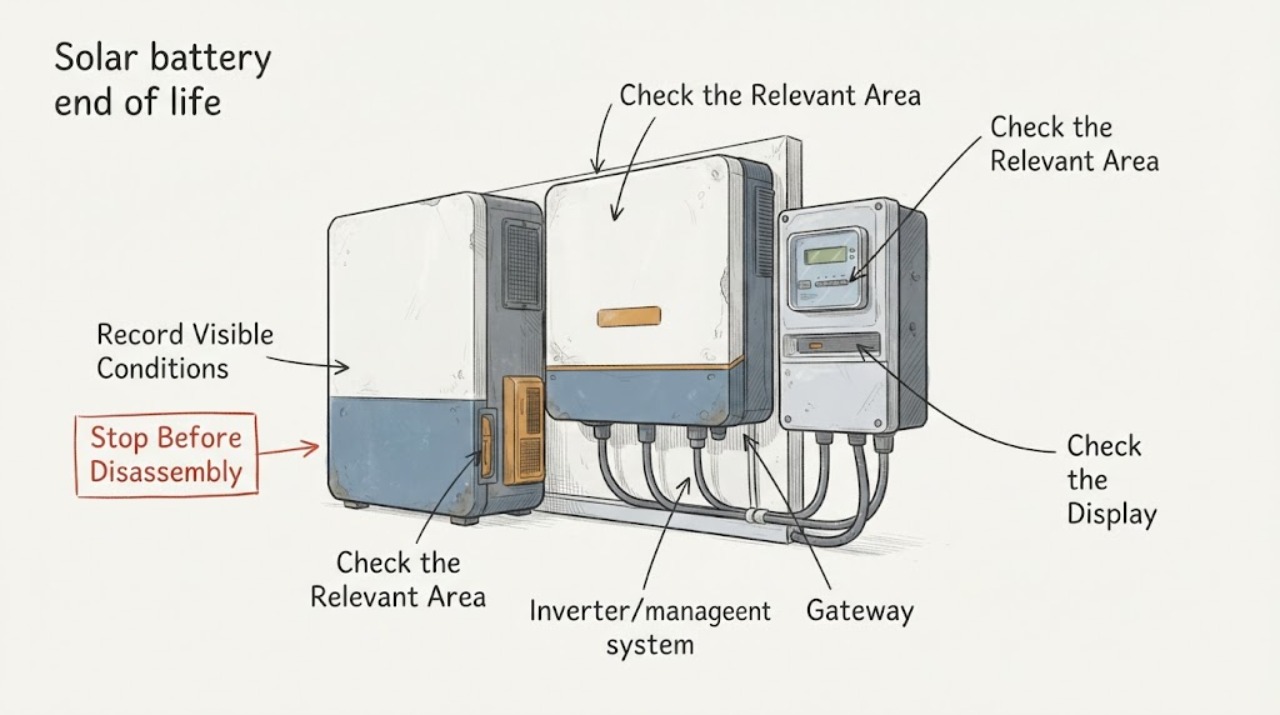
Work through in order
Diagnostic checks
Use only checks that match the exact appliance or system and its official guide.
-
Check 1
Read the model and serial information from a normally accessible label or the app, and record the installation or activation date, current owner, installer, warranty document, firmware or service history, and any prior replacement or repair. Do not remove a cover to find an identifier.
Expected result: The battery's age is known from records, only an approximate age is known, or the model and activation date cannot be confirmed.
Next step: Gather the original commissioning record, warranty, and recent service reports, then use the manufacturer's exact documentation or installer support path. Do not apply another battery's warranty term or capacity target.
Stop if: Stop if identification requires opening the enclosure, entering a restricted electrical area, climbing, or touching the equipment.
Why this matters
Why: Age and warranty clocks are product-specific, and a replacement decision cannot be made reliably without the exact model and installation context. An approximate age is not proof that the battery has reached an end-of-life limit.
-
Check 2
Compare the battery's usable runtime or energy delivered under a similar ordinary household load on several normal days with the earlier record, if one exists. Record solar conditions, starting state of charge, backup reserve, household load, outage or grid status, and whether the battery reached its normal charge limit; do not create an outage or run the battery down deliberately for a test.
Expected result: Runtime has shortened gradually under comparable conditions, dropped suddenly, varies with weather or load, or cannot be compared because the app data is missing or stale.
Next step: Save the comparison and screenshots for the installer. If data is stale or conditions are not comparable, repair the information gap first through the exact support path rather than ordering a battery.
Stop if: Stop observing and request prompt service for an abrupt shutdown, abnormal heat, burning odor, smoke, swelling, arcing, water, or an emergency alert.
Why this matters
Why: A gradual like-for-like reduction is consistent with capacity aging but does not prove the battery itself is at end of life. A sudden or highly variable change keeps reserve, solar, inverter, meter, gateway, temperature, and protection causes in scope.
-
Check 3
Read the app or normal user display for the exact battery state, capacity or energy estimate, charge/discharge availability, reserve setting, calibration or temperature notice, and complete alert text. Compare the app's last-update time with any visible status indicator without opening or touching the equipment.
Expected result: The battery is available with a gradual capacity trend, shows a calibration or reserve state, reports a fault or charging restriction, or the app is blank, stale, or missing power-flow data.
Next step: Record exact wording and timestamps and follow only the model-specific support flow. Do not clear alerts by changing protected settings or by using a reset sequence from another system.
Stop if: Stop if the display reports thermal, isolation, arc, smoke, water, or other emergency conditions, or if the enclosure has heat damage.
Why this matters
Why: Normal availability with lower like-for-like capacity supports an aging assessment. A reserve, calibration, temperature, or communication state can mimic capacity loss, while a persistent fault or charge restriction points to a service diagnosis rather than routine aging.
-
Check 4
From a dry, safe position, visually inspect only the accessible exterior for swelling, cracks, scorching, corrosion, water entry, loose or damaged conduit, blocked ventilation, or an unusual indicator state. Do not touch the battery, move it, open panels, or inspect roof equipment from a ladder.
Expected result: The enclosure appears normal, or there is physical damage, heat discoloration, water, swelling, smoke, odor, arcing, or exposed wiring.
Next step: For a normal exterior, provide the observations with the runtime and status record to qualified service. For damage or a safety symptom, keep people away, stop user troubleshooting, and use emergency or qualified service guidance as appropriate.
Stop if: Stop immediately for smoke, burning smell, unusual heat, swelling, arcing, water at electrical equipment, exposed conductors, or an enclosure that is hot or damaged.
Why this matters
Why: A normal exterior does not rule out capacity degradation or an internal fault. Any physical or thermal warning changes the issue from an age-related performance question to an electrical and battery safety event.
-
Check 5
Prepare a service request with the model, activation date, capacity or runtime comparisons, complete alerts, state-of-charge history, operating mode and reserve, solar and load context, photos from a safe position, and any recent electrical or software work. Ask the manufacturer or certified installer whether a documented capacity assessment, warranty review, repair, or replacement path applies.
Expected result: The provider can match the records to a current warranty and approved diagnostic path, or the product is outside coverage or the cause remains uncertain.
Next step: Let qualified service perform any internal, electrical, capacity, firmware, removal, or replacement work. Keep the system in its documented safe state and do not purchase a part based only on age or runtime.
Stop if: Stop if the provider's next step requires opening equipment, live measurements, disconnect work, lifting, transport, or any action outside the owner's manual.
Why this matters
Why: End-of-life handling, capacity criteria, repairability, recycling, and replacement compatibility are manufacturer- and region-specific. A battery assembly may be the answer, but an inverter, gateway, meter, or control fault must not be mistaken for battery age.
Use your observations
Decision map
Find the observation that best matches what you see, then follow the next safe action.
-
PATH 01Next step
What you see
The battery still charges and discharges normally, no fault or safety alert is present, and comparable records show a gradual reduction in runtime or usable energy as the system ages.
Do this next
Submit the records for a warranty or capacity review; do not label the battery end of life solely from its calendar age or from one short backup event.
Why this path and its safety boundary
Why it matters: Normal capacity degradation is more likely than a sudden control failure, but the installed product's warranty criterion and actual capacity still require manufacturer or installer assessment.
-
PATH 02Next step
What you see
Runtime or usable energy dropped abruptly, the battery will not charge or discharge, or a new fault, open-path, temperature, or protection alert appeared.
Do this next
Preserve the exact alert and timestamps, stop user-level diagnosis, and arrange qualified service. Do not reset repeatedly, change protection settings, or open the equipment.
Why this path and its safety boundary
Why it matters: The pattern is not adequately explained by ordinary age-related loss and may involve the inverter/charger, meter, gateway, thermal controls, protection system, or battery assembly.
-
PATH 03Next step
What you see
The apparent capacity loss occurs only during an outage, high household load, changed reserve or operating mode, low solar production, calibration, or an app/gateway/meter data gap.
Do this next
Rebuild a like-for-like record under ordinary conditions when safe, or ask the installer to restore and validate system data. Do not order a battery until the measurement path is trustworthy.
Why this path and its safety boundary
Why it matters: The observation is not a reliable capacity comparison; operating conditions or missing telemetry may be reducing the apparent runtime or hiding the actual state.
-
PATH 04Next step
What you see
Smoke, burning odor, unusual heat, swelling, arcing, water intrusion, exposed conductors, or enclosure damage is present, regardless of battery age.
Do this next
Keep people away without approaching the hazard, follow the installed system's emergency instructions only if they can be followed without contact, and call emergency or qualified service as appropriate. Do not touch, move, open, or restart the system.
Why this path and its safety boundary
Why it matters: This is a battery and electrical safety event, not routine end-of-life maintenance.
Helpful context
Understand the symptom
End of life is a capacity and service decision, not a calendar date
Rechargeable storage gradually loses usable capacity, but the speed and warranty definition depend on chemistry, model, operating mode, climate, installation date, and usage. A battery that once carried the home overnight but now carries it for less time may be aging; the same symptom can come from a reserve setting, reduced solar input, an inverter or meter issue, or an app that is not receiving current data. Compare like-for-like operating conditions before labeling the battery end of life.
Warranty capacity is not a user repair test
A manufacturer's capacity-retention promise is a warranty criterion, not permission to open the enclosure or connect test equipment. Tesla's warranty states its coverage, capacity, operating limitations, and remedy for specified Powerwall products; other brands use different terms. Give the installer the records and let qualified service perform any capacity or safety assessment.
Separate degradation from a sudden fault
Slowly shorter runtime with normal status is a different pattern from an immediate shutdown, a battery that stops accepting charge, a flashing fault indicator, an open-path alert, or an app that has stopped updating. Sudden changes deserve a system diagnosis even when the battery is old; age can coexist with a gateway, meter, inverter, thermal, or protection problem.
Keep the battery and high-voltage equipment closed
Do not remove a battery cover, gateway deadfront, inverter panel, disconnect, or current-transformer wiring. A dark app screen does not make energized conductors safe. Stop and keep people away for smoke, burning odor, unusual heat, swelling, arcing, water at the equipment, exposed conductors, or a damaged enclosure.
Safety boundary
Stop conditions
- Do not open or disassemble the battery, inverter, gateway, meter, disconnects, junction boxes, or deadfront covers; do not probe or rewire AC/DC conductors or current transformers.
- Do not create an outage, deliberately run the battery flat, change protection or reserve settings, repeatedly toggle breakers, or perform an internal capacity test.
- Stop immediately for smoke, burning odor, unusual heat, swelling, arcing, water intrusion, exposed conductors, or enclosure damage; keep people away and obtain emergency or qualified service as appropriate.
Only after diagnosis
Potential parts
- solar battery module or battery assembly
Consider only after qualified service confirms capacity loss or a battery-side fault and rules out reserve, solar, inverter, meter, gateway, and protection causes.
Battery chemistry, firmware, enclosure, certifications, warranty, and installer configuration are model- and region-specific; use the manufacturer's approved service path. - battery-management system or control module
Consider only when qualified diagnostics identify a battery-management or control fault rather than normal cell-capacity aging.
A control module is not a universal substitute for a battery assembly and may require manufacturer authorization, firmware matching, and certified installation. - inverter/charger, gateway, or energy meter
Consider only when a persistent data, charge-path, or conversion fault explains the apparent loss and the battery's capacity has not been established as the cause.
The system architecture, current-transformer arrangement, grid rules, firmware, and approved part list must be confirmed by the manufacturer or qualified installer.
When checks do not resolve it
Need a professional?
Call a qualified solar installer or manufacturer service team for a persistent or abrupt capacity decline, a battery that no longer charges or discharges, repeated alerts, an out-of-warranty or warranty-capacity decision, uncertain system data, or any internal, electrical, removal, replacement, or recycling work.
Safety scope: Observation from normal user controls and safe exterior viewing only. No enclosure access, live testing, disconnect work, reset experimentation, wiring changes, battery handling, removal, transport, or disposal.
Common questions
FAQ
How old does a solar battery have to be before it is at end of life?
There is no universal age cutoff. Manufacturers define warranty terms and capacity criteria by model, application, installation or activation date, and operating limitations. A calendar age is a reason to review records, not proof that replacement is required.
Does a shorter backup time prove that the solar battery is worn out?
No. Compare the same starting charge, reserve, household load, solar conditions, and outage context. Changed settings, low solar, high loads, telemetry gaps, calibration, inverter, meter, gateway, or protection faults can make runtime look shorter. A gradual like-for-like decline supports a capacity review but does not identify the failed part.
Can I test the battery capacity myself?
Do not open the battery or connect test equipment. Record normal app readings and comparable runtime observations only; any capacity, electrical, firmware, removal, or safety test belongs to the manufacturer or a qualified installer.
Could the inverter or gateway be the problem instead of the old battery?
Yes. A stale app, missing power-flow data, open system path, charge restriction, or sudden shutdown can point to the gateway, meter, inverter/charger, or protection system. Have service validate the data and charge path before approving a battery replacement.
What should I do with a solar battery that is physically damaged?
Treat smoke, burning odor, unusual heat, swelling, arcing, water intrusion, exposed conductors, or enclosure damage as a safety event. Keep people away, do not touch, move, open, or restart it, and use the manufacturer's emergency guidance or qualified emergency service as appropriate.
Read the exact guide
Official sources
- System Alerts and NotificationsTesla Support · Directly applies to Tesla Powerwall systems; used for low-energy, waiting, overload, calibration, breaker, and persistent fault distinctions.
- Tesla Powerwall Limited Warranty (USA)Tesla Energy Library · Directly applies to the listed Tesla Powerwall products installed in the United States; used as an example of model- and application-specific warranty capacity criteria, not as a universal rule for all solar batteries.
- Powerwall / Powerwall+ is Not Charging from SolarTesla Energy Library · Directly applies to Tesla Powerwall/Powerwall+ installations; used for reserve, operating mode, temperature, solar excess, status, and metering distinctions that can mimic end-of-life behavior.
- Troubleshooting Your PowerwallTesla Support · Directly applies to Tesla Powerwall systems; used for distinguishing gateway/meter data gaps, breaker/open-path alerts, and heat-damage service boundaries.
- TroubleshootingTesla Energy Library · Directly applies to Tesla Powerwall and Gateway systems; used for the non-user-serviceable boundary, indicator interpretation, and model-specific reset warning.
Community feedback
Share a repair observation
Share a plain-text repair observation. Accepted observations are published automatically; this page may take a moment to update.