
On this page
Start here
Quick answer
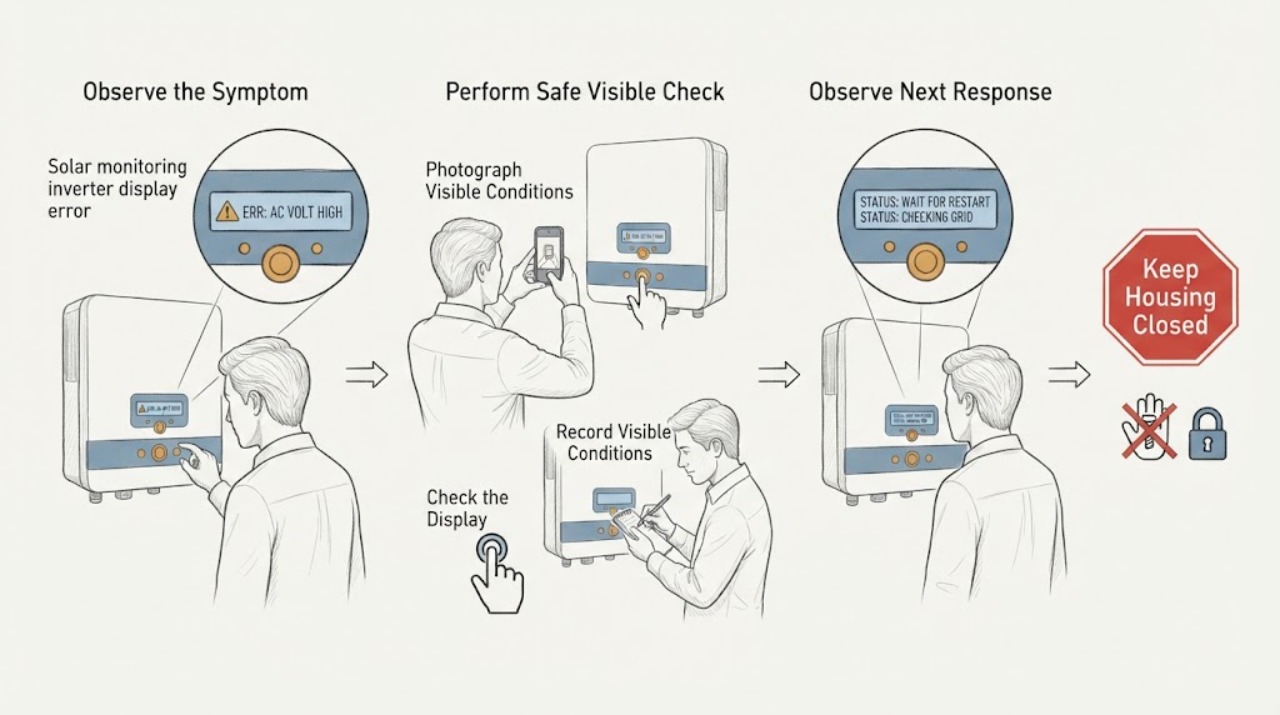
Do not guess what a solar inverter error code means or open the equipment to test it. From a safe position, record the code exactly as shown, the time, weather, monitoring-app state, and any visible inverter indicator. Compare the app and display only as an observation: an app communication alert with a normal-looking local display is different from a persistent equipment fault. If there is a burning smell, smoke, abnormal heat, arcing, loud noise, visible damage, or a code that remains with production stopped, keep people away and contact a qualified solar professional. Do not perform live DC tests or remove the inverter or panel covers.
Work through in order
Diagnostic checks
Use only checks that match the exact appliance or system and its official guide.
-
Check 1
From a safe standing position, copy the inverter display message or code exactly, preserving letters, numbers, punctuation, capitalization, and any indicator color; take a photograph without opening or touching the enclosure.
Expected result: Record whether the display shows a code, warning, blank screen, or normal state, and whether the message is steady, intermittent, or changing.
Next step: Save the image and use the identified manufacturer's owner documentation or qualified installer support for that exact model. Do not search by a similar-looking code and assume the same meaning.
Stop if: Stop approaching the equipment if the display is accompanied by smoke, arcing, a burning smell, abnormal heat, liquid, or a loud electrical sound.
Why this matters
Why: A precise code and its behavior can distinguish a model-specific fault message from a transient notice; a partial transcription is not enough to identify the cause safely.
-
Check 2
Write down when the code appeared and what was happening at that time, including the date and time, cloud or storm conditions, a recent outage, and whether the message appeared after a service or monitoring change.
Expected result: The code may line up with a grid interruption, severe weather, a communications change, or no obvious event; record the sequence rather than assigning a cause.
Next step: Keep the timeline with the exact code and provide it to the solar installer, equipment manufacturer, or qualified PV technician. Do not repeatedly reset the system to make the message disappear.
Stop if: Stop the observation and keep people away if the event includes fire, smoke, exposed wiring, falling equipment, or any sign of physical damage.
Why this matters
Why: Inverters can respond to grid disturbances and may disconnect when conditions fall outside their operating range, so timing helps a professional separate an external event from a persistent equipment fault.
-
Check 3
Check the monitoring app or web portal that is already configured for the system, without changing settings, and note whether it reports the same code, a communication failure, current status, or no data.
Expected result: The local display and portal may agree, or the portal may be offline while the display appears normal; record the last update time and any user-visible status text.
Next step: Screenshot the portal status and give it to the responsible installer or qualified technician with the local display photo. Avoid changing network, firmware, shutdown, or inverter settings unless directed by the exact official instructions for the model.
Stop if: Stop if the portal asks for an unfamiliar electrical procedure, if changing settings could energize equipment, or if a safety alert accompanies the communication message.
Why this matters
Why: A portal-only gap can point to a communications or monitoring-path issue, while a matching local code is stronger evidence that the inverter itself needs model-specific review; neither observation authorizes internal testing.
-
Check 4
From the ground or another normal access point, look at the outside of the inverter and nearby equipment for visible impact, water entry, loose covers, sagging conduit, detached parts, or an indicator that is visibly dark or abnormal; do not climb, open, or touch it.
Expected result: Record only what can be seen from a safe distance and whether the condition appeared after wind, hail, flooding, or other weather; do not probe a cover or cable.
Next step: Keep the area clear and request qualified PV inspection. If a safe, clearly labeled user disconnect is provided and the official system procedure is already known, follow only that procedure; otherwise do not operate unfamiliar switches.
Stop if: Immediately move away and keep others away for smoke, fire, arcing, exposed conductors, strong burning odor, abnormal heat, or a structure or component that appears unstable.
Why this matters
Why: Visible damage or moisture raises both electrical and equipment risk and can make a code more urgent, while an intact exterior does not rule out a hidden fault.
-
Check 5
Collect the system identity and history from safe, already accessible records: inverter manufacturer and model, installation or prior-service date if known, the code photo, portal screenshot, and whether household power or solar production changed.
Expected result: You may have a complete identity and timeline, or only partial information; note what is unknown instead of opening equipment to find a label.
Next step: Send the complete record to the installer, manufacturer support channel, or qualified solar technician and request a professional diagnosis. Do not substitute an internet reset sequence or live DC test for that assessment.
Stop if: Stop all further checks if access would require a roof, ladder, enclosure, panel, battery, wiring, or live electrical work.
Why this matters
Why: The same-looking display message can mean different things across inverter families, and system type and history affect the technician's next diagnostic step.
Use your observations
Decision map
Find the observation that best matches what you see, then follow the next safe action.
-
PATH 01Next step
What you see
The exact code is readable and the equipment is otherwise physically normal.
Do this next
Record it unchanged, identify the exact manufacturer and model from safe records, and follow only model-specific official guidance or qualified technician direction. Do not infer a repair from a similar code.
-
PATH 02Next step
What you see
The portal is offline or stale but the local display appears normal.
Do this next
Treat this as a possible monitoring or communications issue, save the last-update information, and contact the installer or qualified support. Do not alter wiring, network hardware inside the inverter, or system settings.
-
PATH 03Next step
What you see
The local display shows a persistent code, the portal agrees, or solar production has stopped.
Do this next
Arrange qualified PV service and provide the exact code, timestamps, weather and outage history, system identity, and screenshots. Do not perform live DC tests, open covers, or repeatedly reset the system.
-
PATH 04Next step
What you see
Smoke, fire, arcing, burning odor, abnormal heat, loud electrical noise, water entry, exposed conductors, or unstable equipment is visible or audible.
Do this next
Move away, keep people out of the area, and contact emergency services for immediate danger or a qualified solar professional for equipment assessment. Do not touch or approach the equipment to shut it down unless directed by emergency personnel and it is clearly safe.
-
PATH 05Next step
What you see
The required next step would involve opening the inverter, battery, panel, disconnect, or wiring enclosure.
Do this next
Stop user troubleshooting and arrange professional inspection. User-level observations cannot safely identify internal DC, control, or protection faults.
Helpful context
Understand the symptom
An error code is a clue, not a diagnosis
Inverters convert panel-generated DC electricity to AC power and may also provide system monitoring or a network portal. A displayed code can therefore reflect the inverter, grid conditions, a communication path, or a broader system event. Code meanings, reset rules, and safe shutdown procedures vary by manufacturer and model; the exact code and equipment identity are more useful to a qualified technician than a guessed interpretation.
Stay outside the electrical work boundary
Solar arrays and their wiring can remain electrically hazardous even when the household load is off or the sun is weak. Use only normal user-facing displays and an app or portal that you already use. Do not open the inverter, battery, combiner, disconnect, or panel, touch conductors, perform a DC measurement, or repeatedly cycle power.
When checks do not resolve it
Need a professional?
Request qualified solar service for a persistent or repeated inverter code, a code paired with stopped production, disagreement between display and monitoring portal, visible damage or moisture, or any suspected internal fault. Treat smoke, fire, arcing, burning odor, abnormal heat, or exposed conductors as an urgent safety event.
Have this ready
- Provide the exact code and indicator state, photographs taken from a safe position, inverter manufacturer and model from accessible records, date and time, weather or outage context, portal status and last-update time, and whether production changed.
Common questions
FAQ
Can I look up a solar inverter error code and reset it myself?
Record the code exactly and use the exact manufacturer's documentation, but do not assume a similar code has the same meaning or perform a reset sequence that is not clearly authorized for the model. Do not open the equipment or perform live DC testing.
What if the monitoring app shows an error but the inverter display looks normal?
Record both states and the portal's last-update time. This may be a communications or monitoring-path issue rather than proof of an inverter failure, but the installer or qualified technician should distinguish the causes without user wiring or enclosure work.
What information helps a solar technician diagnose the code?
Provide the exact code, indicator behavior, date and time, weather or outage context, inverter model from safe records, portal screenshot, and whether production changed. Photos should be taken from a safe position without opening or touching equipment.
When is a displayed code an emergency?
Smoke, fire, arcing, burning odor, abnormal heat, loud electrical noise, exposed conductors, water entry, or unstable equipment requires distance and an urgent professional or emergency response. Keep people away and do not approach the equipment to investigate.
Read the exact guide
Official sources
- A Guide to Fire Safety with Solar SystemsU.S. Department of Energy · General PV electrical and fire-safety guidance; emergency response takes priority over user troubleshooting.
- Life Cycle of Photovoltaic Systems: Operate and Maintain an Existing Photovoltaic SystemU.S. Department of Energy · General PV operation and maintenance guidance; residential equipment and user controls remain model-specific.
- Solar Integration: Inverters and Grid Services BasicsU.S. Department of Energy · General explanation of inverter-based solar systems; specific fault codes and controls depend on the installed equipment.
Community feedback
Share a repair observation
Share a plain-text repair observation. Accepted observations are published automatically; this page may take a moment to update.