
On this page
Start here
Quick answer
An offline solar-monitoring alert does not automatically mean the array stopped producing. A monitoring platform may lose the internet, gateway, meter, or cloud path while the inverter continues converting power; production and communication are separate functions on many systems. During daylight, use only the installed system's normal display, status light, or authorized app view to see whether the inverter reports production, and compare that with a safe production-meter or utility-meter observation when available. Check the home router and gateway power or network status from outside the equipment, but do not open an inverter, remove covers, touch DC connectors, or change disconnects unless the exact manufacturer instructions and a qualified installer permit it. If local status shows production but the portal is offline, arrange monitoring/network support; if local status shows an error or no production, contact the installer for an electrical and generation diagnosis.
Before you begin
Safety first
- This article supports ordinary-access status and network observation only. A qualified installer or electrician handles inverter, array-side DC, battery, meter, CT, communication-board, firmware, and disconnect work.
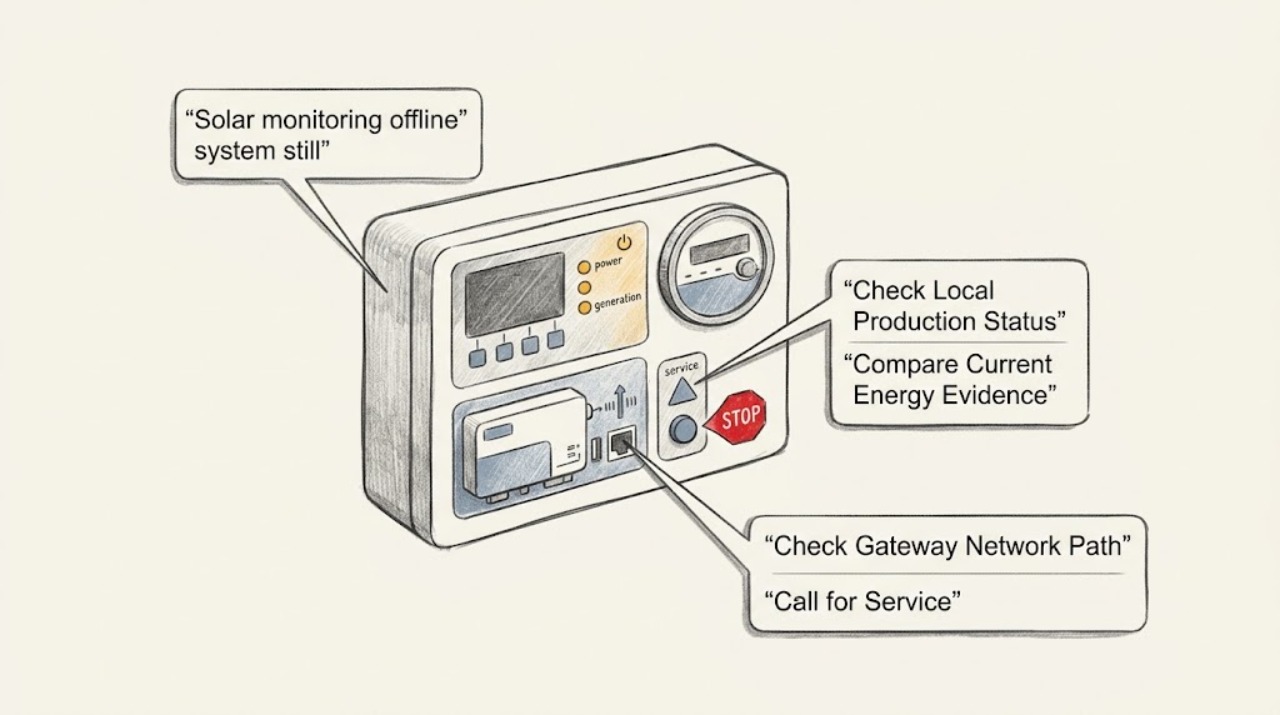
Work through in order
Diagnostic checks
Use only checks that match the exact appliance or system and its official guide.
-
Check 1
During daylight and without opening or touching the inverter, read the installed system's normal display, status lights, or manufacturer-authorized local app view using the exact model instructions.
Expected result: Record whether the local status explicitly reports production or output, reports communication only, shows an error or shutdown state, or is blank and cannot be interpreted from the manual.
Next step: Photograph the display or lights and record the exact time, sunlight conditions, and model before checking the gateway or router; contact the installer if local production is absent, an error is present, or the status cannot be interpreted safely.
Stop if: Do not remove covers, touch DC connectors, operate unfamiliar disconnects, reset a fault repeatedly, or take measurements on exposed electrical equipment.
Why this matters
Why: A valid local production indication while the portal is offline supports a telemetry or network problem rather than an immediate generation failure. A no-production or error indication means the offline alert may be accompanying a real inverter, grid, array, or control issue; a blank or unfamiliar indication is inconclusive.
-
Check 2
Compare the local production indication with any user-accessible production meter, utility interval data, or the home's normal daytime import/export indication, without opening the meter enclosure or relying on a stale app graph.
Expected result: Classify the result as local production and independent meter evidence both present, local production present but meter data stale, no local production and no independent evidence, or readings that cannot be compared because the system has storage, net metering, or a different measurement point.
Next step: Save the comparison and the time window for the installer; do not change export settings, battery controls, meter wiring, or utility equipment to force the readings to match.
Stop if: Stop for an abnormal meter message, exposed conductors, arcing, heat, burning odor, water intrusion, or any request to open utility or inverter equipment.
Why this matters
Why: Agreement between a current local status and independent meter evidence makes a reporting outage more likely. A stale or missing meter can be a separate meter, CT, gateway, or data-path issue. No production evidence raises the priority of an installer diagnosis, while battery or net-metering behavior can make a simple utility-meter glance misleading.
-
Check 3
From ordinary user access, check whether the monitoring gateway or communications device has normal power and whether the home router or internet connection changed, rebooted, lost service, changed Wi-Fi credentials, or moved ports recently.
Expected result: Record gateway power or network indicators, router/internet status, recent password or firewall changes, and whether other household devices are online; do not open the gateway or inverter to reseat internal cables.
Next step: Follow only the installed manufacturer's documented user-level network recovery, such as restoring the known router connection or checking an accessible plug, and record the result; ask the installer or monitoring provider to reconfigure the gateway when credentials, firmware, cellular service, or internal wiring is involved.
Stop if: Do not factory-reset the gateway, change inverter communication settings, update firmware from an unverified file, or cycle AC/DC equipment as a network fix.
Why this matters
Why: If the gateway is unpowered or the household network changed while local inverter production remains normal, the offline state is more likely in the gateway-to-router or router-to-cloud path. If the router is normal but the gateway is unresponsive, the gateway or its power supply needs model-specific support. Network recovery does not prove generation is healthy.
-
Check 4
Check the portal's alert scope and last-seen timestamp, looking for whether the outage covers the whole site, only the inverter, only module-level devices, only a production or consumption meter, or only one monitoring account.
Expected result: Record the last successful report, device or meter named in the alert, whether the local inverter is still producing, and whether other devices or sites under the same account remain visible.
Next step: Send the alert text, timestamp, affected device count, local status, and network observations to the installer or monitoring provider; do not infer a failed panel from an isolated telemetry alert.
Stop if: Do not enter the inverter communication compartment, disconnect RS485 or Ethernet wiring, alter CT orientation, or change site/account settings without qualified instructions.
Why this matters
Why: A single-device or meter-only alert points toward a device link, CT/meter, RS485 or local communications path, while a whole-site outage points toward gateway, internet, account, cloud, or site power. A long stale timestamp increases the chance that production loss has gone unobserved and should be escalated even if the inverter looks normal.
-
Check 5
Contact the original installer, a qualified solar service provider, or the monitoring provider with the model, local status, meter comparison, alert scope, network changes, and photos; request separate checks for production and telemetry.
Expected result: Ask the provider to state whether the site is generating, whether data is being buffered locally or lost, which link failed, whether a meter or communications module is involved, and whether any electrical or firmware work is required.
Next step: Follow the provider's model-specific recovery plan and verify that a new current production report appears after repair; retain the outage interval because portal backfill and utility billing may not use the same data source.
Stop if: Do not open, repair, or bypass the inverter, optimizer, microinverter, battery, meter, or DC/AC disconnects yourself; stop for smoke, arcing, heat, water, exposed wiring, or a burning smell and seek urgent qualified help.
Why this matters
Why: A confirmed communication-only outage can be repaired in the network, gateway, or monitoring account while the array remains in service. A production fault, inverter fault, grid event, or meter failure needs electrical diagnosis and may require the system to remain out of service until safe.
Use your observations
Decision map
Find the observation that best matches what you see, then follow the next safe action.
-
PATH 01Safety boundary
What you see
The portal is offline, but the installed inverter's documented local status reports current production and no fault.
Do this next
Check only the accessible router and gateway status, follow the exact user-level network procedure, and contact the monitoring provider or installer if the outage persists.
Why this path and its safety boundary
Why it matters: A telemetry, gateway, home-network, account, or cloud path problem is more likely than a total generation failure; the portal cannot be used to judge the missing interval until communication returns.
Safety stop: Do not open the inverter or reset electrical equipment to solve a communication alert.
-
PATH 02Safety boundary
What you see
The portal is offline and the local status shows no production, an inverter fault, a shutdown, or no interpretable status during suitable daylight.
Do this next
Leave equipment untouched and contact the installer for a generation and electrical diagnosis, providing the exact status text, time, sunlight conditions, and any independent meter evidence.
Why this path and its safety boundary
Why it matters: The issue is not established as telemetry-only; an inverter, grid, array, optimizer or microinverter, battery-control, or site-power problem may be present.
Safety stop: Do not repeatedly restart, change disconnect positions, open covers, or measure exposed DC or AC conductors.
-
PATH 03Safety boundary
What you see
The inverter locally appears normal, but the gateway has no power or the household router, Wi-Fi credentials, firewall, or internet service changed.
Do this next
Restore only the known user-level network connection according to the installed manufacturer's guide, then ask the installer or provider to reconfigure or replace a gateway if required.
Why this path and its safety boundary
Why it matters: The monitoring path is more likely broken between the gateway and the cloud rather than at the solar generating equipment.
Safety stop: Do not factory-reset the gateway or modify inverter communications, firmware, or internal cabling as a guess.
-
PATH 04Safety boundary
What you see
Only one production meter, consumption meter, optimizer, microinverter, or device group is stale while the rest of the site reports normally.
Do this next
Send the affected device name, last-seen time, local production indication, and any meter or communication alert to the installer for device-level diagnosis.
Why this path and its safety boundary
Why it matters: The alert is localized to a device, meter, CT, or device-to-gateway link; it does not by itself prove that the whole array has stopped.
Safety stop: Do not disconnect RS485, Ethernet, CT, optimizer, or module wiring and do not substitute a part without exact model guidance.
-
PATH 05Safety boundary
What you see
The inverter or gateway shows smoke, arcing, heat, burning odor, water intrusion, exposed wiring, physical damage, or an unexpected fault state.
Do this next
Keep people away and contact the installer, qualified electrician, utility, or emergency service appropriate to the hazard; do not approach damaged equipment.
Why this path and its safety boundary
Why it matters: The monitoring symptom is secondary to an electrical or site-safety hazard and is outside safe user troubleshooting.
Safety stop: Do not touch, open, spray, reset, or move the equipment, and do not assume a monitoring outage means the conductors are de-energized.
Helpful context
Understand the symptom
Offline telemetry is not the same as a failed array
A monitoring app is a reporting path, not the solar array itself. Depending on the installation, data can pass from module electronics or an inverter to a gateway, home network, internet connection, and cloud platform. Any link can go stale while the inverter remains on. Conversely, a portal that still shows an old production value is not proof that power is being generated now. Treat the alert as a request to compare communication status with a current local production indication.
Use local status to separate communication from generation
The exact LED colors, display labels, and access steps vary by inverter. As one manufacturer example, SolarEdge documents separate production and communication indicators and says a system can be producing while communication is unavailable. Use the installed model's owner guide to interpret its own display or lights; do not infer that a green, blue, or red indicator has the same meaning on another brand. If the local status shows production but the portal is offline, start with the network or gateway path. If it shows no production, a fault, or an unexpected shutdown, the installer must evaluate the electrical and generation side.
Do not turn a data check into live electrical work
Solar modules can produce DC voltage whenever illuminated, and an inverter may have both utility AC and array-side DC connections. A monitoring outage does not justify opening the inverter, pulling connectors, measuring exposed conductors, or repeatedly cycling disconnects. Work only from ordinary user access on the router, gateway status, and the documented display or app. Leave wiring, meters, CTs, communication boards, firmware recovery, and inverter resets to the installer or a qualified electrician.
Safety boundary
Stop conditions
- Do not open the inverter, optimizer, microinverter, battery, meter, gateway, or communication compartment; do not touch DC connectors or exposed AC conductors.
- Do not change AC or DC disconnect positions, bypass a safety control, factory-reset a gateway, or install firmware from an unverified source as a monitoring fix.
- Stop for smoke, arcing, burning odor, abnormal heat, water intrusion, exposed wiring, physical damage, or an error state that the exact manual does not explain.
- Do not treat an old portal graph or a single utility-meter glance as proof of current generation when storage, net metering, or separate production and consumption meters are present.
- If local production is absent or a fault is shown while the portal is offline, leave the equipment untouched and arrange qualified solar/electrical diagnosis.
Only after diagnosis
Potential parts
- solar monitoring gateway or data logger
Consider only when the installer confirms that the gateway is unpowered, failed, unsupported, or incompatible with the exact inverter and monitoring platform while generation remains healthy.
Match the exact inverter family, communication protocol, firmware, network or cellular service, enclosure, power supply, account provisioning, and local requirements; do not substitute a generic gateway. - manufacturer-approved Ethernet, Wi-Fi, or cellular communication module
Consider only after qualified diagnosis isolates the offline path to a replaceable communications module rather than the router, gateway, cloud account, or inverter itself.
Confirm the exact inverter revision, connector, firmware, network band or cellular carrier, and manufacturer installation procedure; installation may expose live equipment and is not a user-level repair. - production or consumption meter and current-transformer assembly
Consider only when a qualified installer confirms that a meter, CT, or meter communication link is the isolated cause of missing production or consumption data.
Confirm measurement point, CT orientation and rating, protocol, phase configuration, firmware, utility or interconnection requirements, and exact inverter compatibility; never alter meter wiring yourself.
When checks do not resolve it
Need a professional?
Contact the installer or qualified solar service provider when monitoring remains offline after the documented user-level router or gateway check, when the local inverter status is unclear, when production evidence is absent, or when a device, meter, or communication alert is isolated. Seek urgent qualified help for smoke, arcing, burning odor, abnormal heat, water intrusion, exposed wiring, physical damage, or any need to access live solar equipment. Tell the provider whether the issue appears telemetry-only or also affects production.
Safety scope: This article supports ordinary-access status and network observation only. A qualified installer or electrician handles inverter, array-side DC, battery, meter, CT, communication-board, firmware, and disconnect work.
Common questions
FAQ
Can solar monitoring be offline while the panels are still producing?
Yes. The inverter can continue converting power while the gateway, home network, meter link, or cloud reporting path is offline. Check the installed inverter's documented local production status and an independent current-energy indication rather than relying on a stale portal graph.
What should I check first when the monitoring app says offline?
Record the alert and last-seen time, then check the exact model's normal local display or status lights during daylight. After that, check only the accessible router and monitoring-gateway power or network status. Do not open the inverter or change disconnects.
Does an offline monitoring alert mean the solar system stopped?
Not by itself. A monitoring outage and a production outage are different possibilities. If local status shows no production, a fault, or no interpretable status, escalate to the installer for generation and electrical diagnosis rather than assuming the issue is only Wi-Fi.
Should I reset or power-cycle the inverter to restore monitoring?
Do not do that as a guess. Follow only a documented user-level network procedure for the exact system. Repeatedly cycling AC or DC equipment, opening covers, or touching communication wiring can create electrical and equipment risks; ask the installer when the gateway or inverter needs a reset.
When does an offline solar monitor need urgent service?
Seek urgent qualified help for smoke, arcing, burning odor, abnormal heat, water intrusion, exposed wiring, physical damage, or a local inverter fault. Contact the installer promptly when local production is absent, the alert covers the whole site, or the portal has been stale long enough that lost generation is possible.
Read the exact guide
Official sources
- PV Production and System IssuesSolarEdge · SolarEdge-specific example; indicator labels and access steps differ by brand and model.
- Monitoring Platforms for Solar Photovoltaic SystemsU.S. Department of Energy · DOE FEMP monitoring guidance; residential system architecture and provider features vary by installed equipment.
- Configuring Inverter CommunicationSolarEdge · SolarEdge-specific communication workflow; use only the exact installed model's documented process.
- Solar Integration: Inverters and Grid Services BasicsU.S. Department of Energy · DOE system-level guidance; the installed inverter's model-specific manual governs controls, status indicators, and service procedures.
Community feedback
Share a repair observation
Share a plain-text repair observation. Accepted observations are published automatically; this page may take a moment to update.