
On this page
Start here
Quick answer
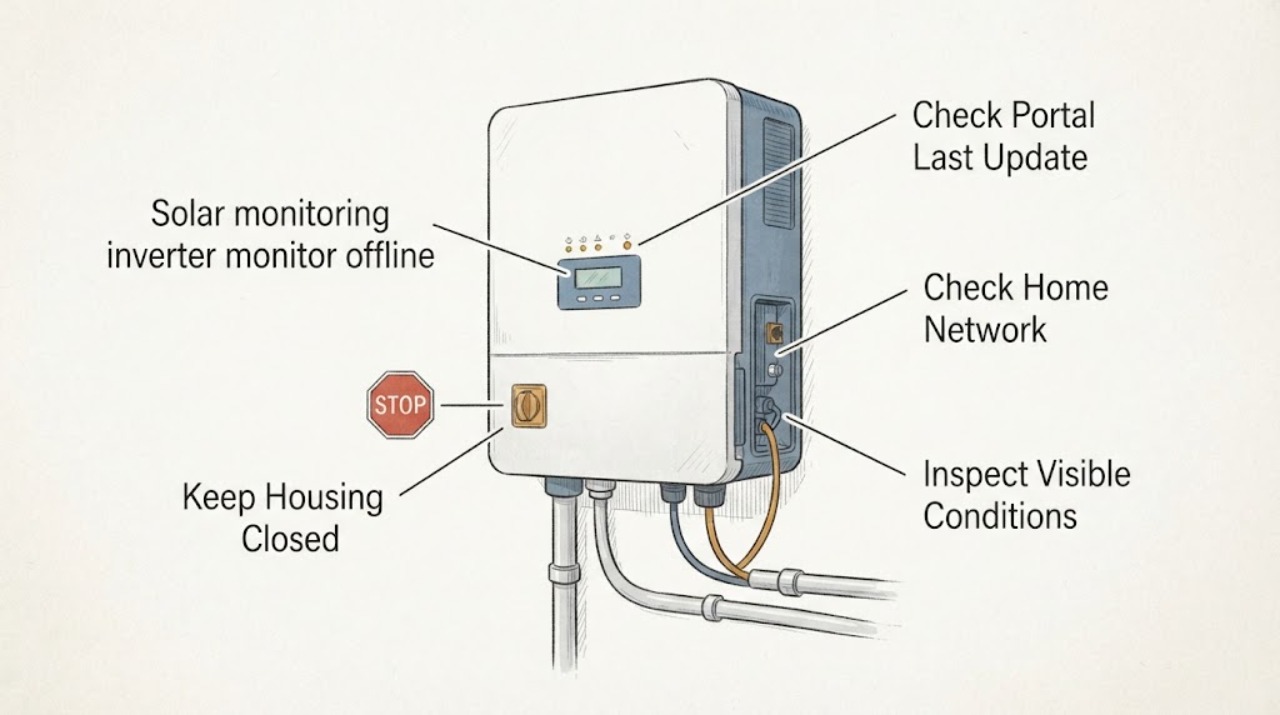
An offline solar monitor does not by itself prove that the inverter or panels have stopped producing. Separate a portal or app outage from a home-network or communication-device problem, then compare the app's last-update time with the inverter's visible external status display or lights. Check your router from a normal user position and follow a restart or reconnection only when the exact manufacturer instructions for your model authorize it. Do not open the inverter, touch DC or AC wiring, take live measurements, or repeatedly reset the system. A fault light, damaged enclosure, burning smell, storm damage, or no production indication should go to the installer or qualified solar technician.
Work through in order
Diagnostic checks
Use only checks that match the exact appliance or system and its official guide.
-
Check 1
Open the usual solar monitoring app or web portal and record its offline message, last-update timestamp, affected site or device, and whether other users or services appear unavailable.
Expected result: Note whether only the portal is unavailable, the site is marked offline with an old timestamp, or the portal shows a current inverter alarm or production fault.
Next step: Save a screenshot or written record and check the home network and visible device status without touching the inverter.
Stop if: Stop if the portal reports a safety, isolation, ground, arc, or equipment fault, or if the system was recently damaged by weather.
Why this matters
Why: A portal-only outage points toward the monitoring service or account path; a current device alarm or recent loss of data needs installer review rather than a simple network assumption.
-
Check 2
From a normal indoor position, confirm whether the household router has power and whether another ordinary device can reach the internet; do not change inverter settings or wiring.
Expected result: Note a home-wide internet outage, a router that is powered but has no service, or a network that works normally while only the solar monitor is offline.
Next step: Record the network result and follow only the router or monitoring manufacturer's documented user-level reconnect steps if the exact model is known; otherwise contact the installer.
Stop if: Do not access the inverter network terminals, change unknown settings, or repeatedly reboot equipment to force a connection.
Why this matters
Why: A home-wide outage can explain lost monitoring without proving a PV fault; normal internet with one offline monitor shifts attention to the gateway, communication link, account, or inverter-side status.
-
Check 3
From the floor and without removing covers, observe any visible gateway, communications module, or inverter status light and display.
Expected result: Note whether the device is dark, shows a normal status, shows a communication warning, shows a production or fault code, or has a damaged, wet, hot, or discolored enclosure.
Next step: Record the exact symbols or code and give them to the installer or manufacturer support without opening or touching the equipment.
Stop if: Stop immediately for heat, smoke, burning odor, water intrusion, cracked housing, exposed conductors, arcing, or a warning that requires electrical intervention.
Why this matters
Why: A communication indicator with otherwise normal external status supports a monitoring-link issue; a production fault, damaged enclosure, or no expected status needs qualified solar service.
-
Check 4
Compare the monitor's last update with safe, ordinary context such as daylight, a known grid outage, recent weather, and any accessible utility or household energy indication; do not infer production from a single dark screen.
Expected result: Note whether the offline period began with an outage or storm, whether the inverter has a visible current status, and whether the portal is stale while other system indications appear normal.
Next step: Include the timeline and weather or outage context in a service request and avoid repeated system resets.
Stop if: Do not climb to inspect panels, enter a roof area, operate disconnects, or touch the system after storm or physical damage.
Why this matters
Why: A communications interruption can coexist with production, while an inverter fault or grid event can stop production and monitoring together; only the system's qualified diagnostics can confirm the distinction.
-
Check 5
Locate the solar system brand and model from accessible paperwork, the app account, or an exterior label that can be read without touching equipment.
Expected result: Note whether the documentation contains a specific user-authorized reconnect or restart procedure for the monitoring device and whether the observed status matches that procedure's conditions.
Next step: Use only the exact documented user step if it is clearly authorized and no warning sign is present; otherwise send the model, screenshots, and observations to the installer.
Stop if: Do not improvise a reset sequence, remove an inverter cover, bridge a connection, or perform a live electrical test.
Why this matters
Why: Model-specific instructions may permit a limited user action for a communications device, but an unknown model or a mismatch between instructions and status should be treated as a service issue.
Use your observations
Decision map
Find the observation that best matches what you see, then follow the next safe action.
-
PATH 01Safety boundary
What you see
The portal or app is unavailable for multiple users or shows a stale site while no device alarm is visible.
Do this next
Record the last update and monitor-service message, then contact the monitoring provider or installer if the service does not recover.
Why this path and its safety boundary
Safety stop: Do not alter inverter settings to correct a portal problem.
-
PATH 02Safety boundary
What you see
The router or general household internet is offline.
Do this next
Restore ordinary home internet through the router provider's documented user steps, then allow the monitoring system to reconnect according to its exact model guidance.
Why this path and its safety boundary
Safety stop: Do not access solar wiring or network terminals and do not assume production stopped.
-
PATH 03Safety boundary
What you see
Home internet works, the monitor is stale, and a visible gateway or communications status indicates a link problem.
Do this next
Use only the exact manufacturer-authorized external reconnect step for the known model; otherwise request installer service.
Why this path and its safety boundary
Safety stop: Stop if the reconnect requires cover removal, electrical access, unknown settings, or repeated resets.
-
PATH 04Safety boundary
What you see
The inverter shows a production fault, error code, no expected external status, or the system stopped after an outage or weather event.
Do this next
Leave the equipment untouched and contact the installer or qualified solar technician with the exact code and timeline.
Why this path and its safety boundary
Safety stop: Do not operate disconnects, open the inverter, climb, or take electrical measurements.
-
PATH 05Safety boundary
What you see
There is heat, burning odor, smoke, water intrusion, exposed wiring, arcing, storm damage, or a damaged enclosure.
Do this next
Keep people away, use emergency or utility help for immediate fire or electrical danger, and arrange qualified solar service before re-entry or inspection.
Why this path and its safety boundary
Safety stop: Do not touch any PV component or assume that a dark or disconnected-looking system is safe.
Helpful context
Understand the symptom
Offline monitoring is not the same as no solar production
A monitoring platform may depend on the inverter, a gateway or communications module, and an internet connection. One layer can be offline while the power-conversion equipment continues to operate, or the inverter can have a fault that also prevents fresh data. Treat the app timestamp and the inverter's external status as separate observations.
Stay outside the electrical boundary
A rooftop PV system can contain hazardous DC and AC equipment even when the grid is unavailable or a display looks dark. Keep the inverter, disconnects, wiring, conduit, and array untouched. Observe only labels, lights, and displays that are visible without opening or reaching into anything.
Give the installer a useful record
Save the last successful update time, app or portal message, router status, visible inverter status, weather or outage context, and any change in household energy behavior. This record helps distinguish a communications ticket from a production or equipment-safety visit.
Only after diagnosis
Potential parts
- energy monitor
Consider only if the installer confirms that the monitor or gateway has failed and replacement is appropriate after separating portal, network, and inverter faults.
Confirm the inverter platform, communication method, account pairing, and manufacturer fit information before ordering; do not substitute a generic monitor. - Wi-Fi range extender
Consider only if the installer confirms that signal coverage is the communication problem and that an extender is suitable for the monitoring device and network.
Confirm network band, gateway requirements, placement, and security settings through the network and solar equipment documentation.
When checks do not resolve it
Need a professional?
Contact the installer or monitoring provider when the app stays offline after ordinary network recovery, a communication device reports an error, the inverter shows a fault or no production indication, or the system was affected by weather. Use emergency or utility help for smoke, fire, exposed conductors, arcing, or immediate electrical danger.
Common questions
FAQ
Does an offline solar app mean the panels stopped producing?
No. Monitoring depends on communication as well as the PV equipment, so an app or gateway can be offline while production continues. Compare the last update with safe external inverter status and ask the installer to confirm production.
Should I restart the inverter to bring monitoring back?
Do not improvise an inverter reset. Use only an exact, model-specific manufacturer instruction for an external monitoring device when no warning sign is present; otherwise contact the installer.
What if my internet works but the monitor is offline?
That makes a communication module, gateway, account, or inverter-side link more likely, but it does not identify which one. Record the visible status and model and request qualified service without opening the equipment.
When is an offline monitor an urgent safety issue?
Heat, burning odor, smoke, arcing, exposed wiring, water intrusion, storm damage, a damaged enclosure, or an inverter fault needs immediate isolation and qualified or emergency help. Do not touch the PV system.
Read the exact guide
Official sources
- Solar Integration: Inverters and Grid Services BasicsU.S. Department of Energy · Understanding that an inverter converts PV electricity and may also provide monitoring and network communication functions
- PV System Owner's Guide to Identifying, Assessing, and Addressing Weather Vulnerabilities, Risks, and ImpactsU.S. Department of Energy · Keeping untrained people away from PV electrical components and treating storm-damaged systems as unsafe pending qualified evaluation
- Monitoring Platforms for Solar Photovoltaic SystemsU.S. Department of Energy · Separating monitoring-platform communication and alarm functions from the physical PV system and its maintenance needs
Community feedback
Share a repair observation
Share a plain-text repair observation. Accepted observations are published automatically; this page may take a moment to update.