
On this page
Start here
Quick answer
Treat a visibly cracked solar panel as a professional inspection issue, even if the system still appears to produce power. Observe the crack, weather or impact history, visible debris or loose parts, safe monitoring warnings, and any odor or sound from the ground or a normal indoor display. Do not climb, touch the panel or glass, cover or seal it, test live wiring, disassemble the module, or keep operating the system when arcing, smoke, fire, or other electrical warning signs are present. A qualified solar PV technician should determine safe isolation, testing, and module replacement.
Work through in order
Diagnostic checks
Use only checks that match the exact appliance or system and its official guide.
-
Check 1
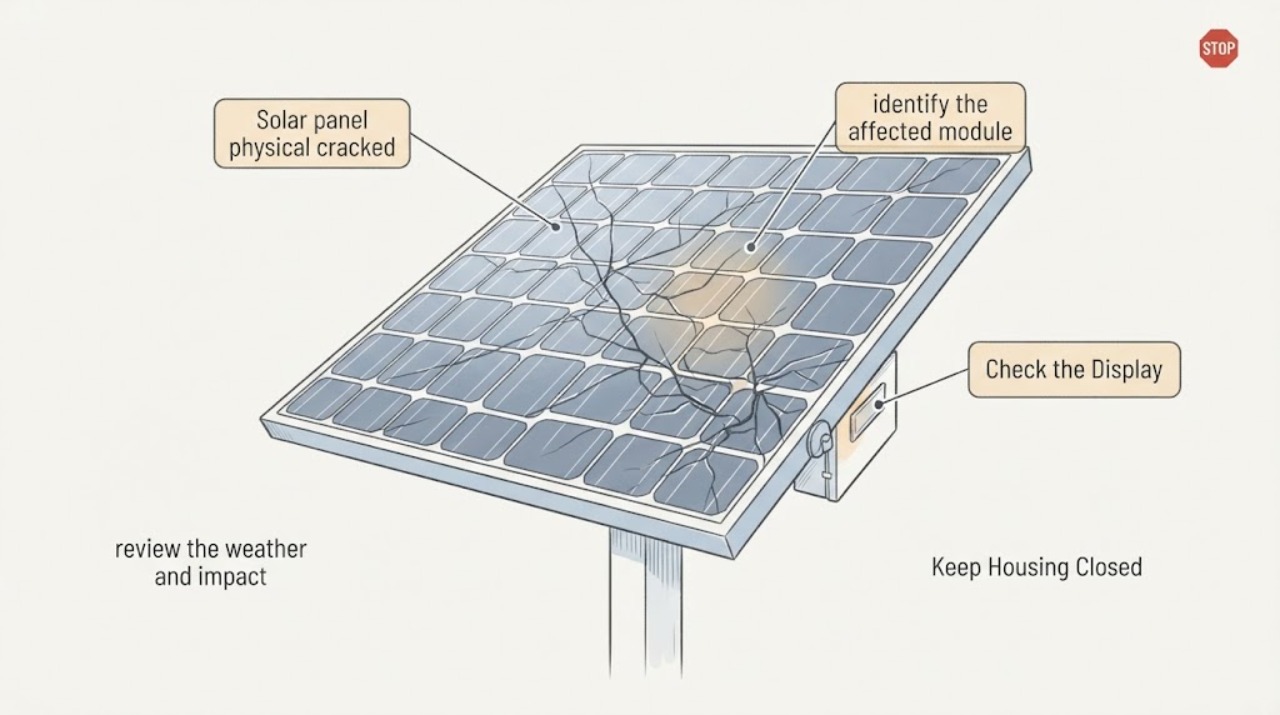
From a safe ground-level or indoor viewpoint, identify the affected module and describe the visible damage without approaching the roof, panel surface, or broken material.
Expected result: Record a single crack, a spiderweb pattern, shattered or missing glass, a dark or discolored area, a visibly damaged backsheet, a loose frame, or damage that appears on several modules.
Next step: Take a zoomed photo from the safe position, note the row or array section, and provide it to a qualified solar PV technician.
Stop if: Stop immediately if getting a closer view would require climbing, using a ladder, touching the array, or walking beneath falling glass or loose equipment.
Why this matters
Why: Broken glass, a cracked backsheet, and cell-like crack patterns can have different inspection implications, but none can be safely classified or repaired from a casual view.
-
Check 2
Review the safe system-monitoring display or app that you already use, without opening equipment or performing electrical tests.
Expected result: Note normal-looking production, a persistent drop relative to the system's own recent pattern, an inverter or monitoring warning, a tripped status, or no accessible monitoring information.
Next step: Save the warning text or screenshot and report whether the change began after hail, wind, impact, or another event.
Stop if: Do not reset, repower, open, or test the inverter or electrical equipment to investigate the crack.
Why this matters
Why: A normal-looking output does not clear a visibly cracked module; a warning or clear performance change increases the urgency and gives the technician a useful time-stamped clue.
-
Check 3
From a safe distance, review the weather and impact history and the surrounding ground for visible debris without collecting, moving, or touching anything.
Expected result: Record recent hail, wind, falling branches, heavy snow, storm debris, glass fragments, or no known event, and note whether the debris field is below the array or elsewhere.
Next step: Keep the area clear, photograph only from a safe position, and share the event timing with the technician and insurer if applicable.
Stop if: Stop if storm conditions continue, debris is unstable, glass may be present, or the area is under an overhead module or electrical equipment.
Why this matters
Why: A recent event can explain both visible and hidden module damage, while debris or loose material can create a separate physical hazard; history helps the technician decide how broadly to inspect.
-
Check 4
From a safe distance, note any unusual odor, buzzing, crackling, smoke, flame, or visible flash near the array, inverter, conduit, or disconnect area without approaching to verify it.
Expected result: Classify the situation as no unusual sign, an intermittent sound or odor, visible smoke or flame, or active arcing or a bright flash.
Next step: For fire or active arcing, move away, keep others clear, and contact emergency services; for other unusual signs, request urgent solar service and follow only a known safe emergency-isolation plan.
Stop if: Stop all observation and do not operate or approach the system when smoke, flame, arcing, a burning odor, or exposed electrical components are present.
Why this matters
Why: Smoke, flame, arcing, or a burning odor can indicate an electrical or fire emergency; an intermittent warning still warrants prompt professional assessment and should not be investigated by touch.
-
Check 5
Gather system records from indoors, such as the panel or inverter make and model, installation date, recent service history, warranty documents, and the date the crack was first noticed.
Expected result: Record whether the module identity is known, whether the damage followed a storm or impact, whether monitoring changed, and whether other modules show the same pattern.
Next step: Send the records, safe photos, monitoring notes, and event history when arranging professional inspection.
Stop if: Do not climb, remove labels from the array, open enclosures, disconnect connectors, or inspect the back of a module to find its model.
Why this matters
Why: The identity and timeline help a qualified technician determine inspection, warranty, and replacement options; they do not authorize a homeowner to handle the module or make an electrical diagnosis.
Use your observations
Decision map
Find the observation that best matches what you see, then follow the next safe action.
-
PATH 01Next step
What you see
A crack or broken glass is visible, but there is no smoke, flame, arcing, burning odor, or loose overhead material.
Do this next
Keep the area clear and request qualified solar PV inspection promptly; do not cover, seal, clean, or continue hands-on investigation of the module.
-
PATH 02Next step
What you see
The crack appeared after hail, wind, heavy snow, impact, or another weather event.
Do this next
Provide the event date, safe photos, affected array section, and monitoring history and ask the technician to assess both visible and possible hidden damage.
-
PATH 03Next step
What you see
The monitoring system shows a new warning or sustained output change near the time of the physical damage.
Do this next
Treat the inspection as higher priority and provide the exact warning or screenshot; do not reset or repower the equipment to test it.
-
PATH 04Next step
What you see
Smoke, flame, active arcing, a burning odor, or exposed electrical parts are visible.
Do this next
Move away, keep others clear, and contact emergency services and the appropriate solar or utility emergency channel; do not approach or operate the system.
-
PATH 05Next step
What you see
The panel looks cracked but output appears normal and no immediate hazard is visible.
Do this next
Do not treat normal output as proof of safety. Arrange professional inspection because some module damage can worsen or remain hidden while production continues.
Helpful context
Understand the symptom
Solar modules can continue to produce power after glass, cell, or backsheet damage, but that does not make the module safe or stable. Department of Energy guidance explains that broken glass or cracked backsheets can admit moisture, create electrical faults, reduce performance, and increase life-safety risk. Damage after hail can also be partly invisible, so a clear visual crack is a reason to document the array and request professional inspection rather than judge it by output alone.
Keep every check observational. Stay on the ground or inside, keep people and pets away from the array and fallen glass, and do not try to cover, clean, tape, seal, or repair the module. If you see smoke, flame, active arcing, a burning odor, or a dangerous loose component, move away and contact emergency services or the appropriate utility and solar emergency contact without approaching the system.
When checks do not resolve it
Need a professional?
Request qualified solar PV inspection for any visible crack, broken glass, damaged backsheet, loose frame, storm debris, monitoring warning, or unexplained production change. Treat smoke, flame, arcing, burning odor, exposed wiring, or overhead loose equipment as urgent and keep away while contacting emergency services and the appropriate solar or utility emergency channel.
Have this ready
- Provide safe ground-level photos, module row or section, weather or impact history, monitoring screenshots and warning text, odor or sound observations, installation and model records, and the date the damage was noticed. Do not send anyone onto the roof just to obtain more detail.
Common questions
FAQ
Can a cracked solar panel still produce power?
Yes, a damaged module may still appear to produce, but normal output does not prove that it is safe or stable. Cracks can worsen, admit moisture, reduce performance, or create electrical faults, so request qualified inspection.
Can I cover or seal the cracked glass until service arrives?
No. Do not touch, cover, tape, seal, clean, or repair the panel. Keep people away and let a qualified PV technician decide how to isolate and replace the damaged module.
What should I do after hail damages a solar panel?
Stay on the ground, document visible damage and the event date, save monitoring warnings, and request professional visual and electrical inspection. Do not repower or test the system yourself.
When is a cracked panel an emergency?
Smoke, flame, active arcing, a burning odor, exposed electrical parts, or loose overhead equipment are emergency warning signs. Move away, keep others clear, and contact emergency services and the appropriate solar or utility emergency channel.
Read the exact guide
Official sources
- Life Cycle of Photovoltaic Systems: Operate and Maintain an Existing Photovoltaic SystemU.S. Department of Energy · Supports securing damaged areas, keeping people away, professional inspection and electrical testing, itemizing repairs, and recommissioning only after corrective work.
- PV System Owner's Guide to Identifying, Assessing, and Addressing Weather Vulnerabilities, Risks, and ImpactsU.S. Department of Energy · Supports the distinction between visible glass, cell, and backsheet damage, the risk of moisture and electrical faults, and the need for trained PV inspection and replacement decisions.
- Hail Damage Mitigation for PV SystemsU.S. Department of Energy · Supports treating visible post-hail damage as an inspection issue, recognizing that microcracks may be hidden, and avoiding repowering until appropriate inspection and electrical safety checks.
Community feedback
Share a repair observation
Share a plain-text repair observation. Accepted observations are published automatically; this page may take a moment to update.