
On this page
Start here
Quick answer
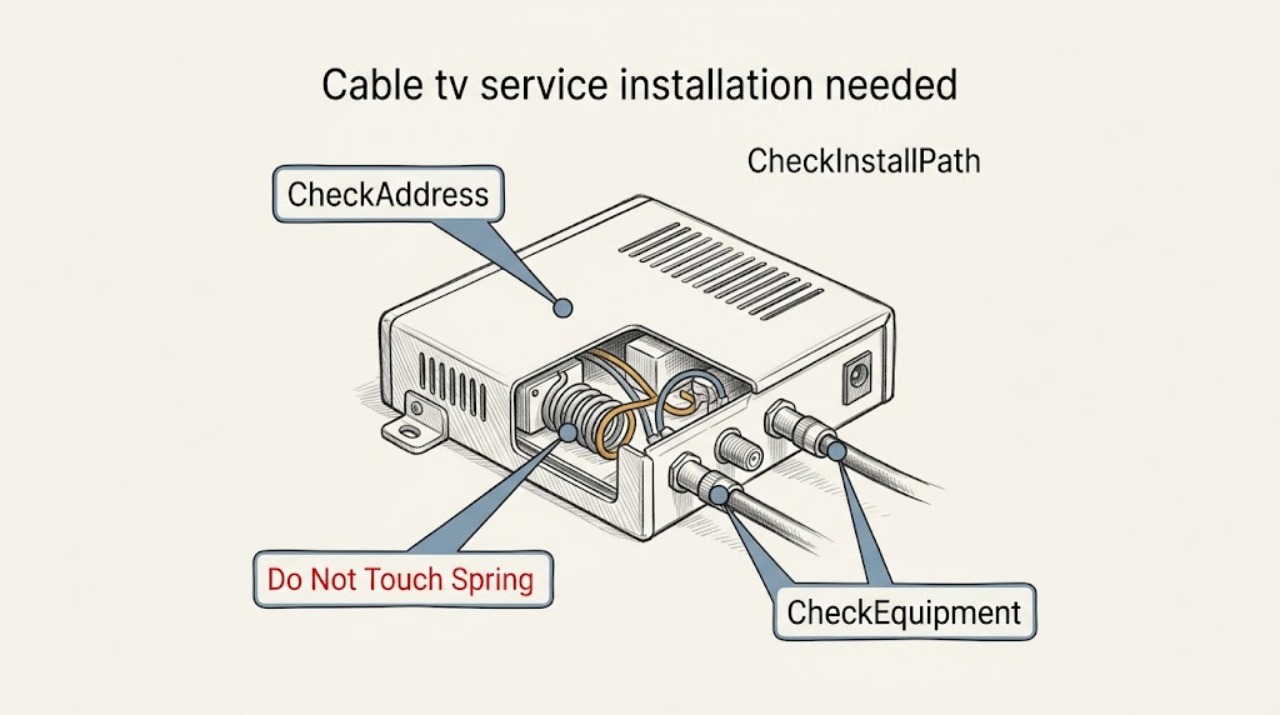
At a new address, a request for cable TV installation is mainly an address-serviceability, appointment, and equipment-compatibility question—not a television repair. Give the provider the complete address and unit, move-in date, and rooms where service is wanted. Ask whether the address supports service, whether an account transfer or new order is required, and whether self-install or a technician is the correct path. Inventory the provider's boxes and cables, check only visible coax outlets and power access, and confirm landlord or property rules before any new cabling. Do not open walls or electrical panels, climb into unsafe spaces, or connect unverified equipment; arrange the provider's installation when the outlet, wiring, or equipment path is uncertain.
Work through in order
Diagnostic checks
Use only checks that match the exact appliance or system and its official guide.
-
Check 1
Contact the chosen or current cable provider with the complete new address, apartment or unit identifier, postal code, and expected move-in date. Ask whether this exact unit is serviceable and whether the request is an account transfer or a new service order.
Expected result: The provider confirms service at the unit, reports a different service tier or installation route, or says the address is unavailable or cannot yet be verified.
Next step: If service is confirmed, ask for the earliest installation or activation path. If it is unavailable or unresolved, ask what alternatives and equipment-return steps apply before disconnecting or moving provider equipment.
Stop if: Do not place an order using a neighboring unit or omit the apartment identifier to force an availability result.
Why this matters
Why: Serviceability is tied to the exact unit, not just the street or ZIP code. An unavailable or unresolved address means a move cannot be assumed to work, even if the old home had service.
-
Check 2
Ask the provider whether this address qualifies for self-install or requires a technician, and record the appointment date, access window, age or access requirements, and whether an adult must be present.
Expected result: The provider offers a kit with activation instructions, schedules a technician, or says the path depends on an outlet, wiring check, property access, or a site visit.
Next step: Use self-install only when the provider confirms eligibility and the written kit instructions fit the site. Otherwise keep the appointment, give the provider access details, and ask what work is included before the visit.
Stop if: Do not substitute your own wall, attic, roof, or electrical work for a provider-required site visit.
Why this matters
Why: A kit generally assumes the provider has already approved the address and equipment path. A technician path suggests that existing wiring, the service drop, the unit, or the requested rooms need provider verification; it is not evidence that the TV is defective.
-
Check 3
Inventory the equipment in your possession before the move: provider boxes or adapters, remotes, gateway if bundled service is involved, power supplies, and coax or other labeled cables. Photograph labels and keep provider-owned items together.
Expected result: The provider confirms that the equipment may transfer, supplies a replacement kit, or says one or more boxes must be returned or are not approved for the new address.
Next step: Follow the provider's equipment list and return instructions. Take only confirmed equipment to the new address; do not purchase a generic receiver, adapter, or amplifier to solve an unconfirmed compatibility issue.
Stop if: Stop if a cable, power supply, or box is damaged, hot, wet, or has exposed conductors; isolate it and tell the provider.
Why this matters
Why: A box that worked at the old home is not automatically authorized or compatible at the new unit. Missing, locked, or unapproved equipment can prevent activation even when the address is serviceable.
-
Check 4
From a normal standing position, note the desired TV rooms, visible coax wall plates, nearby power outlets, signs of a disconnected or damaged jack, and any property restriction on drilling or utility-room access. Do not remove covers or open walls.
Expected result: A visible intact coax outlet is present at the planned TV location, the outlet is absent or damaged, or the room is subject to landlord, building, or access restrictions.
Next step: Tell the provider exactly which rooms need service and describe the visible outlet or restriction. Ask the landlord or property manager to approve any drilling, in-wall work, or shared-utility access before scheduling that scope.
Stop if: Do not probe an outlet, remove a wall plate, enter a locked utility area, or work near electrical, water, or gas services.
Why this matters
Why: An intact visible outlet may make the provider's approved self-install path practical, but it does not prove that the outlet is active. An absent or damaged outlet, a different room layout, or restricted access is a reason to have the provider or property-approved installer assess the route.
-
Check 5
Before moving or installing anything, save the provider's order or appointment confirmation and provide the service address, unit, desired rooms, parking or entry instructions, pets, building contact, and any access restrictions.
Expected result: The confirmation lists an install or activation window and equipment path, or it flags a missing authorization, changed date, unavailable service, or access requirement.
Next step: Resolve address, access, equipment, and scope questions with the provider before the appointment. If the provider cannot service the unit, keep the old equipment connected only as instructed and follow its formal return or transfer process.
Stop if: Do not let an installer or contractor enter a restricted area or perform unapproved cabling without the responsible property owner's permission.
Why this matters
Why: Installation timing and scope can change with the new address. An appointment without building access or the correct equipment may be delayed; a confirmation that changes the route needs clarification before move-in day.
-
Check 6
After the provider-approved equipment is connected, follow the provider's supplied activation instructions for one TV and note whether the box powers on, receives the expected service, and displays the guide or channels described by the order.
Expected result: Activation completes, the provider reports that the line or equipment is not yet activated, or the box shows a provider-specific message or no signal.
Next step: Stop repeated reconnect attempts and give the provider the exact on-screen message, box label, room, and appointment details. Ask for activation support or a technician follow-up; do not bypass the box or add an unapproved amplifier.
Stop if: Disconnect power only as the provider's instructions say, and stop immediately for heat, smoke, sparking, water, or exposed wiring.
Why this matters
Why: A completed activation supports that the new-address order and equipment path are working. A failed or partial activation is usually an account, equipment, signal, or provider-install issue rather than a reason to open the TV or alter house wiring.
Use your observations
Decision map
Find the observation that best matches what you see, then follow the next safe action.
-
PATH 01Safety boundary
What you see
The exact unit is serviceable, the provider confirms the equipment is eligible, and a self-install path is offered for the requested room.
Do this next
Use only the supplied equipment and instructions, connect the confirmed room, and contact the provider if activation does not complete.
Why this path and its safety boundary
Why it matters: The main uncertainty is the provider's activation and the condition of the already-visible site, not a television repair.
Safety stop: Stop for damaged equipment, unsafe access, exposed wiring, or any instruction that would require opening a wall or electrical cover.
-
PATH 02Safety boundary
What you see
The address is serviceable, but the provider requires a technician or the requested room lacks a confirmed active outlet, has damaged visible coax, or needs a site check.
Do this next
Keep the provider appointment, identify every desired TV room, arrange an adult and property access if required, and ask what installation work is included before the visit.
Why this path and its safety boundary
Why it matters: The service order may be valid while the physical route or access still needs provider assessment.
Safety stop: Do not extend cable through walls, ceilings, roofs, or utility spaces yourself.
-
PATH 03Safety boundary
What you see
The provider cannot verify the exact unit or says the new address is not serviceable.
Do this next
Ask the provider what service, waiting-list, or equipment-return options apply, and compare alternatives only after confirming the building's permission and service availability.
Why this path and its safety boundary
Why it matters: The old account cannot be assumed to transfer; the limitation is at the service-address or network level rather than the TV set.
Safety stop: Do not misstate the unit, leave equipment at the new home without instructions, or pay for new wiring to solve a network availability decision.
-
PATH 04Safety boundary
What you see
The address is serviceable, but the provider cannot approve the old box or an item is missing, damaged, locked, or not listed for the new order.
Do this next
Use the provider's confirmed replacement, return, or transfer process and provide the box label and order details; do not substitute retail equipment.
Why this path and its safety boundary
Why it matters: Activation can fail even with a good service path because the equipment identity or authorization is unresolved.
Safety stop: Stop handling equipment that is hot, wet, sparking, or physically damaged.
-
PATH 05Safety boundary
What you see
The provider needs shared-utility, exterior, or in-wall access, but the home is rented or the building requires property authorization.
Do this next
Get written scope and permission from the responsible parties, then let the provider schedule an approved route or advise whether another service path is available.
Why this path and its safety boundary
Why it matters: The installation boundary is controlled by the provider and the property owner or manager, not by a renter troubleshooting a TV.
Safety stop: Do not drill, open shared panels, or enter restricted spaces on your own.
-
PATH 06Safety boundary
What you see
Provider-approved equipment is connected at the confirmed address, but activation fails or shows no signal after the stated instructions.
Do this next
Give the provider the exact message, room, equipment label, and appointment record and request activation support or a technician follow-up.
Why this path and its safety boundary
Why it matters: The remaining causes are commonly order status, equipment authorization, signal, or installation scope; repeated cable swapping will not establish which one applies.
Safety stop: Do not bypass the provider box, add an unapproved amplifier, or alter house wiring to hide the symptom.
Helpful context
Understand the symptom
What a new-address installation request actually involves
The same message—"I need cable TV installed at my new address"—can describe several different jobs. A provider may be checking whether its network serves the exact unit, transferring an account, opening a new order, activating an existing outlet, or sending a technician to extend or verify the service path. The answer cannot be determined from the television alone. The address, unit, provider equipment, visible coax path, property rules, and requested appointment all change the next step.
Prepare the site without turning it into a wiring project
Walk through the new home from normal floor level. Note each desired TV location, a nearby power outlet, and any intact coax wall plate that is already visible. Photograph labels and damage without opening a wall plate or panel. In a rental or managed building, ask the landlord or property manager whether new low-voltage cable, drilling, or access to a utility room is permitted. A provider's self-install kit is appropriate only when the address and equipment are eligible and the kit instructions match the site; otherwise request professional installation.
Keep transfer, equipment, and installation decisions separate
A provider can approve the address while still requiring different equipment or a technician. Conversely, bringing a box from the old home does not prove that it can be activated at the new unit. Keep provider-owned boxes, adapters, remotes, gateways, and cables together, and ask what must move, what must be returned, and what will be supplied at the new address. Do not buy a generic receiver or assume a splitter, adapter, or cable is approved because it has a similar connector.
The safe boundary
Do not remove electrical covers, open walls, work near energized wiring, climb on a roof or unstable ladder, enter a restricted utility space, bypass provider equipment, or run new in-wall cable as a troubleshooting step. Stop if coax is damaged near electrical wiring or water, if there are exposed conductors, or if access is unsafe. Ask the provider and property owner to define the installation scope; use a qualified low-voltage or electrical professional when work outside the provider's documented scope is authorized.
Safety boundary
Stop conditions
- Stop for smoke, sparking, heat, water near equipment, exposed conductors, or damaged power equipment.
- Do not open electrical covers or walls, bypass provider equipment, climb unsafely, or enter restricted utility spaces.
- Stop and obtain provider or property authorization when a new outlet, in-wall cable, exterior route, or shared-utility access is required.
- If address serviceability, equipment authorization, or activation remains unresolved, stop repeated connection attempts and contact the provider.
Only after diagnosis
Potential parts
- provider-approved TV receiver or adapter
Consider only if the provider says the existing box or adapter is not authorized, missing, or incompatible with the new-address order.
Confirm the exact provider, service order, equipment revision, and activation method before obtaining any replacement; a generic receiver is not a substitute. - coaxial cable or coax outlet hardware
Consider only after the provider or a property-approved installer identifies a damaged cable or outlet as part of the documented installation scope.
Confirm cable type, connectors, route, building permission, and who performs the work before purchase or installation.
When checks do not resolve it
Need a professional?
Contact the cable provider when the address is unresolved, the provider requires a technician, equipment is not approved, activation fails, or an outlet or route needs installation. Contact the property owner or manager for permission-controlled work.
Have this ready
- Complete service address and apartment or unit identifier
- Move-in date and whether an existing account should transfer
- Provider order or appointment confirmation
- Desired TV rooms and photos of visible outlets or labels from safe positions
- Equipment inventory, box labels, and any provider return instructions
- Landlord, property manager, access, parking, pet, or building restrictions
Common questions
FAQ
Do I always need a technician for cable TV at a new address?
No. The provider decides from the exact unit, network path, equipment, and site conditions whether self-install or a technician is available. Use a kit only after the provider confirms eligibility and supplies the applicable instructions.
Can I bring my current cable box to the new home?
Sometimes, but do not assume it. Ask the provider whether each box or adapter is authorized for the new order, whether it must be returned, and whether a replacement is required. Keep labels and equipment together while the provider decides.
What if the provider says the new address is unavailable?
Ask whether the unit was entered correctly and what service or equipment-return options apply. Do not misstate the unit or pay for new in-home wiring to solve a provider network-availability decision.
Who pays for a new coax outlet or cable run?
The answer depends on the provider's installation scope, building rules, and any separate property-approved work. Ask for the scope and any charges before authorizing drilling, in-wall work, or an outside installer.
What should I have ready for the installation appointment?
Have the complete address and unit, order confirmation, move-in timing, desired TV rooms, equipment inventory, visible outlet notes, entry or parking instructions, and any landlord or building authorization. Make sure the required adult and access are available if the provider requests them.
What should I do if activation fails after installation?
Record the exact provider message, room, box label, and appointment details, then contact the provider for activation support or a technician follow-up. Do not bypass the box, add an unapproved amplifier, or open house wiring.
Read the exact guide
Official sources
- Spectrum Makes Moving EasySpectrum · Provider-specific moving workflow used for the address, scheduling, and installation-path decisions; other providers may use different terms.
- IMPORTANT INFORMATION FOR XFINITY TV CUSTOMERSXfinity · Provider-specific legal and welcome-kit information used for the need to arrange a new-home installation, compatible TV equipment, home access, and provider-controlled timing; it is not a universal promise for other providers.
- Transfer Cox Services – Move Your Cox ServiceCox Communications · Provider-specific moving guidance used to illustrate exact-address, equipment, access, and self-install versus technician decisions; scope and requirements vary by provider and address.
Community feedback
Share a repair observation
Share a plain-text repair observation. Accepted observations are published automatically; this page may take a moment to update.