
On this page
Start here
Quick answer
A cable-TV provider switch is a new-service and equipment-compatibility decision, not a receiver repair. First confirm that the new provider serves the exact address and ask which delivery method and receiver it supports there. Then record the current receiver's visible model label, ownership status, connections, and TV input without opening, moving, or rewiring anything. Do not assume a receiver supplied by the previous provider can be activated by the new one. Have the new provider confirm the receiver, account provisioning, installation needs, and whether any existing cable or streaming device is supported before you cancel, return, or alter the old setup.
Before you begin
Safety first
- Do not perform wall wiring, ladder work, drilling, opening equipment, live connection changes, or receiver modification.
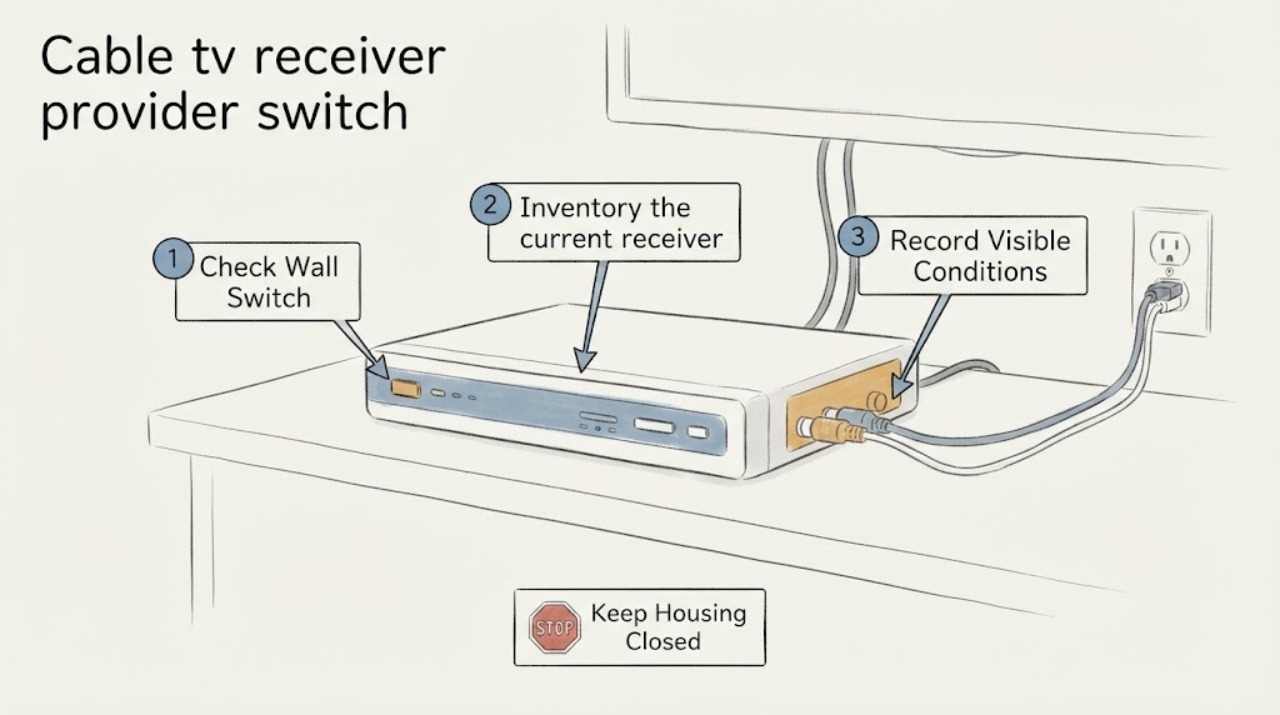
Work through in order
Diagnostic checks
Use only checks that match the exact appliance or system and its official guide.
-
Confirm the switch is a new-service question at the exact address
Write down the service address, whether the household is staying there or moving, the rooms that need TV, and whether the goal is a new provider rather than an outage, billing, or cancellation request.
Expected result: The address, move status, number of viewing locations, and desired service type may differ from the current account's setup.
Next step: Give the exact address and new-customer intent to the prospective provider and ask it to confirm the available TV delivery method before selecting equipment.
Stop if: Stop the switch workflow if the request is actually an outage, billing dispute, account cancellation, or an existing-customer repair; route that issue through the applicable provider support path.
Why this matters
Why: Availability and installation requirements are address-specific, so a general coverage statement or the old receiver cannot establish that the new provider can serve this location.
-
Inventory the current receiver from visible information
From a safe position, read the receiver's visible brand and model label, status lights or on-screen name, and the connection labels that can be seen without moving or opening the unit.
Expected result: Record whether it appears to be a provider-supplied set-top box, a DVR, a gateway-related device, or a consumer streaming device, and note any visible model or account label.
Next step: Give the model and device category to the new provider and ask for an explicit compatibility or replacement decision.
Stop if: Do not open the receiver, remove covers, alter wiring, or move heavy equipment to expose a hidden label.
Why this matters
Why: The device category and identity help the new provider decide whether it supplies a different receiver or supports the existing device; a familiar connector does not prove service compatibility.
-
Check ownership and return obligations in existing records
Review the existing service paperwork or account information that is already available and note whether the receiver is listed as leased, rented, owned, or subject to a return or exchange instruction.
Expected result: The record may identify a provider-owned receiver, a customer-owned device, a pending return, or no clear ownership information.
Next step: Ask the prospective provider what equipment it will supply and separately ask the current provider for its return instructions; keep those conversations separate from a fault or cancellation complaint.
Stop if: Do not discard, ship, reset, or return the receiver until the applicable provider confirms what must happen to it.
Why this matters
Why: A provider-owned receiver may need to remain with or be returned to the old provider, while a customer-owned device still may not be authorized on a different provider's system.
-
Ask the new provider to match technology and receiver requirements
Provide the address, current receiver model, TV model if known, desired viewing locations, and any visible wall-connection or input information to the prospective provider's new-customer or installation team.
Expected result: The provider may confirm service availability, require its own receiver, support an application on a particular device, require an installation visit, or say that the current equipment is not supported.
Next step: Choose the provider-supplied receiver or supported device path only after the provider confirms it in the order or installation instructions.
Stop if: Stop before buying or altering equipment when the provider has not confirmed the device, service technology, account provisioning, or installation method.
Why this matters
Why: This provider-specific answer is the authoritative compatibility result; industry specifications can support interoperability goals, but they do not authorize a particular receiver on a particular account or network.
-
Check the room and display readiness without doing installation work
In each intended viewing room, note the TV input currently used, the visible location of the existing receiver, nearby power availability, and whether the existing connection point is accessible without a ladder, wall opening, or furniture move.
Expected result: The new service may use the same display input, a different provider-supplied receiver, a supported streaming device, or a professional installation route.
Next step: Share the room-by-room notes and let the provider specify any permitted cable, receiver, application, or installation requirements.
Stop if: Do not route cable through walls, climb, drill, open a panel, or perform live connection changes as part of this comparison.
Why this matters
Why: Readiness information helps the provider plan delivery and installation; it does not establish that the current cable, port, or wall connection will work with the new service.
Use your observations
Decision map
Find the observation that best matches what you see, then follow the next safe action.
-
PATH 01Safety boundary
What you see
If the prospective provider confirms service at the exact address and supplies a receiver
Do this next
Use the provider's new-customer order and installation instructions, provide the room and display notes, and keep the old receiver unchanged until the transition instructions are clear.
Why this path and its safety boundary
Safety stop: Stop if the receiver, account activation, or installation method is not confirmed.
-
PATH 02Safety boundary
What you see
If the prospective provider supports an application or consumer device rather than the current receiver
Do this next
Ask the provider to confirm the exact supported device family, application availability, account activation, and display requirements before purchasing or repurposing equipment.
Why this path and its safety boundary
Safety stop: Do not infer support from a similar connector, a device advertisement, or the fact that the current receiver displays television.
-
PATH 03Safety boundary
What you see
If the current receiver is leased or provider-labeled
Do this next
Keep it identified and request the current provider's documented return or exchange instruction while the new provider handles the new-service order separately.
Why this path and its safety boundary
Safety stop: Do not reset, ship, discard, or modify provider-owned equipment without the applicable instruction.
-
PATH 04Safety boundary
What you see
If the address is unavailable, the provider requires an installation visit, or the wiring path is unclear
Do this next
Ask the provider to explain the available service path and have its authorized installation process assess the premises; provide the safe room and connection observations.
Why this path and its safety boundary
Safety stop: Do not climb, open walls, alter wiring, or make a hidden-condition assumption from a map or general availability result.
-
PATH 05Safety boundary
What you see
If the request turns into an outage, billing, cancellation, or account-access problem
Do this next
Stop using this provider-switch checklist and use the relevant existing-provider support channel for that separate issue.
Why this path and its safety boundary
Safety stop: Do not treat a service complaint as proof that a receiver is incompatible with a new provider.
Helpful context
Understand the symptom
A provider switch has two separate decisions
Availability at the address and compatibility of the receiver are related but not interchangeable. A provider may deliver television through a leased set-top box, an application on a supported device, or another service-specific arrangement. The current box may be leased, tied to the previous account, or designed for a different delivery system. Treat the change as a new-customer setup until the new provider confirms otherwise.
Keep the existing setup intact while comparing options
Use labels, paperwork, and on-screen information that are already accessible. Do not open the receiver, change wall wiring, climb to inspect a cable route, or disconnect equipment merely to identify it. The goal is to give the new provider enough information to confirm the correct equipment and installation path.
Keep this page about a new service switch
A receiver that suddenly loses channels, an unexpected charge, or a request to cancel an existing account is a different support question. This guide is for deciding whether and how to start service with a new TV provider. Once a new provider confirms the order and equipment, use that provider's installation instructions or arranged service for the actual connection.
Only after diagnosis
Potential parts
- HDMI cable
Consider this only if the new provider confirms that its receiver uses the television's HDMI input and the existing cable is missing or visibly damaged.
Confirm the connector type and the provider or device guidance for the required video features before ordering. - streaming device
Consider this only if the new provider explicitly delivers the service through an application and confirms that the device family is supported for the account and address.
Verify current provider support, application availability, account activation, and TV input requirements; do not assume a generic streaming device is authorized.
When checks do not resolve it
Need a professional?
Use the prospective provider's official new-customer or installation channel after collecting the address, receiver identity, ownership record, room needs, and visible connection notes. Ask the current provider separately for equipment-return instructions when applicable.
Safety scope: Do not perform wall wiring, ladder work, drilling, opening equipment, live connection changes, or receiver modification.
Have this ready
- exact service address and move or stay status
- current receiver brand, model, and visible device category
- leased, rented, owned, or unclear equipment status
- rooms and TVs that need service
- visible inputs and connection points without opening or altering anything
Common questions
FAQ
Can I use my old cable receiver with a new TV provider?
Do not assume so. The new provider must confirm whether the receiver is supported and can be provisioned on its service. Provider-owned equipment may also need to remain with or be returned to the old provider.
What information should I collect before switching TV providers?
Collect the exact address, move or stay status, current receiver model and visible device category, ownership or lease status, intended rooms, and visible TV inputs or connection points. Do this without opening or altering equipment.
Does a similar HDMI or coaxial connection prove compatibility?
No. A connector only describes a physical connection. The new provider must confirm the delivery technology, receiver or application, account activation, and installation requirements.
Is this guide for a cable outage or a billing problem?
No. It is for planning a new-customer provider switch. An outage, billing dispute, cancellation, or existing-account access issue should use the relevant provider support path instead.
Read the exact guide
Official sources
- TV Form - Descriptions of Complaint IssuesFederal Communications Commission · Use to separate address availability and TV equipment questions from unrelated billing, outage, or account issues.
- SpecificationsCableLabs · Use for the limited point that common specifications can support interoperability while provider authorization and account compatibility still require confirmation.
Community feedback
Share a repair observation
Share a plain-text repair observation. Accepted observations are published automatically; this page may take a moment to update.