
On this page
Start here
Quick answer
If your Bosch dryer door is locked, read the display before trying to open it. A key or lock symbol usually indicates that the child/control lock is active, while DR points to a door-closure or door-switch problem. If the drum is moving or the appliance is hot or cooling, do not force the door; follow the exact model manual's stop and lock-release procedure. If the door remains locked after the cycle has ended and the dryer is cool, or the code returns after a firm, unobstructed closure, stop and arrange qualified Bosch service.
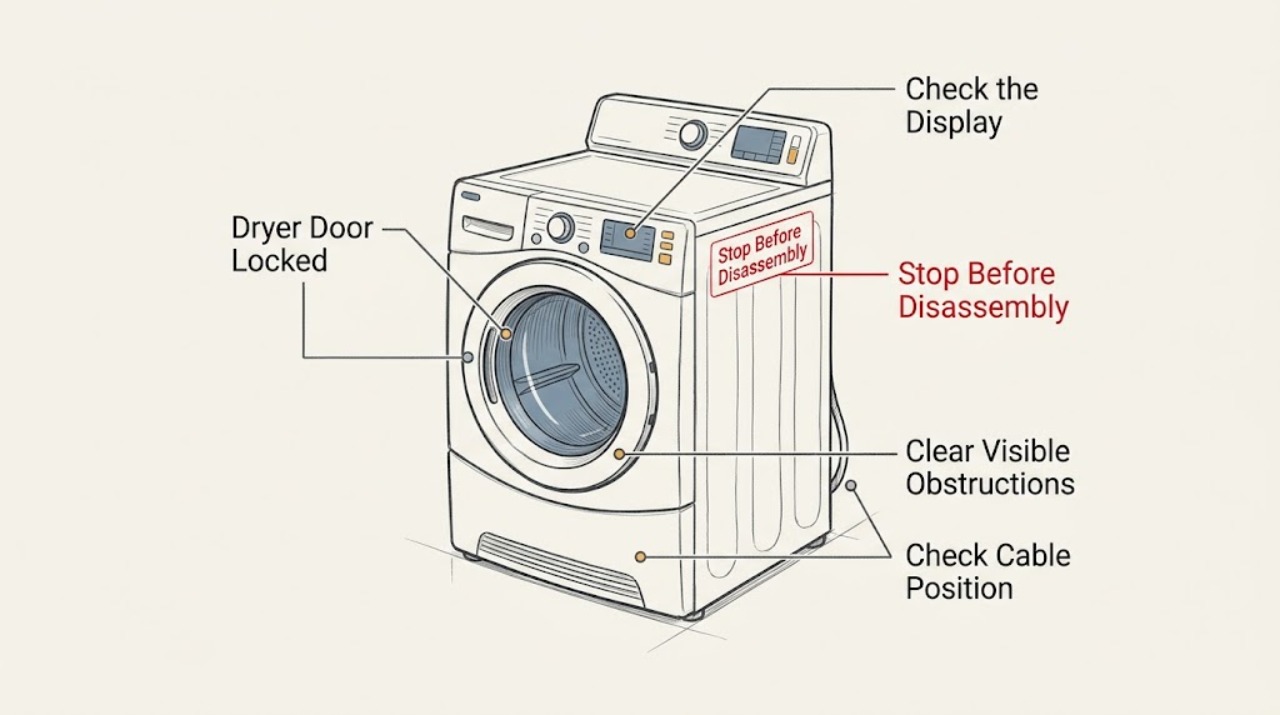
Work through in order
Diagnostic checks
Use only checks that match the exact appliance or system and its official guide.
-
Check 1
Read the display before trying to open the door, and note any key or lock symbol, DR, another code, or no code.
Expected result: A key or lock symbol appears; DR appears; another code appears; or the display shows no relevant code.
Next step: For a key or lock symbol, use the exact Bosch model manual for the release sequence. For DR, continue with the safe closure and obstruction checks. For another code, use that model's code table. Do not force the door.
Stop if: Stop if the display reports an electrical fault, the appliance is damaged, or you would need to bypass the interlock.
Why this matters
Why: A key or lock symbol points toward the child/control lock. Bosch associates DR with a door that is not properly closed or a possible door-switch issue. Another code may be model-specific, while no code leaves the cycle state or latch condition unresolved.
-
Check 2
If the drum is moving, the load is hot, or an applicable model shows a cooling state, leave the door closed and allow that state to finish; do not pull or pry the door.
Expected result: The drum stops and the door releases after the documented cycle state, or the door remains locked after the cycle has ended and the dryer is cool.
Next step: If the door releases, remove the load normally. If it remains locked, continue only with the model's documented lock-release procedure or arrange service; never force the latch.
Stop if: Stop immediately if the door, drum, or appliance is hot, moving, smoking, or visibly damaged; do not open the cabinet.
Why this matters
Why: On applicable Bosch models, a hot or cooling state can be a normal part of operation. A door that remains locked when the cycle is complete and the dryer is cool is not resolved by normal waiting and needs model-specific diagnosis.
-
Check 3
With the drum stopped and the appliance cool, look from outside around the door opening for clothing, lint, or another visible obstruction, then close the door firmly.
Expected result: The opening is clear and the door closes fully, or the door will not align or latch, remains loose, or DR returns.
Next step: If the opening is clear and the door closes fully but the lock persists or DR returns, stop user troubleshooting and arrange qualified service. Do not remove panels or test wiring.
Stop if: Stop if clearing the opening would require tools, disassembly, force, or reaching into a moving or hot drum.
Why this matters
Why: A visible obstruction or incomplete closure can keep the door interlock from registering. Persistent DR after a clear, firm closure makes a latch, switch, alignment, or control fault more likely.
-
Check 4
If the panel is unresponsive and the drum is stopped and cool, perform only the model's documented power reset: switch off or unplug the dryer, or isolate its breaker, wait at least five minutes, and restore power.
Expected result: The controls and door behavior return to normal, or the lock or code persists after power is restored.
Next step: If the lock or code remains, record the model or E-Nr and display code and contact Bosch or qualified service. Do not open the cabinet.
Stop if: Stop if the cord, plug, outlet, or appliance shows damage, overheating, or moisture; do not restore power until it is assessed.
Why this matters
Why: A safe power cycle may clear a temporary electronic state. Persistence after the reset points to a fault requiring exact-model diagnosis rather than repeated resets.
Use your observations
Decision map
Find the observation that best matches what you see, then follow the next safe action.
-
PATH 01Next step
What you see
A key or lock symbol is present, the controls do not change the setting, and there is no visible door obstruction.
Do this next
The control or child lock is the most likely explanation. Use the release sequence in the exact Bosch model manual; button combinations are not safely interchangeable between models. If the lock remains after release and a completed, cool cycle, arrange service.
-
PATH 02Next step
What you see
DR returns after the opening is clear and the door has been closed firmly.
Do this next
The basic closure check did not resolve the condition, so a latch, switch, alignment, or control fault is more likely than an active control lock. Stop forcing the door and have an authorized technician diagnose it.
-
PATH 03Next step
What you see
The door is locked while the drum is hot or an applicable model is in a cooling state, then releases after that state; or it remains locked cold after completion.
Do this next
The first pattern can be consistent with model-specific cooling and lock behavior; the second is not resolved by waiting and calls for model-specific service. Do not pry the door or remove panels.
-
PATH 04Next step
What you see
The panel is blank or unresponsive, or another error remains after one safe, model-documented power reset.
Do this next
Treat this as a possible electrical or electronic fault, not just a door setting. Stop and arrange professional service with the exact model or E-Nr and displayed code.
Helpful context
Understand the symptom
Why a Bosch dryer door may stay locked
A Bosch dryer can keep the door interlocked while the drum is moving or while an applicable model is completing a hot or cooling state. The display helps separate a control-lock indication from a door-closure or switch indication: a key or lock symbol points toward the control lock, while DR points toward the door closure or switch. Exact release steps vary by model, so use the manual for the dryer’s model or E-Nr and never force the latch.
What to have ready for service
Record the full model or E-Nr, the exact display symbol or code, whether the drum was moving or hot, and whether the door was fully closed and unobstructed. Bosch uses the model number to identify the correct documentation and parts; this prevents a latch or switch from being ordered for the wrong dryer.
Only after diagnosis
Potential parts
- door latch or door-switch assembly
Consider this category only if DR persists after the door is unobstructed, fully closed, and the model's documented lock-release procedure does not clear the condition; diagnosis must identify the failed component.
Bosch requires the exact model or E-Nr to identify compatible parts; do not order by appearance alone.
When checks do not resolve it
Need a professional?
Stop and arrange Bosch or qualified service if the door remains locked after the documented cycle has ended and the dryer is cool, if DR returns after a firm unobstructed closure, if a key or lock symbol cannot be cleared with the exact model manual, if the panel remains blank or unresponsive after a safe reset, or if the appliance or cord is damaged. Do not force the door, bypass the interlock, remove panels, or work on wiring.
Common questions
FAQ
Why is a key or lock symbol showing on my Bosch dryer?
Bosch identifies the key symbol as the child or control lock. Use the exact model manual for the release sequence, because the controls differ by model. If it remains locked after the cycle is complete and cool, arrange service.
What does DR mean on a Bosch dryer?
Bosch associates DR with a door that is not properly closed or a possible door-switch issue. Clear only visible obstructions, close the door firmly, and arrange service if DR returns or the door remains locked.
Can I force open a locked Bosch dryer door?
No. If the drum is moving or the appliance is hot or cooling, leave the door closed. If it remains locked after the documented cycle has ended and the dryer is cool, use the model-specific guidance or have qualified service diagnose it.
Read the exact guide
Official sources
- Bosch Dryer Replacement Parts.Bosch Home Appliances · Model or E-Nr lookup for door locking assemblies and other dryer parts
- Bosch D Error Codes: Troubleshooting Guide | Bosch Home AppliancesBosch Home Appliances · Bosch dryer key or lock symbol, DR door code, and safe reset guidance
- User manual and installation instructions WQG24108IN | BoschBosch Home Appliances · Model-specific safety, cooling-state behavior, troubleshooting, and professional repair boundaries; use only as an example of model-specific documentation
Community feedback
Share a repair observation
Share a plain-text repair observation. Accepted observations are published automatically; this page may take a moment to update.