
On this page
Start here
Quick answer
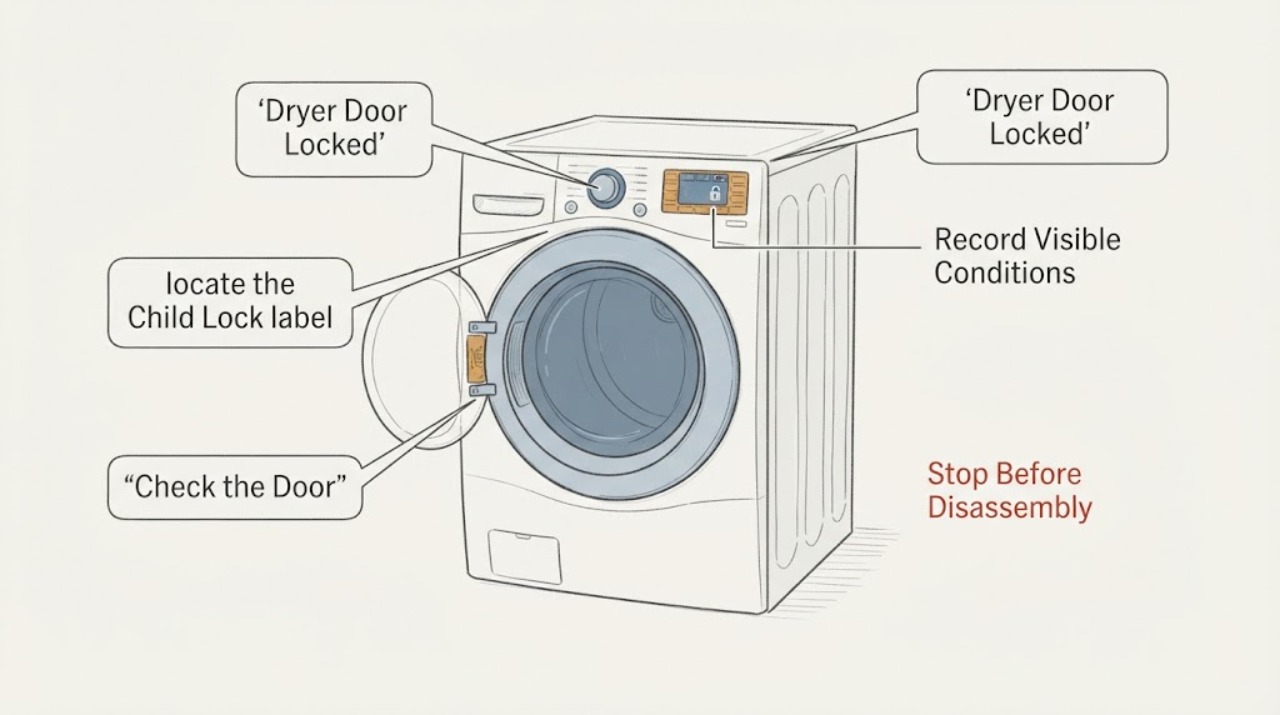
A Samsung dryer door that will not open may be held by Child Lock on some models, an active or just-finished cycle, a door or latch sensing problem, or a control error. First keep the drum stopped and safe, then note whether the Child Lock icon, CL, or a door-related code is displayed. Use only the two-button Child Lock combination marked on the panel or in the exact model manual; the combination and door behavior vary by model, and restarting does not disable Child Lock. Do not pry the door, reach into a moving or hot drum, bypass the latch, or keep forcing the cycle. If the lock will not release after the model-specific control check, a dC, dE, dF, do, d0, 1 DC, or 1 dF code returns, or the door or latch is damaged, leave the dryer off and request service.
Work through in order
Diagnostic checks
Use only checks that match the exact appliance or system and its official guide.
-
Check 1
Leave the dryer in a safe state: stop using the controls if the drum is moving, keep hands out of the drum, and wait until motion and obvious heat have stopped. Record the display, Child Lock icon, selected cycle, and whether the door is physically closed, loose, or visibly damaged.
Expected result: The drum is moving or hot; the panel shows CL or a lock icon; a door-related code is present; the latch or hinge looks damaged; or the dryer is stopped and cool with no visible damage.
Next step: Wait for a moving or hot drum to become safe, then use the Child Lock or door-code branch that matches the recorded state. If there is damage, smoke, or a burning smell, keep the dryer off and arrange professional service.
Why this matters
Why: Motion or heat makes immediate opening unsafe. CL or a lock icon makes a control setting more likely, while dC, dE, dF, do, d0, 1 DC, or 1 dF shifts attention to the door, latch, or sensing circuit. Visible damage is not a user-adjustment problem.
-
Check 2
If the Child Lock icon or CL appears, locate the Child Lock label, icon, or two-button marking on the dryer panel and use only that model-specific combination. If the panel does not show the combination, consult the exact model manual rather than guessing a pair of buttons.
Expected result: The lock icon turns off and the panel and door behave normally; the icon only flashes; the buttons remain disabled; or no lock indicator was present.
Next step: If the icon clears, test the door gently without force and continue only if the drum is stopped. If the lock remains, use the manual's exact procedure once; if controls remain disabled after that, stop and request service.
Why this matters
Why: A cleared icon supports Child Lock as the cause. A flashing icon may be a temporary-off mode on some models, while a lock that will not clear may reflect the wrong combination, a cycle-dependent setting, or a control fault. Restarting the dryer alone does not disable Child Lock.
-
Check 3
If there is no Child Lock indication, confirm that the cycle has actually ended and that the door is fully closed and aligned. Look only for loose laundry or an object visibly caught at the opening; do not insert tools, pull the door, or remove panels.
Expected result: The cycle is still active or the drum is hot; a loose item is caught at the opening; the door closes and latches normally after the item is moved away; or the door remains locked or will not latch.
Next step: Wait for the safe end of the cycle and try the door once. If a loose item can be removed without force, close the door and run only a model-approved short test. Persistent locking, misalignment, or a damaged latch needs service.
Why this matters
Why: An active or just-finished cycle can explain a door that has not released yet. A visible obstruction can prevent the latch from seating, but a door that remains locked, will not align, or will not latch points to a latch, hinge, or door-sensor condition rather than laundry placement alone.
-
Check 4
If the display shows dC, dE, dF, do, d0, 1 DC, or 1 dF, photograph the code and inspect the visible door edge, latch area, and opening for an item preventing closure. Do not treat a code as permission to bypass the latch or open the cabinet.
Expected result: The code clears after the door is correctly closed; it returns immediately; the door is visibly damaged or loose; or the code is different from the listed door-related indications.
Next step: Run a short, supervised test only when the door latches without force and no hazard is present. If the door code returns, the door will not latch, or damage is visible, leave the dryer off and request service.
Why this matters
Why: A code that clears after proper closure is consistent with a door-position or sensing condition. A recurring code or visible damage makes a latch, hinge, sensor, or wiring fault more likely. A different code must be interpreted from the exact model's code guide rather than guessed.
-
Check 5
If the panel is unresponsive after the lock check, preserve the code or blinking pattern, make sure the dryer is cool and stopped, and perform one safe power cycle using the dryer controls or household breaker only as described by Samsung for the exact installation. Do not work on the cord, outlet, or cabinet while energized.
Expected result: The panel responds after power is restored; the Child Lock or door symptom returns; the breaker trips again; or the dryer remains unresponsive on a known-good supply.
Next step: Do not keep resetting the dryer. If the breaker trips, the cord or outlet is damaged, or the panel remains unresponsive, keep the appliance off and use an electrician or qualified appliance technician as appropriate.
Why this matters
Why: Recovery after one power cycle can indicate a temporary control issue but does not prove the latch is repaired. A repeat lock, a breaker trip, or a persistently dead panel shifts the problem toward a control, supply, or door-sensing fault.
-
Check 6
If the display shows dn or another non-door message, record it and follow the exact model guidance before touching Power or the door. For dn, allow the firmware download process to finish as Samsung directs instead of unplugging the dryer during the display.
Expected result: The message clears and the dryer returns to normal; a different code appears; or dn remains displayed and the dryer does not recover.
Next step: Once the message clears and the drum is safely stopped, reassess the door symptom. If the display remains stuck or the door stays locked, stop use and provide the recorded message and model number to Samsung service.
Why this matters
Why: A firmware-download message is not evidence of a locked-door latch and should not be interrupted casually. A different or persistent message requires the exact model's error guidance and may need service.
Use your observations
Decision map
Find the observation that best matches what you see, then follow the next safe action.
-
PATH 01Next step
What you see
The Child Lock icon or CL is present, the drum is stopped, and the door has no visible damage.
Do this next
Use the panel marking or exact manual to disable Child Lock once. If the icon will not clear or the door remains locked after the setting is cleared, stop and request service.
Why this path and its safety boundary
Why it matters: A model setting is more likely than a broken latch, but the exact button pair and whether the door is locked vary by Samsung model.
-
PATH 02Next step
What you see
The cycle is active or the drum is still hot, with no Child Lock indication and no visible door damage.
Do this next
Wait for the drum to stop and cool, then try the door once. If the lock persists after a normal end or the cycle cannot end, leave the dryer off and arrange service.
Why this path and its safety boundary
Why it matters: The dryer may be withholding normal access until the cycle safely stops; opening it by force would create an injury or equipment risk.
-
PATH 03Next step
What you see
A door-related code returns, the door will not align or latch, or the latch, hinge, or door is visibly damaged.
Do this next
Keep the dryer out of service and request a qualified inspection. Give the technician the full model number, exact code, cycle state, and whether the door was hot or physically damaged.
Why this path and its safety boundary
Why it matters: The pattern is more consistent with a door-position, latch, hinge, or sensing fault than with a user setting. A recurring code should not be cleared by repeated resets.
-
PATH 04Next step
What you see
The panel remains unresponsive after the exact lock check, or the breaker trips or power drops again.
Do this next
Keep the appliance disconnected when safe, stop if the cord or outlet is damaged, and use an electrician for the household supply or a qualified appliance technician for the dryer.
Why this path and its safety boundary
Why it matters: A persistent control or electrical symptom is less consistent with Child Lock alone and should not be chased by repeated breaker resets or cabinet work.
-
PATH 05Next step
What you see
Smoke, a burning smell, exposed wiring, water near the electrical connection, or a damaged power cord appears at any point.
Do this next
Stop using the dryer immediately. If it can be done without touching damage or standing in water, isolate power at the normal disconnect; otherwise leave it alone and contact an appropriate qualified professional.
Why this path and its safety boundary
Why it matters: This is a safety hazard, not a door-adjustment problem. Continued operation or repeated resets could worsen the hazard.
Helpful context
Understand the symptom
First separate a control lock from a mechanically stuck door
A lit Child Lock icon or CL message is a control-setting clue, not proof that the latch has failed. A door-related code, a latch that does not engage, or a door that remains locked after the exact lock setting is cleared points to a different branch. Samsung uses model-specific displays and button combinations, so identify the complete dryer model before following any shortcut.
Keep the inspection external and safe
Do not pull against the door, insert a tool into the latch, defeat a safety interlock, or open the cabinet. If the drum is still turning or the load is hot, wait for the cycle to stop and cool before touching the door area. A burning smell, smoke, exposed wiring, water intrusion, or a damaged cord is a stop-use condition.
Preserve the exact display state
Write down the code, blinking pattern, Child Lock icon, selected cycle, and whether the drum is hot or still moving before resetting anything. Door codes and control-lock behavior are model dependent; the record helps the exact manual or technician distinguish a setting from a latch or sensor fault.
Only after diagnosis
Potential parts
- door latch or door-sensor assembly
Consider this category only after the Child Lock setting is cleared, the visible opening is unobstructed, and a door code or persistent locking symptom is confirmed by the exact model diagnosis.
Door and sensor parts are model-specific; confirm the complete model and fit information through Samsung or a qualified service provider before ordering. - door strike, hinge, or related door hardware
Consider this category only when the door is visibly misaligned or damaged and a qualified inspection identifies hardware rather than a control setting.
Do not infer a part from the symptom alone; match the exact model and revision, and do not remove or tension spring-loaded hardware as a casual repair.
When checks do not resolve it
Need a professional?
The door stays locked after Child Lock is cleared according to the exact manual and the drum is stopped and cool., A dC, dE, dF, do, d0, 1 DC, or 1 dF indication returns, or the latch, hinge, door, or sensor area is damaged., The panel remains unresponsive, a breaker trips again, or there is smoke, a burning smell, exposed wiring, water near the electrical connection, or a damaged cord.
Have this ready
- The complete Samsung dryer model number and whether the door is front-hinged or otherwise configured.
- A photo or transcription of the display, lock icon, blinking pattern, selected cycle, and time remaining.
- Whether the drum was moving or hot, whether the door would latch, and which safe model-specific check changed the symptom.
Common questions
FAQ
Why is my Samsung dryer door locked when there is no obvious damage?
Child Lock can disable controls and may lock the door on some Samsung models, while an active or just-finished cycle can also delay normal access. Check for CL or the lock icon, wait until the drum is stopped and cool, and use the exact panel or manual procedure. Do not force the door; a persistent lock needs service.
Will restarting a Samsung dryer turn off Child Lock?
No. Samsung says restarting the washer or dryer does not disable Child Lock. Use the model's labeled two-button combination or manual, and remember that the combination and which controls remain available vary by model.
What do dC, dE, dF, do, d0, 1 DC, or 1 dF mean on a Samsung dryer?
Samsung groups these as door-related indications involving the door, latch, or door sensing. Check that the door is correctly closed and that no loose item is caught at the opening. If the indication returns or the door is damaged or will not latch, stop using the dryer and request service rather than bypassing the latch.
Can I pry open a Samsung dryer door that will not unlock?
No. Do not insert a tool, pull against the door, defeat the interlock, or open the cabinet. Wait for a moving or hot drum to become safe, use the exact model's lock and error guidance, and arrange service if the latch will not release or any door hardware is damaged.
What if the dryer panel is frozen as well as the door?
Record the display or blinking pattern first, check Child Lock, and use one safe power cycle only after the dryer is stopped and cool and the exact installation guidance permits it. A panel that remains unresponsive, a returning lock, or a repeat breaker trip needs qualified service; repeated resets do not establish that the door fault is repaired.
Read the exact guide
Official sources
- Samsung dryer displays an error codeSamsung Support · Samsung dryer error-code troubleshooting; exact code meanings and controls vary by model
- Samsung dryer turns on but will not start or spinSamsung Support · Samsung dryer start and drum-motion troubleshooting; model-specific controls apply
- Use Child Lock on your Samsung washing machine and dryerSamsung Support · Samsung laundry appliances; button combinations, temporary-off behavior, and door locking vary by model
- Control buttons on Samsung dryer do not respondSamsung Support · Samsung dryer control panels; the lock-button pair varies by model
- Samsung dryer loses power or won't turn onSamsung Support · Samsung dryer electrical-supply troubleshooting; household wiring work requires a qualified electrician
Community feedback
Share a repair observation
Share a plain-text repair observation. Accepted observations are published automatically; this page may take a moment to update.