
On this page
Start here
Quick answer
First stop the cycle with the dryer's normal control and wait until the drum is completely stationary and the hot load and door have cooled. Then separate a control or child lock from a physically stuck door: if a lock icon is on but the handle opens, use the exact model manual to turn off the control lock; if the handle will not release after the cycle has ended, do not pry or bypass the latch. Some dryers keep the door locked while a cycle or child lock is active, and button combinations vary by model. If the lock remains after the documented unlock procedure and a safe cool-down, or the dryer reports a door fault, leave it off and request model-specific service.
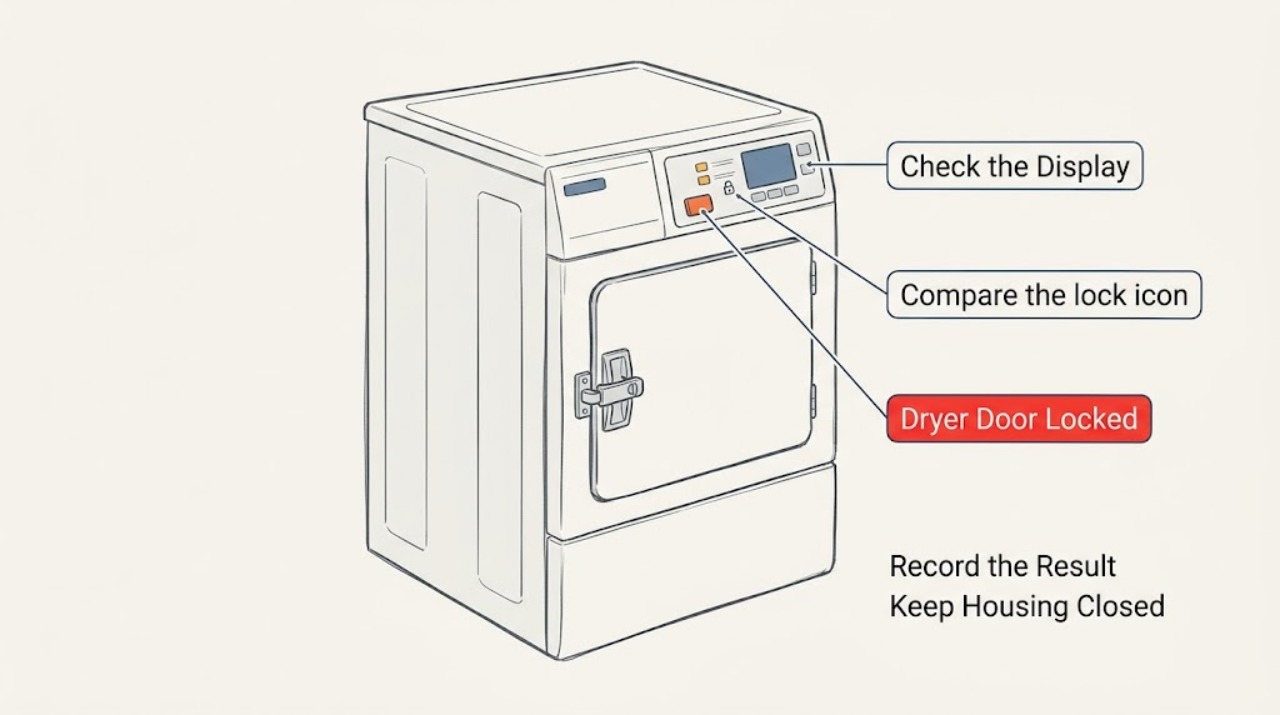
Work through in order
Diagnostic checks
Use only checks that match the exact appliance or system and its official guide.
-
Check 1
Press the dryer's normal Power or Start/Pause control to stop the cycle, then wait until the drum has fully stopped and the door and load are no longer hot.
Expected result: The drum stops and the door releases after the normal stop or cool-down, or the drum is stationary but the handle remains locked.
Next step: If the door releases, open it normally. If it remains locked, do not pull harder or insert tools; identify whether a control/child lock is active before seeking service.
Why this matters
Why: A running cycle or residual heat can be a normal safety reason to keep the door closed. A stationary, cooled drum with a door that still will not release points away from ordinary cycle timing.
-
Check 2
Compare the lock icon or message with the physical handle: test only whether the handle opens normally, without forcing it.
Expected result: The panel shows a lock icon or lock message but the handle opens, or the handle itself will not open even when the drum is stopped and cool.
Next step: For a control/child lock, continue to the model-manual unlock step. For a physically locked handle, skip improvised releases and use the service boundary if it does not release after the documented cycle state is complete.
Why this matters
Why: A responsive handle with disabled controls is more consistent with a control or child lock. A handle that remains physically closed is a latch, hinge, alignment, or safety-state question instead; control-lock instructions do not provide a universal mechanical release.
-
Check 3
Find the dryer's complete model number and follow its owner's manual or the lock label printed on the panel to disable Control Lock or Child Lock.
Expected result: The manual identifies the same two buttons or menu path as the panel, and the lock icon turns off; alternatively, the proposed buttons do not exist or the icon stays on.
Next step: Use only the procedure that matches the exact model and panel. If the controls do not match or the icon remains on, stop experimenting and obtain the correct manual or service rather than guessing another combination.
Why this matters
Why: Manufacturers use different lock procedures. GE gives common examples but says the method varies by model; Samsung likewise says the combination or menu path depends on the model and panel.
-
Check 4
If the cycle has ended but the dryer continues tumbling, check the display for an END, Wrinkle Care, Wrinkle Prevent, or similar post-cycle indication before touching the door.
Expected result: The display indicates a post-cycle wrinkle-prevention function, or there is no such indication and the dryer still spins or will not power off.
Next step: Follow the model manual to end the post-cycle function and wait for the door-lock indicator to clear. If the drum or panel still will not stop, leave the dryer off and request service; never reach into a moving drum.
Why this matters
Why: Some dryers continue intermittent tumbling after the drying portion ends, and the door-lock indicator may remain until the cycle is paused, stopped, or finished. Continued spinning or failure to power off after the model's normal control is not normal.
-
Check 5
With the dryer stopped, cool, and disconnected from power, inspect only the visible door opening, gasket, strike, and latch face for a loose garment, lint, bent edge, or obvious damage.
Expected result: A loose item or lint is plainly accessible, the door edge or latch is visibly bent or damaged, or nothing visible explains the locked handle.
Next step: Remove only loose material that can be lifted out without tools or force. Do not pry, probe the latch, remove panels, or test wiring; if the door remains locked or hardware is damaged, request service.
Why this matters
Why: An accessible obstruction can prevent the door from seating or releasing. Visible damage or no visible cause makes a hinge, latch, door-switch, or alignment fault more likely, but the failed component cannot be identified safely without the model.
-
Check 6
If the panel is unresponsive after the lock procedure, power-cycle the dryer only as the model guidance permits and observe whether the lock or door-status message returns.
Expected result: The panel responds and the lock clears, or the panel remains unresponsive, the door-status message returns, or the door stays physically locked.
Next step: If the fault returns, stop using the dryer and arrange service with the complete model number and exact display message. Do not substitute a latch, switch, or control board by appearance alone.
Why this matters
Why: A successful reset can clear a temporary control state, but it does not prove that the latch or door-sensing circuit is healthy. A recurring lock, door-status message, or physical lock needs model-specific diagnosis.
Use your observations
Decision map
Find the observation that best matches what you see, then follow the next safe action.
-
PATH 01Next step
What you see
Do this next
Use the exact model manual or the lock label on the panel to turn the feature off. Do not assume another manufacturer's button combination applies.
-
PATH 02Next step
What you see
Do this next
Stop the cycle normally if needed and wait for a complete stop and safe cool-down. Do not pry the door or reach into the drum while it is moving or hot.
-
PATH 03Next step
What you see
Do this next
Use the normal Power or door-opening behavior documented for the model. If the dryer keeps spinning or will not power off after that, stop and request service.
-
PATH 04Next step
What you see
Do this next
Leave the dryer off and arrange model-specific service. Do not force the handle, bypass the latch, or remove panels to release the door.
-
PATH 05Next step
What you see
Do this next
Check only the visible opening and that the door closes without force. If the status remains or hardware is damaged, stop using the dryer and request service.
Helpful context
Understand the symptom
A locked panel is not always a locked door
A dryer can show a lock icon because its controls or child-lock feature is enabled, while the door handle still works. A door can also remain locked because a cycle is active, the drum and load are still hot, or a physical latch, hinge, alignment, or door-status fault is present. Manufacturer pages agree that the unlock controls vary by model, so the full model number and the labels printed on your panel matter.
Do not force a hot or moving dryer door
Do not reach through a door gap, pry the latch, bypass the lock, or remove a panel to release the door. Stop the appliance normally, wait for the drum to stop and the load to cool, and then perform only the visible checks below.
Only after diagnosis
Potential parts
- model-specific dryer door latch, door switch, hinge, or control component
The generic symptom does not identify whether the lock is user-selected or mechanical. Consider a part only after the exact manual and a service diagnosis identify the failed component.
Confirm the complete model number and manufacturer parts documentation before ordering; do not substitute a latch, switch, hinge, or control board by appearance alone.
When checks do not resolve it
Need a professional?
Stop and arrange service if the door remains physically locked after the drum has stopped and cooled and the documented control lock is off, the latch or hinge is damaged, the dryer repeatedly reports an open-door or lock fault, the panel will not respond after the permitted reset, or there is smoke, scorching, burning odor, or electrical damage. Disconnect power only when safe.
Common questions
FAQ
Does a dryer Control Lock physically lock the door?
Not always. GE describes Control Lock as preventing control selections, while Samsung notes that Child Lock locks the door on many models. If the panel is locked but the handle opens, use the exact model procedure; a handle that remains physically locked is a separate service question.
Can I open a dryer door while it is running?
Stop the cycle with the normal control and wait for the drum to stop and the hot load to cool. Do not reach into a moving drum or pry the door. Some models may keep the door locked while a cycle or Child Lock is active.
Which buttons unlock a locked dryer?
There is no universal button combination. GE and Samsung both state that the controls vary by model; use the lock label on your panel or the owner's manual for the full model number. If those controls do not match, stop experimenting.
Why is my dryer still locked after the cycle ended?
Check whether a wrinkle-prevention or similar post-cycle function is still active and allow the drum to stop and cool. If the control lock is off but the door remains physically locked, or a door-status message returns, leave the dryer off and request model-specific service.
Read the exact guide
Official sources
- Control buttons on Samsung dryer do not respondSamsung Support US · Brand-specific control-lock, power-cycle, and service guidance; exact buttons and cycle behavior vary by model.
- Dryer - Control LockGE Appliances · Brand-specific example showing that Control Lock is a control-panel feature and unlock methods vary by model; not a universal GE or cross-brand mechanical release.
- Drying time extended [dryer]LG USA Support · Brand-specific example that a post-cycle Wrinkle Care state can make a dryer appear to keep running and that a Door Locked indicator may need to clear; do not assume its display or controls on another brand.
- Use Child Lock to prevent accidental use of your Samsung washer and dryerSamsung Support Canada · Brand- and market-specific Child Lock behavior; used to establish why model and panel differences must be checked, not as a universal button procedure.
- How to safely stop your Samsung dryer mid-cycleSamsung Support Canada · Brand-specific example of safe mid-cycle stopping, residual heat, and Child Lock behavior; use only as general safety context for other brands and follow the appliance's own manual.
Community feedback
Share a repair observation
Share a plain-text repair observation. Accepted observations are published automatically; this page may take a moment to update.