
On this page
Start here
Quick answer
If a Bosch refrigerator is not cooling, first measure the actual temperature in the center of the refrigerator and freezer rather than relying only on the display. Confirm that the appliance has power, the refrigerator setting was not changed, and no showroom or special mode is active; Bosch's general guide uses 35–38°F (1.7–3.3°C) for the refrigerator, but the exact model manual controls the available settings. Check that food is not blocking the internal vents, the doors close fully, and the gaskets are clean and undamaged. Clear boxes or other obstructions from the accessible external ventilation openings, but do not pull apart the appliance or remove a cover to reach a condenser, fan, evaporator, compressor, or sealed-system tubing. After a documented setting change or one model-appropriate reset, allow time for the temperature to stabilize and recheck. If both compartments remain warm, the freezer is cold but the refrigerator stays warm, heavy frost is present, an error returns, or cooling fails after these checks, protect perishable food and arrange qualified Bosch service.
Before you begin
Safety first
- This article covers visible settings, temperature readings, door seals, food placement, and accessible ventilation. Qualified service must handle covers, electrical tests, fans, evaporators, compressors, refrigerant, defrost components, and sealed-system work.
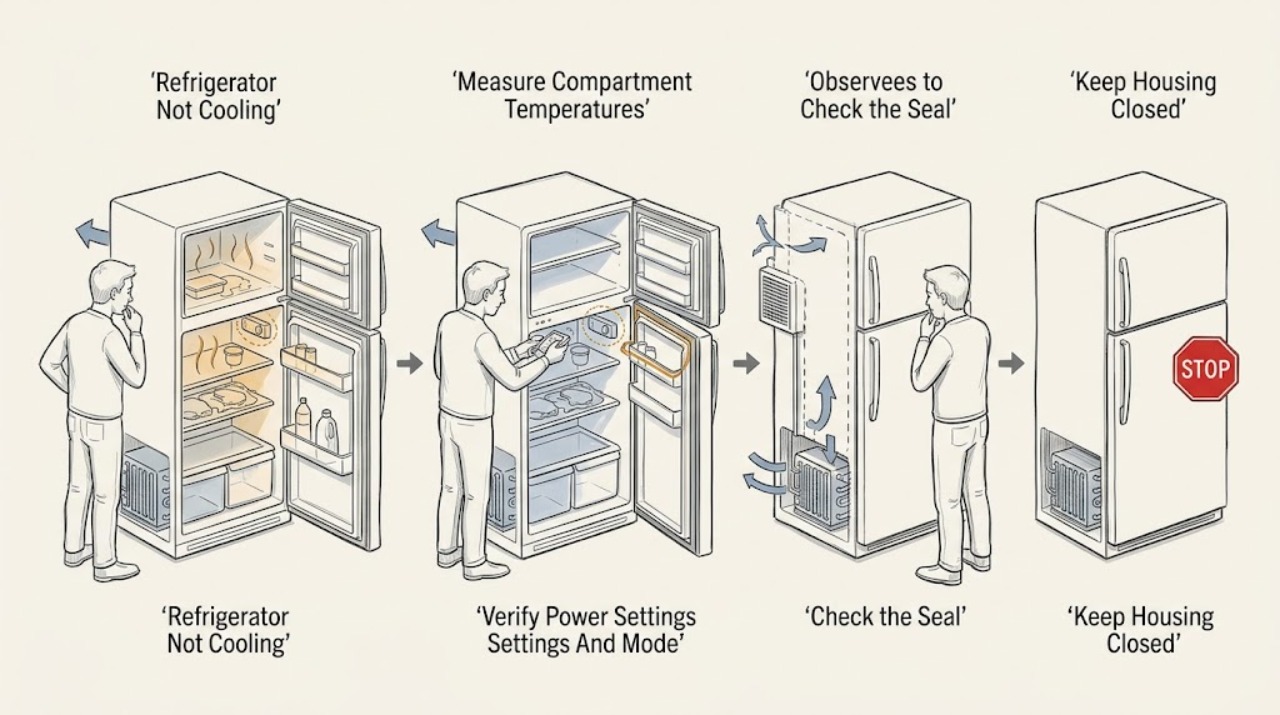
Work through in order
Diagnostic checks
Use only checks that match the exact appliance or system and its official guide.
-
Check 1
Place a refrigerator thermometer in the center of the refrigerator compartment and, if available, another in the center of the freezer. Keep the doors closed as much as practical, record the readings and the control-panel setpoints, and note whether the display or interior light is working.
Expected result: The refrigerator is near the model's target, the refrigerator is warm while the freezer is cold, both compartments are warm, or the display/light is also off.
Next step: Use the pattern to choose the next check instead of ordering a part. If food-safety temperature cannot be maintained, move perishable food to a known-cold appliance and continue only with the safe external checks below.
Stop if: Do not keep opening the doors to chase a reading, taste questionable food, or open a panel to investigate a warm compartment.
Why this matters
Why: A normal measured temperature makes a display or location misunderstanding more likely. A warm refrigerator with a cold freezer suggests a refrigerator-side airflow or control pattern; both compartments warm makes a supply, mode, ventilation, or refrigeration-system issue more likely. A dark appliance adds a power-path question.
-
Check 2
Confirm that the refrigerator is receiving power through its accessible plug or normal household supply and that the display, interior light, and controls respond. Compare the refrigerator setting with the exact Bosch E-Nr manual, and look for an off state, showroom/demo indication, vacation setting, alarm, or another special mode.
Expected result: The appliance is dark, the setting is warmer than intended, a special or showroom mode is shown, the display shows an alarm/error, or power and settings appear normal.
Next step: Restore only an obvious accessible connection and use the model manual for one documented mode change or reset. Do not apply a button sequence from a different Bosch refrigerator. If the breaker trips, the display remains dark, or a code returns, stop and arrange service.
Stop if: Do not open an electrical box, repeatedly reset a breaker, use an extension arrangement, or remove an electrical cover.
Why this matters
Why: A dark unit or absent light points toward an external supply or appliance power problem. A changed setting or showroom mode can leave the display lit while cooling is disabled or reduced. A normal setting with no error makes airflow, door sealing, ventilation, or an internal fault more likely.
-
Check 3
Check each refrigerator and freezer door for a container, shelf, drawer, or misaligned load that prevents closure. Wipe the accessible gasket with a soft cloth and mild soapy water, inspect it for cracks, gaps, or deformation, and use a strip of paper at several points only as a simple seal-resistance comparison.
Expected result: A door springs back or will not close, paper slides out with little resistance at one area, the gasket is dirty or damaged, or both doors close cleanly with an even seal.
Next step: Remove only the accessible obstruction and clean the gasket, then close the door normally and recheck temperature after stabilization. If the gasket, hinge, door, or alignment is damaged or remains intermittent, arrange service or model-specific gasket replacement rather than forcing the door.
Stop if: Do not stretch, glue, heat, puncture, or shim the gasket, and do not force a door or continue using the appliance if it cannot close securely.
Why this matters
Why: An open or leaking door lets cold air escape and can make the unit run longer without reaching temperature. A clean, intact seal and unobstructed door make a setting, airflow, ventilation, or internal cooling issue more likely.
-
Check 4
Look inside the refrigerator and freezer for food, bags, drawers, or containers pressed against the inner ventilation openings or back wall. Rearrange the load to leave the model's air paths clear and allow hot food to cool before storing it; do not remove an interior panel to look for an evaporator fan or frost pattern.
Expected result: An inner vent is covered, food is touching the back wall, the refrigerator is overloaded, or all visible air paths are clear.
Next step: After rearranging, keep the doors closed as much as practical and recheck the measured temperature after the manual's stabilization interval. If the refrigerator remains warm or heavy frost blocks an air path, stop at the user-level check and arrange qualified service.
Stop if: Do not use a knife, hair dryer, heater, steam, or sharp tool to remove frost, and do not dismantle shelves, covers, fans, or evaporator components to reach ice.
Why this matters
Why: Blocked internal circulation can create a warm section even while another compartment remains cold. Clear air paths with a normal load make an airflow obstruction less likely; they do not rule out a damper, fan, sensor, defrost, or refrigeration fault hidden behind a panel.
-
Check 5
From the outside, inspect the accessible front, rear, or toe-kick ventilation openings and the space around the refrigerator for boxes, curtains, furniture, or other obstructions. Follow the exact installation manual for clearance; do not move a built-in unit forcefully and do not remove a cover to expose a condenser, condenser fan, compressor, or tubing.
Expected result: An external ventilation opening is blocked, the appliance is tightly surrounded or exposed to a heat source, the area is visibly clear, or the only possible condenser access is behind a panel.
Next step: Remove only loose external obstructions and keep the appliance away from avoidable heat or direct sun as the manual permits. Allow the appliance to stabilize and remeasure. If it remains warm with clear ventilation, arrange service for condenser airflow, fan, compressor, or sealed-system diagnosis.
Stop if: Do not pull out a built-in refrigerator, remove the rear/bottom grille or cover, touch a fan or compressor, spray cleaner into openings, or work near energized parts.
Why this matters
Why: Blocked external ventilation can make the refrigeration unit run longer and reduce heat rejection. A clear exterior does not prove the condenser or fan is healthy; a hidden or panel-covered condenser is a professional-access condition, not a DIY cleaning invitation.
-
Check 6
Record the E-Nr/model, temperatures, settings, door and vent results, and any error or alarm. If the exact Bosch manual calls for a power reset, perform one documented reset with the appliance safely accessible, then restore the intended setting and check the temperature after the stated stabilization period, up to 24 hours where applicable.
Expected result: Cooling returns and the measured temperature stabilizes, the display returns but the temperature stays high, a code or alarm returns, heavy frost remains, or the breaker trips again.
Next step: Stop further resets and arrange Bosch or authorized service for any persistent pattern. Give the technician the recorded temperatures, compartment pattern, model, settings, error text, and whether the reset changed the symptom.
Stop if: Do not run repeated power cycles, enter undocumented service mode, remove covers, test live voltage, add refrigerant, or open the sealed refrigeration circuit.
Why this matters
Why: Recovery after a documented reset can indicate a temporary mode or control state, but it does not prove a failed component is repaired. Persistent warmth, returning codes, heavy frost, or a repeated trip makes a sensor, fan, defrost, compressor, or sealed-system fault more likely and needs qualified diagnosis.
Use your observations
Decision map
Find the observation that best matches what you see, then follow the next safe action.
-
PATH 01Safety boundary
What you see
The display and interior light are dark, an accessible supply is absent, or the breaker trips when the refrigerator is connected.
Do this next
Check only the accessible plug and household supply, then arrange qualified electrical or Bosch service for a dark appliance or recurring trip. Protect refrigerated food while the unit is off.
Why this path and its safety boundary
Why it matters: This pattern is more consistent with an external supply or appliance power problem than with a simple temperature setting or blocked food vent.
Safety stop: Do not open electrical boxes, repeatedly reset the breaker, use an extension cord, or remove a refrigerator cover.
-
PATH 02Safety boundary
What you see
The display is normal, the freezer is colder than the refrigerator or temperatures vary by section, and a door gasket, internal vent, load, or external ventilation obstruction is found.
Do this next
Clear accessible food and external obstructions, clean the gasket, close the doors normally, and remeasure after stabilization. Arrange service if the gasket or alignment is damaged or the warm pattern persists.
Why this path and its safety boundary
Why it matters: Air leakage or restricted circulation is more likely than a proven compressor or sealed-system failure, although clearing an obstruction cannot confirm every hidden component.
Safety stop: Do not dismantle the inner liner, force a fan, scrape frost, or remove covers to reach a damper or evaporator.
-
PATH 03Safety boundary
What you see
Both refrigerator and freezer measurements are warm even though power and settings are normal, or the appliance runs unusually long without pulling temperatures down.
Do this next
Verify that accessible external openings are clear and perform at most the exact model's documented reset. If temperatures remain high, stop using the appliance for food storage and arrange qualified refrigeration service.
Why this path and its safety boundary
Why it matters: A broad ventilation, control, fan, defrost, compressor, or sealed-refrigeration problem is more likely than a single blocked refrigerator shelf. A user cannot distinguish those causes safely from the outside.
Safety stop: Do not open the sealed system, handle refrigerant tubing, remove a condenser cover, test a compressor or fan live, or chip away evaporator ice.
-
PATH 04Safety boundary
What you see
A heavy frost pattern blocks cooling, an alarm or sensor code returns, a reset gives only temporary recovery, or measured temperature remains high after the visible checks.
Do this next
Leave the unit to qualified Bosch or authorized service, provide the model and recorded pattern, and ask about coverage before authorizing parts. Do not attempt a forced defrost or component replacement based only on the symptom.
Why this path and its safety boundary
Why it matters: A defrost, sensor, airflow, control, or refrigeration-system fault is more likely. A community report also describes a Bosch refrigerator-side compartment becoming warm while the freezer stayed cold and recovery after SuperCool, but the thread did not establish a confirmed repair; that symptom should not be treated as proof of a particular part.
Safety stop: Do not use sharp tools, heaters, steam, refrigerant, diagnostic bypasses, or removed panels to chase the cause.
Helpful context
Understand the symptom
Start with the temperature pattern, not a guessed part
A refrigerator can feel warm because a setting changed, a door is leaking air, food is covering an air path, or the refrigeration system is not removing heat. Record the refrigerator and freezer temperatures separately. A freezer that is also warm points to a broader power, control, ventilation, or refrigeration problem; a cold freezer with a warm refrigerator points more toward compartment airflow or a refrigerator-side control issue. That pattern narrows the next safe step but does not identify a failed part by itself.
Use the exact Bosch E-Nr manual
Bosch refrigerator families do not all use the same controls. Some manuals describe showroom mode, Super cooling, alarms, or reset behavior differently. Find the appliance's E-Nr/model number and use that manual for the available temperature range, mode indicators, clearance requirements, and power-cycle instructions. A generic sequence from another Bosch series can change a setting without fixing the cause.
Where the DIY boundary starts
The safe user checks are visible and external: temperature readings, settings, food placement, door seals, and accessible ventilation openings. Do not remove a rear or bottom cover to inspect a condenser or compressor, disconnect wiring, force a fan, chip ice from an evaporator, add refrigerant, or open the sealed refrigeration circuit. Bosch's manual says repairs should be performed by qualified technicians or authorized service providers; a persistent no-cooling condition needs that level of diagnosis.
Safety boundary
Stop conditions
- Move perishable food to a known-cold appliance if the measured refrigerator or freezer temperature is unsafe or cannot be maintained.
- Stop and arrange service for smoke, burning odor, damaged cord, exposed wiring, repeated breaker trips, refrigerant damage or suspected leak, or a cabinet that is unusually hot.
- Do not remove rear, bottom, interior, or electrical covers; test live wiring; force fans; chip or heat frost; add refrigerant; or open the sealed refrigeration circuit.
- If temperature remains high, an error returns, heavy frost blocks an air path, or cooling recovers only temporarily after a reset, stop user troubleshooting and arrange qualified Bosch service.
Only after diagnosis
Potential parts
- refrigerator door gasket
Consider this category only when the exact model's gasket is visibly damaged or fails an even closure/seal check after cleaning; a warm refrigerator alone does not identify the gasket.
Confirm the complete Bosch E-Nr and the manufacturer's fit information before ordering; refrigerator gaskets are model-specific.
When checks do not resolve it
Need a professional?
Safety scope: This article covers visible settings, temperature readings, door seals, food placement, and accessible ventilation. Qualified service must handle covers, electrical tests, fans, evaporators, compressors, refrigerant, defrost components, and sealed-system work.
Common questions
FAQ
What temperature should I check in a Bosch refrigerator?
Use the exact E-Nr manual for the model's setting range. Bosch's general guide gives 35–38°F (1.7–3.3°C) for the refrigerator, recommends a thermometer in the center, and says to wait about 24 hours after an adjustment before rechecking.
Why is my Bosch freezer cold but the refrigerator warm?
That pattern makes refrigerator-side airflow, a blocked internal vent, door leakage, damper, fan, sensor, or defrost issue more likely than a simple temperature setting, but it does not identify a part. Clear accessible food and check the gasket; if the measured temperature stays high, arrange service without removing panels.
Can blocked vents make a Bosch refrigerator stop cooling?
Yes. Check both internal air openings and the accessible external ventilation openings for boxes or other obstructions. Clear only visible obstructions and keep the appliance's model-specified clearance; a clear grille does not prove that a hidden condenser fan or refrigeration system is working.
Should I clean the condenser coils on my Bosch refrigerator?
Do not remove a cover just to reach a condenser or fan. Bosch's general troubleshooting advice is to clear accessible external ventilation openings; if the condenser, fan, wiring, or tubing is behind a panel, leave that work to qualified service using the exact model instructions.
What if a Bosch refrigerator starts cooling after a reset but becomes warm again?
Treat temporary recovery as a symptom, not a repair. Record separate compartment temperatures and any error or mode indication, perform no more than the exact manual's documented reset, and arrange service if cooling does not remain stable after the model's stabilization interval.
Can I defrost a warm Bosch refrigerator with a heater or sharp tool?
No. Do not chip ice or use a heater, steam, or another improvised method near the evaporator. Heavy frost that blocks cooling should be documented and referred to qualified service, especially when the manual identifies a defrost or NoFrost fault.
Read the exact guide
Official sources
- Bosch B36CL80SNS/04 Fridge and Produce Not Cooling, Freezer OKr/appliancerepair community · Community report of a Bosch refrigerator-side no-cooling pattern; not a manufacturer diagnosis or repair instruction.
- Refrigeration | Error Codes | BoschBosch Home Appliances · Official Bosch refrigeration error-code guidance; codes and reset behavior depend on model.
- How Cold Should a Refrigerator & Freezer Be? | Bosch - A Guide to Ideal Freezer & Refrigerator TemperaturesBosch Home Appliances · Official Bosch general temperature and storage guidance; individual model settings and manuals take precedence.
- Refrigerator Not Cooling Properly | Troubleshooting | Bosch Home AppliancesBosch Home Appliances · Official Bosch support guidance for refrigerator power, thermostat, and external vent checks; exact controls vary by model.
- Use and Care Manual B24...80 | Bosch, Manuel d'utilisation B24...80 | BoschBosch · Opened Bosch B24...80 use-and-care manual used for model-specific examples; owners must use the manual matching their E-Nr.
- Refrigerator Door Won’t Shut | Troubleshooting | Bosch Home AppliancesBosch Home Appliances · Official Bosch refrigerator door-seal troubleshooting applicable to models with accessible door gaskets; model-specific replacement instructions vary.
- Get Support - Refrigeration | Bosch Home AppliancesBosch Home Appliances · Official Bosch support hub for matching the refrigerator's model and owner documentation.
Community feedback
Share a repair observation
Share a plain-text repair observation. Accepted observations are published automatically; this page may take a moment to update.