
On this page
Start here
Quick answer
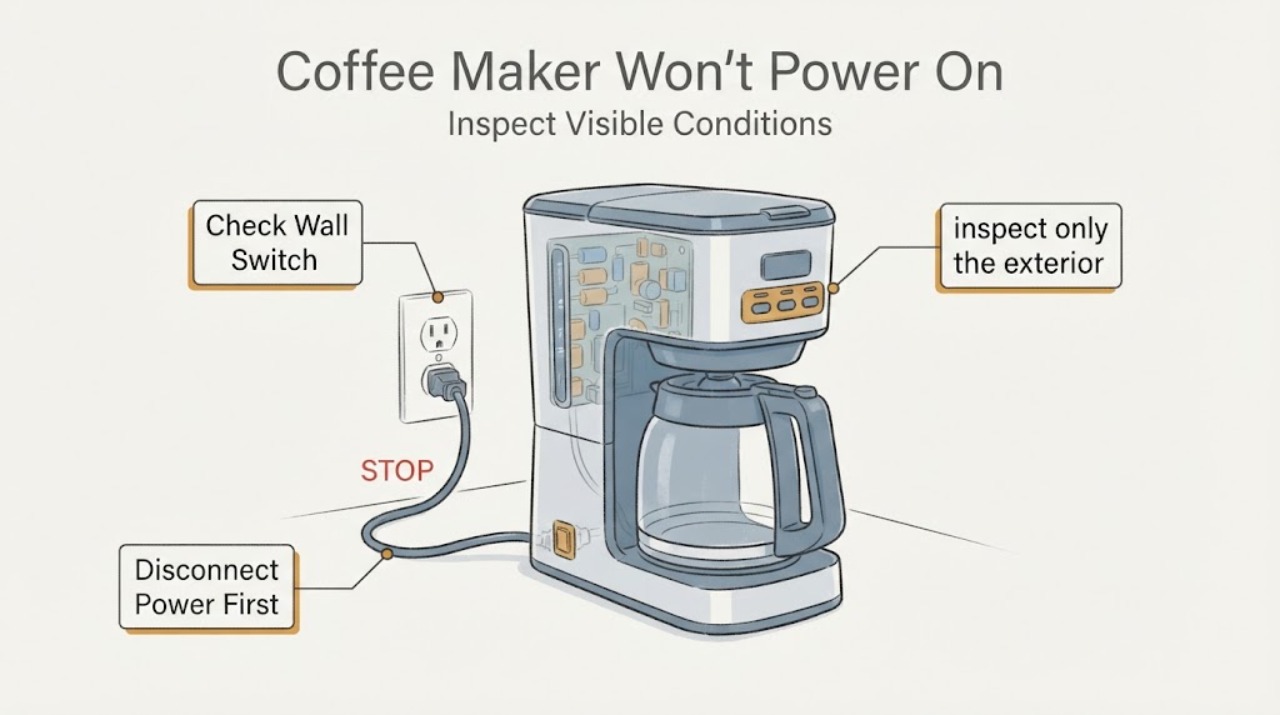
A capacitor cannot be identified as the cause of a coffee maker that will not power on from the symptom alone, and a board photo is not enough to select or replace one. Start with the accessible power path: confirm the cord is seated, test the outlet with another suitable appliance, check a tripped breaker or GFCI from a dry position, and use only the visible power or standby control described by the exact manual. Manufacturer guidance for several coffee-maker families also says not to disassemble the appliance and to use qualified service for repairs. If the maker remains dead, smells burned, shows moisture or damage, trips protection, or the board is already exposed, unplug it and stop; do not probe, discharge, bridge, or replace a capacitor or other board part at home.
Before you begin
Safety first
- Do not open the housing, probe an energized board, discharge or replace a capacitor, bridge a fuse, bypass a safety control, or choose a board component from the symptom alone. Keep the unit unplugged and give service the exact model, region, outlet result, indicator behavior and any odor, liquid or surge history. The opened manufacturer manuals direct nonworking or damaged appliances to qualified service and one explicitly says not to disassemble the unit.
Work through in order
Diagnostic checks
Use only checks that match the exact appliance or system and its official guide.
-
Check 1
From a dry, safe position, confirm the coffee maker's plug is fully seated and test the same outlet with another suitable appliance; if the outlet is protected by a GFCI, check whether it has tripped, and look at the appliance breaker without repeatedly resetting it.
Expected result: The outlet is dead, the GFCI or breaker is tripped, the coffee maker cord or plug is visibly damaged, or the outlet works and the coffee maker still has no indicator.
Next step: Restore a tripped GFCI or breaker only once if it can be done safely and no hazard is present; stop if it trips again and contact an electrician or qualified appliance service. If the outlet works, continue with the exact model's visible controls. Do not test live internal wiring.
Why this matters
Why: A dead receptacle or protective-device state can explain a no-power symptom without implicating the coffee maker board. A working receptacle with no appliance response moves the problem toward the appliance, but still does not identify a capacitor.
-
Check 2
With the appliance still closed, check the exact model manual for a visible power switch, rear switch, standby state, or required start control, then operate only that documented control once.
Expected result: The machine wakes after the documented switch or standby action, or the outlet is live but no display, light, sound or response appears.
Next step: If it wakes, use the manual's normal operating procedure and monitor it. If it remains dead, arrange qualified service with the exact model number and symptom history; do not generalize a button hold from another brand or model.
Why this matters
Why: Some coffee-machine families distinguish a main/rear switch from an On/Off control or can enter an idle state. A model-specific control response is an operating-state issue; no response after the documented external control leaves the internal cause unresolved.
-
Check 3
After unplugging, inspect only the exterior and accessible cord area for a burned smell, melted housing, liquid or scale intrusion, damaged insulation, exposed conductors, or a visibly damaged board if the housing is already open; do not touch or probe a capacitor.
Expected result: There is no visible damage or odor, or there is scorching, liquid, exposed wiring, a swollen or leaking component, or a protection device that trips again.
Next step: For any hazard, leave the maker unplugged and use qualified service. If no hazard is visible but it remains dead, provide the exact model, outlet result and control behavior to service instead of opening the board or ordering a capacitor.
Why this matters
Why: An undamaged exterior does not prove the board is healthy. Any electrical or liquid hazard makes continued powered testing unsafe, and a capacitor's appearance alone still cannot establish its rating, failure mode or safe discharge state.
-
Check 4
Write down the exact model and region, whether any indicator ever appears, what happened immediately before the failure, whether the outlet and GFCI/breaker stay stable, and whether there was liquid, odor or a surge; give this record to service.
Expected result: The machine is consistently dead after the external checks, or it works briefly and then loses power or trips protection.
Next step: Keep the coffee maker unplugged and book qualified appliance service or an appropriately qualified electrician. Do not bridge a fuse, bypass a thermostat or interlock, discharge a capacitor with improvised tools, or perform live-board measurements.
Why this matters
Why: This pattern requires model-specific electrical diagnosis. It does not distinguish a capacitor from a fuse, switch, cord, control supply, wiring or another internal fault, and a successful reset would not prove a component diagnosis.
Use your observations
Decision map
Find the observation that best matches what you see, then follow the next safe action.
-
PATH 01Next step
What you see
The outlet is dead or the GFCI/breaker trips again after one safe reset attempt.
Do this next
Leave the appliance unplugged and have the outlet/protection or appliance checked by a qualified professional; do not keep resetting it or open the coffee maker.
Why this path and its safety boundary
Why it matters: The immediate decision is an electrical-supply or protection problem, not a supported capacitor diagnosis for the coffee maker.
-
PATH 02Next step
What you see
The outlet is live and the exact manual's visible power or standby control restores the indicators.
Do this next
Use the exact manual's normal start procedure and stop if the symptom returns, the appliance overheats, smells burned or trips protection.
Why this path and its safety boundary
Why it matters: The appliance was in a model-specific operating state or control path; that result does not show that a capacitor was bad.
-
PATH 03Next step
What you see
The outlet works, the visible controls are correct, and the coffee maker remains completely unresponsive.
Do this next
Keep it unplugged and arrange qualified service with the model number and symptom record; do not remove the board or select a capacitor by appearance or generic value.
Why this path and its safety boundary
Why it matters: An internal power or control fault is possible, but the available general evidence cannot identify a capacitor or any other component without the exact model and qualified testing.
-
PATH 04Next step
What you see
There is liquid intrusion, scorching, melted insulation, a burning odor, exposed wiring, a visibly damaged component, or repeated protection trips.
Do this next
Do not plug it in again or attempt board repair; isolate it from power if safe and contact qualified service. If there is active smoke or a fire hazard, use local emergency procedures.
Why this path and its safety boundary
Why it matters: This is a safety stop condition. Continued energizing or capacitor testing could create shock, fire or stored-energy hazards.
Helpful context
Understand the symptom
The capacitor question comes after the power question
A coffee maker can appear dead because of an outlet, GFCI or breaker, an unplugged or damaged cord, a visible rear switch, or a model-specific standby state. The opened manuals and support pages use those external checks before service. None of them supports inferring a capacitor failure from a blank display or a board photograph, so keep the board hypothesis unconfirmed until a qualified technician has the exact model information and an appropriate diagnostic procedure.
Use the exact model manual for controls
Power controls are not universal. Miele describes a model-dependent idle state and main switch, while De'Longhi notes that some machines have a separate rear switch. Those examples show why a generic button hold or reset is unsafe as a universal instruction. If the outlet is live, use the exact model's visible switch and start procedure; do not open the housing to reach a hidden control.
Stop when the board or protection shows a hazard
Unplug before looking for external damage. A burnt odor, melted plastic, liquid intrusion, exposed wiring, repeated GFCI or breaker operation, or a visibly damaged board is a stop condition. The opened Profilo manual says repairs and adjustments are for qualified service personnel and says to unplug before cleaning or when a problem occurs; the Hamilton Beach manual explicitly says not to disassemble the unit.
When checks do not resolve it
Need a professional?
Arrange qualified appliance service when the coffee maker remains dead after the outlet, protection-device and exact-model control checks; when it loses power again; or when there is a burning smell, liquid intrusion, visible electrical damage or a repeated GFCI/breaker trip.
Safety scope: Do not open the housing, probe an energized board, discharge or replace a capacitor, bridge a fuse, bypass a safety control, or choose a board component from the symptom alone. Keep the unit unplugged and give service the exact model, region, outlet result, indicator behavior and any odor, liquid or surge history. The opened manufacturer manuals direct nonworking or damaged appliances to qualified service and one explicitly says not to disassemble the unit.
Common questions
FAQ
Does a coffee maker that will not turn on prove its capacitor is bad?
No. A blank display can come from the outlet, GFCI or breaker, cord, visible switch, standby state, wiring or several internal faults. The manufacturer sources opened for this topic do not support identifying a capacitor from the symptom; use external checks first and qualified service for internal diagnosis.
Can I discharge or replace the coffee maker capacitor myself?
Do not do that from a general no-power symptom. The exact model, circuit design, stored-energy condition and repair procedure are unknown here. Unplug the unit, do not probe the board, and use qualified service, especially if the board is wet, scorched, swollen, leaking or the appliance has tripped protection.
What should I check before calling service?
Confirm the cord and outlet, check a GFCI or breaker once from a safe dry position, and follow the exact model manual for any visible rear switch or standby control. Record the model number, indicator behavior, protection trips, recent liquid or surge event, and any burning smell. Do not remove the housing to continue the diagnosis.
Why does the exact model matter for a coffee maker that has no power?
Manufacturers use different switch layouts and standby behavior. Miele documents a model-dependent idle state and De'Longhi notes that some machines have a separate rear switch, so a reset or button hold from another maker may not apply. Service needs the exact model and region before selecting a schematic or component.
Read the exact guide
Official sources
- PCM1000X Filter Coffee Maker User ManualBSH Home Appliances / Profilo · The opened BSH-hosted PDF cover identifies the Profilo PCM1000X filter coffee maker. Its safety and troubleshooting sections say to unplug for problems, use qualified service for repairs, and check the plug/socket when the appliance does not operate. These are general safety examples and do not establish a component fault or model applicability for the unbranded task.
- Hamilton Beach Coffeemaker Use and Care Manual 840231300Hamilton Beach · The opened manufacturer-hosted manual includes a coffeemaker troubleshooting section for a unit that will not turn on and explicitly says not to disassemble the unit. It supports the external-check and service boundary for a general coffeemaker page; it is not evidence that the unbranded assigned device is a Hamilton Beach model.
- Espresso Maker - Does not respond or turn onFrigidaire Support · The opened Frigidaire support page addresses an espresso maker that does not respond or turn on and lists cord, fuse box and GFCI checks before service. It is used only to corroborate safe external power triage for an unbranded coffee maker; it does not support capacitor or board diagnosis.
- Coffee machine not switching onMiele USA · The opened Miele support page addresses a coffee machine that will not switch on and distinguishes idle mode, the main switch, plug and breaker. Its timing and controls are model-specific, so it is used to warn against transferring a universal reset instruction to the unbranded assigned device.
- My bean to cup machine will not switch on - What can I try?De'Longhi · The opened De'Longhi FAQ says to check a rear switch if provided and then contact service. It demonstrates why exact model controls must be checked without implying that an unbranded coffee maker has the same switch or procedure.
- Won't Turn On - Automatic Coffee MakerKitchenAid Product Help · The opened KitchenAid page directly addresses an automatic coffee maker that will not operate. It supports checking the plug, ON/OFF control, fuse or circuit breaker and contacting service if those checks do not resolve the symptom; because the assigned topic has no brand or model, it is used as a manufacturer example for external checks, not as a universal internal diagnosis.
Community feedback
Share a repair observation
Share a plain-text repair observation. Accepted observations are published automatically; this page may take a moment to update.