
On this page
Start here
Quick answer
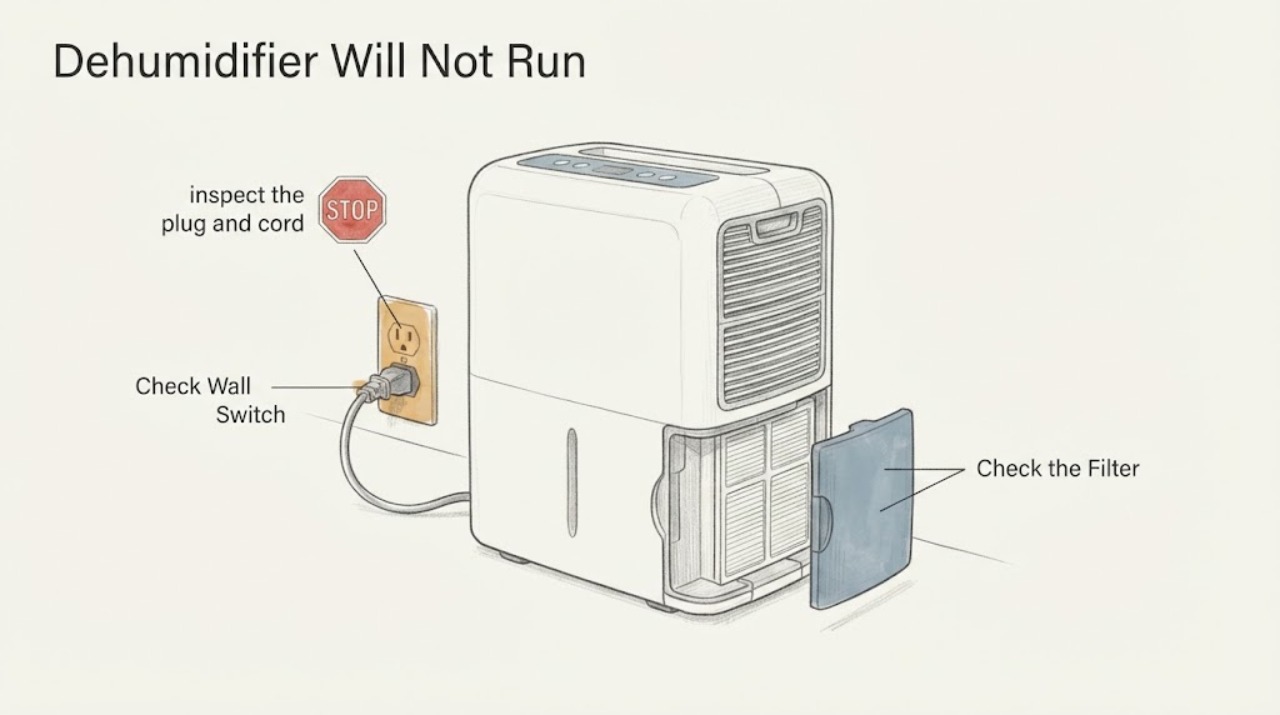
Do not start by choosing a capacitor value: this task has no brand, model, schematic, or confirmed failed component, and a dehumidifier capacitor or control board can be part of a hazardous electrical circuit. First check only the outside of the unit: a sound power connection, a tripped breaker or GFCI, a damaged cord, a full or poorly seated bucket, blocked airflow, the humidity setting, and a dirty filter. A brief power reset is reasonable only where the exact manual permits it. If the unit still will not start, smells hot, has damaged wiring, trips protection again, or would require opening the case, unplug it and use model-specific professional service.
Before you begin
Safety first
- Do not open the cabinet, discharge or replace a capacitor, probe live wiring, bypass a bucket or float switch, or choose capacitance or voltage ratings from a generic dehumidifier value. Leave the unit unplugged for electrical damage, repeated trips, heat, burning odor, or water near wiring.
Work through in order
Diagnostic checks
Use only checks that match the exact appliance or system and its official guide.
-
Check 1
From a dry position, inspect the plug and cord for damage, make sure the plug is fully seated in a properly installed wall receptacle, and check whether the breaker or GFCI/AFCI has tripped. Do not use an extension cord or power strip, and do not remove the case or use a meter on live parts.
Expected result: The protection device is tripped, the cord or plug is damaged, the receptacle is not working, or the unit still has no display or response after a known-good connection is restored.
Next step: Reset a tripped breaker or GFCI only once if it can be done safely and without approaching heat, water, or damaged wiring. If it trips again or the cord is damaged, leave the unit unplugged and arrange qualified service.
Why this matters
Why: A supply or connection issue can make a dehumidifier appear dead. A damaged cord, repeated trip, or absent response after an external supply check is a stop condition, not evidence of a capacitor value.
-
Check 2
Turn the unit off and unplug it before removing the water bucket. Empty the bucket, check for visible damage, and slide it back into its normal seated position without touching or bypassing the float or bucket switch.
Expected result: The bucket was full, not seated, or the unit resumes normal controls after it is emptied and correctly reinstalled; alternatively, the bucket is empty and seated but the unit remains unresponsive.
Next step: Use the exact model manual if its bucket or float arrangement differs. If the unit remains dead or the bucket sensor would need to be bypassed, stop and arrange service.
Why this matters
Why: Manufacturers document a full or incorrectly seated bucket as a condition that can stop operation. A correctly seated empty bucket with no response leaves the cause unresolved and does not identify an internal component.
-
Check 3
With the unit unplugged, clear objects blocking the air inlet or outlet and inspect the removable filter. Clean and dry the filter only as the exact owner manual permits, then reinstall it before reconnecting power; never run the unit without its filter.
Expected result: Airflow is blocked, the filter is dirty or damp, or the grille and filter are clear while the unit still will not run.
Next step: Restore unobstructed airflow and reinstall a completely dry filter. If the fan or compressor still will not start, do not open the case to inspect the electrical circuit; use model-specific service.
Why this matters
Why: Manufacturers identify blocked airflow and dirty filters as operating or moisture-removal problems. They do not establish that a dirty filter has damaged a capacitor, compressor, or control board.
-
Check 4
Check the user controls from the outside: confirm the desired humidity setting is below the current room humidity when the model displays humidity, cancel any timer or standby mode documented for that model, and verify that the fan or operating mode is selected. Do not infer a control-board fault from a single display state.
Expected result: The room is already at or below the set humidity, the unit is in a timer or non-running mode, or the controls call for operation but there is no fan or compressor response.
Next step: Use only the controls documented for the exact model and allow the unit to respond under suitable room conditions. If it still does not run, unplug it and provide the model, display state, and external checks to service.
Why this matters
Why: A dehumidifier may stop collecting water when the humidity target has been reached; a timer or model-specific mode can also change when it runs. A call for operation with no response is a service symptom, not a capacitor specification.
-
Check 5
If the exact owner manual allows a reset, disconnect power for the manual's stated interval and reconnect once after the external checks are complete. Observe from a safe distance; do not repeat resets if the unit trips protection, smells hot, makes abnormal noise, or remains unresponsive.
Expected result: The unit restarts normally, restarts but stops again, or remains dead after the documented reset.
Next step: Record the exact model and the reset result. Leave the unit unplugged and arrange qualified service if the fault returns or internal access would be required.
Why this matters
Why: A reset can clear a control state on some models, but it does not prove or disprove a capacitor or board failure. A repeated trip, heat, odor, or persistent no-run condition requires service.
Use your observations
Decision map
Find the observation that best matches what you see, then follow the next safe action.
-
PATH 01Next step
What you see
The breaker or GFCI trips again, the power cord is damaged, there is heat or a burning odor, or water has reached the electrical area.
Do this next
Leave the unit unplugged, keep clear of wet or damaged parts, and obtain qualified appliance or electrical service. Do not reset repeatedly or open the case.
Why this path and its safety boundary
Why it matters: This is an electrical or moisture safety stop condition, not a capacitor-identification problem.
-
PATH 02Next step
What you see
The unit has power, the bucket is full or not seated, airflow is blocked, or the filter is dirty or damp.
Do this next
Empty and seat the bucket, restore airflow, and clean and dry the filter according to the exact manual. Retest once only after all parts are correctly installed.
Why this path and its safety boundary
Why it matters: An external operating condition can explain the no-run or no-water symptom without identifying an internal electrical failure.
-
PATH 03Next step
What you see
The humidity target has been met or a documented timer/standby mode is active, but the unit has no electrical or mechanical warning.
Do this next
Check the exact model's humidity and timer controls and observe under a higher-humidity condition. Do not alter internal components.
Why this path and its safety boundary
Why it matters: The control may be intentionally preventing continuous operation; a lack of collected water is not automatically a component fault.
-
PATH 04Next step
What you see
The receptacle, bucket, airflow, filter, controls, and permitted reset are normal, but the dehumidifier still will not run.
Do this next
Keep the unit unplugged and give qualified service the exact model, serial number, symptoms, display state, and external checks. Do not buy a capacitor based on a generic value or open the case.
Why this path and its safety boundary
Why it matters: A model-specific electrical, motor, sensor, or control problem remains possible, but no brand, model, schematic, or component evidence supports a capacitor value.
Helpful context
Understand the symptom
A capacitor question does not identify the failure
The supplied title asks for a capacitor value, but no brand, model, board revision, component marking, schematic, or confirmed diagnosis is provided. A dehumidifier that will not run may instead have a power, bucket-interlock, setting, airflow, filter, or control problem. The safe article scope is therefore external checks and the boundary for model-specific service; it does not name a capacitor, capacitance, voltage rating, replacement part, or board repair.
Use manufacturer guidance for the exact unit
The opened Frigidaire and GE pages are manufacturer examples of user-level dehumidifier checks, not a universal manual for every brand. Controls, bucket sensors, filters, reset behavior, and service coverage vary by model. Once the exact model is known, use its owner manual before attempting anything beyond the checks below.
When checks do not resolve it
Need a professional?
Arrange qualified service when the dehumidifier still will not run after safe external checks, when a breaker or GFCI trips again, when the cord or plug is damaged, when there is heat or burning odor, or when internal access or a component replacement would be required.
Safety scope: Do not open the cabinet, discharge or replace a capacitor, probe live wiring, bypass a bucket or float switch, or choose capacitance or voltage ratings from a generic dehumidifier value. Leave the unit unplugged for electrical damage, repeated trips, heat, burning odor, or water near wiring.
Have this ready
- Provide the full model and serial number, whether the display has power, breaker/GFCI behavior, cord condition, bucket and filter status, humidity or timer setting, any odor/noise, and exactly what happened after a permitted reset.
Common questions
FAQ
Can I choose a dehumidifier capacitor value from the appliance type?
No. The task has no brand, model, schematic, board revision, or confirmed component diagnosis. A capacitor value and voltage rating must come from the exact model's documentation or the original component and be handled by qualified service; generic dehumidifier values are unsafe.
What can make a dehumidifier appear not to run without an internal failure?
Check the external power connection and protection device, a full or poorly seated bucket, blocked airflow, a dirty or damp filter, and the humidity or timer setting. Manufacturer guidance treats these as separate user-level conditions before service.
Is a brief power reset safe?
Only follow the exact owner manual for the unit. GE describes a short disconnect/reconnect reset for a dehumidifier that is not collecting water, but a reset is not a component diagnosis. Do not repeat it after a trip, heat, burning odor, damaged cord, or water near electrical parts.
When should I stop troubleshooting and call for service?
Stop when the unit still will not run after safe external checks, protection trips again, the cord is damaged, there is heat or a burning odor, or internal access would be needed. Give service the exact model and the observations rather than a guessed capacitor value.
Read the exact guide
Official sources
- Dehumidifier - Not Collecting WaterFrigidaire · Opened Frigidaire's official dehumidifier support page. It applies to dehumidifiers and covers installation, power, airflow, a full bucket, humidity setting, continuous mode, fan speed, filter, and service. It supports only external checks for this brand-unspecified task.
- Dehumidifier - Cleaning and MaintenanceGE Appliances · Opened GE Appliances' official dehumidifier maintenance page. It covers turning off and unplugging before cleaning, bucket seating, filter cleaning and drying, grille cleaning, and not operating without the filter. It is used as manufacturer-specific external guidance, not as a universal procedure for an unidentified model.
- Dehumidifier - No PowerFrigidaire · Opened Frigidaire's official dehumidifier support page. It applies to dehumidifiers and covers external power, cord, extension/power-strip, breaker, GFCI/AFCI, and service checks. It does not identify a capacitor or apply a component value across brands.
- Dehumidifier - Not Collecting WaterGE Appliances · Opened GE Appliances' official dehumidifier support page. It distinguishes low humidity from a unit that never collects water, describes a brief power disconnect/reconnect reset, and directs persistent faults to the specific owner manual or service. It does not support choosing a capacitor value.
Community feedback
Share a repair observation
Share a plain-text repair observation. Accepted observations are published automatically; this page may take a moment to update.