
On this page
Start here
Quick answer
For a Fisher & Paykel DD60SCTX7 DishDrawer that leaves dishes dirty, start with the parts of the wash that can be observed without service access: load the drawer so the spray arm can rotate, confirm the filter plate and drain filter are seated and clean, and check that the detergent is suitable, correctly placed, and measured for the selected program. Then separate hard-water or rinse-aid symptoms from a remaining circulation, heating, water-inlet, or drawer-seal fault. The official DD60-family guide does not justify guessing a pump or heater from dirty dishes alone, so persistent poor cleaning after these checks belongs with model-specific service.
Work through in order
Diagnostic checks
Use only checks that match the exact appliance or system and its official guide.
-
Check 1
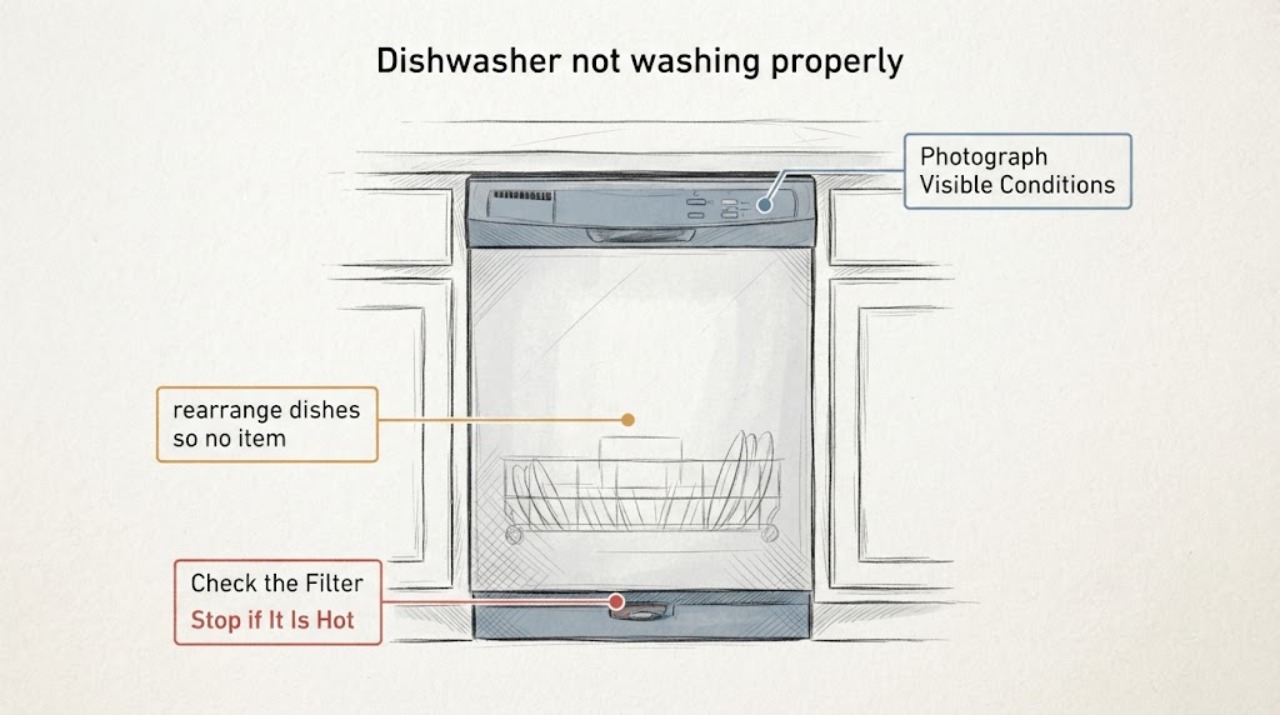
Photograph the dirty load before unloading it, then note whether soil is widespread, limited to dishes blocked by another item, white or chalky, or accompanied by water left in the drawer.
Expected result: The whole load is dirty, only shielded surfaces are dirty, white marks dominate, or standing water remains after the cycle.
Next step: Use the matching check below and keep the load pattern for service if the result does not improve. Do not infer a failed pump from the appearance of one load.
Why this matters
Why: Widespread soil points toward wash coverage, program, detergent, or water conditions; shielded soil points toward loading; white marks point toward rinse-aid or hard-water settings; standing water adds a drain-path decision.
-
Check 2
With the drawer off and safe to open, rearrange dishes so no item blocks the spray arm path, verify the spray arm is correctly mounted and turns freely, and inspect its visible holes for food debris.
Expected result: The spray arm is obstructed or cannot rotate freely, its holes are visibly blocked, or it rotates freely with clear holes.
Next step: Remove only loose visible debris and reload the drawer according to the exact guide. If the arm remains loose, damaged, or unable to rotate, leave component replacement to model-specific service.
Why this matters
Why: An obstruction or blocked hole can reduce water coverage without establishing a motor or pump failure. A freely rotating, clear arm shifts attention to filters, detergent, program, water conditions, or service.
-
Check 3
Turn the dishwasher off before owner maintenance, then remove and clean the accessible drain filter and filter plate only as the DD60 guide illustrates; refit them level and securely.
Expected result: Food particles are present, the filter plate or drain filter was not seated correctly, or both are clean and correctly seated.
Next step: Run the next test load only after the filter parts are correctly installed. If water remains, the filter cannot be refitted, or the symptom returns, stop and arrange service rather than reaching into the pump.
Why this matters
Why: Debris or incorrect seating can reduce the effective wash and drain path. A clean, correctly refitted filter makes a hidden pump, drain, sensor, or control issue more plausible if poor cleaning continues.
-
Check 4
Check the detergent dispenser is dry, put automatic-dishwasher detergent in the correct compartment, and use the amount specified for the selected program and local water conditions; scrape excess food from dishes before loading.
Expected result: The dispenser was wet or retained detergent, the detergent was in the wrong compartment or unsuitable, the amount was low, or detergent use was correct.
Next step: Correct one detergent or preparation variable at a time and compare a similar load. Do not use hand-washing liquid or add chemicals to force a result.
Why this matters
Why: A wet dispenser, wrong product, wrong compartment, too little detergent, or heavy unremoved soil can all produce dirty dishes without a hardware diagnosis. Correct use with persistent soil shifts the decision toward spray, water, or service checks.
-
Check 5
Compare the selected program with the load and inspect the drawer interior and perimeter for a visible obstruction or damaged seal; use the exact guide's loading and program guidance, without entering service mode.
Expected result: The load is heavily baked-on or unsuitable for the selected program, or the drawer perimeter is clean and intact with no obstruction.
Next step: Choose the documented program for the soil level and remove only visible loading interference. If the seal is torn, displaced, or the drawer will not close evenly, keep the appliance out of service and arrange qualified repair.
Why this matters
Why: An unsuitable cycle or load can explain poor results. A visible drawer-seal or closure problem can reduce wash containment and needs exact model service guidance; an intact perimeter keeps attention on wash chemistry, spray coverage, water, or hidden faults.
-
Check 6
After the owner checks, run one comparable normal load while remaining nearby and record whether the spray action, water level, heating phase, drainage, and end result change; stop if there is a leak, abnormal heat, smoke, burning smell, or repeated fault indication.
Expected result: The load cleans normally, soil remains widespread, white marks persist, water remains, or a leak or abnormal operation appears.
Next step: For a repeat failure, record the model, program, load, detergent, filter and spray-arm checks, water left in the drawer, and any visible leak, then contact Fisher & Paykel or qualified service.
Why this matters
Why: Improvement supports a loading, filter, spray-arm, detergent, program, or water-condition cause. Persistent widespread soil or any leak, heat, or fault after clear owner checks needs model-specific diagnosis rather than a guessed component.
Use your observations
Decision map
Find the observation that best matches what you see, then follow the next safe action.
-
PATH 01Next step
What you see
Only surfaces hidden by another dish are dirty, the spray arm was obstructed, or the load was too crowded for the arm to rotate.
Do this next
Reload with the spray path clear and use the program suitable for the soil level; compare the next similar load before seeking parts.
Why this path and its safety boundary
Why it matters: Loading and spray coverage are more likely than a failed pump or heater.
-
PATH 02Next step
What you see
The spray arm holes or accessible filters contain food debris, or the filter plate and drain filter were not seated correctly.
Do this next
Clean and refit only the owner-accessible filter and spray-arm parts as the exact DD60 guide shows. If they are damaged or the symptom returns, arrange service.
Why this path and its safety boundary
Why it matters: The documented maintenance path is the stronger first explanation for reduced wash coverage or poor drainage.
-
PATH 03Next step
What you see
The dispenser was wet, detergent was unsuitable or misplaced, the amount was low, white marks dominate, or the home has hard water.
Do this next
Dry the dispenser, use only suitable automatic-dishwasher detergent in the documented compartment, and adjust rinse aid or detergent only within the exact guide's recommendations. Do not add hand soap or unapproved chemicals.
Why this path and its safety boundary
Why it matters: Detergent, rinse-aid, or water-hardness conditions are more likely than a confirmed circulation component fault.
-
PATH 04Next step
What you see
The load, spray arm, filters, detergent, and program are correct, but the same dishes remain broadly dirty; or a drawer seal is torn, displaced, or will not close evenly.
Do this next
Keep the dishwasher out of service if the drawer leaks or closure is unsafe, and arrange Fisher & Paykel or qualified service with the recorded checks. Do not enter service mode or remove panels.
Why this path and its safety boundary
Why it matters: A circulation, water-temperature, inlet, drain, drawer-seal, sensor, or control problem remains possible, but the symptom does not identify which component failed.
-
PATH 05Next step
What you see
Water remains in the drawer, a hose or connection leaks, abnormal heat or smell occurs, or a fault indicator returns.
Do this next
Stop the cycle, isolate water and power only from a safe dry location, and contact qualified service. Do not restart to reproduce the problem.
Why this path and its safety boundary
Why it matters: The symptom has crossed from a cleaning-result adjustment into a drain, leak, electrical, heating, or control safety boundary.
Helpful context
Understand the symptom
Read the symptom before naming a part
Dirty dishes are a wash-result symptom, not a pump or heater diagnosis. Record whether soil is spread across the whole load, concentrated on one side, left as white marks, or accompanied by water remaining in the drawer. For this DD60SCTX7 DishDrawer, those observations decide whether to start with loading and spray coverage, filters and drainage, detergent and water hardness, or a service boundary.
Owner-accessible checks
Power the drawer off and allow hot water to settle before opening it. Use only the maintenance steps in the exact guide: clear visible food debris from the filter plate and drain filter, make sure the spray arm can rotate and its holes are not blocked, and keep the detergent dispenser dry before adding the correct automatic-dishwasher detergent. Do not enter service mode or remove covers to prove a component fault.
When cleaning results need service
If the same load remains dirty after a correctly loaded test, clean filters, unobstructed spray arm, suitable program, and correctly used detergent, stop escalating by swapping parts. A continuing circulation, water-temperature, inlet, drain, drawer-seal, sensor, or control problem requires diagnosis for the exact DD60SCTX7 configuration.
When checks do not resolve it
Need a professional?
Arrange Fisher & Paykel or qualified appliance service when poor cleaning persists after correct loading, clear spray arm, clean and correctly fitted filters, suitable detergent and program, or when the drawer seal, inlet, drain, heating, sensor, or control appears involved.
Have this ready
- Give service the complete DD60SCTX7 model, drawer affected, program and load, detergent and rinse-aid details, filter and spray-arm observations, water left after the cycle, seal condition, and any fault or leak record.
Common questions
FAQ
Does dirty dishware prove the DD60SCTX7 pump is failing?
No. The official DD60 guide lists loading, spray-arm rotation or holes, filters, detergent, program choice, and hard water before an internal component diagnosis. A repeated result after those checks needs service, not a guessed pump.
What should I check first if only some dishes are dirty?
Look for items blocking the spray arm or shielding one another, then verify the arm rotates and its holes are clear. Re-load and compare a similar cycle before escalating.
Can hard water cause poor cleaning on a DishDrawer?
Yes, the DD60-family guide identifies hard water as a possible cause and directs users toward its rinse-aid, detergent, and water-softener guidance. Use only settings documented for the exact model and local conditions.
Should I buy a replacement spray arm because the model appears on a spare-parts page?
No. The official parts page confirms that DD60SCTX7 is listed among models for a spray-arm assembly, but that does not show the arm on your unit is faulty or establish that a replacement is needed. Inspect the existing arm first and use qualified service for damage or fitment questions.
Read the exact guide
Official sources
- DishDrawer DishwashersFisher & Paykel · Fisher & Paykel DishDrawer washing-result context for DD60SCTX7, including the interaction of temperature, detergent chemistry, time, and spray action.
- DishDrawer Dishwasher User Guide DD60 DD24Fisher & Paykel · Fisher & Paykel DD60SCTX7 unclean dishes and poor washing results; DD60-family user guidance, not a claim that a specific internal part has failed.
- Spray Arm AssemblyFisher & Paykel · Fisher & Paykel DD60SCTX7 DishDrawer platform identity and spray-arm applicability for the not washing properly topic; listing compatibility does not prove replacement need.
Community feedback
Share a repair observation
Share a plain-text repair observation. Accepted observations are published automatically; this page may take a moment to update.