
On this page
Start here
Quick answer
First determine whether food is freezing in the fresh-food compartment, a drawer, a door bin, or only in the freezer, and record the complete GE Profile model and refrigerator style. GE's official guidance says freezing-food causes differ by side-by-side, bottom-freezer, and top-freezer design. Check the exact model's temperature setting before moving parts: GE support pages describe a fresh-food target around 37–42°F on applicable digital models, but the Owner's Manual controls your model. Move delicate food away from a documented freezer air vent or cold spot, keep the fresh-food temperature control from being set too cold, and do not block a model-specific temperature sensor. Bottom-freezer models may have a ceiling sensor that needs clear air around it; side-by-side and top-freezer models can have cold areas near freezer-origin air vents or the rear of the top shelf. If warming the setting and correcting food placement do not stop freezing, or frost, a blocked damper, sensor, fan, or control issue is suspected, arrange qualified GE service. Do not remove panels, force a damper, or test live wiring.
Before you begin
Safety first
- This article covers model identification, control observation, food placement, accessible vent checks, applicable bottom-freezer sensor clearance, drawer/bin placement, and monitoring after one external correction. Internal sensors, dampers, fans, controls, defrost parts, wiring, and panel access require qualified service.
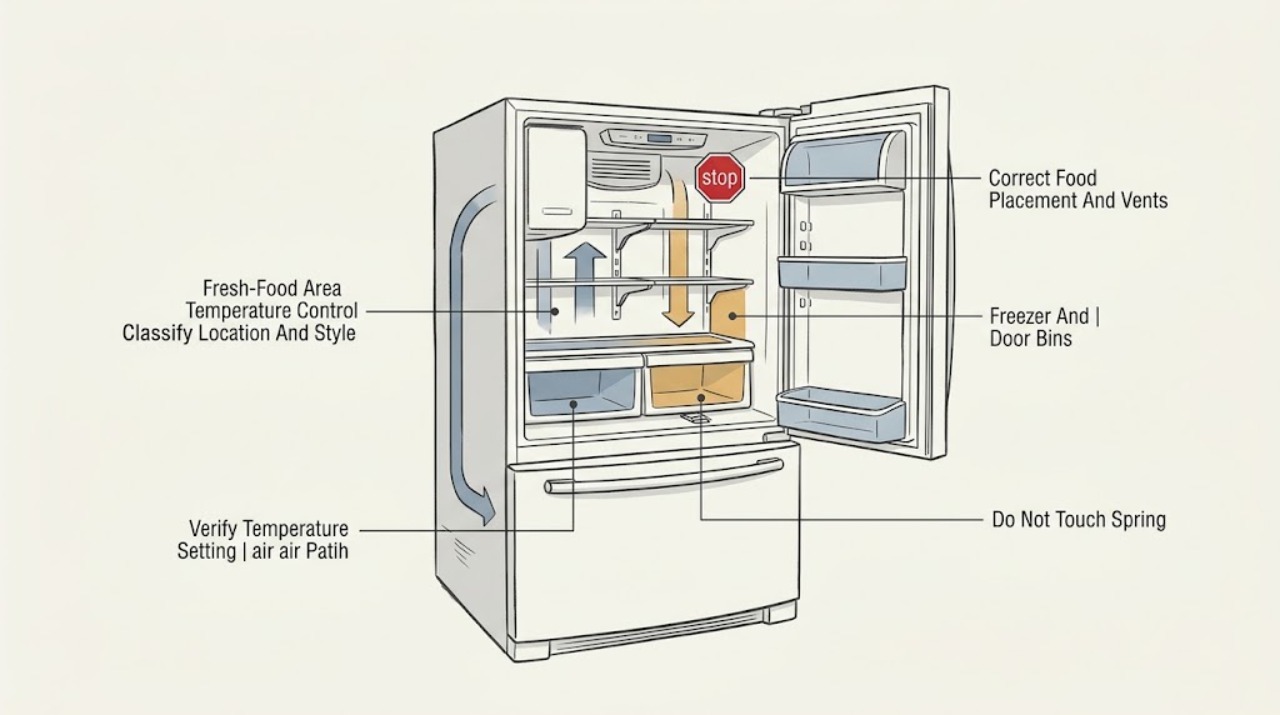
Work through in order
Diagnostic checks
Use only checks that match the exact appliance or system and its official guide.
-
Check 1
Record the complete GE Profile model and identify the refrigerator style from the Owner Center or manual. Note whether food freezes in the fresh-food compartment, a crisper/deli drawer, a door bin, the rear of a top shelf, or only in the freezer; also note whether all foods freeze or only items near one vent.
Expected result: The model is bottom-freezer, top-freezer, or side-by-side; only one drawer or cold spot freezes; door-bin food freezes; or the entire fresh-food compartment is too cold.
Next step: Follow the style-specific branch below and use the complete model manual before touching a sensor, vent, drawer control, or damper.
Stop if: Do not remove an interior panel, probe a sensor, or force a vent or damper to identify its function.
Why this matters
Why: A localized cold spot points toward food placement or a style-specific air path. Whole-compartment freezing points more toward the control setting, sensor/control, or broad airflow problem. The GE Profile label does not establish one internal layout for every model.
-
Check 2
Check the fresh-food and freezer controls against the exact GE Profile Owner's Manual. If your model uses a digital display, compare the displayed setting with the manual; if it uses controls or dials, do not copy a numbered setting from a different GE refrigerator. Record any recent setting change, cooling mode, or reset.
Expected result: The fresh-food setting is colder than the manual recommends; the setting was recently changed; the freezer control is unusually cold; or the settings match the manual.
Next step: If the setting is wrong, adjust only the fresh-food control or drawer control specified by the manual, one step at a time, and reassess after the model's stabilization period. If settings are correct, continue to placement and airflow checks.
Stop if: Do not set controls to extreme positions, enter diagnostic mode, or change multiple controls at once while trying to identify the cause.
Why this matters
Why: GE's freezing-food pages begin with control settings and note that proper ranges and control positions depend on design and model. A colder setting can explain broad freezing; matching settings make food placement, sensor, vent, or service causes more likely.
-
Check 3
Move delicate food away from the coldest documented area and check that food containers are not directly blocking a fresh-food vent or freezer-origin air path. For top-freezer models, pay attention to the rear of the top shelf; for side-by-side models, check the freezer-side damper or vent area; for other designs, use the exact manual rather than assuming the same location.
Expected result: Freezing is limited to food near a vent or the rear/top shelf; a package blocks an air path; door-bin food sits near a freezer vent; or food freezes throughout the compartment.
Next step: Clear only visible food obstructions and relocate delicate items to a neutral location, then monitor one stabilization period. If air is weak, excessive, or the whole compartment freezes, stop external checks and arrange service.
Stop if: Do not remove a damper cover, insert objects into a vent, or use a heat source to thaw an internal air path.
Why this matters
Why: GE explains that freezer air can create cold spots in the fresh-food section and that food placement can make freezing more likely. A localized result supports placement/airflow correction; widespread freezing is less likely to be solved by moving one item.
-
Check 4
Only if the exact GE Profile is a bottom-freezer/french-door design with the documented dome-shaped fresh-food temperature sensor, inspect from inside that no food or container is close enough to block its air clearance. Do not assume every Profile model has a ceiling sensor or use a clearance measurement from another design.
Expected result: The manual and appliance show the documented ceiling sensor and items are crowding it; the sensor area is clear; or the model has a different sensor location or no such sensor.
Next step: Move food away from the documented sensor without removing the sensor cover, then monitor the fresh-food compartment. If freezing persists with the sensor clear, call service for temperature-control or airflow diagnosis.
Stop if: Do not unplug, relocate, cover, or probe the sensor; do not apply this bottom-freezer procedure to a top-freezer or side-by-side model.
Why this matters
Why: GE says a blocked sensor on many older French-door bottom-freezer models can prevent correct temperature control and identifies a clear-air requirement for that sensor. A different sensor layout makes this specific check inapplicable, not evidence of a failed sensor.
-
Check 5
If only a crisper, deli/snack drawer, or door bin freezes, check whether that drawer has a temperature control and whether its setting is colder than the manual specifies. On side-by-side models, check whether a door bin sits directly beside a freezer vent; on other styles, use the model's documented bin and vent arrangement.
Expected result: Only one adjustable drawer freezes; door-bin food freezes; the bin is near a freezer vent; the drawer control is set too cold; or all locations freeze.
Next step: Adjust the affected drawer or relocate the bin only as the exact manual allows, and move delicate food away from the cold path. If several locations remain frozen, continue to service escalation.
Stop if: Do not dismantle drawer slides, remove bin rails, or force a damper or air-control mechanism.
Why this matters
Why: GE identifies drawer settings, door-bin position, food load, and freezer-origin airflow as style-specific causes. A single drawer or bin result supports a local control/placement correction; all locations freezing requires broader temperature or service diagnosis.
-
Check 6
After one documented setting or placement correction, keep the doors closed as much as practical and monitor the same food location and compartment temperature through the stabilization period specified by the model. Record whether freezing stops, moves with the food, or continues in the same location.
Expected result: Freezing stops; it follows food moved near a vent; the same location freezes despite clear space and correct settings; or frost/ice appears around an air path.
Next step: If the symptom persists, protect food and arrange qualified GE service with the model, settings, location, and observation record. Do not attempt internal thawing or panel removal.
Stop if: Do not use a hair dryer, heat gun, knife, or sharp tool to clear internal ice, and do not continue if water reaches controls or electrical parts.
Why this matters
Why: Improvement after placement or control correction supports a localized or setting cause. Persistent same-location freezing or frost after external checks makes a damper, sensor, fan, control, or defrost/airflow issue more likely and cannot be diagnosed safely from the symptom alone.
-
Check 7
If the exact settings, food placement, applicable sensor clearance, drawer/bin position, and stabilization check do not correct the freezing, stop owner diagnosis. Provide GE or a qualified technician with the complete model, refrigerator style, location and type of frozen food, displayed settings, photos of vents/sensor area, and any frost or temperature observations.
Expected result: The entire fresh-food section freezes; a single location repeatedly freezes; a sensor or vent is inaccessible; frost blocks an internal path; or a control, fan, damper, or wiring fault is suspected.
Next step: Arrange qualified GE Profile refrigerator service and keep delicate food away from the cold spot until the issue is resolved.
Stop if: Do not open panels, bypass a control, probe wiring, or order a sensor, damper, fan, or board based only on the freezing symptom.
Why this matters
Why: Persistent freezing after external corrections requires model-specific airflow and temperature-control diagnosis. The GE Profile family includes different refrigerator styles and does not support a universal sensor, damper, or replacement-part conclusion.
Use your observations
Decision map
Find the observation that best matches what you see, then follow the next safe action.
-
PATH 01Safety boundary
What you see
Only food near one vent, the rear of the top shelf, or one side of the fresh-food compartment freezes.
Do this next
Use the exact model's vent layout, clear visible food obstructions, and relocate delicate items. Escalate if the same spot freezes after stabilization.
Why this path and its safety boundary
Why it matters: Food placement and a style-specific cold-air path are more likely than a whole-compartment control fault.
Safety stop: Do not insert objects into vents or remove a damper cover.
-
PATH 02Safety boundary
What you see
Only a crisper/deli drawer or a door bin freezes while other fresh-food areas are normal.
Do this next
Adjust the drawer or relocate the bin only with the matching model instructions and keep food away from the cold-air path. Call service if multiple locations begin freezing.
Why this path and its safety boundary
Why it matters: A drawer temperature setting, bin position, food load, or nearby freezer vent is more likely.
Safety stop: Do not remove drawer rails or force air-control parts.
-
PATH 03Safety boundary
What you see
A bottom-freezer/french-door model has a documented ceiling sensor, and food or a container is crowding its air clearance.
Do this next
Clear the documented sensor area without touching its cover and monitor. If freezing continues, arrange service; do not transfer this sensor check to another style.
Why this path and its safety boundary
Why it matters: The blocked sensor can misread fresh-food air temperature on applicable older bottom-freezer designs.
Safety stop: Do not probe, cover, or relocate the sensor.
-
PATH 04Safety boundary
What you see
Food freezes throughout the fresh-food compartment, and the control is set colder than the exact manual recommends or was recently changed.
Do this next
Return the control to the model-documented setting one step at a time and allow stabilization. If the entire compartment still freezes, call service.
Why this path and its safety boundary
Why it matters: A setting or broad temperature-control condition is more likely than a single cold spot.
Safety stop: Do not use extreme settings or diagnostic mode to force a correction.
-
PATH 05Safety boundary
What you see
Settings and external placement are correct, but the same area keeps freezing or frost blocks an inaccessible air path.
Do this next
Protect food and arrange qualified GE service with the model and observations. Leave internal panels and live testing to the technician.
Why this path and its safety boundary
Why it matters: An internal damper, sensor, fan, control, or defrost/airflow issue is more likely; no universal GE Profile part can be selected from this symptom.
Safety stop: Do not thaw with heat, scrape ice, remove panels, or bypass the control system.
Helpful context
Understand the symptom
Freezing is a location clue, not one universal Profile fault
Food frozen in the fresh-food compartment can result from a setting, a cold-air path, food placement, a drawer control, a blocked sensor, or a design-specific airflow condition. Record the exact location and GE Profile model first. A bottom-freezer sensor procedure does not automatically apply to a side-by-side or top-freezer refrigerator.
Correct the control before moving architecture-specific parts
GE's public guidance gives examples for different designs, but it directs owners to the model manual for exact controls. Change temperature settings one step at a time and correct food placement before attempting any damper, sensor, fan, or panel work. A freezer that is operating normally can still send cold air to a fresh-food cold spot.
When freezing persists, protect food and stop at the external boundary
Move delicate food away from the identified cold spot while troubleshooting and monitor the fresh-food temperature with the method specified by the model. If a setting and placement correction does not change the symptom, an internal airflow or temperature-control fault needs service. Do not remove covers or defeat a sensor or damper.
Safety boundary
Stop conditions
- Protect or move delicate food if the fresh-food compartment is freezing broadly, the temperature is outside the model's safe range, or frost is accumulating rapidly.
- Do not remove interior or rear panels, force a damper or fan, probe a sensor or wiring, or use a heat source, knife, or sharp tool to clear internal ice.
- Do not copy a temperature setting, sensor location, vent position, or adjustment sequence from a different GE Profile refrigerator style.
- If one documented external setting or placement correction does not resolve persistent freezing, stop owner diagnosis and arrange qualified GE service.
When checks do not resolve it
Need a professional?
Arrange qualified GE Profile refrigerator service when food continues freezing after the exact model settings and external placement checks, the whole fresh-food compartment freezes, a documented sensor is clear but the symptom persists, frost blocks an inaccessible air path, or diagnosis would require a damper, fan, sensor, control, defrost system, panel, or live electrical test.
Safety scope: This article covers model identification, control observation, food placement, accessible vent checks, applicable bottom-freezer sensor clearance, drawer/bin placement, and monitoring after one external correction. Internal sensors, dampers, fans, controls, defrost parts, wiring, and panel access require qualified service.
Common questions
FAQ
Why is my GE Profile refrigerator freezing food?
First identify where the freezing occurs and the refrigerator style. Check the exact model's temperature settings, then move delicate food away from freezer-origin vents or a documented cold spot. A bottom-freezer model may have a blocked fresh-food temperature sensor, while side-by-side and top-freezer models have different cold-air locations. Persistent freezing after those external checks needs service.
What temperature should a GE Profile refrigerator be set to?
Use the complete model's Owner's Manual. GE's freezing-food guidance gives an applicable digital fresh-food range of about 37–42°F, but controls and acceptable settings vary by design. Do not copy a dial position or temperature from another Profile model.
Why does only the top shelf of my GE Profile refrigerator freeze?
On applicable top-freezer designs, GE says cold air enters the fresh-food section from the freezer and the rear of the top shelf can be the coldest spot. Move delicate food away from that path and check for a blocked vent. If the same area freezes after placement and setting corrections, arrange service.
Why are my GE Profile refrigerator drawers freezing?
GE identifies drawer temperature settings, food load, and cold-air placement as possible causes. Check whether the affected drawer has an adjustable control and use the exact manual to set it warmer. If the entire fresh-food compartment freezes or the drawer stays cold after correction, call service.
Where is the temperature sensor on a GE Profile refrigerator?
Sensor location varies by model. GE specifically describes a dome-shaped sensor on the ceiling of the fresh-food compartment on many older French-door bottom-freezer refrigerators and advises clear air around it. Do not assume that location on a side-by-side, top-freezer, or newer model; use the complete Owner's Manual.
When should I call service for a GE Profile refrigerator that freezes food?
Call service when correct model settings, food placement, applicable sensor clearance, drawer/bin checks, and a stabilization period do not stop freezing; when frost blocks an inaccessible vent; or when a fan, damper, sensor, control, or wiring issue is suspected. Do not remove panels or test live parts.
Read the exact guide
Official sources
- Bottom Freezer Refrigerator - Too Cold, Freezing FoodGE Appliances · Official GE guidance for bottom-freezer refrigerators; the sensor description applies only to models with that documented dome-shaped sensor.
- Top Freezer Refrigerator - Too Cold, Freezing FoodGE Appliances · Official GE guidance for top-freezer refrigerators; control positions and cold-spot locations remain model-dependent.
- Refrigerator - Too Cold, Freezing FoodGE Appliances · Official GE refrigerator support article; it directs owners to style-specific guidance and does not replace the exact GE Profile model manual.
- Side-by-Side Refrigerator - Too Cold, Freezing FoodGE Appliances · Official GE guidance for side-by-side refrigerators; vent and damper locations vary by model.
- Troubleshooting for PSS26SGPSSGE Appliances · Official GE Appliances Owner Center page for the named PSS26SGPSS GE Profile side-by-side model; its architecture must not be generalized to other Profile models.
Community feedback
Share a repair observation
Share a plain-text repair observation. Accepted observations are published automatically; this page may take a moment to update.