
On this page
Start here
Quick answer
First distinguish a locked control panel from a door that is physically stuck. If LOCK or LOCKED is displayed and the door itself opens normally, the GE control-lock feature is active: older models commonly use the LOCK pad twice within three seconds, while many newer models use a documented three-second hold on a model-specific pad or pad combination. Use the exact Owner's Manual because GE says the combination varies by model. If the dishwasher has lights or sounds but will not start, also check that the door closes and the latch fully engages, Delay Start is not active, and Sleep/Sabbath or leak protection is not preventing operation. If the door will not latch, inspect only for a rack, dish, utensil, trim, insulation, or countertop obstruction; do not force the handle or remove the latch. If the panel is dark, check the accessible power source and GFCI or wall switch only when dry and safe. Stop for water on the floor, smoke, burning odor, heat, exposed wiring, a damaged latch, or a door that remains physically stuck; arrange qualified dishwasher service.
Before you begin
Safety first
- The user may identify the exact model, use the documented control-lock procedure, inspect visible rack and door obstructions, check an accessible breaker/GFCI/wall switch when dry and safe, and use one documented cancel or reset. Qualified personnel must handle latches, hinges, door panels, wiring, leak protection, flood floats, pumps, controls, live measurements, and repairs near water or electricity.
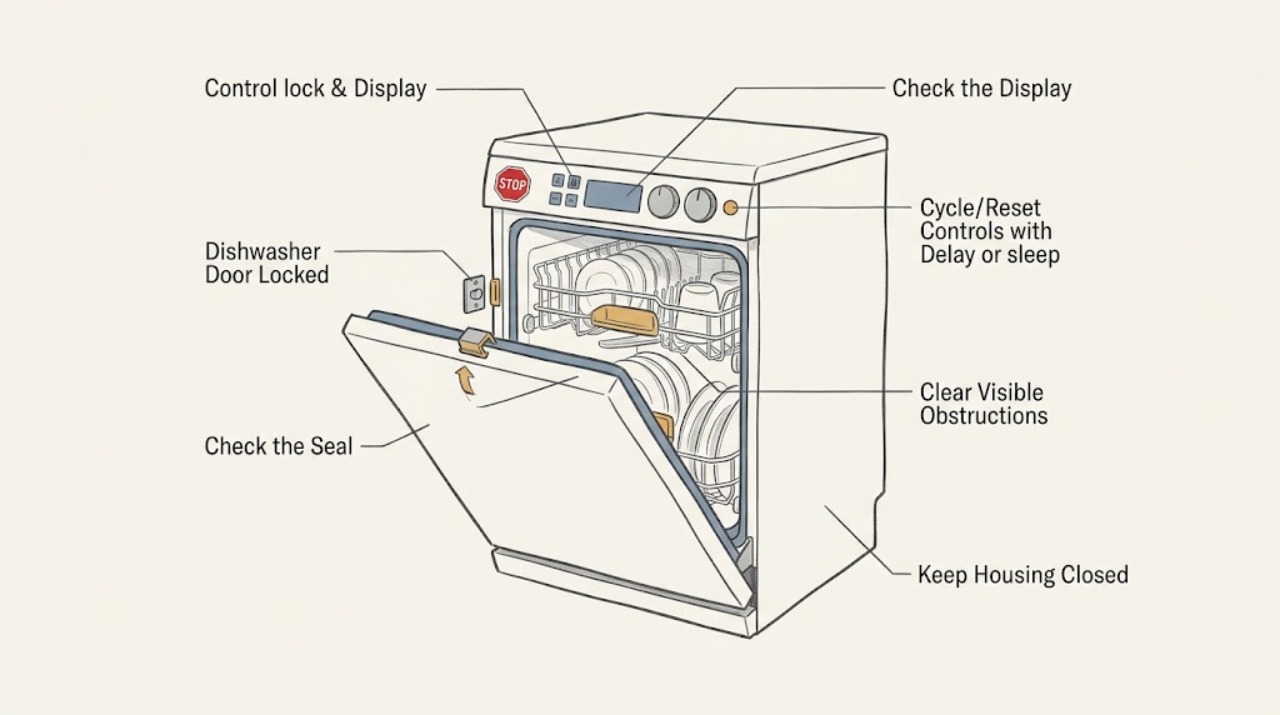
Work through in order
Diagnostic checks
Use only checks that match the exact appliance or system and its official guide.
-
Check 1
Observe the panel and door without forcing either one. Record whether LOCK or LOCKED is displayed, whether buttons light or beep, whether a cycle appears active, whether the door opens but controls are inactive, and whether the handle or door itself will not move.
Expected result: The panel says LOCKED but the door opens; the panel has lights or sounds but no cycle starts; the door will not latch; the door will not open; or the panel and door have no response.
Next step: Use the control-lock, latch, power, or active-cycle branch that matches the result and identify the exact model before using a button sequence.
Stop if: Stop for a stuck door with force required, water on the floor, smoke, burning odor, abnormal heat, sparks, or exposed wiring.
Why this matters
Why: A control lock is more likely when the door moves normally but pads are disabled. A latch or cycle-state issue is more likely when the door is physically affected; no lights or response points toward power, sleep mode, or an electronic fault.
-
Check 2
Find the exact GE model in the Owner's Manual and follow its control-lock method. Older models may use the LOCK pad twice within three seconds; many newer models use a documented three-second hold on a specific pad or pad combination. Perform the normal user control action only once and watch the Lock Controls indicator.
Expected result: The lock indicator turns off and pads work; the indicator remains on; there is no lock indicator but pads are inactive; or the model's manual does not match the panel.
Next step: If the lock remains, verify the exact model and use its manual again without trying another model's combination. Follow the panel, power, or service branch if it remains inactive.
Stop if: Do not pry the panel, bridge controls, repeatedly cycle power, or remove the door or control housing.
Why this matters
Why: A cleared indicator with responsive pads confirms a control-lock state. A persistent or ambiguous panel problem may involve a different mode, power, control, or model-specific interface; it does not prove a failed board.
-
Check 3
If the door will not close or latch, open it normally and inspect only the visible door edges, gasket, racks, dishware, utensil handles, trim, insulation, cabinet, and countertop for interference. Push a rack fully in and remove only an obvious obstruction; do not bend the door or dismantle the latch.
Expected result: A rack, dish, utensil, gasket, trim, insulation, cabinet, or countertop was preventing closure; the door closes but the latch does not engage; the door is misaligned; or no visible obstruction is present.
Next step: Correct only the visible loading issue and close the door firmly once. For alignment, gasket, latch, or strike problems that remain, leave the dishwasher off and arrange service or installer correction.
Stop if: Do not force the handle, remove the latch, pinch the gasket, drill cabinetry, or continue if the door or frame is damaged.
Why this matters
Why: A visible obstruction or installation interference can prevent the latch switch from confirming a closed door. A clean closure with no latch engagement makes a latch, strike, alignment, or control-sensing fault more likely.
-
Check 4
If the panel has lights or sounds but the dishwasher will not run, check the exact manual for an active Delay Start, Sleep/Sabbath mode, leak-protection indication, or flood-float condition. If a normal RESET or cancel action is documented, use it once and wait for the dishwasher to stop; do not reach into a running or water-filled machine.
Expected result: A delay countdown is shown; Sleep/Sabbath has disabled lights or sound; an LCD shows leak protection; water remains in the tub; a slight hum is present; or no mode or water condition is visible.
Next step: Cancel the documented delay or mode and reset once as directed. If water, leak protection, a flood float, or a persistent hum remains, keep the door closed or appliance off as appropriate and arrange service.
Stop if: Do not bypass leak protection, reach into the tub while energized, add water as an improvised repair, or continue with a leak.
Why this matters
Why: A schedule or protection feature can look like a lock even when the controls and door are intact. Standing water, a flood float, a leak condition, or a hum without operation shifts the issue toward water protection or pump/start diagnosis.
-
Check 5
If the panel is dark and the dishwasher is non-responsive, check only the accessible breaker, GFCI reset, adjacent-cabinet receptacle, or wall switch when the area is dry and there is no damage. For a hardwired unit or a new-installation power problem, use the installation instructions and a qualified professional; do not remove panels or access energized wiring.
Expected result: The breaker or GFCI was tripped; a wall switch was off; a cord or receptacle is loose; power returns but the panel remains locked; or the accessible supply appears normal.
Next step: Restore only an accessible switch or documented reset once. Leave a hardwired, damaged, or persistent no-power condition for an electrician or qualified dishwasher servicer.
Stop if: Stop for a hot, wet, loose, or damaged connection, smoke, burning odor, sparks, repeated trips, or exposed wiring.
Why this matters
Why: A household supply or installation issue can make the dishwasher appear locked. Power that is present but leaves the panel or latch inactive points toward a dishwasher control, harness, lock, or latch fault.
Use your observations
Decision map
Find the observation that best matches what you see, then follow the next safe action.
-
PATH 01Safety boundary
What you see
The panel shows LOCK or LOCKED, the door opens normally, and buttons are otherwise illuminated or responsive.
Do this next
Use the exact model's unlock procedure: older LOCK-pad models commonly use two presses within three seconds, while newer models use a documented three-second pad hold.
Why this path and its safety boundary
Why it matters: The electronic control-lock feature is more likely than a broken physical door latch.
Safety stop: Do not use a button sequence from another model, pry the panel, or bridge a control.
-
PATH 02Safety boundary
What you see
The panel responds, but a rack, dish, utensil, gasket, trim, cabinet, countertop, or alignment issue prevents the door from closing and engaging the latch.
Do this next
Remove only the visible obstruction and close the door once. Arrange installer or service correction for a persistent alignment, gasket, strike, or latch problem.
Why this path and its safety boundary
Why it matters: A visible obstruction or installation/latch condition is more likely than a control-lock state.
Safety stop: Do not force the handle, remove the latch, bend the door, or run without a secure latch.
-
PATH 03Safety boundary
What you see
The dishwasher has lights or sounds but does not start, and Delay Start, Sleep/Sabbath, leak protection, standing water, flood-float, or an active cycle is observed.
Do this next
Use only the exact manual's cancel, reset, or mode procedure once. Arrange service if water, protection status, or a hum persists.
Why this path and its safety boundary
Why it matters: A documented schedule or protection state can prevent operation without a locked control; water protection can indicate a leak or pump condition.
Safety stop: Do not bypass leak protection, reach into a running tub, or repeatedly restart a water-filled machine.
-
PATH 04Safety boundary
What you see
The display and buttons are dark and the dishwasher does not respond, or an accessible breaker, GFCI, wall switch, or receptacle is abnormal.
Do this next
Check the accessible supply once when dry and safe. Use an electrician for household wiring or hardwired installation and qualified appliance service for a persistent dishwasher fault.
Why this path and its safety boundary
Why it matters: Household power, installation, or an internal input/control fault is more likely than a control-lock indicator.
Safety stop: Do not open electrical enclosures, touch damaged wiring, repeatedly reset protection, or continue with heat, smoke, or odor.
-
PATH 05Safety boundary
What you see
The door will not open or close without force, the latch remains engaged after a documented cycle state is cleared, or the lock/panel remains inactive after the model-specific procedure.
Do this next
Keep the dishwasher off and arrange qualified service. Provide the model, display state, cycle state, water level, latch behavior, and obstruction checks.
Why this path and its safety boundary
Why it matters: A mechanical latch, strike, hinge, gasket, control, harness, or internal protection fault requires service; the symptom does not select a part.
Safety stop: Do not force the door, insert tools around the latch, remove panels, or operate with a damaged seal or leak.
Helpful context
Understand the symptom
“Door locked” can mean two different things
A LOCKED indicator or unresponsive pads usually describes the electronic control lock, not a mechanically locked door. A door that will not open, will not close, or will not latch is a separate latch, rack, gasket, installation, or cycle-state problem. Record whether the display shows LOCKED, whether the panel lights and beeps, whether a cycle is running, whether water remains in the tub, and whether the handle moves normally. Do not pull harder on the handle while the symptom is still ambiguous.
Unlock the controls only with the exact model method
GE documents more than one control-lock interface. Older models may toggle the lock with two LOCK-pad presses within three seconds; newer models may require holding Dry Boost, Steam/Sani/Presoak-Sani/Sanitize, Cycle, or another documented combination for three seconds. A model's light turns off when its lock is released. Do not copy a combination from another GE dishwasher or assume the word LOCKED means the physical latch is broken.
A door must close and latch before the dishwasher can run
If the lock clears but the dishwasher still will not start, check for a rack, pan handle, utensil, trim, insulation, cabinet, or countertop preventing full closure. GE says the latch must engage its switch so the dishwasher recognizes a closed door. Delay Start, Sleep/Sabbath mode, and leak-protection features can also make an apparently powered machine seem locked or inactive. Latch, flood-float, leak, and control repairs are not user-level cabinet work.
Safety boundary
Stop conditions
- Stop immediately for water on the floor or near electrical parts, smoke, burning odor, sparks, abnormal heat, exposed wiring, or a hot, wet, loose, or damaged cord, receptacle, latch, or control.
- Do not force a physically stuck door, pry the latch, insert tools around the door seal, bypass the control lock, or defeat leak or flood protection.
- Do not remove the door panel, control housing, latch, wiring, pump, heater, or other internal component, and do not access energized parts.
- Do not reach into a running or water-filled dishwasher, repeatedly reset the controls, or use a reset as proof that an internal fault is fixed.
- If the exact model unlock procedure and visible obstruction/power checks do not restore safe operation, leave the dishwasher off and arrange qualified service.
When checks do not resolve it
Need a professional?
Arrange qualified GE dishwasher service when the model-specific control-lock procedure does not restore the panel, the door will not latch or open without force, a latch, strike, hinge, gasket, harness, lock, flood float, leak-protection, pump, or control issue is suspected, or the dishwasher remains inactive after the safe power and mode checks. Use an electrician for a hardwired, dead, hot, wet, loose, damaged, or repeatedly tripping household supply. Stop immediately for water on the floor, smoke, burning odor, sparks, abnormal heat, exposed wiring, or a damaged door or latch. Provide the exact model and serial information, LOCK/LOCKED indication, panel lights or sounds, door and latch behavior, rack/loading condition, Delay Start or Sleep/Sabbath state, water level, reset result, and safe checks attempted.
Safety scope: The user may identify the exact model, use the documented control-lock procedure, inspect visible rack and door obstructions, check an accessible breaker/GFCI/wall switch when dry and safe, and use one documented cancel or reset. Qualified personnel must handle latches, hinges, door panels, wiring, leak protection, flood floats, pumps, controls, live measurements, and repairs near water or electricity.
Common questions
FAQ
How do I unlock a GE dishwasher control panel?
Use the exact Owner's Manual. GE says older models may unlock by pressing LOCK twice within three seconds, while newer models may require holding a model-specific pad or combination for three seconds. The lock indicator should turn off; do not borrow a sequence from another model.
Does a control lock physically lock the GE dishwasher door?
Usually the control lock disables the pads; it does not by itself prove that the physical door latch is stuck. If the door will not move or will not latch, inspect visible rack, dishware, utensil, gasket, trim, cabinet, or countertop interference and arrange service if the latch remains affected.
Why is my GE dishwasher locked but has lights or sounds?
Check the control-lock indicator and exact unlock method, then check door-latch engagement, Delay Start, Sleep/Sabbath mode, leak protection, and standing water. These states can prevent a cycle even when the dishwasher has power.
What if my GE dishwasher door will not latch?
Check whether a rack, pan handle, utensil, gasket, trim, insulation, cabinet, or countertop prevents full closure. GE says the latch must engage its switch before the dishwasher can run. Do not force the handle or remove the latch; persistent misalignment or latch damage needs service or installer correction.
When should I stop troubleshooting a GE dishwasher door lock?
Stop for water on the floor, smoke, burning odor, sparks, abnormal heat, exposed wiring, a damaged latch, or a door that remains physically stuck. Also stop after the exact model unlock, visible obstruction, power, and documented mode checks fail; leave the dishwasher off and arrange qualified service.
Read the exact guide
Official sources
- Dishwasher - Door Will Not LatchGE Appliances · Applies to GE dishwashers; door styles, gaskets, adjustable racks, and latch assemblies vary by model.
- Operating InstructionsGE Appliances · Only an older compatible GE dishwasher manual; its LOCK pad, display, and cycle controls must not be generalized to current models.
- Dishwasher - Control Lockout FeatureGE Appliances · Applies to GE dishwashers with electronic control lock features; exact pad or pad combination varies by model.
- Dishwasher - Not Running But Has Lights or SoundGE Appliances · Applies to GE dishwashers with lights or sound; model-specific modes and pump behavior vary.
- Owner's Manual & Installation InstructionsGE Appliances · Applies to locating model-specific GE literature; exact feature and procedure availability depends on the dishwasher model.
- Dishwasher - Won't Run and Has No PowerGE Appliances · Applies to GE dishwashers with no display or button response; exact power installation varies.
- Dishwasher - Will Not Start or Run but Has Lights or SoundGE Appliances · Applies to GE dishwashers with lights or sounds; exact modes, displays, and model families vary.
- Dishwasher - Will Not Run or Has No PowerGE Appliances · Applies to GE dishwashers; cord, hardwire, wall-switch, and control arrangements vary by installation and model.
Community feedback
Share a repair observation
Share a plain-text repair observation. Accepted observations are published automatically; this page may take a moment to update.