
On this page
Start here
Quick answer
A GE freezer may run for most of the day and can run continuously while it is first cooling, recovering from frequent door or lid openings, handling a large warm load, or operating in very hot room conditions. GE says freezer compressors are designed to run about 80% to 90% of the time, so sound alone does not prove a fault. Check the actual food temperature against the model target, then inspect the door or lid seal, blocked vents, load, room conditions, temperature setting, and any fast-freeze mode. If the freezer is not reaching temperature, the compressor never cycles after conditions normalize, the gasket is damaged, or an alarm will not clear, arrange service; do not open the sealed refrigeration system or electrical covers.
Before you begin
Safety first
- This article covers thermometer readings and ordinary-access inspection only. Leave electrical, compressor, fan, refrigerant, evaporator, condenser, sealed-system, and control replacement work to qualified appliance service.
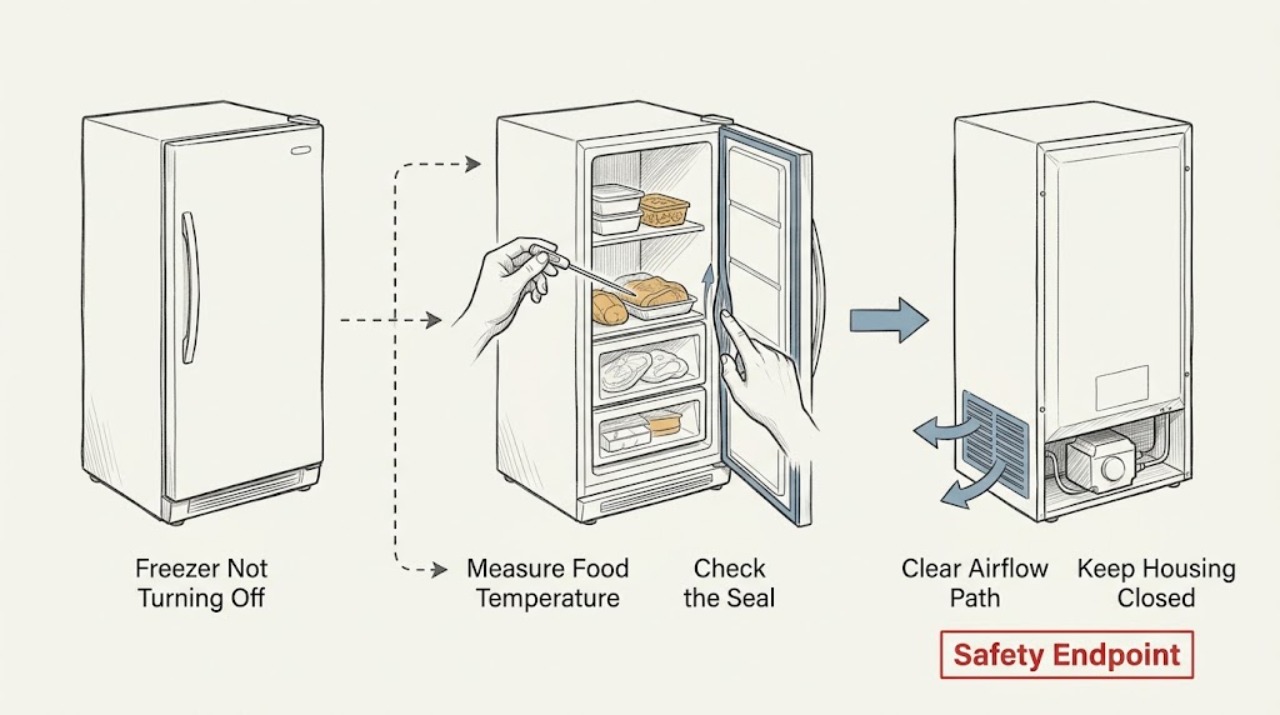
Work through in order
Diagnostic checks
Use only checks that match the exact appliance or system and its official guide.
-
Check 1
Place a suitable freezer thermometer between frozen packages or in a stable frozen item, close the door or lid, and allow the reading to settle according to the thermometer instructions without repeatedly opening the appliance.
Expected result: Record whether the food is at the model's target range, warmer than expected, or fluctuating; also note whether frost or thawing is visible.
Next step: Use the temperature result to choose the next branch. If food is thawing or the temperature is rising, protect the food and arrange prompt service after the safe external checks.
Stop if: Stop relying on the appliance for food preservation when food is thawing, the alarm remains active, or the temperature cannot be brought back to the model target; do not open sealed-system components.
Why this matters
Why: A target-temperature freezer with a long run time may be operating normally. A freezer that runs continuously and remains warm has a cooling, airflow, warm-air-entry, load, or control branch that requires further checks.
-
Check 2
From outside the cabinet, inspect the full door or lid gasket for dirt, gaps, tears, flattening, or sections that do not contact the cabinet. Check that no package, basket, shelf, or lid hardware prevents full closure.
Expected result: Record whether the seal contacts evenly, a package holds the door or lid open, the gasket is dirty but intact, or the gasket is damaged or remains gapped when closed.
Next step: Remove only an obvious package obstruction and clean the accessible gasket according to the model care guidance, then close the door or lid and recheck temperature without repeated opening. Arrange service for a torn, distorted, loose, or persistently gapped gasket.
Stop if: Do not force the door or lid, bend hinges, use an improvised gasket, or continue if the cabinet is damaged or the seal cannot close without pressure.
Why this matters
Why: Warm air entering through a gap can keep the freezer warm and make the compressor run for a long time. A clean, evenly seated seal makes blocked airflow, settings, load, room conditions, or a cooling fault more likely.
-
Check 3
Check that packages do not block internal air vents, that recently added unfrozen food is not an unusually large load, and that the freezer has reasonable clearance and is not exposed to an unusually hot or humid environment. Do not remove interior panels to inspect hidden airflow parts.
Expected result: Record whether vents are blocked, the cabinet is nearly empty or heavily loaded with warm food, or room heat is unusually high; note whether the issue began after loading or a heat wave.
Next step: Restore clear airflow without packing food against vents, avoid repeated door openings, and allow the freezer time to recover while monitoring food temperature. If recovery does not occur, request service.
Stop if: Do not use a heater, add an improvised fan inside the cabinet, move the appliance while loaded, or block external ventilation to make the compressor stop.
Why this matters
Why: GE identifies blocked vents, a lightly loaded freezer, a large warm load, and extreme heat or humidity as conditions that can increase run time. If none applies and food is warm, a mechanical or control diagnosis becomes more likely.
-
Check 4
Read the freezer control or display and compare its setting with the model manual. Check for an enabled fast-freeze or TurboFreeze function, and confirm the control is not set colder than needed; do not turn a thermostat beyond its stops or change several settings at once.
Expected result: Record the displayed or dial setting, whether a fast-freeze indicator is active, and whether the control responds normally. Note if the control has no clear OFF or normal range for the exact model.
Next step: Return only a documented temporary mode to its normal state and make one controlled observation. If the control remains unresponsive or the run time and temperature do not improve, stop adjusting it and arrange service.
Stop if: Do not bypass a thermostat, short control wires, remove a control panel, or use a generic setting guide in place of the exact model manual.
Why this matters
Why: A colder setting or temporary fast-freeze mode can intentionally lengthen compressor operation. A setting that cannot be changed, a display that does not respond, or a freezer that remains warm at a normal setting points to a control or cooling fault.
-
Check 5
After the door, airflow, load, room, and control checks, listen from outside the cabinet for whether the compressor appears to run continuously, cycles briefly and stops, or is silent while a fan or alarm remains. Do not remove the rear cover or touch the compressor, condenser, wiring, or refrigerant tubing.
Expected result: Record the sound pattern, cabinet temperature, food temperature, alarm state, and whether the freezer ever reaches its target. Note any clicking, repeated restart attempts, vibration, burning smell, or oil-like residue.
Next step: Arrange qualified appliance service with the model, temperature trend, control setting, door-seal result, load and room conditions, and sound pattern. Keep the door closed as much as practical while protecting food.
Stop if: Stop immediately for burning smell, smoke, sparking, damaged cord, hot electrical parts, refrigerant or oil residue, a rapidly warming cabinet, or any need to access the sealed system or wiring.
Why this matters
Why: A steady compressor with a cold freezer can be normal. Repeated clicking or short cycling, a silent compressor with a warm freezer, abnormal vibration, or continuous operation without reaching temperature indicates a service diagnosis rather than a user-adjustment problem.
Use your observations
Decision map
Find the observation that best matches what you see, then follow the next safe action.
-
PATH 01Safety boundary
What you see
The freezer reaches its model target and the long run follows initial cooling, a warm load, frequent openings, or unusually hot room conditions.
Do this next
Keep the door or lid closed, restore clear airflow, avoid adding large warm loads, and monitor the actual food temperature.
Why this path and its safety boundary
Why it matters: The compressor may be operating within expected behavior rather than failing to turn off.
Safety stop: Request service if the freezer later warms, never cycles after conditions normalize, or an alarm remains active.
-
PATH 02Safety boundary
What you see
The freezer is warm and the gasket is dirty, gapped, damaged, or held open by a package or lid obstruction.
Do this next
Remove only the obvious obstruction and clean the accessible gasket, then monitor temperature with minimal door opening; replace or repair a damaged seal through qualified service.
Why this path and its safety boundary
Why it matters: Warm air entry can make the compressor run longer while the freezer tries to recover.
Safety stop: Do not force the door, reshape a damaged gasket with heat, or use the freezer for food storage while the seal remains open.
-
PATH 03Safety boundary
What you see
The freezer has blocked vents, a large warm load, little stored mass, or unusually hot or humid surrounding conditions.
Do this next
Restore internal airflow, avoid repeated openings, and allow recovery while monitoring food temperature; request service if it remains warm after conditions normalize.
Why this path and its safety boundary
Why it matters: The operating conditions themselves can increase run time even when the cooling system is working.
Safety stop: Do not cover vents, add improvised cooling equipment, or use a heater or other device to change cabinet conditions.
-
PATH 04Safety boundary
What you see
The control is set unusually cold or a documented fast-freeze mode is active, while the freezer otherwise reaches temperature.
Do this next
Return the mode or setting only to the exact model's normal documented state and monitor the food temperature; stop adjusting if the control does not respond.
Why this path and its safety boundary
Why it matters: The control can intentionally extend compressor operation.
Safety stop: Do not bypass, short, or replace the control based only on a long-run symptom.
-
PATH 05Safety boundary
What you see
The freezer remains warm despite a normal setting, clear airflow, a closed seal, and normalized load or room conditions, or the compressor repeatedly clicks, stops, or never starts.
Do this next
Protect food and arrange qualified appliance service with the measured temperature and complete observations.
Why this path and its safety boundary
Why it matters: A control, fan, condenser, compressor, sealed-system, or electrical fault remains possible and cannot be isolated safely from outside.
Safety stop: Do not remove covers, handle refrigerant, puncture tubing, touch wiring, or force a compressor or fan to run.
Helpful context
Understand the symptom
Continuous operation is not automatically a failure
The useful question is whether the freezer is holding its target temperature, not whether the compressor can be heard every minute. GE describes 80% to 90% compressor run time as designed behavior and says operation can approach 100% during initial cooling, after a large warm load, or in extreme heat. A fan may also continue when the compressor is not the sound you are noticing, so identify the symptom without removing any panel.
Check food temperature and the conditions around the cabinet
Use a thermometer between frozen packages or in ice cream as GE recommends; air temperature alone is less reliable. A freezer that is cold enough but sounds busy may be working normally under a high-load condition. A freezer that runs constantly while food remains too warm needs a different branch: look for warm-air entry, blocked circulation, a setting or fast-freeze mode, or a cooling-system fault.
Keep refrigeration and electrical work professional
Ordinary-access checks can identify a bad seal, a package blocking the door, blocked vents, an unusual setting, or a room-condition explanation. Do not remove an evaporator cover, access wiring, puncture tubing, handle refrigerant, or force a fan or compressor test. Preserve food safety by minimizing door openings while a warm freezer is being assessed.
Safety boundary
Stop conditions
- Stop using the freezer for food preservation if food is thawing, the cabinet is warming, or the temperature cannot return to the model target.
- Stop for burning smell, smoke, sparking, a hot or damaged power cord, repeated electrical trips, or unusual compressor clicking or vibration.
- Do not remove evaporator or rear covers, access wiring, puncture refrigerant tubing, handle refrigerant, or open the sealed cooling system.
- Do not bypass or short a thermostat, temperature sensor, fan, door switch, alarm, or other safety control.
- Do not force the door or lid, reshape a damaged gasket with heat, block vents, or add improvised heaters or fans.
Only after diagnosis
Potential parts
- freezer door or lid gasket
Consider this category only if inspection confirms a torn, distorted, loose, or persistently gapped seal after package obstruction and ordinary cleaning checks.
Confirm the exact GE model, door or lid configuration, and manufacturer fit information before ordering; do not force or heat-form a replacement. - temperature control or sensor
Consider this internal part only after qualified testing confirms a control or sensing fault and the seal, airflow, load, and temperature setting are correct.
Confirm the exact model and electrical specification with the manufacturer or technician; do not bypass or substitute a control based only on continuous running.
When checks do not resolve it
Need a professional?
Arrange qualified appliance service when the GE freezer stays warm while running continuously, never cycles after the initial cooling or recovery conditions have ended, has a damaged or persistently gapped gasket, repeatedly clicks or trips a circuit, shows a control or alarm fault, or requires access to the compressor, wiring, evaporator, condenser, or sealed system.
Safety scope: This article covers thermometer readings and ordinary-access inspection only. Leave electrical, compressor, fan, refrigerant, evaporator, condenser, sealed-system, and control replacement work to qualified appliance service.
Common questions
FAQ
Is it normal for a GE freezer to run all the time?
It can be normal during initial cooling, after a large warm load, or in very hot conditions. GE says freezer compressors are designed to run much of the time. Check the actual food temperature and look for warm-air entry or blocked airflow before treating sound alone as a failure.
Why does my GE freezer run continuously but stay warm?
Check the door or lid gasket, package obstruction, vents, load, room conditions, temperature setting, and any fast-freeze mode. If it remains warm with a closed seal and clear airflow, arrange service because a fan, control, compressor, electrical, or sealed-system fault may be involved.
How should I check the temperature of a GE freezer?
GE recommends checking food temperature with a thermometer between frozen packages or in ice cream because air temperature is less reliable. Compare the result with the exact model's target and minimize door openings during the check.
Can a damaged freezer gasket make the compressor run constantly?
Yes. A dirty, damaged, or gapped gasket lets warm air enter and can lengthen run time. Remove only an obvious package obstruction and clean the accessible seal; a torn or persistently gapped gasket needs model-specific service.
Should I unplug a GE freezer that will not turn off?
Do not unplug a full freezer as a routine way to solve long run time because food can warm. Isolate it for smoke, burning smell, electrical damage, or a repeated trip only when safe, and arrange qualified service. Use the control or documented mode procedure for ordinary settings.
Read the exact guide
Official sources
- Refrigerator or Freezer - Normal Run TimeGE Appliances · GE support guidance for refrigerator and freezer operating time; exact model controls and installation conditions remain model-specific.
- Upright & Chest Freezer - Run TimeGE Appliances · GE support guidance for upright and chest freezers; model-specific recovery time and controls vary.
- Upright & Chest Freezer - How to Confirm Power to the FreezerGE Appliances · GE support guidance for confirming external power to upright and chest freezers; electrical work remains for an electrician or qualified technician.
- Upright & Chest Freezer - Temperature ControlGE Appliances · GE support guidance for upright and chest freezer controls; use the exact model manual for a particular control or alarm procedure.
Community feedback
Share a repair observation
Share a plain-text repair observation. Accepted observations are published automatically; this page may take a moment to update.