
On this page
Start here
Quick answer
A power drop before a GE Profile microwave stopped heating is a timeline clue, not proof that a high-voltage part failed. First preserve the exact model label and record whether the display, clock, fan, light, turntable, and countdown still work. GE says a power failure may leave PF, 888, or 8888 on the display, while a unit that appears powerless should be checked at the household breaker and accessible outlet. If the controls run a genuine cooking function with the door securely closed but food remains cold after the supply is normal, stop testing and arrange qualified microwave service. Do not open the cover, replace a fuse, probe live wiring, or work on the high-voltage section.
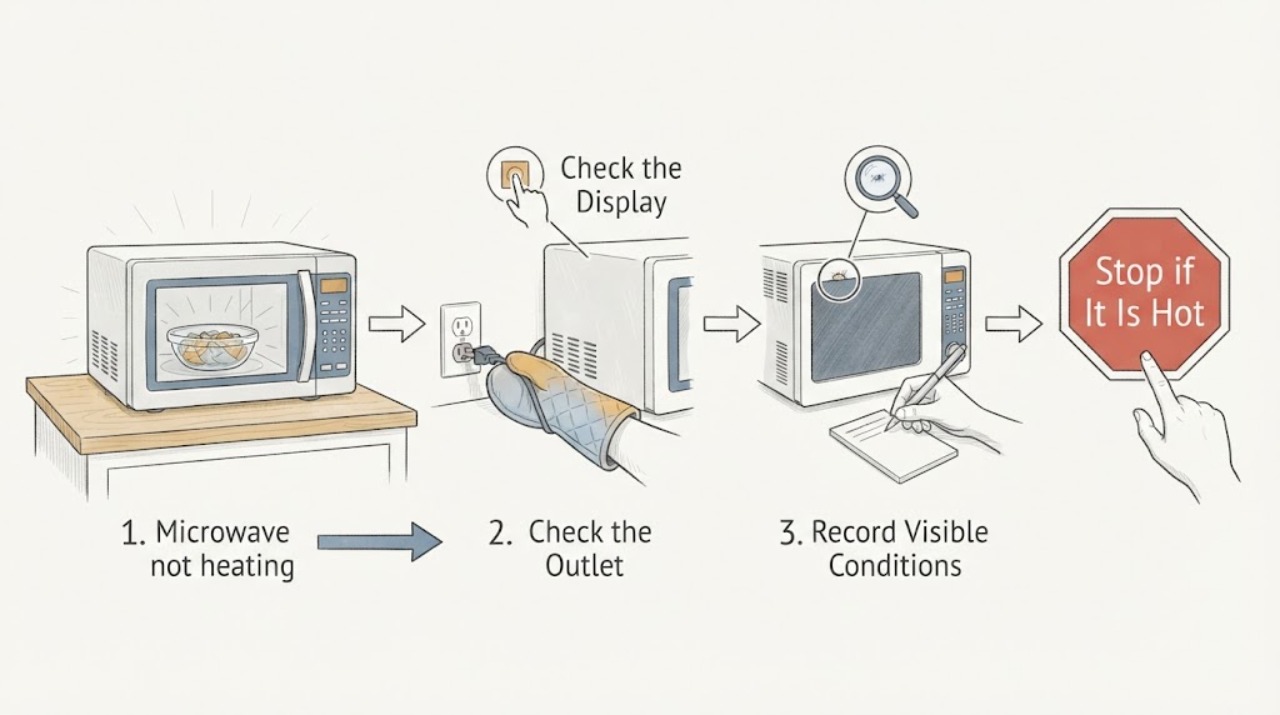
Work through in order
Diagnostic checks
Use only checks that match the exact appliance or system and its official guide.
-
Check 1
Stop further cooking attempts and write a short timeline: when the area power drop occurred, whether the microwave display went blank or reset, and whether the no-heat symptom began immediately afterward.
Expected result: The clock reset or the display showed PF, 888, or 8888 after the event; the display stayed normal; or the exact sequence is unknown.
Next step: Photograph the complete display and record the model suffix before clearing anything. If a documented power-failure indication is present, use only the model-approved clear/clock step once; do not repeatedly reset the appliance.
Why this matters
Why: GE documents PF, 888, or 8888 as possible power-failure indications, so a reset display supports a supply-event branch. The timing still does not identify a microwave heating component.
-
Check 2
From a dry, accessible location, check the household breaker or fuse that supplies the microwave and confirm whether the accessible outlet has power with a simple lamp or other ordinary appliance; do not remove trim, open a junction box, or probe wiring.
Expected result: The breaker is tripped, the accessible outlet is dead, the outlet works but the microwave display is blank, or the microwave still has a display.
Next step: If the breaker trips again or the outlet is dead, leave the microwave off and arrange qualified electrical or appliance service. Do not keep resetting protection or access built-in wiring.
Why this matters
Why: GE directs owners to distinguish a household supply problem from a microwave that has power. A dead supply is an installation or electrical-service path; a live supply with a blank or malfunctioning unit needs service rather than an internal fuse guess.
-
Check 3
Use the last recorded run, or one normal use only if the oven is intact and no safety symptom is present, to distinguish Timer or a program that was never started from a real cooking function; confirm that the door closes squarely and do not assume a button sequence from another GE model.
Expected result: Only a timer or unstarted program was selected; the door did not close securely; or a genuine cooking program counted down with fan, light, or turntable activity while the food stayed cold.
Next step: Correct only an obvious program-selection or door-closure issue once. If a genuine cook cycle still produces no heat, stop user-level testing and arrange qualified microwave service.
Why this matters
Why: GE says Timer does not cook and that the door must close securely for the safety mechanisms to engage. A genuine cooking run with no heating after the supply event is a service pattern, not proof of a magnetron, fuse, or board failure.
-
Check 4
Record which functions still operate without starting another empty or repeated heating test: display and clock, interior light, fan, turntable, countdown, and any unusual sound or odor.
Expected result: The display and countdown work but the load stayed cold; the fan or turntable runs alone; the unit is completely dead; or there is arcing, smoke, burning odor, or a damaged door or seal.
Next step: Keep the oven out of use for a cold-load result with normal power, and immediately isolate it when safe for any arcing, smoke, burning odor, or door damage. Do not attempt internal diagnosis.
Why this matters
Why: A working control, fan, or turntable does not prove microwave energy is being produced. A completely dead unit follows the supply/power branch, while arcing, smoke, odor, or physical damage is an immediate safety stop.
-
Check 5
If the microwave actually shut down during a long run, inspect only the external case vents and clearance for an obvious obstruction and allow one approximately 30-minute cooling period; do not block, dismantle, or repeatedly re-run the oven.
Expected result: Power returns once after the documented cooling period and the exterior is unobstructed; power does not return; or the shutdown/no-heat condition recurs.
Next step: Stop using the microwave and arrange service if power does not return or the symptom recurs. Do not inspect a thermostat, magnetron, capacitor, fuse, inverter, or control board.
Why this matters
Why: GE says overheating can follow several minutes of cooking or inadequate air clearance and recommends about 30 minutes to see whether power returns. Recurrence is not a user-adjustable heating diagnosis.
-
Check 6
Prepare a service handoff containing the exact rating-label model, the power-drop time, display or clock change, breaker/outlet result, mode and door behavior, which functions ran, and any odor, noise, smoke, or arcing.
Expected result: The failure is repeatable only after the power event, present whenever a real cook function is selected, limited to one control state, or accompanied by a safety symptom.
Next step: Arrange qualified microwave service for persistent no heat, recurring power loss, or any safety symptom. Keep the unit out of use while waiting and do not open the cover even after unplugging.
Why this matters
Why: This timeline separates household power recovery, control/program behavior, and persistent no-heat symptoms without exposing the owner to high-voltage testing. It still cannot identify a safe replacement part.
Use your observations
Decision map
Find the observation that best matches what you see, then follow the next safe action.
-
PATH 01Next step
What you see
The clock reset or PF/888/8888 appeared immediately after the area power drop, and the display returns to normal after the one documented clear or clock step.
Do this next
Confirm the household supply is stable and use the exact model manual once. If a genuine cook function still leaves food cold, stop and arrange qualified microwave service.
Why this path and its safety boundary
Why it matters: A household power event is supported as the first explanation for the reset state. It does not prove that the heating section was damaged or that the microwave is safe to keep testing.
-
PATH 02Next step
What you see
The breaker or accessible outlet is dead, trips again, or the microwave is blank after the power event.
Do this next
Leave the microwave off and arrange qualified electrical or appliance service. Do not repeatedly reset the breaker, remove trim, or probe the supply.
Why this path and its safety boundary
Why it matters: The immediate decision is a household supply or appliance power-path problem, not a no-heat component diagnosis.
-
PATH 03Next step
What you see
The display, fan, light, turntable, and countdown operate during a genuine cooking function with a securely closed door, but the load remains cold after supply recovery.
Do this next
Keep the microwave out of service and arrange qualified microwave repair. Do not run an empty cavity, repeat tests, remove the cover, or perform live measurements.
Why this path and its safety boundary
Why it matters: The user-level evidence supports persistent no heat, but GE's guidance does not allow the symptom to select a magnetron, fuse, inverter, capacitor, or control-board replacement.
-
PATH 04Next step
What you see
There is arcing, smoke, burning odor, an unusually hot or discolored case, liquid intrusion, a damaged door or seal, or repeated power loss.
Do this next
Stop immediately, disconnect power only if this can be done without contact with damage or unsafe wiring, keep clear, and arrange qualified service. Do not attempt another run.
Why this path and its safety boundary
Why it matters: The condition has crossed the microwave safety boundary and may involve an enclosure, interlock, electrical, or internal high-voltage hazard.
-
PATH 05Next step
What you see
The rating label cannot be confirmed as PEB7227AN1DD or matches a different PEB7227 suffix than the official support record.
Do this next
Pause model-specific troubleshooting and obtain the exact GE manual or service match from the rating label. Until then, use only the external safety stop and power-event observations above.
Why this path and its safety boundary
Why it matters: The public GE material opened here identifies PEB7227ANDD and a PEB7227 family naming transition; a close suffix is not enough to transfer model-specific instructions.
Helpful context
Understand the symptom
Confirm the model before applying instructions
The assigned label is PEB7227AN1DD, but GE's public Owner Center page opened for this family identifies PEB7227ANDD, and GE's own PEB7227 support note discusses a nomenclature change. Read the rating label exactly and keep every suffix. Use the matching GE manual or service record for the confirmed label; do not assume that a close-looking PEB7227 suffix has identical wiring or settings.
Why the power-drop timing matters
A power drop can leave a power-failure indication or reset the clock, and it can also trip the household protection that feeds a built-in microwave. Those observations tell you where to start. They do not show whether the microwave heating system itself is intact. A fan, light, turntable, or countdown can operate while the heating section remains out of service.
Microwave safety boundary
Only external, de-energized observations are appropriate here. GE specifically declines do-it-yourself microwave repair because an internal high-voltage capacitor can retain a charge after unplugging. Do not run the cavity empty, repeat a heat test to chase the symptom, remove the cover, change a fuse, bypass a door interlock, or take live measurements.
When checks do not resolve it
Need a professional?
Persistent no heat after the power event, unresolved or recurring loss of power, a model-label mismatch, or any smoke, odor, arcing, damage, or overheating symptom.
Have this ready
- Provide the exact rating-label model and suffix, the power-drop timeline, display/clock behavior, breaker and outlet result, mode, door behavior, fan/light/turntable/countdown observations, and any safety symptoms.
Common questions
FAQ
Can a neighborhood voltage drop cause a GE microwave to stop heating?
It can be a useful timeline clue, but it does not prove which internal part is affected. First document any PF/888/8888 or clock reset and confirm the household supply. If the controls run a genuine cooking function and the load remains cold afterward, service is required.
What does a fan or turntable running prove?
It proves only that some controls or motors operate. GE's no-heat guidance still requires checking that a cooking function, not Timer, was selected and that the door closes securely; persistent cold food then requires service rather than an internal part guess.
Is PEB7227AN1DD the same as PEB7227ANDD?
Do not assume that from appearance alone. The GE support material opened here identifies PEB7227ANDD and separately documents a PEB7227 naming transition. Read the rating label exactly and obtain the matching manual or service record before applying model-specific instructions.
Read the exact guide
Official sources
- User Manual & Care for PEB7227ANDD | GE AppliancesGE Appliances · GE Profile PEB7227AN1DD label verification against the official PEB7227 family and PEB7227ANDD owner-support record
- Microwave Power Outage TipsGE Appliances · GE microwave power-outage clock recovery guidance
- Microwave - Power Failure (PF) CodeGE Appliances · GE microwave power-failure display and one-time clear/clock decision
- Microwave - Runs But Does Not HeatGE Appliances · GE microwave runs-but-does-not-heat program, door, and professional-service guidance
- Microwave - Power is OffGE Appliances · GE microwave breaker, outlet, overheating, airflow, and one-time cooling guidance
- Microwave - PEB7227 / PES7226 Stainless or Slate OptionGE Appliances · GE PEB7227AN1DD label verification and official PEB7227 model-family naming context
Community feedback
Share a repair observation
Share a plain-text repair observation. Accepted observations are published automatically; this page may take a moment to update.