
On this page
Start here
Quick answer
A GE oven error display is a diagnostic message, not a universal diagnosis. Photograph the exact letters, numbers, punctuation, and the operating mode, then use the owner manual or GE's model-specific error-code guidance. You can try the normal CLEAR/OFF control once when the oven is safe and cool, and a power reset only through the appliance's identified household breaker or fuse procedure. If the code returns, the display shows a door-lock or internal fault, the oven is hot, the appliance is gas-fired and there is any gas odor, or you see smoke, arcing, damaged wiring, or a damaged door, stop using the oven and arrange qualified service.
Before you begin
Safety first
- This article covers model-specific user controls and safe external observation only. Do not open the appliance, defeat the door latch, handle energized wiring, relight a gas appliance after an odor event, or continue using an oven with a recurring fault or hazardous symptom.
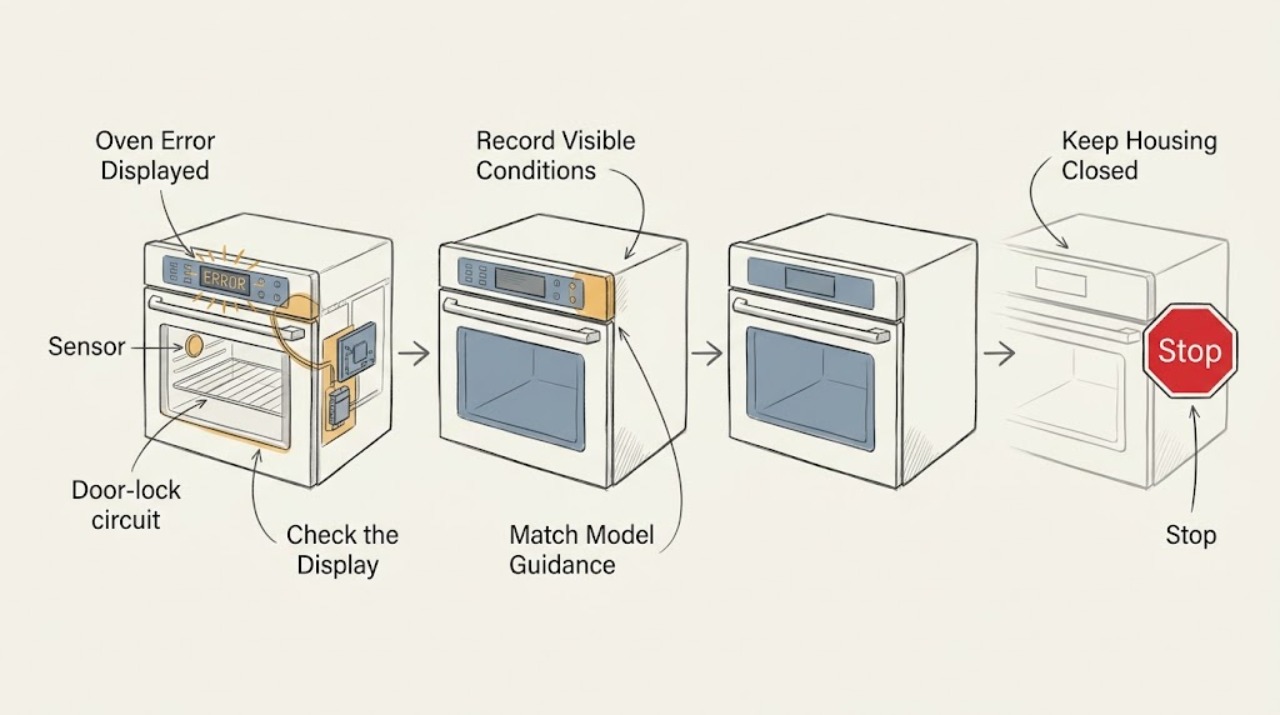
Work through in order
Diagnostic checks
Use only checks that match the exact appliance or system and its official guide.
-
Check 1
From a safe position, photograph the full display and record every character, whether it is flashing, what the oven was doing, whether the oven was hot or in self-clean, and whether the appliance is a range or wall oven.
Expected result: Note the exact code or word, the selected mode, recent power interruption, door-lock state, smoke or odor, and whether the controls still respond normally.
Next step: Keep the photograph and model information together, then consult the installed model's owner manual and GE's error-code guide before trying a reset.
Stop if: Stop immediately for gas odor, smoke, flame outside the normal burner area, arcing, a hot or damaged cord, exposed wiring, broken glass, or a damaged door or latch.
Why this matters
Why: The exact message and model category determine which GE guidance applies; a code, LOC-style mode message, and heat-related OFF message should not be treated as interchangeable.
-
Check 2
Use the GE model and serial information available from a safe, ordinary-access location to open the corresponding owner manual or GE support article; compare the photographed display with that exact model's terminology.
Expected result: Record whether the manual identifies the message as a mode or user setting, a temperature or door-lock condition, or a fault that requires service, and whether the instructions differ for gas and electric versions.
Next step: Follow only the model's ordinary user controls for the matched message. If the code is not listed or the manual directs service, stop troubleshooting and arrange qualified repair.
Stop if: Do not remove the control panel, defeat a door latch, open the oven cavity, or infer a part failure from the code alone.
Why this matters
Why: A model-specific match prevents a generic F-code explanation from being mistaken for a confirmed failed component; GE says its common list is not complete for all models.
-
Check 3
If the oven is cool, intact, and free of smoke or unusual odor, press the model's normal CLEAR/OFF control once as described in the manual; do not start bake, broil, or self-clean while the error is unresolved.
Expected result: Record whether the message clears, returns immediately, or changes to another message, and whether the door and display behave normally afterward.
Next step: If the code clears, leave the oven off until the manual permits a normal low-risk check; if it returns or the controls remain abnormal, proceed to service rather than repeating the cycle.
Stop if: Do not continue if the oven is hot, the door is locked unexpectedly, the display is erratic, smoke or odor is present, or the appliance begins heating without a deliberate command.
Why this matters
Why: A message that clears once may have been an invalid entry or a transient control state, but recurrence or a new abnormal message means the underlying condition remains unresolved.
-
Check 4
Only when the appliance is cool and safe, and you can identify the correct household breaker or fuse without opening the appliance, use the GE reset procedure: remove power at that household disconnect for the interval specified in the GE guidance, then restore it and observe the display.
Expected result: Record whether the clock or display returns normally, whether the original code reappears before any cooking command, and whether the breaker trips again.
Next step: If the code returns or the household disconnect trips again, leave the oven off and arrange qualified service with the code, model, and reset result.
Stop if: Do not access wiring, repeatedly cycle the breaker, or reset power when there is smoke, gas odor, water near electrical parts, damaged insulation, or a hot appliance.
Why this matters
Why: A cleared display shows only that the control restarted; a recurring code, blank display, repeated trip, or abnormal heating indicates a fault that the reset did not repair.
-
Check 5
With the oven off and cool, compare the displayed message with the manual's entries for LOC, LOC DOOR, OFF, ERR, Sabbath mode, and door-lock messages; check only the normal user-visible latch or control position described for that model.
Expected result: Note whether the message is a child lock or Sabbath setting, a self-clean or residual-heat state, an invalid control entry, or a latch that stays locked after cooling and the documented reset.
Next step: Use only the model's documented unlock or mode-exit steps once. If the door remains locked, the message returns, or the latch is damaged, stop and arrange service.
Stop if: Never force the door or latch, insert tools into the lock, start self-clean to test it, or work around a door-lock safety device.
Why this matters
Why: A mode or cool-down message may have a user procedure, while a latch that remains locked or a code tied to the door-lock circuit needs service; GE identifies F9 and FC as door-lock-circuit fault examples but does not make them universal diagnoses.
-
Check 6
Before any further use, review the oven for safe external condition: door and glass intact, no smoke or gas odor, no uncontrolled heat, no exposed wiring, no repeated breaker trip, and no fault display after the documented reset.
Expected result: Classify the result as normal display and controls, a cleared one-time message, a recurring or unidentified code, a locked or damaged door, or a heat, gas, or electrical hazard.
Next step: Give qualified service the exact code, model, operating mode, temperature or self-clean status, reset result, and photographs; keep the oven off until the cause is addressed.
Stop if: Stop all use for gas odor, smoke, flame abnormality, arcing, damaged wiring or cord, uncontrolled temperature, a damaged door, or a fault that returns after reset.
Why this matters
Why: Only the first category supports a normal operation permitted by the model manual. Every other category needs a documented service decision, with gas, smoke, uncontrolled heat, or electrical danger treated as an immediate stop.
Use your observations
Decision map
Find the observation that best matches what you see, then follow the next safe action.
-
PATH 01Safety boundary
What you see
The display matches a documented user mode or entry message such as LOC, ERR, OFF, or Sabbath mode, and the oven is cool and otherwise safe.
Do this next
Follow the exact model manual's normal control sequence once, then verify that the display and controls return to normal without starting an unsafe cycle.
Why this path and its safety boundary
Why it matters: The message may describe a setting or operating condition rather than a failed part.
Safety stop: Stop and request service if the message is not cleared by the documented procedure or if the controls behave unexpectedly.
-
PATH 02Safety boundary
What you see
The documented CLEAR/OFF or single household power reset clears the code and no hazard or abnormal behavior remains.
Do this next
Record the event and use the oven only as allowed by the model manual; stop and arrange service if the same code returns.
Why this path and its safety boundary
Why it matters: The electronic control restarted, but this does not establish that the cause is permanently fixed.
Safety stop: Do not repeatedly reset, start self-clean, or continue use when the display returns or the appliance heats abnormally.
-
PATH 03Safety boundary
What you see
The code returns, remains unidentified, or does not clear after the model-specific user procedure and one controlled reset.
Do this next
Keep the oven off and arrange qualified GE appliance service with the exact display, model, mode, and reset result.
Why this path and its safety boundary
Why it matters: The fault is not resolved by a control restart and may involve a sensor, control, keypanel, door-lock circuit, or another internal component.
Safety stop: Do not open the control area, replace a part from a generic code chart, or bypass a door-lock or control safety function.
-
PATH 04Safety boundary
What you see
The message indicates a locked door or door-lock circuit, the door remains locked after the oven cools, or the latch is damaged.
Do this next
Use only the model's documented cool-down and unlock procedure once; if it fails, keep the oven off and request service.
Why this path and its safety boundary
Why it matters: A door-lock mechanism or control condition remains unresolved and opening the door by force can create injury or further damage.
Safety stop: Do not force the door, insert tools, defeat the latch, or start another self-clean cycle as a test.
-
PATH 05Safety boundary
What you see
There is gas odor, smoke, abnormal flame, arcing, exposed wiring, a hot or damaged cord, uncontrolled heat, or a repeated household breaker trip.
Do this next
Leave the appliance area, avoid operating switches or controls when gas odor is present, and contact the appropriate emergency, gas-safety, electrical, or appliance service from a safe location.
Why this path and its safety boundary
Why it matters: The issue has crossed the ordinary troubleshooting boundary and may present fire, explosion, burn, or shock risk.
Safety stop: Do not relight burners, inspect energized parts, reset a tripping breaker repeatedly, or continue using the oven.
Helpful context
Understand the symptom
Read the display before treating it as a failure
GE uses the display for several different kinds of messages. A code such as F0, F4, F9, or FC can point toward different control, sensor, or door-lock areas, while LOC, LOC DOOR, ERR, OFF, or a Sabbath-mode symbol can describe a mode or operating condition rather than the same failed part. GE also states that its common-code list does not cover every past and present model. Capture the exact display and the mode in which it appeared; do not substitute a similar-looking code from a different model.
Use a reset only as a controlled observation
When the oven is cool, intact, free of smoke or odor, and no cooking or self-clean cycle is active, use the normal CLEAR/OFF control according to the manual. If the message remains, a single household power reset can show whether the electronic control clears. A reset does not prove that the underlying fault is repaired. If the message returns, the display remains blank, the door stays locked, or the appliance behaves abnormally, leave the oven out of service and give the exact code to qualified service.
Gas, heat, and electrical symptoms change the stop point
Do not troubleshoot an oven that is producing smoke, a burning or gas odor, unusual flame behavior, arcing, a hot or damaged cord, exposed wiring, a damaged door, or an uncontrolled temperature. For a gas odor, leave the area without operating switches or controls and contact the appropriate emergency or gas-safety service from a safe location. For a suspected electrical fault or damaged wiring, keep the appliance off and use qualified service. A code associated with an oven door lock or internal control is also not an invitation to open the control panel or defeat a latch.
Only after diagnosis
Potential parts
- oven temperature sensor
Consider this only if the exact model documentation and qualified diagnosis link the recurring display to the sensor circuit.
Sensor design and connection vary by model; confirm the complete GE model identity and service instructions before ordering. - electronic oven control
Consider this only after a qualified diagnosis identifies the control as the cause of a recurring fault or failed reset.
Controls are model- and revision-specific; a generic F-code does not establish compatibility or prove this part is needed. - oven door-lock assembly
Consider this only when the exact model guidance and service diagnosis confirm a mechanical or electrical door-lock fault.
Lock assemblies and latch geometry vary by model and self-clean design; do not bypass or substitute the safety mechanism.
When checks do not resolve it
Need a professional?
Safety scope: This article covers model-specific user controls and safe external observation only. Do not open the appliance, defeat the door latch, handle energized wiring, relight a gas appliance after an odor event, or continue using an oven with a recurring fault or hazardous symptom.
Common questions
FAQ
What should I do first when my GE oven displays an error?
Photograph the exact code and record the mode, heat, self-clean state, and door-lock state. Use the exact model manual or GE's code guide before trying CLEAR/OFF or one controlled power reset.
Can I reset a GE oven error by turning off the breaker?
GE describes a controlled breaker or fuse reset for range and wall-oven controls. Do it only when the appliance is cool and safe, through the identified household disconnect, and only once; a returning code or repeated trip needs qualified service.
Does an F-code identify the exact part that failed?
No. GE's common list gives typical areas for some codes, but the code set varies by model and the list is not complete. Treat it as a diagnostic direction, not proof that a sensor, control, keypanel, or lock assembly should be replaced.
What if the GE oven error is LOC, OFF, ERR, or LOC DOOR?
These messages can represent a lockout, invalid entry, residual heat or self-clean condition, or door-lock state. With the oven cool, use only the exact model's documented control or cool-down procedure; never force the latch. If it remains, request service.
When is a GE oven error an immediate stop?
Stop for gas odor, smoke, abnormal flame, arcing, exposed wiring, a hot or damaged cord, uncontrolled heat, a damaged door or latch, or a breaker that trips again. Leave a gas or smoke hazard and contact the appropriate emergency or qualified service from a safe location.
Read the exact guide
Official sources
- 49-80058GE Appliances · Official GE legacy owner-manual PDF; examples apply only to the documented model family and are not universal code definitions.
- Range & Wall Oven - Oven Error, Fault or Function CodesGE Appliances · Official GE Appliances support article; the displayed code list is a common summary and does not replace the exact model manual.
- Range & Wall Oven - Oven Will Not Come OnGE Appliances · Official GE Appliances support for ranges and wall ovens; power and latch procedures remain model-dependent.
- FAQs | Ranges & OvensGE Appliances · Official GE Appliances FAQ for GE ranges and wall ovens; exact behavior depends on the installed model and owner manual.
Community feedback
Share a repair observation
Share a plain-text repair observation. Accepted observations are published automatically; this page may take a moment to update.